1. پیژندنه
Thank you for choosing the Gzunelic 9500 Lumens Android WiFi Projector. This projector is designed for home entertainment, offering a bright, high-definition viewing experience with versatile connectivity options. Featuring a native 1080p resolution, Android operating system, and wireless mirroring capabilities, it provides a comprehensive solution for your multimedia needs. This manual will guide you through the setup, operation, and maintenance of your new projector.
2. د خوندیتوب معلومات
- د پروجیکټر شاوخوا مناسب هوا ورکول ډاډمن کړئ ترڅو د ډیر تودوخې مخه ونیول شي. د هوا د توییدو لارې مه بندوئ.
- یوازې هغه بریښنا اډاپټر وکاروئ چې د پروجیکټر سره چمتو شوی وي.
- په مستقیم ډول د پروجیکټر لینز ته د کتلو څخه ډډه وکړئ کله چې lamp فعال دی، ځکه چې روښانه رڼا کولی شي سترګو ته زیان ورسوي.
- Do not place the projector on unstable surfaces.
- پروجیکټر د اوبو یا نورو مایعاتو څخه لرې وساتئ.
- د بریښنا د طوفانونو په وخت کې یا کله چې د اوږدې مودې لپاره نه کارول کیږي، پروجیکټر خلاص کړئ.
- د پروجیکټر د ترمیم هڅه مه کوئ. ټولې خدمتونه وړ پرسونل ته واستوئ.
۲. په بکس کې څه دي؟
- Gzunelic 9500 Lumens Android WiFi Projector
- د بریښنا کیبل
- ریموټ کنټرول
- HDMI کیبل
- د VGA کیبل
- د کارونکي لارښود (دا لاسوند)
4. محصول ختم شوview
۳.۲ فزیکي برخې

شکل 4.1: مخکی view of the Gzunelic Projector, highlighting the lens and ventilation.

شکل 4.2: مختلف views of the projector, including top, front, left, right, and back, showing its compact design.
The Gzunelic projector features a sleek design with a prominent lens at the front. It includes a robust cooling system with ventilation grilles on the sides and back to ensure stable operation.
4.2 د کنټرول پینل

شکل 4.3: Top-mounted control panel with navigation and function buttons.
The control panel is located on the top of the projector, providing easy access to essential functions. It includes directional buttons for navigation, an OK button for selection, a power button, and menu/return buttons.
4.3 ان پټ/آؤټ پټ بندرونه

شکل 4.4: شاته view showing the comprehensive array of input and output ports.
The projector offers a wide range of connectivity options on its rear panel, including:
- VGA پورټ: For connecting to older computers or laptops.
- ۲ x USB پورټونه: For connecting USB drives, external hard drives, mouse, or keyboard.
- ۴ x HDMI پورټونه: For connecting modern devices like PCs, laptops, set-top boxes, gaming consoles (PS3/PS4/Xbox), and DVD players.
- ایترنیټ پورټ: د تار لرونکي انټرنیټ اتصال لپاره.
- د AV پورټ: For connecting older video sources.
- 3.5mm آډیو پورټ: د هیډفونونو یا بهرني سپیکرو د نښلولو لپاره.
The projector also supports Wi-Fi for direct signal connection and Bluetooth for wireless audio output.
4.4 د قد تنظیم کول

شکل 4.5: Adjustable foot for precise height and projection angle alignment.
An adjustable foot is located on the underside of the projector, allowing you to fine-tune the projection angle and height for optimal image alignment on your screen or wall.
5. ترتیب کول
- ځای په ځای کول: Position the projector on a stable, flat surface. Ensure there is adequate space around the projector for ventilation. For ceiling mounting, use the four holes on the bottom of the unit.
- د بریښنا پیوستون: د بریښنا کیبل د پروجیکټر د بریښنا ان پټ سره وصل کړئ او بیا د بریښنا آوټ لیټ سره وصل کړئ.
- پاور آن: په پروجکټور یا ریموټ کنټرول کې د بریښنا تڼۍ فشار ورکړئ ترڅو وسیله چالان کړئ.
- لوړوالی تنظیم کړئ: Use the adjustable foot at the front of the projector to raise or lower the front of the unit, aligning the projected image with your screen.
- د تمرکز سمون: Rotate the focus ring around the lens until the projected image appears sharp and clear.
- د کیسټون سمون: Adjust the keystone correction dial (if available) to correct any trapezoidal distortion in the image, ensuring a rectangular projection.
6. عملیاتي لارښوونې
6.1 بنسټیز عملیات
- پاور آن/بند: Press the power button once to turn on. Press and hold the power button for a few seconds to initiate shutdown.
- نیویگیشن: Use the directional buttons on the control panel or remote to navigate through menus. Press 'OK' to select.
- د سرچینې انتخاب: From the main menu, select "Signal Source" to choose your input (HDMI, VGA, AV, etc.).
6.2 د نښلولو وسایل
The projector supports various wired and wireless connections:
- HDMI/VGA/AV: Connect your PC, laptop, gaming console, or DVD player using the respective cables to the corresponding ports on the projector.
- USB: Insert a USB flash drive or external hard disk into a USB port to play media files directly. You can also connect a USB mouse or keyboard for easier navigation within the Android OS.
- ایترنیټ: Connect an Ethernet cable to the port for a stable wired internet connection.
- وای فای: Navigate to the projector's settings menu to connect to your wireless network.
- بلوتوث: To connect a Bluetooth speaker, go to the settings menu, enable Bluetooth, and pair with your speaker. If using a wired external speaker, connect it via the 3.5mm audio port and set the sound output to "line out" in the Android settings.
6.3 Android OS and Wireless Mirroring
شکل 6.1: The Android OS home screen displaying available applications.
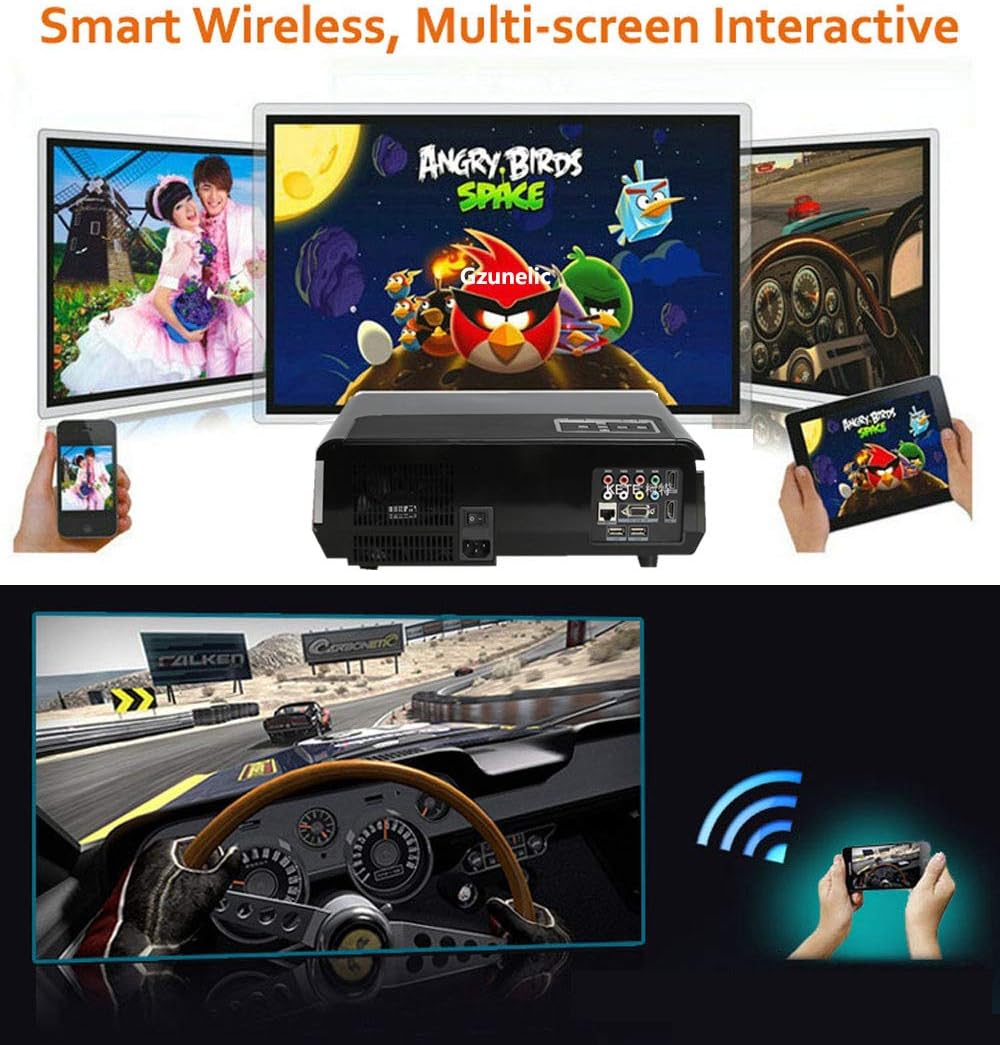
شکل 6.2: Illustration of wireless mirroring from smartphones and tablets to the projector.
The projector runs on an Android operating system, allowing direct access to online content, shopping, and games. You can navigate using the remote control or by connecting a USB mouse/keyboard.
- Screen Mirroring (Airplay/Miracast): On the projector's Android home page, locate and click the "Screening Assistant" app. Follow the on-screen instructions to connect your phone via Airplay (for iOS devices) or Miracast (for Android devices). Ensure both your phone and the projector are connected to the same Wi-Fi network.
- مخکې نصب شوي ایپسونه: Access apps like YouTube, Aptoide TV, and WPS Office directly from the home screen for various entertainment and productivity functions.
۵.۴ د محصول د ښودلو ویډیو
ویډیو 6.3: A brief demonstration video showcasing the Gzunelic projector in operation. This video provides a visual overview of the projector's capabilities and image quality.
7. ساتنه
- د لینز پاکول: Use a soft, lint-free cloth specifically designed for optical lenses to gently wipe the projector lens. Avoid using abrasive cleaners or cloths that could scratch the lens.
- د بهر پاکوالی: د پروجیکټر بهرنۍ برخه د نرم او وچ ټوکر سره پاک کړئ. د سختې خاورې لپاره، یو څه damp ټوکر کارول کیدی شي، مګر ډاډ ترلاسه کړئ چې رطوبت وسیله ته ننوځي.
- وینټیلیشن: Regularly check and clean the ventilation openings to prevent dust buildup, which can impede airflow and cause overheating. Use a soft brush or compressed air to clear dust.
- ذخیره کول: When not in use for extended periods, store the projector in a cool, dry place, ideally in its original packaging or a protective case, to prevent dust accumulation and physical damage.
8. ستونزه حل کول
| ستونزه | احتمالي لامل | د حل لاره |
|---|---|---|
| هیڅ انځور نه دی وړاندې شوی | Power not connected; Incorrect input source; Device not powered on. | Check power cable and outlet; Select correct input source (HDMI, VGA, AV); Ensure connected device is on. |
| خړ انځور | Out of focus; Incorrect keystone adjustment; Projector too close/far from screen. | Adjust focus ring; Adjust keystone correction; Reposition projector for optimal distance. |
| غږ نشته | Volume too low/muted; Incorrect audio output setting; External speaker not connected/paired. | Increase volume, unmute; Check audio settings (e.g., set to "line out" for wired external speakers); Ensure Bluetooth speaker is paired. |
| بېسیم عکس العمل کار نه کوي | Not on same Wi-Fi network; "Screening Assistant" not active. | Ensure both devices are on the same Wi-Fi network; Open "Screening Assistant" app on projector and follow instructions. |
| Projector turns on by itself | Possible software glitch or power issue. | Unplug the projector from the wall to fully power cycle it. If the issue persists, contact customer support. |
9. مشخصات
| برانډ | ګزونیلیک |
| د ماډل شمیره | led86+W |
| روښانتیا | 9500 lumens LED light utilization efficiency |
| اصلي حل | 1920 x 1080 (Full HD), supports 2K/4K (limited to 100Mbps, 60Hz) |
| د تناسب تناسب | 10000:1 |
| عملیاتي سیسټم | د Android OS |
| د ارتباط ټیکنالوژي | Ethernet, Wireless (Wi-Fi), Bluetooth, 2x HDMI, 2x USB, AV, VGA, 3.5mm Audio |
| د محصول ابعاد | 13.77 x 10.82 x 5.51 انچه |
| د توکي وزن | ۲.۴۵ پونډه |
| د لید وړ سکرین ډیګونال | تر ۴۵۰ انچه / ۱۱۴۳ سانتي متره پورې |
10. تضمین او ملاتړ
Gzunelic offers comprehensive support for your projector:
- د راستنیدو پالیسي: 6 Months Return for Full Payment Refund.
- د بدلولو پالیسي: 1 Year Free Replacement.
- د ترمیم خدمت: 3 Years Repair service available at our repair center in LA, United States.
- تخنیکي ملاتړ: د ژوند لپاره مسلکي تخنیکي ملاتړ.
For any problems or questions, please feel free to contact us. We aim to reply within 24 hours.


