1. پیژندنه
This manual provides instructions for the installation, operation, and maintenance of the Nexxt Solutions Naxos800 8-Port Fast Ethernet Network Switch. The Naxos800 is an unmanaged compact desktop switch designed for small office/home office (SOHO) environments, student dormitories, and small enterprises, offering reliable network connectivity.
2. کلیدي ځانګړتیاوې
- 8 Fast Ethernet Ports: Provides 8 UTP/STP 10/100Mbps ports with auto MDI/MDIX.
- پلګ او پلی کول: Simple setup requiring no software configuration.
- غیر منظم سویچ: Operates without requiring complex management interfaces.
- Store-and-Forward Technology: Ensures efficient packet transmission.
- د MAC پته زده کړه: Supports auto-learning and aging with a built-in 1000 MAC address table.
- تړون ډیزاین: Suitable for desktop or wall mounting.
- د انرژي سپما: د ټیټ بریښنا مصرف ډیزاین.
- د جریان کنټرول: Full duplex and half duplex back pressure flow control.
- پایښت: Integrated lightning protection and a sturdy metal case.
- خاموش عملیات: Fanless design for silent performance.
3. د بسته محتويات
ډاډ ترلاسه کړئ چې ستاسو کڅوړه لاندې توکي لري:
- One (1) Nexxt Solutions Naxos800 8-Port Fast Ethernet Switch
- یو (1) بریښنا اډاپټر

Image: The Nexxt Solutions Naxos800 switch, its power adapter, and product packaging.
4. محصول ختم شوview

انځور: مخکینۍ برخه view of the Naxos800 switch, showing the Nexxt logo and eight green LED indicators for port activity.
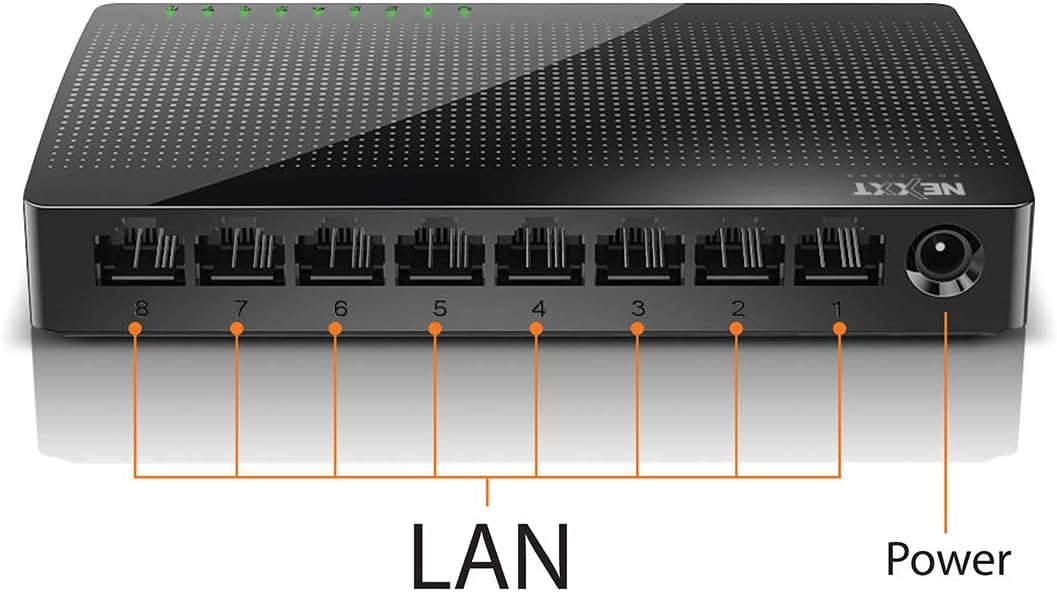
انځور: شاته view of the Naxos800 switch, highlighting the eight LAN ports (numbered 1-8) and the power input port.
د LED شاخصونه
The front panel features LED indicators for each port, providing visual status:
- شنه LED (جامد): Indicates a stable link connection.
- شنه LED (چمکۍ): Indicates data activity on the corresponding port.
- LED بند: No link or connection detected.
5. ترتیب او نصب کول
The Naxos800 switch is designed for simple plug-and-play installation. No software or complex configuration is required.
- ځای په ځای کول: Place the switch on a stable, flat surface or mount it on a wall using appropriate hardware (not included). Ensure adequate ventilation around the device.
- د بریښنا سره نښلول: Connect the provided power adapter to the power input port on the switch and then plug the adapter into a standard electrical outlet. The power LED (if present, or the port LEDs will light up) should illuminate.
- شبکې سره وصل شئ:
- Connect your router or modem to any of the 8 LAN ports on the Naxos800 switch using an Ethernet cable.
- Connect your network devices (e.g., computers, gaming consoles, IP cameras, Smart TVs, printers) to the remaining LAN ports on the Naxos800 switch using an Ethernet cable.
- پیوستون تایید کړئ: Once devices are connected, the corresponding LED indicators on the switch's front panel should light up green (solid for link, flashing for activity).

Image: Diagram illustrating a typical network setup. An ADSL or Cable Modem connects to a Router, which then connects to the Naxos800 switch. Various devices like laptops, media players, game consoles, IP cameras, Smart TVs, and IP phones are connected to the Naxos800 switch.
۵. د سویچ چلول
The Naxos800 is an unmanaged switch, meaning it operates automatically without user intervention once connected. It functions as an internet splitter, expanding the number of wired network connections available from your router or modem.
- د سرعت اتومات کشف: Each port automatically detects the speed of the connected device (10Mbps or 100Mbps) and adjusts accordingly.
- اتومات MDI/MDIX: Eliminates the need for crossover cables; the switch automatically detects and corrects for straight-through or crossover cable types.
- د معلوماتو لیږد: Data packets are forwarded between connected devices at Fast Ethernet speeds. The store-and-forward architecture ensures data integrity.
7. ساتنه
The Naxos800 switch requires minimal maintenance.
- پاکول: د سویچ بهرنۍ برخه پاکولو لپاره نرم، وچ ټوکر وکاروئ. مایع یا ایروسول پاکوونکي مه کاروئ.
- وینټیلیشن: ډاډ ترلاسه کړئ چې د هوا د تودوخې د مخنیوي لپاره د وینټیلیشن خلاصونه بند شوي ندي.
- د بریښنا دوره: If the device experiences issues, a simple power cycle (unplugging and replugging the power adapter) can often resolve minor problems.
8. ستونزه حل کول
If you encounter issues with your Naxos800 switch, refer to the following common problems and solutions:
| ستونزه | احتمالي لامل | د حل لاره |
|---|---|---|
| بریښنا نشته / وسیله نه چالانیږي. | د بریښنا اډاپټر نه دی وصل شوی یا خراب شوی؛ د بریښنا آوټ لیټ کار نه کوي. | ډاډ ترلاسه کړئ چې د بریښنا اډاپټر په خوندي ډول د سویچ او کار کونکي بریښنایی آوټ لیټ سره وصل دی. یو بل آوټ لیټ هڅه وکړئ. |
| د وصل شوي وسیلې لپاره د لینک څراغ نشته. | د ایترنیټ کیبل خراب یا په ناسم ډول وصل شوی؛ وسیله فعاله نه ده یا خرابه ده؛ غلط پورټ. |
|
| Slow network speeds. | Network congestion; faulty cable; device limitations. |
|
9. مشخصات
| صفت | ارزښت |
|---|---|
| د ماډل شمیره | ASIDT084U3 |
| بندرونه | 8 x 10/100Mbps Fast Ethernet (UTP/STP) |
| Backplane Bandwidth | 1.6 Gbps |
| د MAC پته جدول | 1000 ننوتل |
| د لاسرسي کنټرول | CDMA |
| د جریان کنټرول | Full duplex and half duplex back pressure |
| ابعاد (L x W x H) | 12.4 x 5.9 x 2.3 سانتي متره |
| وزن | 140 ګرامه |
| د بریښنا انډول | د بهرنی بریښنا اډاپټر (شامل دی) |
یادونه: مشخصات د مخکینۍ خبرتیا پرته د بدلون تابع دي.
10. تضمین او ملاتړ
The Nexxt Solutions Naxos800 8-Port Fast Ethernet Network Switch comes with a د 5 کلن محدود تضمین. For warranty claims or technical support, please contact Nexxt Solutions customer service. Refer to the official Nexxt Solutions webد ملاتړ تازه معلوماتو او اړیکو توضیحاتو لپاره سایټ.
Nexxt Solutions is a US company committed to quality and customer service.


