پیژندنه
Thank you for choosing the Capello Extra Large Display Digital Alarm Clock. This manual provides detailed instructions to help you set up, operate, and maintain your new alarm clock. Designed for clarity and ease of use, this clock features a large digital display and a stylish wood-grain finish, making it a perfect addition to any bedroom or living space.
محصول پای ته ورسیدview
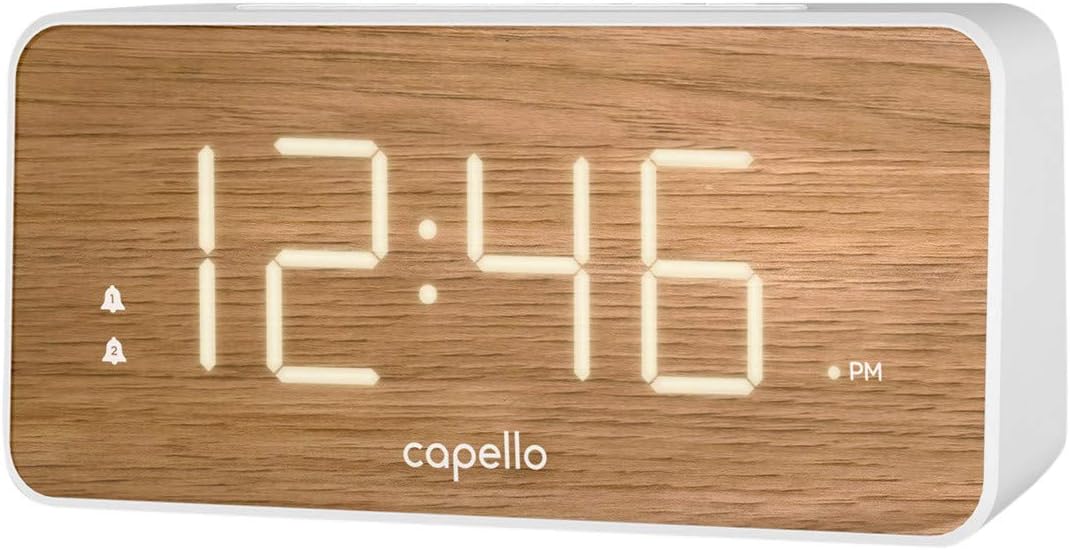
The Capello Digital Alarm Clock (Model: 43213-14795) features an extra-large digital display for easy readability from across the room. Its elegant white and pine D-frame design with a wood-grain finish complements various interior styles. The clock is equipped with intuitive controls for setting time and alarms, ensuring a user-friendly experience.
چمتو کول
د بریښنا پیوستون
The alarm clock requires a continuous power supply via its included AC adapter for full functionality. Insert the adapter into a standard wall outlet and connect it to the clock's power input port. For backup during power outages, install 2 AAA batteries (not included) into the battery compartment located on the underside of the unit. These batteries will preserve time and alarm settings but will not power the display or alarm functions during an outage.
د وخت تنظیم کول
- فشار ورکړئ او ونیسئ د وخت وخت button (or similar button, refer to specific button labels on your unit) until the hour digits begin to flash.
- د کارولو ساعت د ساعت تنظیمولو لپاره تڼۍ. د سهار/ماښام شاخص ته پام وکړئ.
- فشار ورکړئ د وخت وخت د دقیقو عددونو ته د تګ لپاره بیا تڼۍ.
- د کارولو MIN دقیقې تنظیمولو لپاره ت buttonۍ.
- مطبوعاتي د وخت وخت یو ځل بیا د تایید لپاره او د وخت تنظیم کولو حالت څخه وتلو لپاره.
د الارم تنظیم کول
This clock supports dual alarms.
- فشار ورکړئ او ونیسئ د الارم. تڼۍ تر هغه وخته پورې چې د الارم ساعت عددونه فلش شي.
- د کارولو ساعت او MIN buttons to set the desired alarm time for Alarm 1.
- مطبوعاتي د الارم. again to confirm. The alarm indicator for Alarm 1 will illuminate.
- د 1-3 مرحلې تکرار کړئ د د الارم. if a second alarm is desired.
- To activate/deactivate an alarm, simply press the corresponding د الارم. or د الارم. button. The alarm indicator will show its status.
عملیاتي لارښوونې
Snooze فعالیت
کله چې الارم غږ شي، لوی فشار ورکړئ لنډول button located on the top of the clock. This will temporarily silence the alarm for approximately 9 minutes, allowing for extra rest. The alarm will sound again after the snooze period ends.
د الارم مخه نیول
To turn off the alarm completely after it sounds, press the corresponding د الارم. or د الارم. button. The alarm indicator will turn off, signifying that the alarm is deactivated for the next day.
روښانتیا ښکاره کړئ
The display brightness can be adjusted to suit your preference. Locate the رڼا or DIMMER button (often represented by a sun icon) on the top panel. Press this button repeatedly to cycle through different brightness levels (e.g., High, Medium, Low, Off).
ساتنه
To ensure the longevity and optimal performance of your Capello Digital Alarm Clock, follow these simple maintenance guidelines:
- پاکول: Wipe the clock's surface with a soft, dry cloth. Do not use abrasive cleaners, waxes, or solvents as they may damage the finish.
- ځای په ځای کول: ساعت په یوه مستحکم، فلیټ سطحه کې کیږدئ چې د مستقیم لمر وړانګو، تودوخې سرچینو او ډیر رطوبت څخه لرې وي.
- د بیټرۍ بدلول: هر کال یا کله چې د بریښنا بندیدو پرمهال د سکرین د تیاره کیدو نښې ښکاره شي، د بیک اپ بیټرۍ بدل کړئ.tage. Ensure correct polarity when inserting new batteries.
د ستونزو حل کول
که تاسو د خپل الارم ساعت سره کومې ستونزې سره مخ شئ، مهرباني وکړئ لاندې عامې ستونزې او حل لارې وګورئ:
| ستونزه | احتمالي حل |
|---|---|
| ښودنه خالي یا تیاره ده. | Ensure the AC adapter is securely plugged into both the clock and a working wall outlet. Check the display brightness setting using the LIGHT/DIMMER button. |
| الارم نه غږېږي. | Verify that the alarm is activated (alarm indicator is lit). Ensure the alarm time is set correctly (AM/PM). Check if the volume is set to an audible level. |
| وخت غلط دی. | Reset the time following the 'Setting the Time' instructions. If using backup batteries, ensure they are fresh and correctly installed. |
| تڼۍ بې ځوابه دي. | Unplug the AC adapter, remove backup batteries, wait for 1 minute, then reconnect power. This performs a soft reset. |
مشخصات
- نښه: کیپیلو
- د ماډل شمیره: 43213-14795
- رنګ: سپین
- د ښودلو ډول: ډیجیټل
- سټایل: عصري
- ځانګړې ځانګړنه: Large Display, Alarm
- د محصول ابعاد: ۱۷" څراغ x ۱۷" ح
- د بریښنا سرچینه: AC Powered (with battery backup for settings)
- مواد: پلاستیک
- د توکي وزن: 1.01 پونډه
د رسمي محصول ویډیوګانې
دا مهال د دې توکي لپاره د پلورونکي لخوا د محصول رسمي ویډیوګانې شتون نلري.
تضمین او ملاتړ
For warranty information and customer support, please refer to the manufacturer's official documentation included with your product or visit the Capello webسایټ د تضمین ادعاګانو لپاره خپل د پیرود رسید وساتئ.