1. پیژندنه
This manual provides detailed instructions for the assembly, operation, and maintenance of your Kappesberg S973 Office Desk. Please read all instructions carefully before beginning assembly and retain this manual for future reference.
د خوندیتوب معلومات
- تل میز په نرم او پاک سطحه راټول کړئ ترڅو د سکریچونو مخه ونیول شي.
- ډاډ ترلاسه کړئ چې ټول هارډویر د کارولو دمخه په خوندي ډول ټینګ شوي دي.
- Do not overload the desk or shelves.
- د غونډو په جریان کې کوچني برخې د ماشومانو څخه لرې وساتئ.
- که چیرې کومې برخې ورکې یا زیانمنې وي، نو د نصبولو سره مخ مه ګرځئ. د پیرودونکو ملاتړ سره اړیکه ونیسئ.
2. د بسته محتويات
Before starting assembly, verify that all components listed below are present in your package. Unpack all items and lay them out on a clean, soft surface.
- Desk panels (top, side, back, shelves)
- Hardware pack (screws, dowels, cam locks, cam studs, L-brackets, plastic feet)
- Assembly tools (usually an Allen key, screwdriver not included)
- د لارښوونې پاڼه (دا لارښود)
Note: The exact number and type of hardware may vary slightly. Refer to the specific hardware diagram included in your package.
3. د مجلس لارښوونې
Follow these steps carefully to assemble your Kappesberg S973 Office Desk. It is recommended to have two people for assembly.
Step 1: Prepare the Base Structure
Identify the main side panels and the bottom panel. Attach the plastic feet to the bottom edges of the side panels. Connect the side panels to the bottom panel using dowels and cam locks/studs as indicated in your hardware diagram.
Step 2: Assemble the CPU/Storage Compartment
Assemble the vertical and horizontal panels that form the CPU and storage shelves on the right side of the desk. Secure them to the main desk structure using the provided hardware.
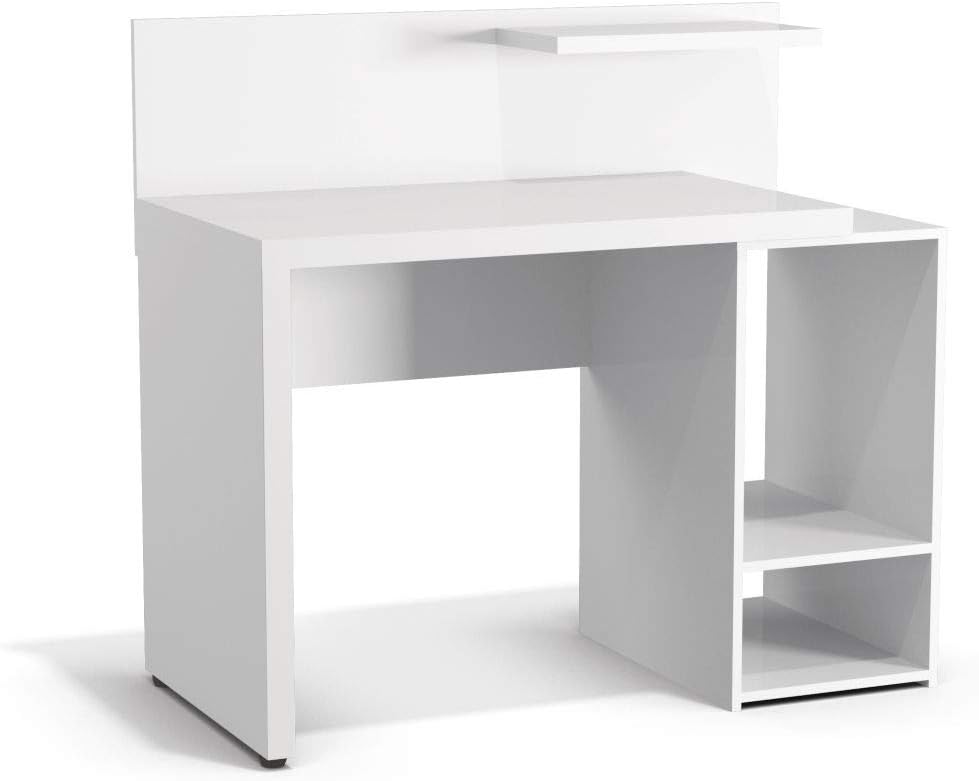
شکل 3.1: مخکی view of the assembled desk structure, highlighting the integrated storage compartment.
Step 3: Attach the Desktop Surface
Carefully place the main desktop panel onto the assembled base structure, aligning the pre-drilled holes. Secure it using cam locks and studs, ensuring a tight fit.
Step 4: Install the Back Panel and Upper Shelf
Attach the back panel to the rear of the desk using small nails or screws. Then, install the small upper shelf above the main desktop, typically secured with L-brackets or dowels and cam locks.

شکل ۳: زاویه لرونکی view of the fully assembled desk, ready for use.
5 ګام: وروستی چک
Once all components are assembled, gently lift and move the desk to its desired location. Verify that all screws and fasteners are tight and that the desk is stable and level. Adjust plastic feet if necessary to prevent wobbling.

Figure 3.3: The Kappesberg S973 Office Desk in a typical usage scenario.
۴. عملیات او کارول
The Kappesberg S973 Office Desk is designed for various office and home study applications. Its features include:
- Main Desktop Surface: برابروي ample space for a computer monitor, keyboard, mouse, and writing tasks.
- Side Storage Compartment: Features two shelves, ideal for housing a CPU tower, printer, books, or other office supplies.
- پورتنۍ شیلف: A smaller shelf above the main desktop for decorative items, small speakers, or frequently accessed stationery.
Ensure that the weight distribution on the desk is balanced to maintain stability. Avoid placing excessively heavy items on the edges or on the upper shelf.
5. ساتنه او پالنه
To ensure the longevity and appearance of your Kappesberg S973 Office Desk, follow these maintenance guidelines:
- پاکول: سطحونه په نرمۍ سره مسح کړئ، دamp cloth. For stubborn marks, use a mild, non-abrasive cleaner specifically designed for wood or laminate furniture. Dry immediately with a clean cloth.
- د سختو کیمیاوي موادو څخه ډډه وکړئ: Do not use abrasive cleaners, solvents, or polishes containing silicone, as these can damage the finish.
- د تودوخې او رطوبت څخه ساتنه: Avoid placing hot items directly on the surface. Use coasters for drinks. Wipe up spills immediately.
- د لمر ښکاره کول: د لمر مستقیم وړانګو ته اوږد مهاله تماس کولی شي د رنګ د تیاره کیدو یا رنګ بدلیدو لامل شي.
- د هارډویر معاینه: ټول پیچونه او فاسټینرونه په دوره یي ډول وګورئ ترڅو ډاډ ترلاسه شي چې دوی کلک پاتې دي. که اړتیا وي نو بیا یې ټینګ کړئ.
6. ستونزه حل کول
دلته د هغو عامو ستونزو حلونه دي چې تاسو ورسره مخ کیدی شئ:
- میز ډوب دی:
- ډاډ ترلاسه کړئ چې ټول کیم لاکونه او پیچونه په بشپړ ډول ټینګ شوي دي.
- Check if the desk is on an uneven surface. Adjust the plastic feet or place shims under the legs if needed.
- Parts Don't Fit Together:
- Double-check the assembly diagram to ensure you are using the correct parts for each step.
- Ensure parts are oriented correctly (e.g., pre-drilled holes facing the right direction).
- Do not force parts. If a part does not fit, re-examine the instructions.
- Missing Hardware/Damaged Parts:
If you find any missing or damaged components upon unpacking, do not proceed with assembly. Contact Kappesberg customer support immediately for assistance.
7. د محصول مشخصات
| د ماډل شمیره: | S973 |
| نښه: | کاپیسبرګ |
| مواد: | MDF, MDP |
| رنګ: | سپین |
| د محصول ابعاد (L x W x H): | ۳۷.۵ x ۲۶.۵ x ۳۴ سانتي متره (تقریبا ۱۴.۷۶ x ۱۰.۴۳ x ۱۳.۳۹ انچه) |
| د بسته ابعاد: | ۳۷.۵ x ۲۶.۵ x ۳۴ سانتي متره (تقریبا ۱۴.۷۶ x ۱۰.۴۳ x ۱۳.۳۹ انچه) |
| د محصول وزن: | ۳.۶۳ کیلوګرامه (تقریبا ۸ پونډه) |
| مجلس ته اړتیا ده: | هو |
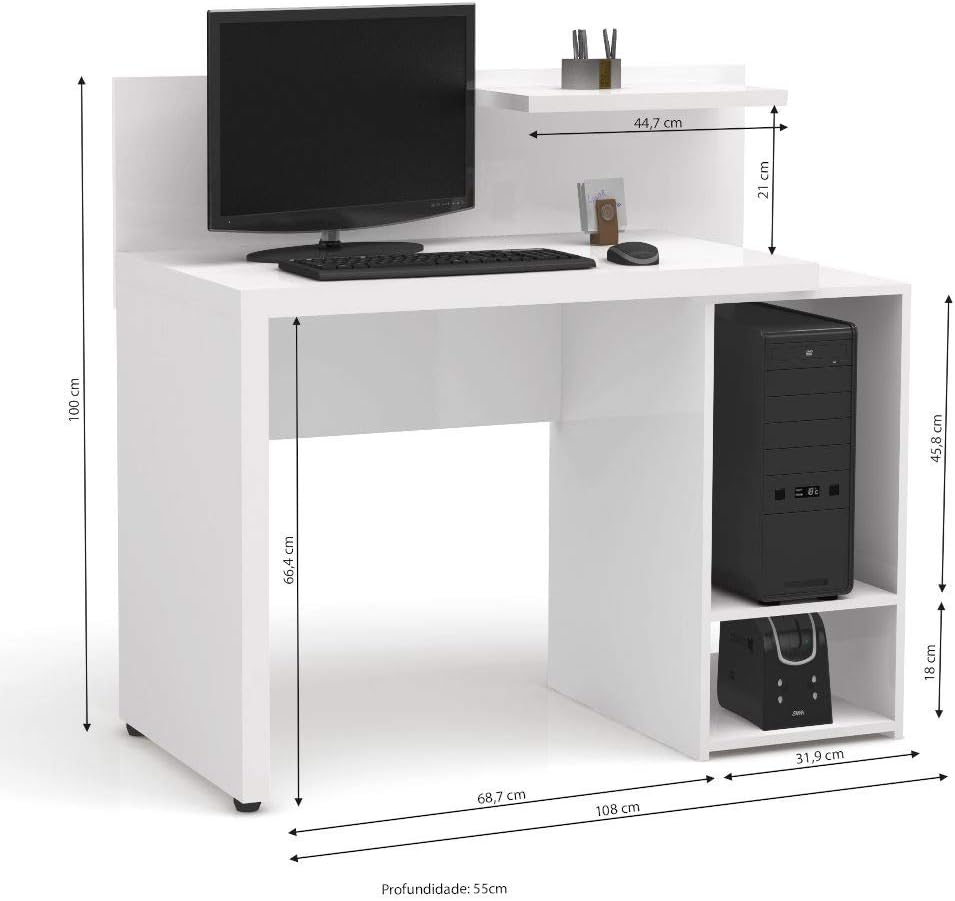
Figure 7.1: Detailed dimensions of the Kappesberg S973 Office Desk.
۷. تضمین او د پیرودونکو ملاتړ
Kappesberg products are manufactured to high-quality standards. For information regarding warranty coverage, please refer to the warranty card included with your purchase or visit the official Kappesberg webسایټ
If you have any questions, require assistance with assembly, or need to report missing/damaged parts, please contact Kappesberg customer support:
- Webسایټ: www.kappesberg.com.br (مهرباني وکړئ رسمي وګورئ webد اوسني اړیکو معلوماتو لپاره سایټ)
- تلیفون: د محصول بسته بندۍ یا رسمي ته مراجعه وکړئ webد سیمه ییزو اړیکو شمیرو لپاره سایټ.
Please have your model number (S973) and purchase details ready when contacting support.


