1. پیژندنه
د پیرودلو لپاره مننهasing the Capello Play it All Bluetooth Wireless Home Stereo Speaker CI302. This device offers versatile audio playback options including Bluetooth wireless streaming, CD player functionality, and FM digital radio. This manual provides detailed instructions for setup, operation, maintenance, and troubleshooting to ensure optimal performance and longevity of your speaker system.
۱.۱. د خوندیتوب مهم معلومات
- د وسیلې د چلولو دمخه ټولې لارښوونې ولولئ.
- دا لارښود د راتلونکي حوالې لپاره وساتئ.
- د اور یا شاک د خطرونو د مخنیوي لپاره واحد باران یا رطوبت ته مه ښکاره کوئ.
- د هوا مناسبه هوا ورکول ډاډمن کړئ؛ د هوا د بهېدو هیڅ لاره مه بندوئ.
- واحد په مستحکم، فلیټ سطح کې ځای په ځای کړئ.
- یوازې د جوړونکي لخوا مشخص شوي ضمیمې / لوازم وکاروئ.
- د برښنا د طوفان په وخت کې یا کله چې د اوږدې مودې لپاره نه کارول کیږي یونټ خلاص کړئ.
- ټول خدمتونه وړ خدمت پرسونل ته راجع کړئ.
3. د بسته محتويات
مهرباني وکړئ وګورئ چې ټول توکي شتون لري:
- Capello Play it All Bluetooth Wireless Home Stereo Speaker CI302
- ریموټ کنټرول
- د AC ځواک اډیپټر
- د کارونکي لارښود (دا لاسوند)
4. محصول ختم شوview
Familiarize yourself with the main components and controls of your Capello Play it All speaker.
مخکی View

شکل 4.1: مخکی view of the Capello Play it All speaker, showing the speaker grille, digital clock display, and subtle branding.
د سرلیک پینل کنټرولونه

شکل 4.2: Top panel of the Capello Play it All speaker, illustrating the CD compartment, 'capello' logo, and various control buttons including PRESET, MODE, PAIRING, PROGRAM/CLOCK SET, SKIP, PLAY/PAUSE, STOP, REPEAT, and VOLUME.
- PRESET +/-: Navigate through saved FM radio stations.
- لارښوونه: Switch between Bluetooth, CD, FM Radio, and Line-In modes.
- جوړه کول: د بلوتوث جوړه کولو حالت پیل کړئ.
- PROGRAM/CLOCK SET: Program CD tracks or set the clock.
- SKIP ◀◀ / ▶▶: Skip tracks on CD or adjust FM frequency.
- PLAY/PAUSE ▶▶: Play or pause CD playback.
- STOP ■: Stop CD playback.
- تکرار: Repeat current track or all tracks on CD.
- VOL +/-: د حجم کچه تنظیم کړئ.
- خلاص / بندول: د سي ډي کمپارټمنټ خلاص یا بند کړئ.
- تيارسئ: د واحد بریښنا فعاله/بنده کړئ.
Rear Panel (Typical)
The rear panel typically includes the AC power input, FM antenna connection, and Line-In jack.
5. ترتیب کول
5.1 د بریښنا نښلول
- Connect the AC power adapter to the DC IN jack on the rear of the speaker.
- د اډاپټر بله پای په معیاري دیوال کې ولګوئ.
- The unit will enter standby mode, and the digital clock display will illuminate.
د ۴.۴ ایف ایم انټینا تنظیم کول
For optimal FM radio reception, extend the FM wire antenna fully and position it for the best signal. Avoid placing it near other electronic devices that may cause interference.
5.3 د ساعت تنظیم کول
- په سټنډرډ حالت کې، فشار ورکړئ او ونیسئ PROGRAM/CLOCK SET تڼۍ
- The hour digits will begin to flash. Use the SKIP ◀◀ / ▶▶ د ساعت تنظیم کولو لپاره تڼۍ.
- مطبوعاتي PROGRAM/CLOCK SET بیا د ساعت تایید لپاره.
- د دقیقو شمېرې به ځلیږي. وکاروئ SKIP ◀◀ / ▶▶ د دقیقو تنظیم کولو لپاره تڼۍ.
- مطبوعاتي PROGRAM/CLOCK SET one last time to save the setting.
6. عملیاتي لارښوونې
۶.۱ د بریښنا فعالول/بندول او د حالت انتخاب
- فشار ورکړئ تيارسئ button on the unit or the remote control to turn the speaker on or off.
- فشار ورکړئ موډ button repeatedly to cycle through available modes: Bluetooth, CD, FM Radio, and Line-In.
۵.۲ بلوتوث بېسیم سټریمینګ
- سپیکر چالان کړئ او د بلوتوټ حالت غوره کړئ چې په کارولو سره موډ button. The display will show 'BT' and flash, indicating it's in pairing mode.
- په خپل بلوتوث فعال شوي وسیله (سمارټ فون، ټابلیټ، کمپیوټر) کې، بلوتوث فعال کړئ او د شته وسایلو لټون وکړئ.
- Select 'Capello CI302' (or similar) from the list of devices.
- Once paired, the speaker will emit a confirmation tone, and 'BT' on the display will stop flashing.
- You can now play audio from your device through the speaker. Use your device or the speaker's controls for volume and track navigation.
6.3 CD پلے بیک
- فشار ورکړئ خلاص/بند د سي ډي کمپارټمنټ خلاصولو لپاره تڼۍ.
- Carefully place an audio CD (CD, CD-R/-RW) with the label side facing up into the compartment.
- د سي ډي کمپارټمنټ وتړئ. واحد به ډیسک ولولي.
- If not already in CD mode, press the موډ د CD حالت غوره کولو لپاره ت buttonۍ.
- فشار ورکړئ پلی/پاز د بيا غږولو پيلولو لپاره ت buttonۍ.
- کارول SKIP ◀◀ / ▶▶ to skip tracks, ودروئ to stop, and تکرار کړئ to cycle through repeat options.
6.4 FM Digital Radio
- فشار ورکړئ موډ button to select FM radio mode. The current frequency will be displayed.
- اتومات سکین: فشار ورکړئ او ونیسئ پلی/پاز button to automatically scan and save available FM stations as presets.
- لاسي لارښود: مطبوعاتي SKIP ◀◀ / ▶▶ briefly to fine-tune the frequency. Press and hold to scan for the next strong station.
- پریسیټونو ته لاسرسی: د کارولو مخکې ټاکل شوی +/- د خوندي شوي سټیشنونو له لارې د سایکل چلولو لپاره تڼۍ.
6.5 Line-In Operation
- Connect an audio cable (not included) from the headphone jack or line-out of an external audio device to the کرښه jack on the speaker.
- فشار ورکړئ موډ button to select Line-In mode.
- Play audio from your connected device. Volume can be controlled via the speaker or the external device.
6.6 د USB چارج کول
The speaker features a USB port for charging compatible devices (e.g., smartphones, tablets). Connect your device's USB charging cable (not included) to the USB port on the speaker. The speaker does not need to be in a specific mode for USB charging to function.
6.7 د ریموټ کنټرول کارول
The included remote control provides convenient access to all functions. Ensure the remote has working batteries and is pointed towards the front of the speaker.
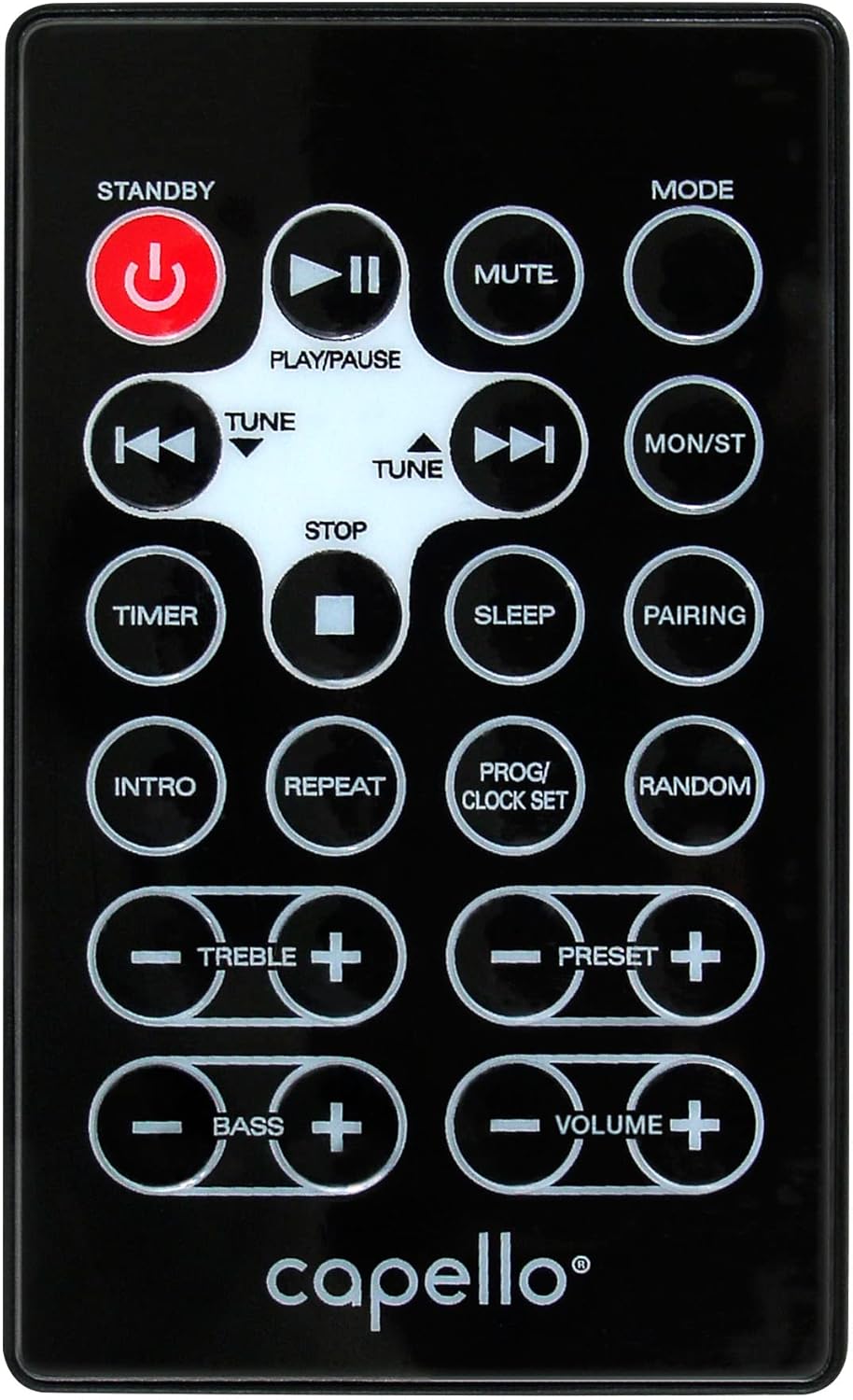
شکل 6.1: Layout of the remote control for the Capello Play it All speaker, showing buttons for Standby, Play/Pause, Mute, Mode, Skip/Tune, Stop, Timer, Sleep, Pairing, Intro, Repeat, Program/Clock Set, Random, Treble, Bass, and Volume controls.
- تيارسئ: بریښنا آن/آف.
- پلی/پاز: غږ غږول یا بندول.
- خاموش: غږ خاموش یا غیر خاموش کړئ.
- لارښوونه: Cycle through input modes.
- SKIP/TUNE ◀◀ / ▶▶: Skip tracks or tune radio frequency.
- ودرول: بیا غږول بند کړئ.
- ټایمر: د خوب وخت تنظیم کړئ.
- خوب: Activate sleep function.
- جوړه کول: د بلوتوث جوړه پیل کړئ.
- پیژندنه: Play the first few seconds of each CD track.
- تکرار: Repeat current track or all tracks.
- PROG/CLOCK SET: Program CD tracks or set clock.
- رندوم: Play CD tracks in random order.
- ستونزه +/-: Adjust treble levels.
- BASS +/-: Adjust bass levels.
- حجم +/-: ټول حجم تنظیم کړئ.
7. ساتنه
7.1 پاکول
- تل د پاکولو دمخه یونټ د بریښنا له سایټ څخه خلاص کړئ.
- د بهرنۍ سطحې د پاکولو لپاره نرم، وچ ټوکر وکاروئ.
- د کثافاتو پاکوونکي، موم یا محلول مه کاروئ ځکه چې دوی ممکن پای ته زیان ورسوي.
- د سي ډي لینز لپاره، د سي ډي لینز پاکولو لپاره ځانګړی ډیسک وکاروئ.
7.2 ذخیره کول
If storing the unit for an extended period, unplug it from the power source and store it in a cool, dry place away from direct sunlight and extreme temperatures.
8. ستونزه حل کول
| ستونزه | احتمالي لامل | د حل لاره |
|---|---|---|
| هیڅ ځواک نشته | د برېښنا تار نه دی تړل شوی؛ آوټ لیټ فعال نه دی. | ډاډ ترلاسه کړئ چې د بریښنا تار په خوندي ډول ولګول شوی دی؛ یو بل سایټ هڅه وکړئ. |
| غږ نشته | Volume too low; incorrect mode selected; external device muted. | Increase volume; select correct input mode; check external device volume/mute. |
| سي ډي نه غږېږي یا نه غږېږي | Dirty or scratched CD; CD inserted incorrectly; dirty CD lens. | Clean or replace CD; insert CD label-side up; use a CD lens cleaner. |
| بلوتوث جوړه ناکامه ده | Device too far; Bluetooth not enabled on device; speaker not in pairing mode. | Move device closer; enable Bluetooth; ensure speaker is in BT pairing mode. |
| د FM ضعیف استقبال | انتن غځول شوی نه دی؛ مداخله. | Fully extend and reposition FM antenna; move away from other electronics. |
| ریموټ کنټرول کار نه کوي | Batteries depleted; obstruction; not pointed at sensor. | Replace batteries; remove obstructions; point remote directly at the unit. |
9. مشخصات
| فیچر | مشخصات |
|---|---|
| برانډ | کیپیلو |
| د ماډل شمیره | CI302 |
| د ارتباط ټیکنالوژي | بلوتوث |
| د سپیکر ډول | سټیریو |
| د آډیو وتلې حالت | سټیریو |
| ملاتړ شوي آډیو فارمیټونه | سي ډي، MP3 |
| سپیکرونه نومیالي تولیدي ځواک | 10 واټ |
| د سپیکرو اعظمي تولید ځواک | 10 واټ |
| د سپیکر شاوخوا غږ چینل ترتیب | 2.0 |
| د ځواک سرچینې ډول | د بریښنا تار شوی |
| مطابقت لرونکې وسیلې | لپ ټاپ، سمارټ فون، ټابلیټ |
| ځانګړي ځانګړتیاوې | Digital Display, Portable, USB Port |
| د موادو ډول | پلاستیک |
| د نصب کولو ډول | د جدول سر |
| د توکي وزن | 2.57 کیلوګرامه |
| د کڅوړې ابعاد | 38.3 x 24.2 x 18.5 سانتي متره |
| بیټرۍ پکې شاملې دي | نه |
| بیټرۍ ته اړتیا ده | نه |
10. تضمین او ملاتړ
This product is covered by a limited warranty. Please refer to the warranty card included in your package for specific terms and conditions. For technical support or customer service inquiries, please contact Capello customer support through their official webسایټ یا د اړیکې معلومات چې ستاسو د پیرود اسنادو سره چمتو شوي.


