1. پیژندنه
The MASTECH MS8050 is a high-accuracy, high-stability digital multimeter designed for precise measurements in various applications. It features a 24-bit A/D converter and a direct digit display up to 53000 counts. This instrument supports DC, AC RMS, and mixed signal DC+AC RMS voltage measurements up to 1000V, and current measurements up to 10A. With a 1 microvolt DC and 20KHz AC frequency resolution, it meets diverse measurement requirements. It also functions as a frequency meter, capable of measuring pulses over 2MHz and linear frequencies up to 200KHz, including current frequency. The MS8050 offers measurements for large resistors up to 50MΩ, capacitors up to 5000µF, and includes functions for maximum, minimum, relative, average values, decibel measurements, diode tests, and continuity checks. Its color fluorescent digital display and 30-full storage function enhance usability. The device includes an RS-232C interface with PC software for data display, recording, and dynamic mapping, transforming it into a versatile measuring recorder. Misoperation protection ensures safety.

This image displays the MASTECH MS8050 Bench Digital Multimeter from a slightly elevated front-right angle, showcasing its green casing, large digital display, function buttons, and input terminals.
2. کلیدي ځانګړتیاوې
- 53000 counts measurement. Auto/Manual range. ACV and ACV measurements reach up to 1000V. DC measurement accuracy reaches up to 0.03%.
- 0.1Ω resistance and 1µV voltage resolution. Voltage/Current linear frequency measurement. Logic frequency/duty cycle measurement.
- Capacitance measurement from 0.01nF to 5000µF. AC/AC + DC true RMS/dBm measurement. MAX/MIN/MAX-MIN value, relative value, average value measurement.
- Data hold function. RS-232C interface and PC Windows software for data logging and analysis. Software calibrates automatically. Full overload protection.
- Color fluorescent double display. Full screen memory function. Insulating performance reaching 1000V CATII.
3. ترتیب کول
Before operating the MASTECH MS8050, ensure proper setup to guarantee accurate measurements and user safety.
3.1 پیک کول او تفتیش کول
- Carefully remove the multimeter from its packaging.
- Inspect the device for any signs of physical damage. If damage is found, do not use the device and contact customer support.
- Verify that all accessories, including test leads, power cord, and RS-232C cable, are present.
3.2 د بریښنا نښلول
- Ensure the multimeter's power switch is in the OFF position.
- Connect the provided power cord to the power input socket on the rear of the multimeter.
- د بریښنا کارډ بله پای په مناسب AC بریښنا پلورنځي کې ولګوئ.
۶.۲ د ټیسټ لیډونو نښلول
- د ډیری برخې لپارهtage, resistance, and continuity measurements, insert the red test lead into the VΩ ان پټ ټرمینل او تور ټیسټ لیډ ته COM (common) input terminal.
- د اوسني اندازه کولو لپاره، سور ټیسټ لیډ په کې دننه کړئ mA or 10A input terminal, depending on the expected current range, and the black test lead into the COM ترمینل
- Always ensure test leads are securely connected before taking measurements.
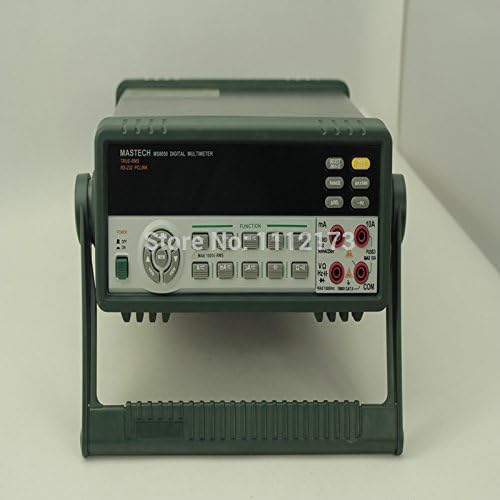
مستقیمه جبهه view of the MASTECH MS8050 Bench Digital Multimeter, highlighting the display, control panel, and input jacks. The integrated stand is visible at the bottom.
4. عملیاتي لارښوونې
This section details the operation of the MASTECH MS8050 for various measurement functions.
4.1 بریښنا کول / بندول
- To power on the device, press the green power button located on the front panel.
- د بریښنا بندولو لپاره، د بریښنا تڼۍ بیا فشار ورکړئ.
4.2 د فعالیت انتخاب
Use the function buttons on the front panel to select the desired measurement mode:
- V™: DC Voltage اندازه کول.
- وی∼: د AC حجمtage اندازه کول.
- A™: DC Current measurement.
- A∼: AC Current measurement.
- اومه: د مقاومت اندازه کول.
- CAP: Capacitance measurement.
- Hz: Frequency measurement.
- ډایډ: ډایډ ازموینه.
- CONT: د دوام ازموینه.
۵.۲.۴ د حد انتخاب
The MS8050 supports both auto-ranging and manual ranging. Press the بدل کړئ button to switch between auto and manual modes. In manual mode, repeatedly press بدل کړئ to cycle through available ranges for the selected function.
4.4 ځانګړې دندې
- MAX/MIN: Press this button to record and display the maximum and minimum values measured during a session.
- REL (Relative): Press to set the current reading as a reference value, and subsequent measurements will be displayed as a deviation from this reference.
- AVG (Average): Calculates and displays the average of measurements over time.
- هوډ: Freezes the current display reading. Press again to release.
- dBm: Measures decibels relative to 1 milliwatt.
- ریښتیا RMS: The multimeter automatically performs True RMS measurements for AC voltage and current, providing accurate readings for non-sinusoidal waveforms.
4.5 PC Software and RS-232C Interface
The MS8050 includes an RS-232C interface for connection to a personal computer. Use the provided RS-232C cable and Windows software to:
- Display real-time measurement data on the computer screen.
- Record and log measurement data over time.
- Generate graphs and charts of measurement trends.
- Perform automatic calibration of the instrument via software.
Refer to the software's dedicated manual for detailed installation and operation instructions.
5. ساتنه
Proper maintenance ensures the longevity and accuracy of your MASTECH MS8050 multimeter.
5.1 پاکول
- Always disconnect the power cord and test leads before cleaning.
- Wipe the exterior of the multimeter with a soft, damp ټوکر د کثافاتو پاکوونکي یا محلول مه کاروئ.
- Ensure no moisture enters the device through the input terminals or ventilation openings.
5.2 اندازه کول
The MS8050 features software-based automatic calibration. Regular calibration, as recommended by MASTECH, helps maintain the instrument's high accuracy. Refer to the PC software manual for calibration procedures.
5.3 ذخیره کول
- ملټي میټر په یخ او وچ ځای کې وساتئ، د مستقیم لمر وړانګو او سختې تودوخې څخه لرې.
- وسیله د دوړو او رطوبت څخه پاک وساتئ.
- If storing for extended periods, ensure the device is powered off and disconnected from all power sources.
6. ستونزه حل کول
This section provides solutions to common issues you might encounter with the MS8050 multimeter.
۶.۱ هیڅ ښودنه یا بریښنا نشته
- Check if the power cord is securely connected to both the multimeter and the AC outlet.
- د بل وسیلې په لګولو سره تایید کړئ چې د AC آوټ لیټ فعال دی.
- Ensure the power switch on the multimeter is in the ON position.
6.2 Incorrect or Unstable Readings
- Ensure test leads are correctly inserted into the appropriate input terminals for the selected function.
- Check for loose or damaged test leads. Replace if necessary.
- Verify that the correct measurement function and range are selected for the circuit being tested.
- Ensure good contact between the test probes and the circuit points.
- Environmental factors like strong electromagnetic interference can affect readings. Move the multimeter away from such sources.
۶.۳ د کمپیوټر سافټویر اتصال ستونزې
- Ensure the RS-232C cable is securely connected to both the multimeter and the computer.
- Verify that the correct COM port is selected in the PC software settings.
- Check if the necessary drivers for the RS-232C interface are installed on your computer.
- Restart both the multimeter and the computer, then try connecting again.
7. مشخصات
Detailed technical specifications for the MASTECH MS8050 Bench Digital Multimeter:
| مشخصات | ارزښت |
|---|---|
| برانډ | ماسټر |
| ماډل | MS8050 |
| د اندازه کولو ډول | ملټي میټر |
| د ښودلو شمیرې | 53000 |
| DC Voltage دقت | 0.03% |
| Max Voltage اندازه کول | 1000V (DC/AC RMS) |
| د اعظمي اوسني اندازه کول | 10A |
| د مقاومت حل | 0.1Ω |
| والیtage ریزولوشن | 1µV |
| د ظرفیت اندازه کولو سلسله | 0.01nF to 5000µF |
| د فریکونسی اندازه کولو رینج | Pulse >2MHz, Linear 200KHz |
| انٹرفیس | RS-232C |
| د بریښنا سرچینه | Manual (AC Power) |
| سټایل | ډیجیټل |
| من عملیاتي حجمtage | 1 Microvolts |
| UPC | 760970480348 |
| جوړونکی | چین |
| د توکو د بسته بندي مقدار | 1 |
| بیټرۍ پکې شاملې دي؟ | نه |
| بیټرۍ ته اړتیا ده؟ | نه |
| نیټه لومړی شتون لري | د ۲۰۲۴ کال د جنورۍ ۲۸ مه |
8. د خوندیتوب معلومات
Always observe the following safety precautions when operating the MASTECH MS8050 multimeter to prevent personal injury or damage to the instrument:
- د هر فعالیت لپاره د اعظمي ان پټ حد څخه تجاوز مه کوئ.
- هيڅکله د حجم غوښتنه مه کوئtage to the current input terminals (mA, 10A) when the function switch is set to a current range.
- Ensure the multimeter is in good working condition and that test leads are not damaged before use.
- Do not operate the multimeter in wet environments or with wet hands.
- محتاط اوسئ کله چې د حجم سره کار کوئtagد 30V AC RMS، 42V پیک، یا 60V DC څخه پورته، ځکه چې دا د شاک خطر رامینځته کوي.
- Always disconnect power to the circuit under test before connecting or disconnecting test leads for current measurements.
- Use the correct terminals, function, and range for your measurements.
- Refer to the CAT rating of the instrument (1000V CATII) and ensure it is suitable for your application.
9. محدود تضمین
MASTECH products are manufactured to high-quality standards. This product is covered by a limited warranty against defects in materials and workmanship. The specific terms and duration of the warranty may vary by region and retailer. Please retain your proof of purchase for warranty claims. For detailed warranty information, refer to the documentation included with your purchase or contact MASTECH customer support.
10. د پیرودونکي ملاتړ
For technical assistance, troubleshooting, or inquiries regarding your MASTECH MS8050 multimeter, please contact MASTECH customer support. Contact information can typically be found on the MASTECH official website or in the product packaging. When contacting support, please have your product model number (MS8050) and purchase details ready.


