پیژندنه
د پیرودلو لپاره مننهasing the VONYX SPX-PA9210 Portable PA System. This manual provides essential information for the safe and efficient operation of your device. Please read it thoroughly before use and retain it for future reference.
د خوندیتوب لارښوونې
- د وسیله چلولو دمخه ټولې لارښوونې په دقت سره ولولئ.
- واحد د اوبو، رطوبت او سختې تودوخې څخه لرې وساتئ.
- سي مه خلاصوهasinز؛ ټولې خدمتونه وړ پرسونل ته راجع کړئ.
- د چارج کولو لپاره یوازې ټاکل شوی بریښنا اډاپټر وکاروئ.
- د ډیر تودوخې مخنیوي لپاره مناسب هوا ورکول ډاډمن کړئ.
- د اوریدلو زیان څخه مخنیوي لپاره د لوړې حجم کچې سره د اوږدې مودې تماس څخه مخنیوی وکړئ.
د بسته محتويات
ډاډ ترلاسه کړئ چې ټول توکي په کڅوړه کې شتون لري:
- VONYX SPX-PA9210 Portable PA System Unit
- ۲ x UHF بېسیم مایکروفونونه
- د بریښنا اډاپټر/چارج کیبل
- د کارونکي لارښود (دا لاسوند)
محصول پای ته ورسیدview
The VONYX SPX-PA9210 is a portable PA system designed for various audio applications. It features integrated speakers, media playback options, and wireless microphones for versatile use.
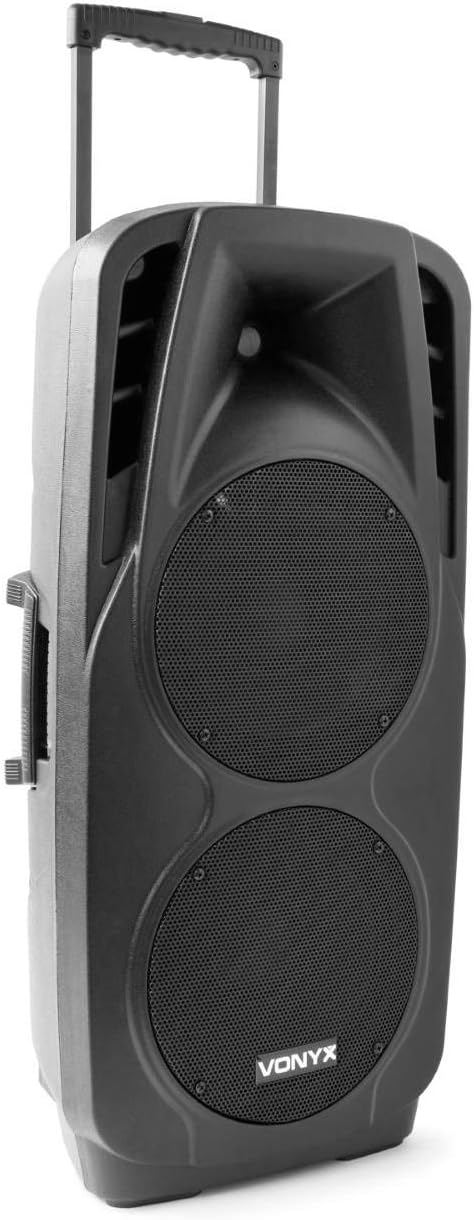
An image showing the VONYX SPX-PA9210 portable PA system. It features a black casing, two large speaker grilles on the front, and a retractable handle at the top for easy transport. A side handle is also visible.
کلیدي ځانګړتیاوې:
- Integrated 2x 10-inch speakers with titanium tweeter controller.
- Built-in media player with USB and SD/MMC card slots.
- د بېسیم آډیو سټریمینګ لپاره د بلوتوټ اتصال.
- High-performance 12V/7A rechargeable battery for 4-6 hours of autonomy.
- Two UHF wireless microphones with up to 50m range.
- Integrated trolley with telescopic handle and wheels for portability.
- LCD screen for media information display.
چمتو کول
۱. ابتدايي چارج کول
Before first use, fully charge the internal 12V/7A battery. Connect the provided power adapter to the charging port on the PA system and then to a suitable power outlet. The charging indicator will show the charging status. A full charge typically provides 4-6 hours of operation.
2. بریښنا کول/بندول
- To power on the unit, locate the power switch (usually on the rear or control panel) and set it to the "ON" position.
- To power off, set the switch to the "OFF" position.
۳. د مایکروفون تنظیم کول
- Insert fresh batteries into the two UHF wireless microphones.
- Turn on the microphones. They should automatically connect to the PA system.
- Adjust the microphone volume on the PA system's control panel. The wireless range is up to 50 meters.
عملیاتي لارښوونې
1. Media Playback (USB/SD/MMC)
- Insert a USB flash drive or an SD/MMC card into the corresponding slot on the control panel.
- The system will automatically detect the media and begin playback, or you may need to select the input source using the "Mode" button.
- Use the playback controls (Play/Pause, Next, Previous) on the control panel to manage your music.
- The LCD screen will display track information.
2. د بلوتوث جوړه کول
- Press the "Mode" button on the PA system until "Mode" button on the PA system until "Bluetooth" is selected.
- په خپل سمارټ فون، ټابلیټ، یا بل بلوتوث فعال شوي وسیله کې، بلوتوث فعال کړئ او د شته وسایلو لټون وکړئ.
- Select "VONYX SPX-PA9210" (or similar name) from the list to pair.
- یوځل چې جوړه شي، تاسو کولی شئ د خپل وسیله څخه د PA سیسټم ته په بېسیم ډول آډیو واستوئ.
3. Volume and Tone Controls
- Adjust the master volume knob to control the overall sound output.
- Separate volume controls are available for microphones and media playback.
- Use the bass and treble controls (if available) to adjust the tone of the audio.
ساتنه
1. پاکول
Wipe the exterior of the unit with a soft, dry cloth. Do not use abrasive cleaners or solvents. Ensure no liquids enter the device.
2. د بیټرۍ پاملرنه
- د بیټرۍ د ژوند اوږدولو لپاره، د بیټرۍ په مکرر ډول د بشپړ چارج کولو څخه ډډه وکړئ.
- Charge the unit regularly, even if not in use, to maintain battery health.
- کله چې د اوږدې مودې لپاره نه کارول کیږي، نو دا واحد په یخ او وچ ځای کې وساتئ.
د ستونزو حل کول
- ځواک نشته: Ensure the unit is charged or connected to a power source, and the power switch is in the "ON" position.
- غږ نشته: Check all volume controls (master, microphone, media player). Ensure the correct input source is selected. Verify microphone batteries.
- بلوتوث نه نښلي: Ensure the PA system is in Bluetooth mode and discoverable. Turn off and on Bluetooth on your device and try pairing again. Move closer to the PA system.
- تحریف شوی غږ: Reduce the volume. Check audio cables if using wired inputs. Ensure microphones are not too close to the speakers (feedback).
مشخصات
| برانډ | وونيکس |
| د ماډل شمیره | Sky-170.082 (SPX-PA9210) |
| ابعاد (L x W x H) | 27 x 38.5 x 81 سانتي متره |
| وزن | 16.25 کیلو ګرامه |
| د ارتباط ټیکنالوژي | بلوتوث، USB |
| د محصول سپارښتنه کارول | سمارټ فونونه او ټابلیټونه |
| ځانګړي ځانګړتیاوې | Bluetooth, USB Port, Portable, LCD Screen |
| د بریښنا سرچینه | Wireless (Internal Battery) |
| بیټرۍ | 12V/7A, 4-6 hours autonomy |
| مواد | اکریلونایتریل بوټاډین سټیرین (ABS) |
| د چینلونو شمیر | 5 |
| ويناوالو | 2x 10-inch woofers, Titanium tweeter controller |
| مایکروفون | 2x UHF Wireless Microphones (up to 50m range) |
تضمین او ملاتړ
For warranty information and technical support, please refer to the documentation provided with your purchase or contact VONYX customer service directly.
د پرزو شتون: د دې محصول لپاره د پرزو د شتون په اړه معلومات اوس مهال شتون نلري.
د سافټویر تازه معلومات: د دې محصول لپاره د تضمین شوي سافټویر تازه معلوماتو په اړه معلومات اوس مهال شتون نلري.


