1. پیژندنه
This manual provides instructions for the setup, operation, and maintenance of your Marathon Slim Jumbo Atomic Wall Clock (Model CL030067WD). This clock is designed for accurate timekeeping, automatically synchronizing with the NIST atomic clock signal in North America. It also displays indoor temperature and humidity.

انځور 1.1: مخکی view of the Marathon Slim Jumbo Atomic Wall Clock, showcasing its large digital display with time, day, date, temperature, and humidity.
2. کلیدي ځانګړتیاوې
- Self-Setting, Self-Adjusting Time: Automatically synchronizes with the NIST atomic clock signal (North America only).
- لوی نندارتون: High-contrast display with 3.25-inch digits for easy readability.
- د ښودلو څو طریقې: Choose between AM/PM or 24-hour time format, full date (month, weekday, date), and indoor temperature (°C/°F) with humidity.
- د سنوز سره الارم: Features an easy-to-set alarm with a five-minute snooze function.
- Adjustable Time Zones: Supports seven North American time zones (Pacific, Mountain, Central, Eastern, Atlantic, Alaska, Hawaii) and Daylight Saving Time preference.
- څو اړخیز ځای پرځای کول: Designed for wall mounting or tabletop use with a fold-out stand.

Image 2.1: Diagram highlighting the key features on the clock's display, including time, date, temperature, and humidity.
3. د تنظیم کولو لارښود
3.1. د بیټرۍ نصب کول
ساعت درې AA بیټرۍ ته اړتیا لري (شامل نه دي).
- د ساعت په شا کې د بیټرۍ کڅوړه ومومئ.
- د بیټرۍ کمپارټ پوښ خلاص کړئ.
- څلور نوي AA بیټرۍ دننه کړئ، د سم قطبیت ډاډ ترلاسه کړئ (+/-).
- د بیټرۍ کمپارټ پوښ په خوندي ډول وتړئ.
۳. د لومړني وخت همغږي کول
After battery installation, the clock will automatically attempt to synchronize with the NIST atomic clock signal. This process may take several minutes to several hours, depending on your location and signal strength. For best reception, place the clock near a window, away from electronic devices that may cause interference.
۳. د وخت زون او د ورځې د رڼا د سپمولو وخت (DST) ټاکل
Use the buttons on the back of the clock to set your desired time zone and enable/disable Daylight Saving Time. Refer to the labels next to the buttons for specific functions.
۶. د ځای پر ځای کولو اختیارونه
The clock can be mounted on a wall using the convenient wall mount slot or placed on a flat surface using its sturdy, fold-out stand.
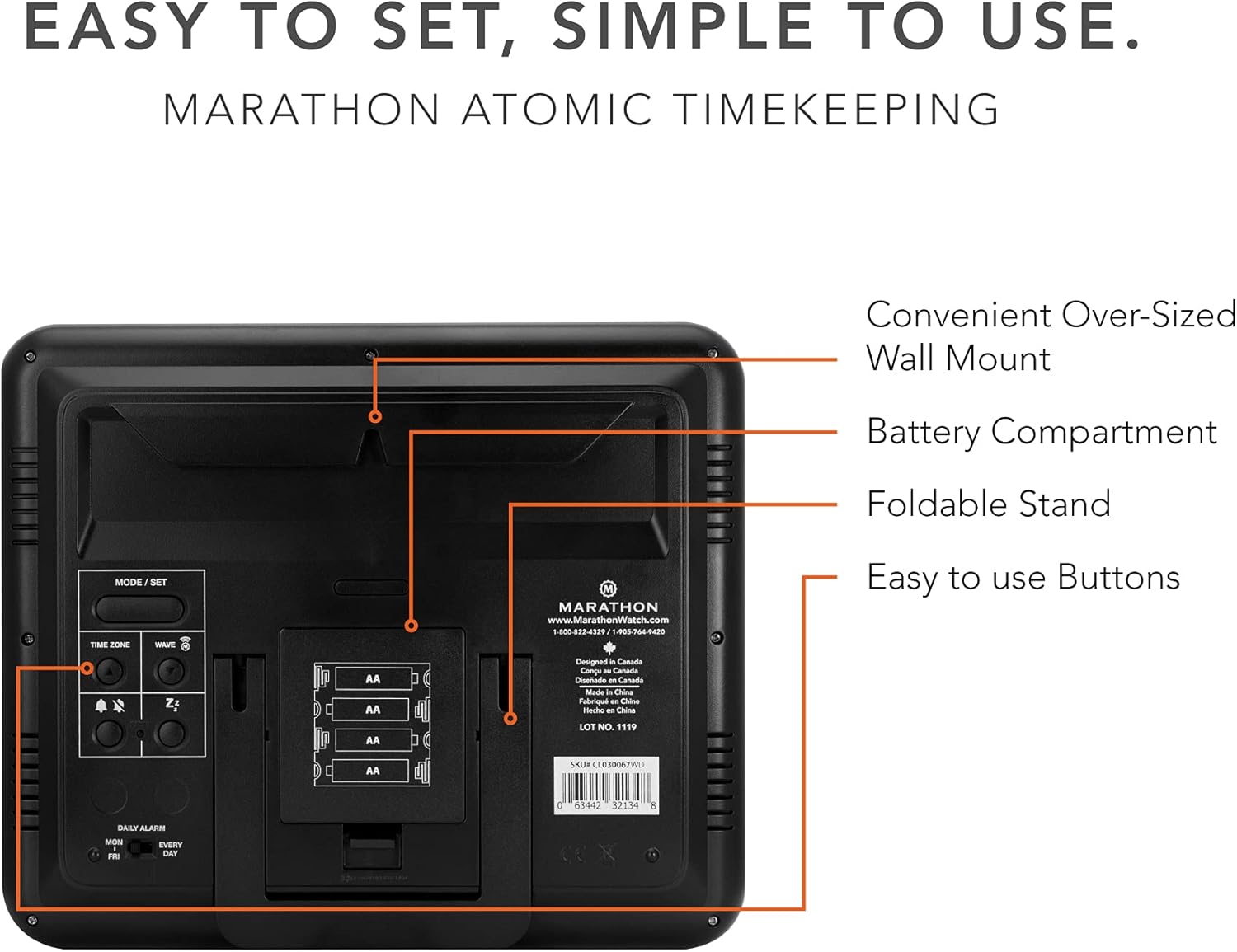
انځور 3.1: شاته view of the clock, illustrating the battery compartment, fold-out stand, and control buttons for setup.
4. عملیاتي لارښوونې
4.1. د ښودلو طریقې
The clock offers multiple display configurations. Use the "MODE/SET" button (or similar, refer to button labels on the back) to cycle through:
- Time in AM/PM or 24-hour format.
- Month, weekday, and date.
- Indoor temperature in Celsius or Fahrenheit, along with humidity percentage.
4.2. د الارم تنظیم کول
The clock includes an alarm function with a snooze feature.
- د الارم تنظیم کولو حالت ته د ننوتلو لپاره د "الارم" تڼۍ فشار ورکړئ.
- Use the adjustment buttons (e.g., "+" or "-") to set the desired alarm time.
- Press "ALARM" again to confirm and activate the alarm.
- When the alarm sounds, press the "SNOOZE" button to temporarily silence it for five minutes.
4.3. د ژبې انتخاب
The display language can be set to English, French, or Spanish. Consult the buttons on the back of the clock for the specific language setting control.

Image 4.1: The clock displayed in an office setting, demonstrating its clear visibility for daily use.
5. ساتنه
To ensure the longevity and optimal performance of your Marathon Atomic Wall Clock, follow these simple maintenance guidelines:
- پاکول: Wipe the clock's surface with a soft, dry cloth. Avoid abrasive cleaners or solvents, which can damage the finish and display.
- د بیټرۍ بدلول: Replace all 4 AA batteries annually or when the display dims to ensure continuous operation and atomic signal reception.
- ځای په ځای کول: Avoid placing the clock in direct sunlight or near extreme heat sources, as this can affect temperature readings and display longevity.
6. ستونزه حل کول
| ستونزه | احتمالي لامل | د حل لاره |
|---|---|---|
| Clock does not display time or is dim. | ټیټ یا ختم شوي بیټرۍ. | ټولې څلور AA بیټرۍ په نویو سره بدلې کړئ. |
| Time is incorrect or not setting automatically. | Poor atomic signal reception or incorrect time zone setting. |
|
| Temperature/Humidity readings appear inaccurate. | Clock placed in an area with fluctuating conditions or direct heat/sunlight. | Move the clock to a location with stable ambient conditions, away from direct heat or drafts. |
7. مشخصات
- نښه: ماراتون
- د ماډل شمیره: CL030067WD
- د ښودلو ډول: ډیجیټل
- د بریښنا سرچینه: د بیټرۍ چلول (دوه AA بیټرۍ اړینې دي، شاملې نه دي)
- د محصول ابعاد: ۳" واټ x ۲" واټ (۷.۶ سانتي متره واټ x ۵.۱ سانتي متره واټ)
- د توکي وزن: 1.26 پونډه (20.16 اونس)
- د چوکاټ مواد: لرګي
- د نصب کولو ډول: Wall Mount or Tabletop (with fold-out stand)
- د کور دننه او بهر کارول: دننه
- ځانګړتیاوې: Atomic Timekeeping, Large Display, Full Calendar, Alarm, Indoor Temperature, Humidity, Multiple Time Zones, Daylight Saving Time adjustment.

Image 7.1: Visual representation of the clock's dimensions.
8. تضمین او ملاتړ
The Marathon Slim Jumbo Atomic Wall Clock comes with a 2 کلن تضمین. For warranty claims, technical support, or further assistance, please refer to the contact information provided with your product packaging or visit the official MARATHON webسایټ
جوړونکی: ماراتن


