1. پیژندنه
This manual provides essential information and instructions for the safe and efficient use of your Nokia 8 Sirocco TA-1005 smartphone. Please read this guide thoroughly before operating your device to ensure optimal performance and longevity. This device is designed for use with GSM, 3G, and 4G LTE networks. Compatibility with CDMA networks, including Verizon, Sprint, and US Cellular, is not supported. Verify network compatibility with your service provider prior to use.
۲. په بکس کې څه دي؟
Upon unboxing your Nokia 8 Sirocco TA-1005, verify that all components are present:
- Nokia 8 Sirocco TA-1005 Device
- د USB ډول - سي کیبل
- د بریښنا اډاپټر
- هیډسیټ
- د سیم Ejector وسیله
- د چټک پیل لارښود
- د خوندیتوب او تضمین معلومات
3. د وسیلې ترتیب
Familiarize yourself with the physical components of your Nokia 8 Sirocco TA-1005.
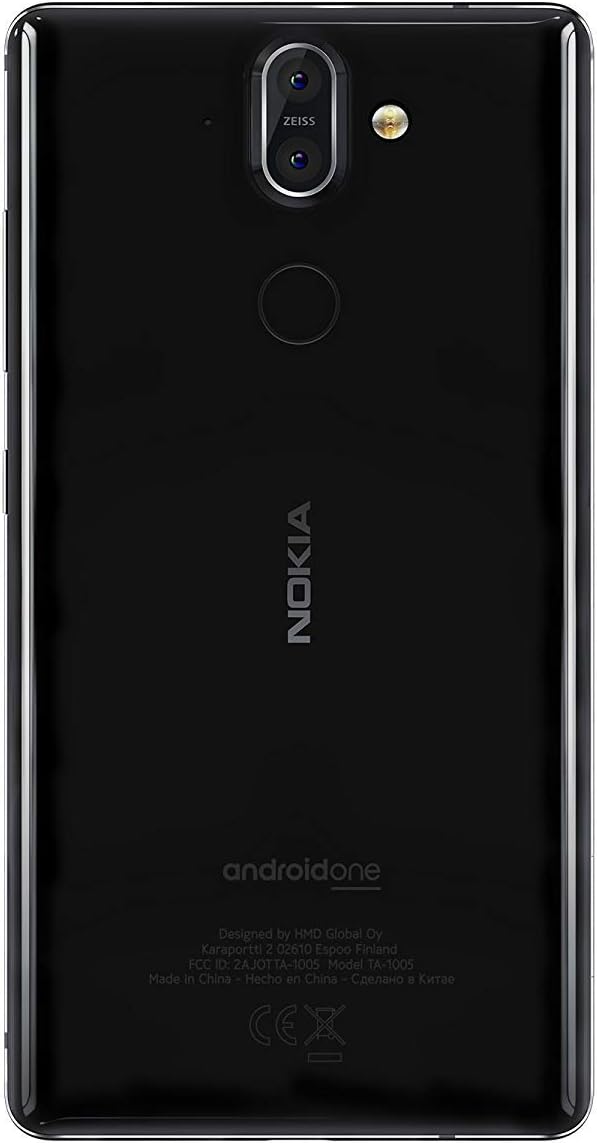
شکل 3.1: شاته view of the Nokia 8 Sirocco TA-1005. This image displays the dual camera setup with ZEISS optics, the circular fingerprint sensor below the camera, and the Nokia logo centrally placed. The 'androidone' branding is visible towards the bottom.
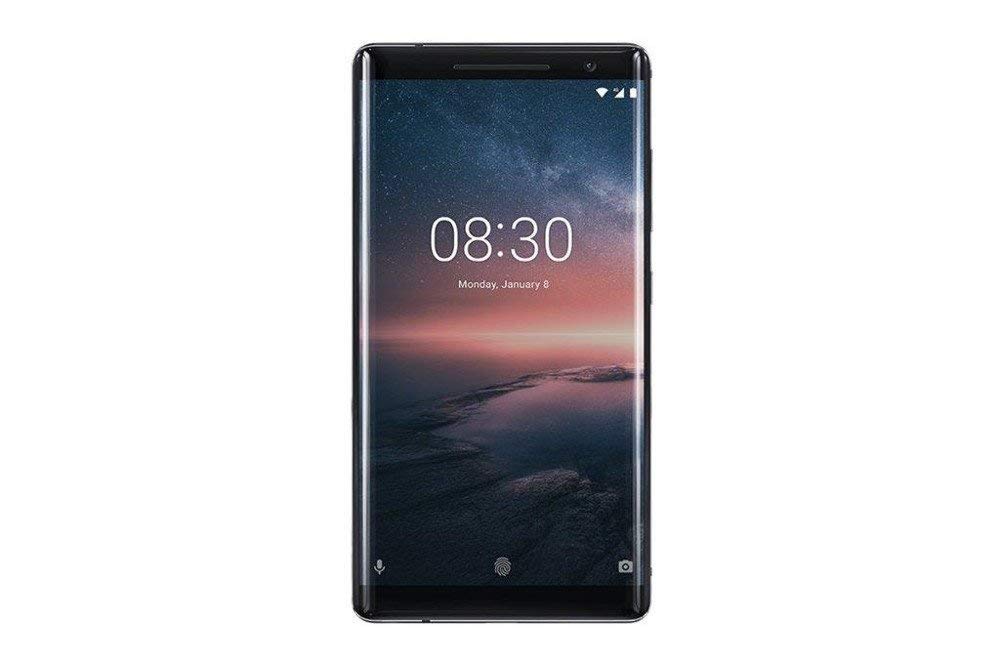
شکل 3.2: مخکی view of the Nokia 8 Sirocco TA-1005. The image highlights the 5.5-inch P-OLED curved display, the front-facing camera at the top, and the on-screen navigation buttons. The device features minimal bezels.

شکل 3.3: اړخ view of the Nokia 8 Sirocco TA-1005. This image illustrates the slim profile of the device, with the power button and volume rocker located on the right side for easy access.
مهمې برخې:
- مخکینۍ کیمره: د نندارې په سر کې موقعیت لري.
- ایرپیس: For calls, located above the display.
- ښکاره کول: 5.5-inch P-OLED capacitive touchscreen.
- د حجم تڼۍ: On the right side, to adjust audio levels.
- د بریښنا/لاک تڼۍ: On the right side, to power on/off or lock/unlock the screen.
- د USB ډول-C پورټ: په ښکته برخه کې، د چارج کولو او معلوماتو لیږد لپاره.
- مایکروفون: Located at the bottom and top.
- سپیکر: په ښکته برخه کې موقعیت لري.
- د سیم/میموري کارت ټرې: On the side, for inserting SIM cards.
- شاته کیمرې: Dual cameras with ZEISS optics on the back.
- فلش: Dual-tone flash next to the rear cameras.
- د ګوتو نښې سینسر: On the back, below the rear cameras.
4. ترتیب کول
4.1. د سیم کارت داخلول
- د خپل وسیلې په اړخ کې د سیم کارت ټری ومومئ.
- د سیم ایجیکټر وسیله د ټرې په کوچني سوري کې دننه کړئ ترڅو یې خلاص کړئ.
- Place your Nano-SIM card(s) into the designated slot(s) on the tray, ensuring the gold contacts face downwards.
- ټری په احتیاط سره بیرته وسیله ته فشار ورکړئ تر هغه چې دا ځای ته کلیک وکړي.
یادونه: This device does not support external memory cards.
4.2. بریښنا کول او بندول
- د فعالولو لپاره: Press and hold the Power/Lock button until the Nokia logo appears.
- د بریښنا بندولو لپاره: Press and hold the Power/Lock button until the power options menu appears, then select "Power off".
4.3. ابتدايي ترتیب
Upon first power-on, the device will guide you through the initial setup process. This includes selecting your language, connecting to a Wi-Fi network, setting up your Google account, and configuring security features like fingerprint unlock or a PIN/pattern.
5. عملیاتي لارښوونې
5.1. زنګ وهل
- Open the "Phone" application.
- د ډایل پیډ په کارولو سره د تلیفون شمیره دننه کړئ یا د خپل پتې کتاب څخه اړیکه غوره کړئ.
- د زنګ پیل کولو لپاره د زنګ آیکون باندې کلیک وکړئ.
5.2. د پیغامونو لیږل
- Open the "Messages" application.
- د "چیټ پیل کړئ" یا "نوی پیغام" آیکون باندې کلیک وکړئ.
- د ترلاسه کوونکي شمیره دننه کړئ یا د اړیکو څخه غوره کړئ.
- خپل پیغام د متن په ساحه کې ولیکئ.
- د لیږلو آیکون باندې کلیک وکړئ.
5.3. د کیمرې کارول
- د "کیمرې" اپلیکیشن خلاص کړئ.
- خپله موضوع په سکرین کې چوکاټ کړئ.
- د عکس اخیستلو لپاره د شټر تڼۍ کېکاږئ.
- Switch between photo and video modes, or access advanced settings like portrait mode or panorama, as desired.
5.4. د انټرنیټ اتصال
- وای فای: ورتګ ترتیبات > شبکه او انټرنیټ > وای فای. Turn Wi-Fi on and select an available network. Enter the password if required.
- د موبایل ډیټا: ورتګ ترتیبات> شبکه او انټرنیټ> ګرځنده شبکه. Ensure "Mobile data" is enabled.
5.5. امنیتي ځانګړتیاوې
Your Nokia 8 Sirocco TA-1005 offers various security options:
- د ګوتې نښه خلاصه کول: د ګوتو نښې ثبت کړئ له لارې Settings > Security & Location > Fingerprint.
- د سکرین لاک: Set a PIN, pattern, or password via Settings > Security & Location > Screen lock.
6. ساتنه
6.1. د آلې پاکول
Use a soft, lint-free cloth to clean your device. Avoid using harsh chemicals or abrasive materials, which can damage the screen or finish.
6.2. د بیټرۍ پاملرنه
- Charge your device using only Nokia-approved chargers and cables.
- د وسیلې له خورا تودوخې سره مخ کیدو څخه مخنیوی وکړئ.
- بیټرۍ ته اجازه مه ورکوئ چې په مکرر ډول په بشپړه توګه خارج شي.
6.3. د سافټویر تازه معلومات
په منظم ډول د سافټویر تازه معلومات وګورئ او نصب کړئ ترڅو ډاډ ترلاسه کړئ چې ستاسو وسیله وروستي ځانګړتیاوې، امنیتي پیچونه، او د فعالیت ښه والی لري. لاړ شئ ترتیبات> سیسټم> د سیسټم تازه کول.
7. ستونزه حل کول
که تاسو په خپل وسیله کې ستونزې سره مخ شئ، لاندې عام حلونو ته مراجعه وکړئ:
| ستونزه | د حل لاره |
|---|---|
| وسیله نه فعالیږي | ډاډ ترلاسه کړئ چې بیټرۍ چارج شوې ده. لږترلږه د 30 دقیقو لپاره چارجر سره وصل شئ. که ځواب ورنکړل شي، د 10-15 ثانیو لپاره د بریښنا تڼۍ په نیولو سره په زور سره بیا پیل کړئ. |
| د شبکې ضعیف سیګنال | Check SIM card insertion. Move to an area with better network coverage. Restart the device. Verify network settings in ترتیبات> شبکه او انټرنیټ> ګرځنده شبکه. |
| Applications are crashing | د اپلیکیشن کیش پاک کړئ (ترتیبات > ایپسونه او خبرتیاوې > [د اپلیکیشن نوم] > ذخیره او زیرمه > زیرمه پاکه کړئ). د ګوګل پلی سټور څخه اپلیکیشن تازه کړئ. که ستونزه دوام ومومي، اپلیکیشن غیر نصب او بیا نصب کړئ. |
| بیټرۍ په چټکۍ سره وچیږي | د سکرین روښانتیا کمه کړئ. نه کارول شوي شالید ایپسونه بند کړئ. کله چې نه کارول کیږي وای فای، بلوتوث، او GPS غیر فعال کړئ. د بیټرۍ کارول چیک کړئ ترتیبات> بیټرۍ د بریښنا مصرفونکي ایپسونو پیژندلو لپاره. |
| وسیله بې ځوابه ده | Perform a force restart by holding the Power button for 10-15 seconds. If the issue continues, consider a factory reset (ترتیبات> سیسټم> د بیا تنظیم کولو اختیارونه> ټول معلومات پاک کړئ (د فابریکې بیا تنظیم کول)). خبرداری: د فابریکې بیا تنظیم کول به ستاسو په وسیله کې ټول معلومات له منځه یوسي. د پرمخ تللو دمخه مهم معلومات بیک اپ کړئ. |
8. مشخصات
Detailed technical specifications for the Nokia 8 Sirocco TA-1005:
| فیچر | تفصیل |
|---|---|
| د ماډل نوم | 8 Sirocco |
| د ماډل شمیره | TA-1005 |
| عملیاتي سیسټم | انډرایډ ۸.۰ (اوریو) |
| پروسیسر | Qualcomm MSM8998 Snapdragon 835, Octa-core (4x2.5 GHz Kryo & 4x1.8 GHz Kryo) |
| GPU | Adreno 540 |
| RAM | 6 جي بي |
| داخلي ذخیره | 128 جي بي |
| ښودل | 5.5 inches, P-OLED capacitive touchscreen, 1440 x 2560 pixels, Corning Gorilla Glass 5 |
| شاته کیمره | 12MP Wide (f/1.7) + 13 MP Tele (f/2.6), dual-tone flash |
| مخکینۍ کیمره | 5MP |
| د بیټرۍ ظرفیت | 3250 mAh |
| چارج کول | د چټک چارج کولو ملاتړ |
| ارتباط | Wi-Fi 802.11a/b/g/n, Bluetooth, USB Type-C |
| ابعاد | 43.36 x 43.17 x 0.75 سانتي متره |
| وزن | 181 ګرامه |
| د سیم ډول | نانو-سیم |
| د شبکې ملاتړ | 2G GSM, 3G, 4G LTE (Note: Not compatible with CDMA networks) |
9. Safety and Warranty Information
9.1. د خوندیتوب لارښوونې
- Do not use the device in prohibited areas, such as aircraft or hospitals.
- وسیله د اوبو یا ډیر رطوبت سره مخ کیدو څخه ډډه وکړئ.
- Use only original or approved accessories.
- هڅه مه کوئ چې وسیله پخپله جلا کړئ یا ترمیم کړئ.
- وسیله او د هغې بیټرۍ د ځایی مقرراتو سره سم په مسؤلیت سره تصفیه کړئ.
9.2. د تضمین معلومات
Your Nokia 8 Sirocco TA-1005 is covered by a limited manufacturer's warranty. Please refer to the separate warranty document included in your product packaging or visit the official Nokia support webد تفصيلي شرایطو او مقرراتو لپاره سایټ. د تضمین ادعاوو لپاره د پیرود ثبوت وساتئ.


