1. پیژندنه
This manual provides detailed instructions for the setup, operation, and maintenance of your LMP USB Wired Keyboard with Numeric Keypad, Model 17203. This keyboard is designed for use with Mac computers and features a German (QWERTZ) layout.
د بسته محتويات:
- LMP USB Wired Keyboard (Model 17203)
- یوځای شوی USB کیبل

2. ترتیب کول
Follow these steps to connect your LMP USB Wired Keyboard to your Mac computer.
- کیبورډ وصل کړئ: Locate an available USB port on your Mac computer. Insert the USB connector of the keyboard's integrated cable into the USB port.
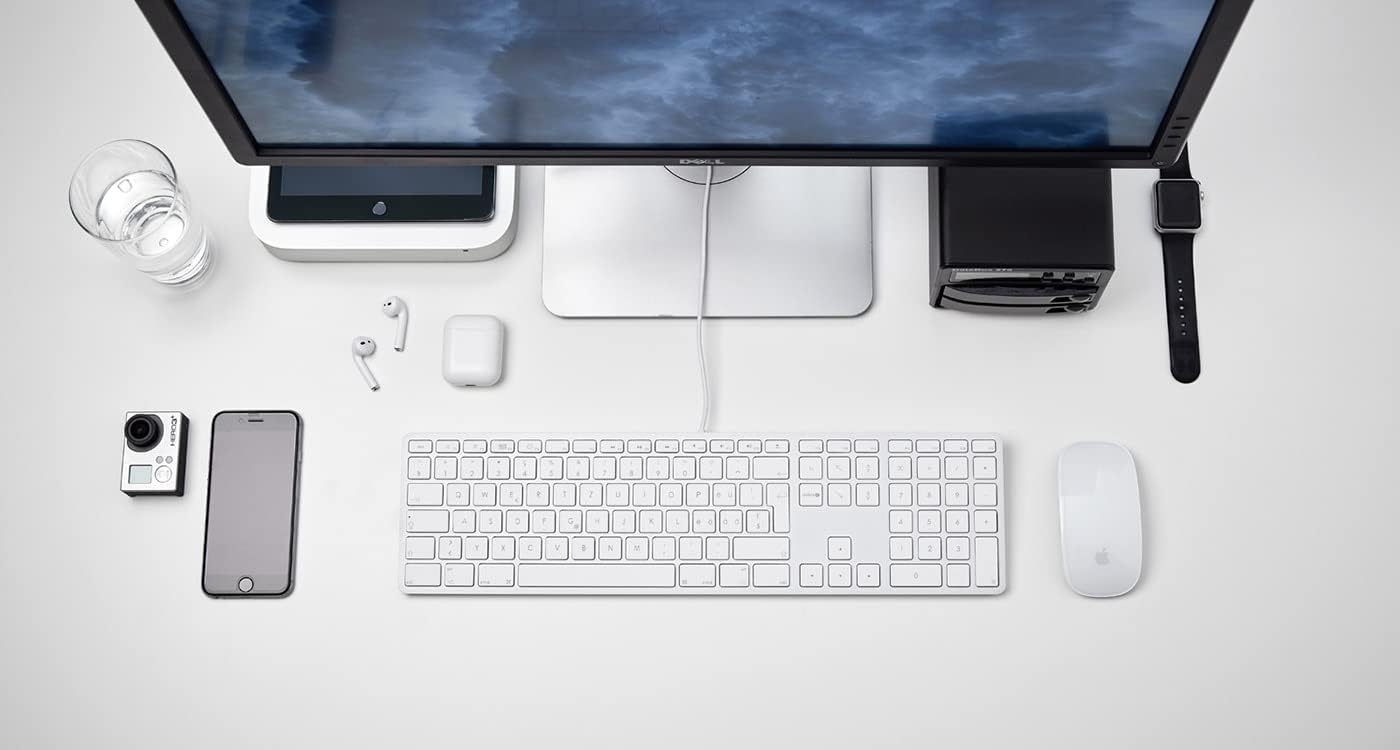
شکل 2.1: The LMP USB Wired Keyboard integrated into a typical Mac desktop setup, demonstrating its connection via USB. - د سیسټم پیژندنه: Your Mac operating system (macOS 10.5 or higher is required) should automatically detect and configure the keyboard. No additional drivers are typically needed.
- لومړنۍ ازموینه: Open a text editor or any application where you can type to confirm the keyboard is functioning correctly.
3. عملیاتي لارښوونې
This section details the primary functions and features of your LMP USB Wired Keyboard.
۴.۱ معیاري ټایپ کول
The keyboard features a full German (QWERTZ) layout with 110 laser-engraved keys, providing a familiar typing experience. All standard alphanumeric, symbol, and modifier keys function as expected on macOS.
۵.۲ د فعالیت کیلي (F1-F12)
The top row of keys includes dedicated function keys (F1-F12) that control various macOS features:
- د روښانتیا کنټرول: F1 (decrease), F2 (increase)
- Mission Control/App Exposé: F3
- د لانچ پیډ: F4
- Keyboard Backlight (if applicable): F5 (decrease), F6 (increase) - Note: This keyboard does not feature backlighting.
- د رسنیو کنټرول: F7 (previous track), F8 (play/pause), F9 (next track)
- د حجم کنټرول: F10 (mute), F11 (decrease), F12 (increase)
To use F-keys as standard function keys (e.g., F5 for refresh in a browser), you may need to hold the Fn key simultaneously or adjust settings in System Preferences > Keyboard.
3.3 عددي کیپډ
The integrated numeric keypad on the right side of the keyboard allows for efficient data entry and calculations. It includes standard number keys, arithmetic operators, and navigation keys.
3.4 Integrated USB Hubs
The keyboard features two USB 2.0 hubs, one on each side, allowing you to connect low-power USB devices directly to your keyboard. These are suitable for devices such as USB mice, flash drives, or other peripherals that do not require significant power.

مهم: High-power devices (e.g., external hard drives, some webcams) may not function correctly when connected to the keyboard's USB hubs due to power limitations. Connect such devices directly to your Mac's USB ports.
۱. ډیزاین او ځانګړتیاوې
The LMP USB Wired Keyboard is crafted with a focus on functionality and aesthetic integration with Mac environments.
- Aluminum Top Cover: The keyboard features a durable aluminum top cover, contributing to its robust construction and sleek appearance.
- Laser-Engraved Keys: All keycaps are laser-engraved, ensuring long-lasting legibility and resistance to wear.
- German (QWERTZ) Layout: Specifically designed for users requiring a German keyboard layout, including special characters and key placements.
- بشپړ ډیزاین: Includes a full complement of 110 keys, including a dedicated numeric keypad and a full set of function keys.


5. ساتنه
Proper care will extend the lifespan of your keyboard.
- د سطحې پاکول: د نرم، لینټ پاک ټوکر څخه لږ څه کار واخلئampened with water or a mild, non-abrasive cleaning solution. Avoid spraying liquids directly onto the keyboard.
- Cleaning Between Keys: د کیلي ګانو ترمنځ د دوړو او کثافاتو د لرې کولو لپاره د فشار شوي هوا څخه کار واخلئ. یو نرم برش هم کارول کیدی شي.
- له توییدو ډډه وکړئ: د کیبورډ څخه مایعات لرې وساتئ ترڅو داخلي برخو ته زیان ونه رسیږي.
- ذخیره کول: کله چې د اوږدې مودې لپاره نه کارول کیږي، کیبورډ په پاک او وچ چاپیریال کې وساتئ.
6. ستونزه حل کول
که تاسو د خپل کیبورډ سره ستونزې سره مخ شئ، لاندې عام حلونو ته مراجعه وکړئ:
| ستونزه | احتمالي لامل / حل |
|---|---|
| کیبورډ ځواب نه ورکوي. |
|
| Keys are not typing correctly or are sticky. |
|
| Devices connected to the keyboard's USB hubs are not working. |
|
| Function keys (F1-F12) are not performing expected macOS actions. |
|
7. مشخصات
| فیچر | تفصیل |
|---|---|
| برانډ | LMP |
| د ماډل نوم | KB-1243 |
| د ماډل شمیره | 17203 |
| د ارتباط ټیکنالوژي | USB (ویر شوی) |
| د کیبورډ توضیحات | QWERTZ (German Layout) |
| د کلیدونو شمیر | 110 (ISO) |
| ځانګړي ځانګړتیاوې | Integrated Numeric Keypad, 2x USB 2.0 Hubs, Laser-engraved keys |
| مطابقت لرونکې وسیلې | Mac computers with USB port (macOS 10.5 or higher) |
| مواد | Aluminum (top cover) |
| رنګ | سره زر |
| شاملې برخې | USB کیبل |
8. تضمین او ملاتړ
For warranty information and technical support, please refer to the documentation provided with your purchase or visit the official LMP webسایټ. د تضمین ادعاوو لپاره د پیرود ثبوت وساتئ.


