1. پیژندنه
This manual provides essential information for the installation, configuration, operation, and maintenance of the MOXA AWK-1137C-US-T 802.11n Wireless AP Client. This device is designed for industrial wireless applications, offering reliable 802.11n connectivity in challenging environments with a wide operating temperature range.
2. د خوندیتوب معلومات
- تل د وسیلې پاکولو یا خدمت کولو دمخه بریښنا قطع کړئ.
- د بریښنایی خطرونو د مخنیوي لپاره مناسب ځمکني کول ډاډمن کړئ.
- وسیله د ټاکل شوي تودوخې او رطوبت حدودو کې چل کړئ.
- وسیله د لندبل یا خورا تودوخې سره مه ښکاره کوئ.
- یوازې وړ پرسونل باید نصب او ساتنه ترسره کړي.
3. د بسته محتويات
ډاډ ترلاسه کړئ چې ستاسو کڅوړه لاندې توکي لري:
- MOXA AWK-1137C-US-T Wireless AP Client unit
- د چټک نصبولو لارښود
- Documentation CD (or link to online resources)
- Mounting kit (if applicable)
- Power adapter or terminal block (if applicable)
که کوم توکي ورک یا زیانمن شوي وي، مهرباني وکړئ سمدلاسه خپل پلورونکي سره اړیکه ونیسئ.
4. هارډویر ختمview
The AWK-1137C-US-T features robust industrial design. Key components typically include:
- ایترنیټ بندرونه: د تار لرونکي شبکې اتصال لپاره.
- د انتن نښلونکي: For external antennas to optimize wireless signal.
- د بریښنا ننوتل: Terminal block for DC power input.
- د LED شاخصونه: Provide status information for power, WLAN, and Ethernet activity.
- د بیا تنظیم تڼۍ: For restoring factory default settings.
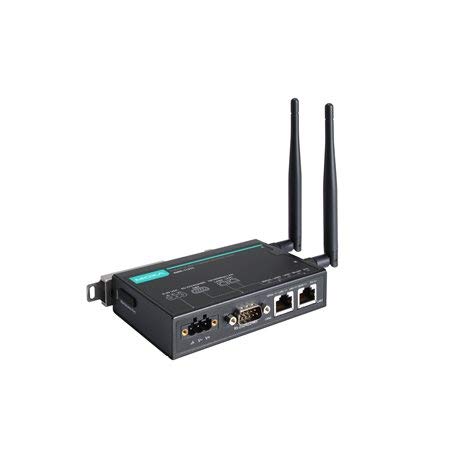
Figure 1: MOXA AWK-1137C-US-T Wireless AP Client. This image shows the compact industrial design of the device, typically featuring antenna ports, Ethernet connections, and power input.
5. ترتیب کول
5.1 پورته کول
The AWK-1137C-US-T supports DIN-rail mounting. Attach the DIN-rail kit to the device and snap it onto a standard DIN-rail. Ensure the device is securely fastened to prevent vibration or accidental dislodgement.
5.2 د بریښنا نښلول
- Connect a suitable DC power source (e.g., 12-48 VDC) to the device's power input terminal block.
- Ensure correct polarity (+ and -) as indicated on the device.
- Tighten the screws on the terminal block to secure the power wires.
د شبکې اتصال
- Connect an Ethernet cable from your network switch or router to the Ethernet port on the AWK-1137C-US-T.
- Attach appropriate antennas to the antenna connectors. Ensure they are securely tightened.
5.4 ابتدايي ترتیب
د وسیلې ته د لاسرسي لپاره webد مدیریت انٹرفیس پر بنسټ:
- Connect a computer directly to the device's Ethernet port or ensure it is on the same network segment.
- Configure your computer's IP address to be in the same subnet as the device's default IP address (refer to the Quick Installation Guide for the default IP).
- خلاص a web browser and enter the device's default IP address.
- Log in using the default username and password (refer to the Quick Installation Guide).
- Change the default password immediately for security.
6. چلول
6.1 عملیاتي طریقې
The AWK-1137C-US-T can operate in various modes, including Access Point (AP) and Client mode. Select the appropriate mode based on your network requirements.
- د لاسرسي نقطې (AP) حالت: The device acts as a central hub for wireless clients to connect.
- د پیرودونکي حالت: The device connects to an existing Access Point, extending wired network connectivity wirelessly.
6.2 بې سیم ترتیبات
Configure the following wireless parameters via the web انٹرفیس:
- SSID: The name of your wireless network.
- چینل: Select an appropriate wireless channel to avoid interference.
- بانډ: Configure for 2.4 GHz or 5 GHz operation, depending on the model and environment.
- د بریښنا لیږد: Adjust the output power for optimal coverage and compliance.
۸.۵ امنیتي ترتیبات
Implement strong wireless security to protect your network:
- کوډ کول: Use WPA2/WPA3-PSK or Enterprise for robust security.
- Password/Passphrase: Choose a strong, unique password.
- د MAC پته فلټر کول: Optionally restrict access to specific devices.
7. ساتنه
7.1 د فرم ویئر تازه معلومات
Regularly check the MOXA website for the latest firmware updates. Firmware updates can provide new features, performance improvements, and security patches. Follow the instructions provided with the firmware package for a safe update process.
7.2 پاکول
Clean the device periodically with a soft, dry cloth. Do not use liquid or aerosol cleaners. Ensure the device is powered off before cleaning.
7.3 د چاپیریال په اړه نظرونه
Ensure the operating environment remains within the specified temperature and humidity limits (-40 to 75°C). Avoid placing the device near heat sources or in direct sunlight.
8. ستونزه حل کول
۱ برېښنا نشته
- د بریښنا کیبل اتصال وګورئ او ډاډ ترلاسه کړئ چې د بریښنا سرچینه فعاله ده.
- د بریښنا رسولو حجم تایید کړئtage is within the device's specified range.
- Inspect the power input terminal block for loose connections.
۸.۳ د شبکې اړیکه نشته
- Check Ethernet cable connections and ensure they are properly seated.
- Verify that the network switch or router is functioning correctly.
- For wireless connections, ensure the SSID, security settings, and channel match the connected AP/client.
- Check the LED indicators for network activity.
۷.۳ ورو بېسیم سرعت
- Ensure antennas are properly connected and positioned for optimal signal.
- Check for sources of interference (e.g., other wireless devices, microwave ovens).
- Adjust the wireless channel to a less congested one.
- Verify that the device is operating in 802.11n mode and not a slower standard.
۶.۴ د فابریکې ډیفالټ ته بیا تنظیم کول
If configuration issues persist, you may need to reset the device to its factory default settings. Locate the reset button (often recessed) and press and hold it for approximately 5-10 seconds while the device is powered on. The device will reboot with default settings.
9. مشخصات
| فیچر | مشخصات |
|---|---|
| د ماډل شمیره | د AWK-1137C-US-T لپاره تفتیش وسپارئ، موږ به په XNUMX ساعتونو کې له تاسو سره اړیکه ونیسو. |
| بيسيم ستندرد | 802.11n |
| عملیاتي بند | US Band |
| د عملیاتي حرارت درجه | -40 څخه تر 75 درجو پورې |
| د کڅوړې ابعاد | 7.87 x 6.57 x 1.97 انچه |
| د توکي وزن | ۲.۴۵ پونډه |
| جوړونکی | MOXA |
| نیټه لومړی شتون لري | د اپریل 30، 2018 |
10. تضمین او ملاتړ
10.1 د تضمین معلومات
MOXA products typically come with a standard warranty. For detailed warranty terms and conditions, please refer to the official MOXA webسایټ یا د تضمین کارت چې ستاسو محصول سره شامل دی. د تضمین ادعاوو لپاره د پیرود ثبوت وساتئ.
10.2 تخنیکي ملاتړ
For technical assistance, product documentation, or driver downloads, please visit the official MOXA support website. You can also contact MOXA's customer support team directly through the contact information provided on their webسایټ


