پیژندنه
This manual provides detailed instructions for the setup, operation, maintenance, and troubleshooting of your Jaycar Composite AV to HDMI Converter (Model AC-1722). Please read this manual thoroughly before using the device to ensure proper functionality and to prevent damage.
کلیدي ځانګړتیاوې
- Converts Composite Video and Stereo Audio (RCA) to HDMI output.
- Supports HDMI 1080p or 720p output resolutions.
- Compatible with NTSC and PAL video systems.
- Plug and play operation.
د بسته محتويات
مهرباني وکړئ تصدیق کړئ چې ټول توکي ستاسو په کڅوړه کې شتون لري:
- Jaycar Composite AV to HDMI Converter (AC-1722)
- د بریښنا اډاپټر (5V DC)
- د کارونکي لارښود (دا لاسوند)
محصول پای ته ورسیدview
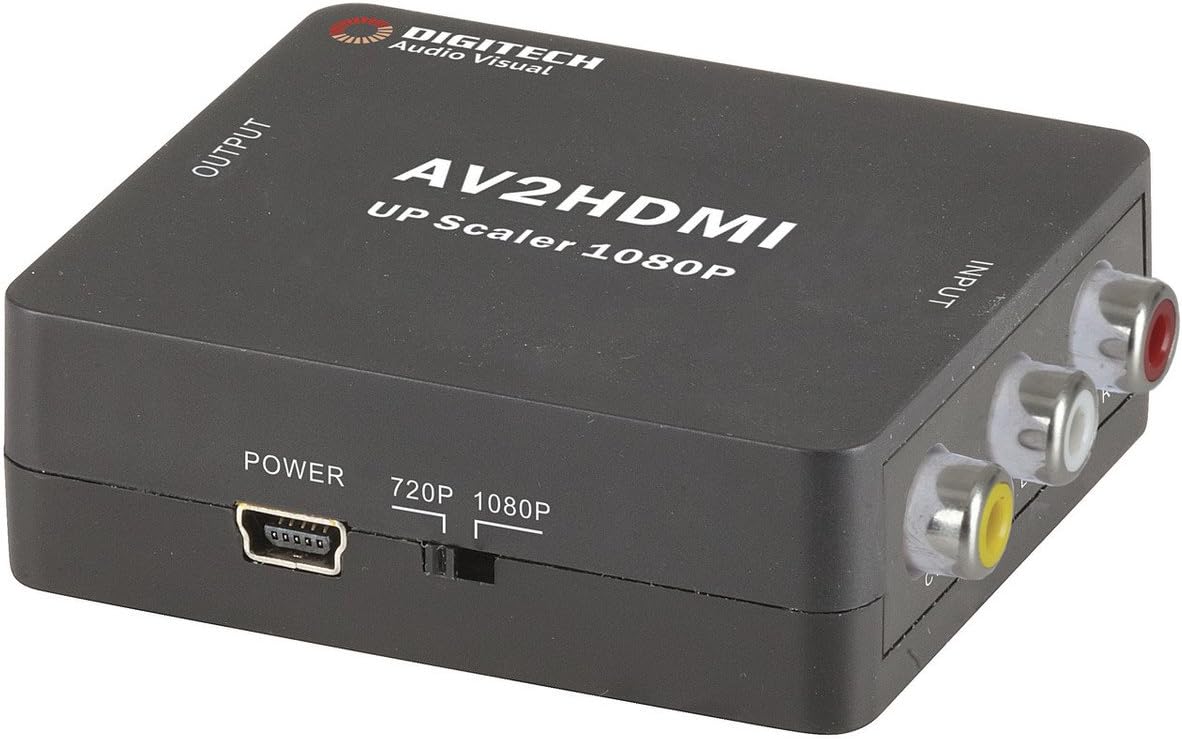
انځور 1: مخکی view of the Jaycar Composite AV to HDMI Converter. This image displays the top and front of the converter, showing the "AV2HDMI UP Scaler 1080P" label, "OUTPUT" and "INPUT" indicators, the power input, and the 720p/1080p resolution switch. The Composite AV input ports (yellow, white, red) are visible on the right side.

انځور 2: اړخ view of the converter showing the HDMI output port. This port is labeled "HDMI" and is where the HDMI cable connects to your display device.

انځور 3: اړخ view of the converter showing the Composite AV input ports. These ports are labeled "CVBS" (yellow for video), "L" (white for left audio), and "R" (red for right audio).

انځور 4: اړخ view of the converter showing the power input port and the 720p/1080p resolution switch. The power port is a mini-USB type, and the switch allows selection between 720p and 1080p output resolutions.
د تنظیم کولو لارښوونې
- د سرچینې وسیله وصل کړئ: Connect your Composite AV source device (e.g., DVD player, VCR, game console) to the converter's input ports. Match the yellow RCA cable to the "CVBS" port, the white RCA cable to the "L" (Left Audio) port, and the red RCA cable to the "R" (Right Audio) port.
- د ښودلو وسیله وصل کړئ: Connect an HDMI cable from the converter's "HDMI" output port to an available HDMI input on your display device (e.g., TV, monitor, projector).
- Select Output Resolution: Use the 720p/1080p switch on the converter to select your desired output resolution. For most modern displays, 1080p is recommended. If you experience issues, try 720p.
- بریښنا وصل کړئ: Connect the provided 5V DC power adapter to the converter's "POWER" input port, then plug the adapter into a wall outlet. The converter will power on automatically.
- په ښودنه کې ان پټ غوره کړئ: Turn on your display device and select the corresponding HDMI input channel to view the converted signal.
عملیاتي لارښوونې
The Jaycar Composite AV to HDMI Converter is designed for plug-and-play operation. Once all connections are made and power is supplied, the converter will automatically scale the analog AV signal to the selected HDMI output resolution (720p or 1080p).
- Ensure your source device is powered on and outputting a Composite AV signal.
- ډاډ ترلاسه کړئ چې ستاسو د ښودنې وسیله سم HDMI ان پټ ته تنظیم شوې ده.
- If no image appears, check all cable connections and the power supply.
- Experiment with the 720p/1080p switch if the image is distorted or not displayed correctly.
ساتنه
The converter requires minimal maintenance. Follow these guidelines to ensure longevity:
- وسیله په وچه، ښه هوا لرونکې سیمه کې وساتئ، د مستقیم لمر وړانګو، لوړې تودوخې او رطوبت څخه لرې.
- د قوي تاثیراتو سره د وسیله له مینځه وړلو یا تابع کولو څخه ډډه وکړئ.
- بهرنۍ برخه د نرم او وچ ټوکر سره پاکه کړئ. مایع پاکوونکي یا محلول مه کاروئ.
- Ensure all cables are securely connected but do not force them.
د ستونزو حل کول
| ستونزه | احتمالي لامل | د حل لاره |
|---|---|---|
| هیڅ ویډیو یا آډیو محصول نشته. |
|
|
| Distorted or flickering image. |
|
|
| No audio, but video is present. |
|
|
مشخصات
| د ننوتلو ډول | Composite Video and Audio (3 RCA) |
| د محصول ډول | د HDMI ډول-A |
| ملاتړ شوي حلونه | 1080p (1920 x 1080), 720p |
| د ویډیو سیسټمونه | NTSC ، PAL |
| د بریښنا اړتیا | ۱۲ ولټه ډي سي (د برېښنا اډاپټر شامل دی) |
| د محصول ابعاد (L x W x H) | ۲۱۰ ملي متره x ۱۷۵ ملي متره x ۱۴۰ ملي متره (تقریبا ۸.۲۶" x ۶.۸۸" x ۵.۵۱") |
| د محصول وزن | 80 ګرامه |
د تضمین معلومات
This Jaycar product comes with a ۱-کلن تضمین د پیرود نیټې څخه. دا تضمین د عادي استعمال لاندې موادو او کاریګرۍ کې نیمګړتیاوې پوښي. دا د ناوړه ګټې اخیستنې، حادثې، غیر مجاز تعدیل، یا ناسم نصب له امله رامینځته شوي زیان پوښښ نه کوي.
For warranty claims, please retain your proof of purchase and contact Jaycar customer support.
د پیرودونکي ملاتړ
If you require further assistance or have questions not covered in this manual, please contact Jaycar customer support through their official webسایټ یا پرچون پلورونکي ته چې تاسو یې محصول اخیستی.
For the latest support information, please visit the official Jaycar webسایټ: www.jaycar.com.au


