پیژندنه
This manual provides essential information for the safe and efficient operation of your Behringer EUROPORT MPA200BT portable PA system. Please read these instructions thoroughly before using the device to ensure proper setup, usage, and maintenance. Retain this manual for future reference.
The Behringer EUROPORT MPA200BT is an all-in-one portable PA system designed for various applications, featuring 200 watts of power, Bluetooth connectivity for audio streaming, and a wireless microphone for vocal performances or presentations. Its battery operation allows for use in locations without direct power access.
د خوندیتوب مهمې لارښوونې
د بریښنایی تجهیزاتو کارولو پرمهال تل دا لومړني خوندیتوب احتیاطات تعقیب کړئ:
- د محصول کارولو دمخه ټولې لارښوونې ولولئ.
- Do not use this product near water or in wet environments.
- یوازې د وچې جامې سره پاک کړئ.
- د هوا د بهېدو لارې مه بندوئ. د جوړونکي د لارښوونو سره سم نصب کړئ.
- د تودوخې کومې سرچینې ته نږدې مه نصب کړئ لکه ریډیټرونه، د تودوخې راجسترونه، بخارۍ، یا نور وسایل (په شمول ampلایفیر) چې تودوخه تولیدوي.
- د قطبي یا ځمکني ډول پلګ خوندیتوب هدف مه ماتوئ. یو قطبي پلګ دوه تیغونه لري چې یو یې د بل په پرتله پراخ دی. د ګراونډنګ ډوله پلګ دوه تیغونه او دریم ګراونډنګ پرنګ لري. پراخه تیغ یا دریم پرنګ ستاسو د خوندیتوب لپاره چمتو شوي. که چیرې چمتو شوی پلګ ستاسو په پلورنځي کې مناسب نه وي، د ناببره پلورنځي ځای په ځای کولو لپاره د بریښنایی کارکونکي سره مشوره وکړئ.
- د بریښنا تار د چلولو یا پنچ کیدو څخه خوندي کړئ، په ځانګړې توګه په پلګونو، د اسانتیاو استخراج، او هغه ځای چې دوی د وسایلو څخه وځي.
- یوازې د جوړونکي لخوا مشخص شوي ضمیمې / لوازم وکاروئ.
- دا آله د بریښنا د طوفانونو په جریان کې یا کله چې د اوږدې مودې لپاره نه کارول کیږي خلاص کړئ.
- ټول خدمتونه وړ خدمت پرسونل ته راجع کړئ. خدمت کول اړین دي کله چې وسایل په هر ډول زیانمن شوي وي، لکه د بریښنا رسولو تار یا پلګ زیانمن شوی وي، مایع توی شوي وي یا توکي په وسایلو کې راوتلي وي، وسیله د باران یا رطوبت سره مخ شوې وي، په نورمال ډول کار نه کوي. ، یا غورځول شوی دی.
د بسته محتويات
Upon unpacking your Behringer EUROPORT MPA200BT, please verify that all components are present and in good condition:
- Behringer EUROPORT MPA200BT Portable PA System
- Wireless Microphone (ULM300M)
- USB Receiver for Wireless Microphone (ULM300USB)
- د بریښنا کیبل
- د کارونکي لارښود (دا لاسوند)

Image: The Behringer EUROPORT MPA200BT portable PA system shown with its accompanying wireless microphone.
محصول پای ته ورسیدview: کنټرولونه او ارتباطات
Familiarize yourself with the various controls and connection points on your MPA200BT unit.

Image: Rear panel of the MPA200BT, highlighting the main control interface, inputs, and outputs.

انځور: تفصیلي view of the MPA200BT's control panel, including display, rotary encoder, and buttons.
د کنټرول پینل ځانګړتیاوې:
- د ښودلو سکرین: Shows current settings, input levels, and Bluetooth status.
- روټری کوډر: Used to navigate menus and adjust parameters. Press to confirm selections.
- د پروسې تڼۍ: Activates or deactivates sound processing effects.
- د تنظیم تڼۍ: Enters the system setup menu.
- د وتلو تڼۍ: Exits current menu or setting.
- د ننوتلو تtonۍ: په مینو کې انتخابونه تاییدوي.
- د بلوتوت تڼۍ: د بلوتوث جوړه کولو حالت پیل کوي.
د ننوتلو/آؤټ پټ ارتباط:
- INPUT 1 & 2 (XLR/TRS Combo Jacks): For connecting microphones or line-level instruments.
- WIRELESS SYSTEM (USB Port): For connecting the ULM300USB wireless microphone receiver.
- MP3 Input (3.5mm Stereo Jack): د بهرنیو آډیو پلیرونو سره د نښلولو لپاره.
- MIX OUTPUT (XLR): For sending the mixed audio signal to another PA system or recording device.
- د AC بریښنا داخلول: د بریښنا کیبل سره نښلولو لپاره.
چمتو کول
- د بریښنا پیوستون:
Connect the supplied power cable to the AC Power Inlet on the rear of the MPA200BT and then to a suitable power outlet. The unit can also operate on its internal battery.
- ابتدايي بریښنا فعاله:
Press the power switch to turn on the unit. The display will illuminate.
- موقعیت:
Place the MPA200BT on a stable, flat surface or mount it on a speaker stand (sold separately). Ensure proper ventilation around the unit.
- د نښلولو آخذې:
- Wired Microphones/Instruments: Connect to INPUT 1 or INPUT 2 using XLR or 1/4" TRS cables.
- External Audio Players: Connect to the MP3 Input using a 3.5mm stereo cable.
عملیاتي لارښوونې
بلوتوث آډیو

Image: The Bluetooth logo, representing wireless audio streaming capability.
- Ensure the MPA200BT is powered on.
- فشار ورکړئ بلوتوث button on the control panel. The Bluetooth icon on the display will flash, indicating pairing mode.
- On your smartphone or Bluetooth-enabled device, navigate to the Bluetooth settings and select "BEHRINGER MPA200BT" from the list of available devices.
- Once paired, the Bluetooth icon on the MPA200BT display will stop flashing and remain solid.
- You can now stream audio from your device to the MPA200BT. Adjust the volume using your device's controls and the MPA200BT's master volume.
Wireless Microphone Usage (ULM300M/ULM300USB)
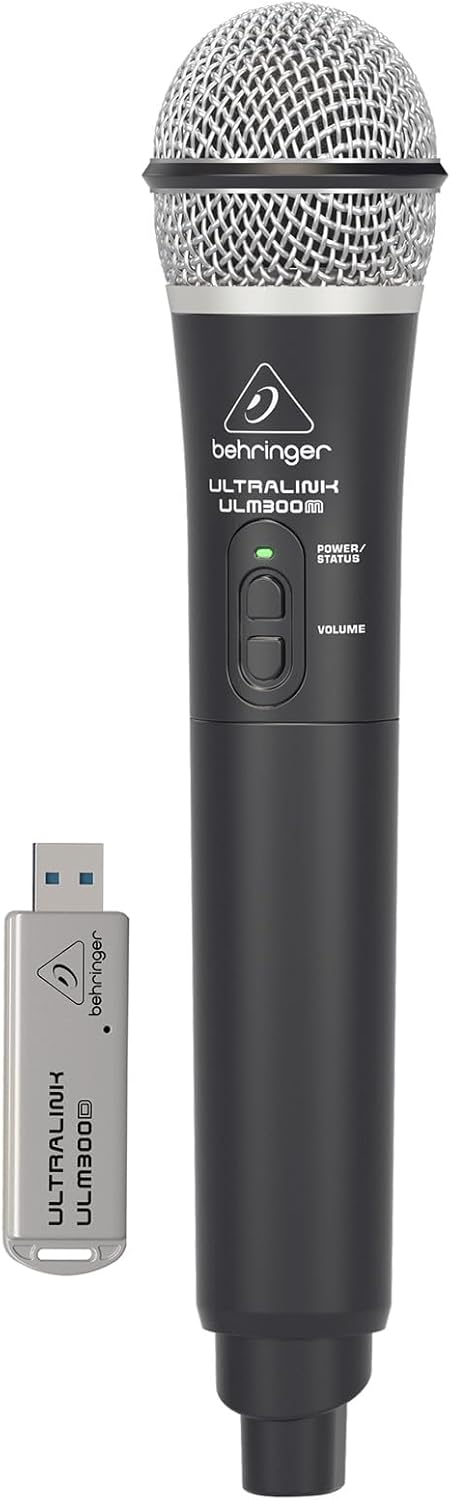
Image: The Behringer ULM300M wireless microphone shown with its USB receiver, the ULM300USB.
- Insert the ULM300USB receiver into the د وایرلس سیسټم USB port on the MPA200BT.
- Ensure the ULM300M wireless microphone has fresh batteries installed.
- Power on the wireless microphone. The status LED on both the microphone and the receiver should indicate a successful connection (usually a solid green light).
- Adjust the microphone's volume using the controls on the microphone itself and the MPA200BT's input gain settings.
Remote Control via Smartphone App

Image: A smartphone screen showing the graphical user interface of the Behringer remote control application, used to manage the PA system settings.
The MPA200BT can be controlled remotely using a dedicated smartphone application. This allows for adjustments to volume, EQ, and effects from a distance.
- Download the official Behringer MPA200BT control app from your device's app store (iOS/Android).
- Ensure your smartphone is connected to the MPA200BT via Bluetooth (as described in the "Bluetooth Audio Streaming" section).
- Open the app. It should automatically detect and connect to your MPA200BT unit.
- Use the app's interface to control various parameters of the PA system.
د بیټرۍ عملیات
The MPA200BT features an internal rechargeable battery for portable use.
- The battery charges automatically when the unit is connected to AC power.
- A battery level indicator on the display shows the remaining charge.
- For optimal battery life, fully charge the unit before its first use and periodically when not in use for extended periods.
ساتنه
- پاکول: د واحد بهرنۍ برخه پاکولو لپاره نرم، وچ ټوکر وکاروئ. د کثافاتو پاکوونکي یا محلولونه مه کاروئ.
- ذخیره کول: When not in use, store the MPA200BT in a cool, dry place, away from direct sunlight and extreme temperatures.
- د بیټرۍ پاملرنه: If storing for extended periods, ensure the battery is partially charged (around 50%) and recharge it every few months to prevent deep discharge.
- وینټیلیشن: Ensure that the ventilation openings are not obstructed during operation to prevent overheating.
د ستونزو حل کول
| ستونزه | احتمالي لامل | د حل لاره |
|---|---|---|
| هیڅ ځواک نشته | Power cable not connected; unit not switched on; battery depleted. | Check power cable connection; ensure power switch is ON; charge battery. |
| د غږ تولید نشته | Volume too low; input source not connected or selected; faulty cable; microphone off. | Increase master volume and input gain; check input connections; test cables; ensure microphone is powered on and paired. |
| بلوتوث جوړه ناکامه ده | MPA200BT not in pairing mode; device too far; interference. | Press Bluetooth button to enter pairing mode; move device closer; restart both devices. |
| Wireless microphone not working | USB receiver not connected; microphone off; depleted batteries in microphone; interference. | Ensure ULM300USB is fully inserted; power on microphone; replace microphone batteries; ensure clear line of sight. |
| Squealing/Feedback | Microphone too close to speaker; microphone gain too high. | Move microphone further from speaker; reduce microphone input gain. |
مشخصات
| فیچر | تفصیل |
|---|---|
| ماډل | EUROPORT MPA200BT |
| د واټ محصولtage | 200 واټ |
| د بریښنا سرچینه | Battery Powered / AC Power |
| د ارتباط ټیکنالوژي | بلوتوث |
| د چینلونو شمیر | 2 |
| د توکي وزن | ۷.۰ کیلو ګرامه (۱۵.۵ پونډه) |
| د محصول ابعاد (L x W x H) | 11.02 x 10.11 x 16.53 انچه |
| د نصب کولو ډول | ټابلیټ |
| مطابقت لرونکې وسیلې | سمارټ فون |
| جوړونکی | د امریکا د موسیقۍ قبیله |
تضمین او ملاتړ
د تفصيلي تضمین معلوماتو او تخنیکي ملاتړ لپاره، مهرباني وکړئ رسمي بهرینګر ته مراجعه وکړئ webسایټ ته مراجعه وکړئ یا د دوی د پیرودونکو خدماتو سره اړیکه ونیسئ. د پیرود ثبوت په توګه د پیرود رسید وساتئ.
آنلاین سرچینې: www.behringer.com
جوړونکی: د امریکا د موسیقۍ قبیله
د رسمي محصول ویډیوګانې
No relevant official product videos from the seller were found in the provided data for embedding.


