پیژندنه
This instruction manual provides detailed guidance for the safe and efficient use of your Lenco Xemio-768 Digital Media Player. Please read this manual thoroughly before operating the device and retain it for future reference.
The Lenco Xemio-768 is a versatile digital media player capable of playing MP3/MP4 files, displaying photos, reading e-books, and recording voice memos. It features Bluetooth connectivity for wireless audio and an expandable memory via Micro SD card.
د بسته محتويات
- Lenco Xemio-768 Digital Media Player
- USB کیبل
- د غوږ دننه هیډفونونه
- ۶۴ جي بي مایکرو ایس ډي کارت (مخکې له مخکې نصب شوی یا په جلا توګه شامل شوی)
- د لارښود لارښود (دا سند)
وسیله ختمه شوهview
Familiarize yourself with the various parts and controls of your Xemio-768 player.
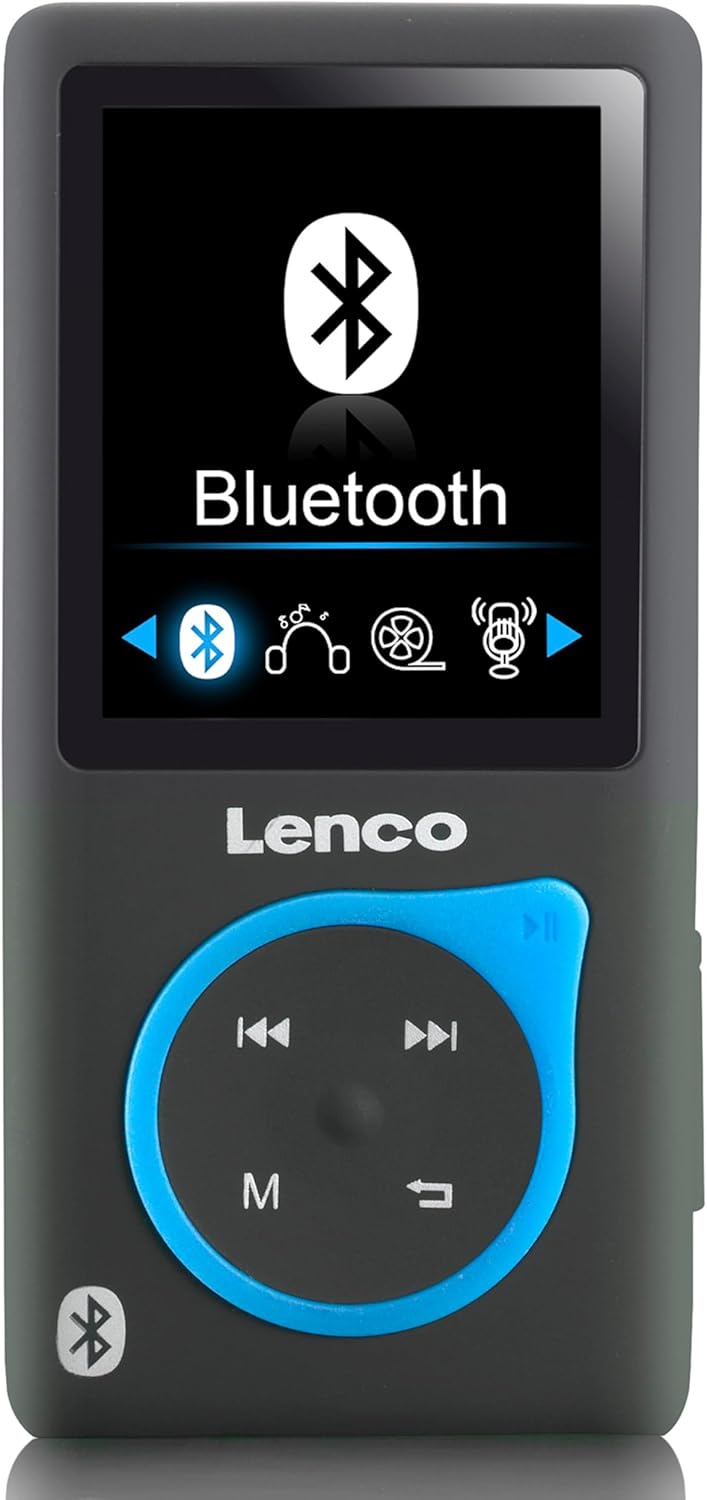
انځور 1: مخکی view of the Lenco Xemio-768 Digital Media Player. The screen displays the Bluetooth menu option. Below the screen are the Lenco logo and a circular control pad with playback buttons (previous, next, play/pause) and a menu button (M). A Bluetooth symbol is also visible on the bottom left of the device.
Key Controls and Ports:
- د ۴.۳ انچه TFT LCD سکرین: Displays menus, media, and settings.
- د کنټرول پیډ: Navigation and playback controls (Play/Pause, Next/Fast Forward, Previous/Rewind, Menu).
- د مایکرو USB پورټ: د چارج کولو او ډیټا لیږد لپاره.
- د مایکرو SD کارت سلاټ: For memory expansion (supports up to 32GB).
- ۳.۵ ملي میتره هیډفون جیک: For wired headphone connection.
- جوړ شوی مایکروفون: د غږ ثبتولو لپاره.
چمتو کول
1. د وسیلې چارج کول
- Connect the small end of the included USB cable to the Micro USB port on the player.
- Connect the larger end of the USB cable to a powered USB port on a computer or a USB wall adapter (not included).
- د بیټرۍ شاخص به په سکرین کې د چارج کولو حالت وښيي. بشپړ چارج معمولا نږدې 3 ساعته وخت نیسي.
- Disconnect the USB cable once fully charged.
۴. د مایکرو ایس ډی کارت داخلول (اختیاري)
The player comes with an 8GB Micro SD card. If you wish to expand the storage, you can replace it with a card up to 32GB.
- د پلیر په اړخ کې د مایکرو ایس ډی کارت سلاټ ومومئ.
- مایکرو ایس ډی کارت په نرمۍ سره دننه کړئ پداسې حال کې چې د سرو زرو اړیکې ښکته وي تر هغه چې ځای ته راشي.
- د لرې کولو لپاره، کارت په نرمۍ سره دننه کړئ تر هغه چې کلیک وکړي، بیا یې خوشې کړئ، او دا به راووځي.
3. د هیډفون سره نښلول
- تار لرونکي هیډفونونه: Plug the 3.5 mm jack of the included in-ear headphones (or your own compatible headphones) into the headphone port on the player.
- بلوتوث هیډفونونه/سپیکرونه: Refer to the "Bluetooth Connectivity" section under Operating for wireless connection instructions.
4. لیږدول Files
- پلیر د USB کیبل په کارولو سره خپل کمپیوټر ته وصل کړئ.
- دا پلیر به ستاسو په کمپیوټر کې د لرې کولو وړ ډیسک ډرایو په توګه څرګند شي.
- Drag and drop your desired music (MP3, WMA), videos (AMV, AVI), photos (JPG, BMP, GIF), or e-books (TXT) into the appropriate folders on the player's internal memory or Micro SD card.
- یوځل fileکه چیرې فایلونه لیږدول کیږي، نو د USB کیبل له منحل کولو دمخه په خوندي ډول له خپل کمپیوټر څخه لرې کیدونکی ډیسک وباسئ.
عملیاتي لارښوونې
پاور آن/بند
- To power on, press and hold the Power button (usually on the side) until the screen lights up.
- د بریښنا بندولو لپاره، د بریښنا تڼۍ فشار کړئ او وساتئ تر هغه چې وسیله بنده شي.
د مینو غورځول
- Use the directional buttons on the control pad to navigate through menu options.
- Press the central button (often Play/Pause) to select an option.
- Press the 'M' (Menu) button to go back to the previous menu or to access context-sensitive options during playback.
د غږ غږ
- د اصلي مینو څخه، "موسیقي" غوره کړئ.
- Browse through your folders and files to find the desired track.
- Press the central button to play the selected track.
- د کارولو مخکینی او بل د ټریکونو پریښودو لپاره تڼۍ.
- Press the central button again to pause/resume playback.
ویډیو غږول
- From the main menu, select "Video".
- خپل ویډیو ته ورشئ files (AMV, AVI format).
- Select a video to begin playback.
انځور Viewer
- From the main menu, select "Photos".
- خپل انځور وګورئ files (JPG, BMP, GIF format).
- لپاره یو انځور غوره کړئ view دا
د ای کتاب لوستونکی
- From the main menu, select "E-book".
- Navigate to your text files (TXT format).
- غوره کړه a file د خلاصولو او لوستلو لپاره.
غږ ثبتول
- From the main menu, select "Recorder" or "Voice Memo".
- د پیل کولو لپاره "ریکارډ پیل کړئ" غوره کړئ.
- Press the central button to stop recording.
- Recordings are saved and can be accessed from the "Recordings" menu.
د بلوتوټ ارتباط
- Ensure your Bluetooth headphones or speaker are in pairing mode. Refer to their respective manuals for instructions.
- On the Xemio-768, navigate to the "Bluetooth" menu.
- غوره کړئ "لټون Devices" or "Pair New Device".
- Once your device appears in the list, select it to initiate pairing.
- که غوښتنه وشي نو په دواړو وسیلو کې جوړه تایید کړئ.
- Once connected, audio will be routed wirelessly to your Bluetooth device.
ساتنه
پاکول
- Use a soft, dry, lint-free cloth to clean the device's exterior.
- د کثافاتو پاکوونکي، الکول، یا محلولونه مه کاروئ، ځکه چې دا ممکن سطح ته زیان ورسوي.
- په هر ډول خلاصیدو کې د رطوبت له ننوتلو څخه ډډه وکړئ.
د بیټرۍ پاملرنه
- د بیټرۍ د ژوند اوږدولو لپاره، د بیټرۍ په مکرر ډول د بشپړ چارج کولو څخه ډډه وکړئ.
- وسیله په منظم ډول چارج کړئ، حتی که د اوږدې مودې لپاره نه کارول کیږي.
- وسیله په یخ او وچ ځای کې د مستقیم لمر وړانګو او سختې تودوخې څخه لرې وساتئ.
د ستونزو حل کول
| ستونزه | احتمالي لامل | د حل لاره |
|---|---|---|
| وسیله نه ورځي. | بیټرۍ ختمه شوې. | د ورکړل شوي USB کیبل په کارولو سره وسیله چارج کړئ. |
| د بلوتوث له لارې نشي وصل کېدای. | Bluetooth device not in pairing mode; interference; device out of range. | Ensure your Bluetooth headphones/speaker are in pairing mode. Move closer to the player. Try restarting both devices. |
| Files are not recognized or played. | غلط file بڼه؛ فاسد file; Micro SD card issue. | ډاډ ترلاسه کړئ files are in supported formats (MP3, WMA, AMV, AVI, JPG, BMP, GIF, TXT). Check if the Micro SD card is properly inserted or try another card. |
| د هیډفونونو څخه غږ نشته. | هیډفونونه په سمه توګه نه دي وصل شوي؛ غږ ډیر ټیټ دی؛ خراب شوی غږ file. | Check headphone connection. Increase volume. Test with different headphones or audio files. |
مشخصات
- ماډل: زیمیو-768
- ښکاره کول: د 1.8 انچ TFT LCD
- داخلي حافظه: 8 GB (via Micro SD card)
- د پراخیدو وړ حافظه: Up to 32 GB (Micro SD card)
- ملاتړ شوي آډیو فارمیټونه: MP3، WMA
- ملاتړ شوي ویډیو فارمیټونه: AMV، AVI
- د ملاتړ شوي انځور بڼه: JPG، BMP، GIF
- Supported E-book Format: TXT
- ارتباط: بلوتوث، مایکرو USB
- د سر غوږ جیک: 3.5 ملي متره
- د بیټرۍ ډول: لیتیم پولیمر
- د بیټرۍ ژوند: Approximately 3 hours (playback)
- ابعاد: 0.09 x 4.15 x 8.5 سانتي متره
- وزن: 28.5 ګرامه
تضمین او ملاتړ
For warranty information and technical support, please refer to the warranty card included with your product or visit the official Lenco webسایټ. د هر ډول تضمین ادعا لپاره د پیرود ثبوت وساتئ.


