پیژندنه
This manual provides essential instructions for the safe and efficient operation of your Fujitsu FS-6160ZLA Document Scanner. Please read this manual thoroughly before using the scanner and retain it for future reference. Following these guidelines will ensure optimal performance and longevity of your device.
محصول پای ته ورسیدview
The Fujitsu FS-6160ZLA is a high-performance document scanner designed for efficient paper handling and digital conversion. It features an Automatic Document Feeder (ADF) for batch scanning and a user-friendly control panel.
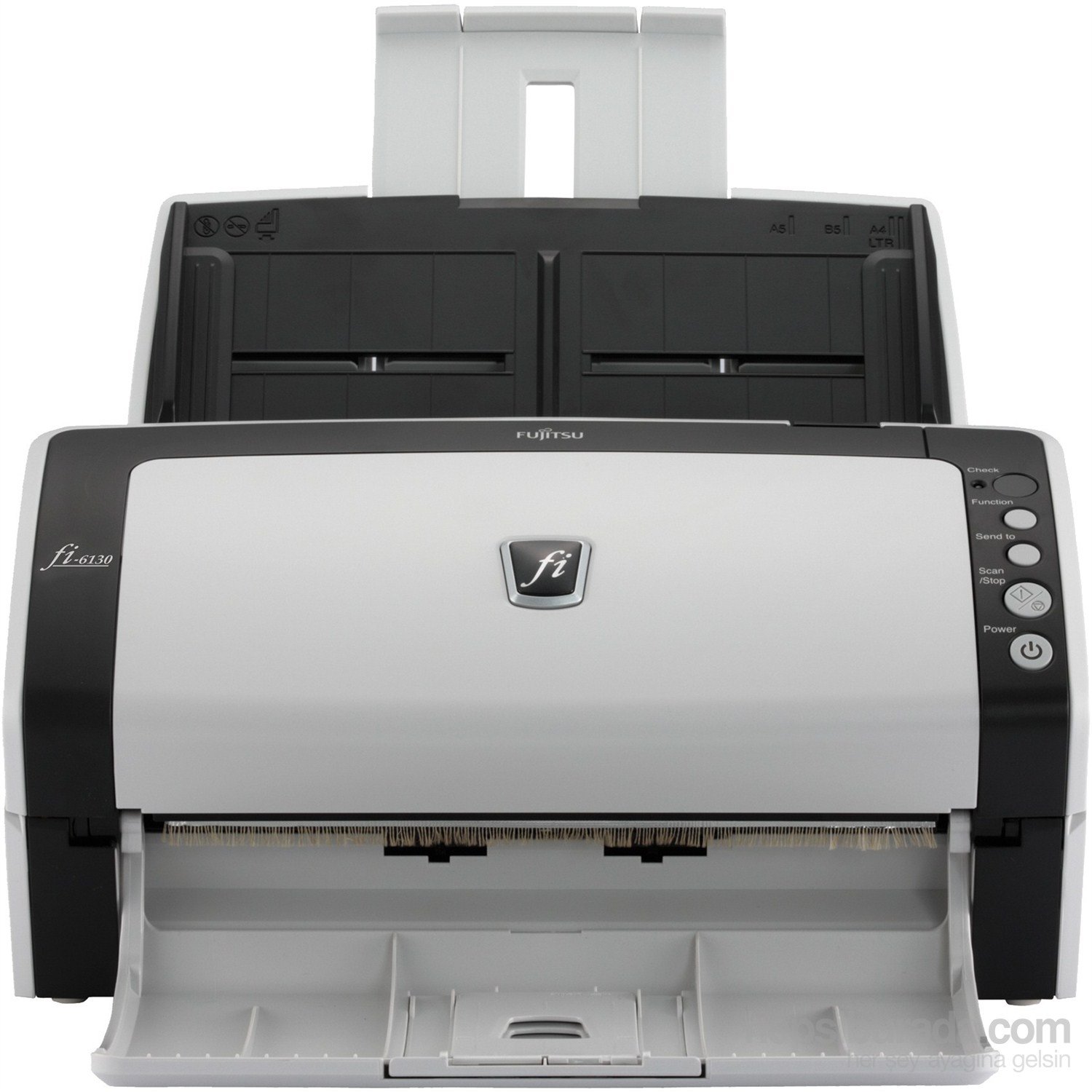
شکل 1: مخکی view of the Fujitsu fi-6130 document scanner, showing the automatic document feeder (ADF) input tray at the top, the control panel on the right, and the output tray at the bottom. The scanner is white and black.
مهمې برخې:
- د اتوماتیک سند فیډر (ADF): For loading multiple documents for continuous scanning.
- د تضمین اداره: Buttons for various functions including power, scan, and job selection.
- د محصول ټری: سکین شوي اسناد راټولوي.
- USB/Power Ports: Located at the rear for connectivity and power supply.
چمتو کول
- بسته بندي کول: Carefully remove the scanner and all accessories from the packaging. Ensure all components are present: scanner unit, AC adapter, USB cable, and software CD/DVD (if included).
- ځای په ځای کول: Place the scanner on a stable, flat surface with adequate space for document feeding and output. Ensure proper ventilation.
- بریښنا وصل کړئ: Connect the AC adapter to the scanner's power input and then plug it into a wall outlet.
- کمپیوټر سره وصل کړئ:
- د USB پیوستون: د USB کیبل یوه پای د سکینر USB پورټ سره او بله پای یې ستاسو په کمپیوټر کې موجود USB پورټ سره وصل کړئ.
- د وای فای اتصال: Refer to the separate network setup guide or the scanner's display (if applicable) for instructions on connecting to your wireless network.
- د سافټویر نصب کول: Insert the provided software CD/DVD into your computer's drive, or download the latest drivers and scanning software from the official Fujitsu support webسایټ. د نصبولو بشپړولو لپاره په سکرین کې لارښوونې تعقیب کړئ.
عملیاتي لارښوونې
- پاور آن: فشار ورکړئ ځواک button on the control panel to turn on the scanner. Wait for the scanner to initialize.
- د اسنادو بارول:
- Fan the stack of documents to separate pages and align edges.
- Place documents face-down in the Automatic Document Feeder (ADF) input tray. Adjust the side guides to fit the width of your documents.
- Ensure documents are within supported sizes (e.g., A4, A5, B5, Letter, Legal).
- Select Scan Settings: Open your scanning software on the computer. Select the desired scan profile, resolution, color mode (e.g., color, grayscale, black & white), and destination folder.
- سکینګ پیل کړئ:
- فشار ورکړئ سکین / ودرول button on the scanner's control panel, or initiate the scan from your computer software.
- The scanner will feed and scan the documents.
- Review او خوندي کړئ: د سکین کولو وروسته، بیاview the digitized images on your computer. Save them to your preferred location and format.
- د کنټرول پینل دندې:
- چک: Verifies scanner status or settings.
- دنده: Cycles through predefined scan jobs or settings.
- ته واستول: Directs scanned documents to a specific application or destination.
- سکین/بندول: Starts or stops the scanning process.
- ځواک: سکینر فعال یا بندوي.
ساتنه
Regular maintenance ensures consistent scan quality and extends the life of your scanner.
- د رولرونو پاکول:
- سکینر بند او خلاص کړئ.
- Open the scanner cover to access the feed rollers.
- Gently wipe the rollers with a lint-free cloth dampened with isopropyl alcohol or a specialized roller cleaner. Allow to dry completely before closing the cover.
- د شیشې پاکول:
- Locate the glass scanning surface inside the scanner.
- د نرم، لینټ پاک ټوکر څخه کار واخلئampened with glass cleaner (non-abrasive) to clean the glass. Avoid spraying cleaner directly onto the glass.
- بهرنۍ پاکوالی: Wipe the exterior of the scanner with a soft, dry cloth. Do not use abrasive cleaners or solvents.
- مصرفي توکي: Periodically check the condition of feed rollers and separation pads. Replace them as recommended by Fujitsu to maintain optimal performance. Refer to the Fujitsu support webد بدلې برخې معلوماتو لپاره سایټ.
د ستونزو حل کول
This section addresses common issues you might encounter with your Fujitsu FS-6160ZLA scanner.
- سکینر فعال نه دی:
- Ensure the power cable is securely connected to both the scanner and a working power outlet.
- ډاډ ترلاسه کړئ چې د بریښنا اډاپټر په سمه توګه کار کوي.
- Documents Jamming:
- Remove all jammed documents carefully, following the scanner's internal guides.
- Ensure documents are properly fanned and aligned in the ADF.
- Check for worn-out feed rollers or separation pads and replace if necessary.
- Avoid loading creased, stapled, or damaged documents.
- Poor Scan Quality (Streaks, Blurs, Dots):
- Clean the glass scanning surface and feed rollers as described in the Maintenance section.
- Adjust scan settings (e.g., resolution, brightness) in your scanning software.
- ډاډ ترلاسه کړئ چې اسناد پاک او له کثافاتو څخه پاک دي.
- سکینر د کمپیوټر لخوا ونه موندل شو:
- Verify the USB or Wi-Fi connection is secure and active.
- سکینر او کمپیوټر دواړه بیا پیل کړئ.
- Reinstall the scanner drivers and software.
- یو بل USB پورټ یا کیبل هڅه وکړئ.
مشخصات
| فیچر | تفصیل |
|---|---|
| برانډ | فوجیتسو |
| ماډل | FS-6160ZLA |
| د سکینر ډول | سند |
| د ارتباط ټیکنالوژي | وای فای |
| د نظری سینسر ټیکنالوژي | CIS |
| قرارداد | 200 dpi |
| د بیت ژورتیا | 24-بټ |
| وزن | 4.2 کیلو ګرامه |
| ابعاد (W x D x H) | 301 mm x 160 mm x 158 mm |
| د اسنادو اعظمي اندازه | A4 Vertical: 210 mm x 297 mm, Legal: 216 mm x 355.6 mm (8.5 in x 14 in) |
تضمین او ملاتړ
For detailed warranty information, technical support, or to purchase replacement parts and consumables, please visit the official Fujitsu website or contact your local Fujitsu service provider. Keep your purchase receipt as proof of purchase for warranty claims.
آنلاین سرچینې:


