1. پیژندنه
Thank you for choosing the WARSUN Y36 Rechargeable COB LED Work Light. This portable and versatile lighting solution is designed for various applications, from professional work environments to outdoor activities and emergency situations. Please read this manual carefully to ensure proper use, maintenance, and longevity of your device.

Image 1: WARSUN Y36 Rechargeable COB LED Work Light (Front and Back)
This image displays the compact, yellow and black design of the WARSUN Y36 work light, showing both its illuminated front panel and its versatile back panel featuring a magnetic base and a foldable hook.
2. د محصول ب Featuresې
- لوړ روښانتیا: Equipped with a COB LED, providing up to 1200 lumens of bright illumination.
- د روښنايي ډیری طریقې: Features three adjustable brightness levels (High, Medium, Low) to suit different needs.
- د چارج وړ بیټرۍ: Integrated 3600mAh Lithium-Ion battery for extended use.
- د بریښنا بانک فعالیت: Includes a USB output port (DC 5V) to charge other devices like smartphones.
- څو اړخیز نصب کول: Built-in super-strong magnetic base, foldable hanging hook, and a rotation bracket for hands-free operation.
- دوامدار ساختمان: Crafted from durable ABS material with rubberized corners for enhanced drop resistance (up to 4.9ft).
- کمپیکٹ او پورټ ایبل: Lightweight and small, making it easy to carry and store.
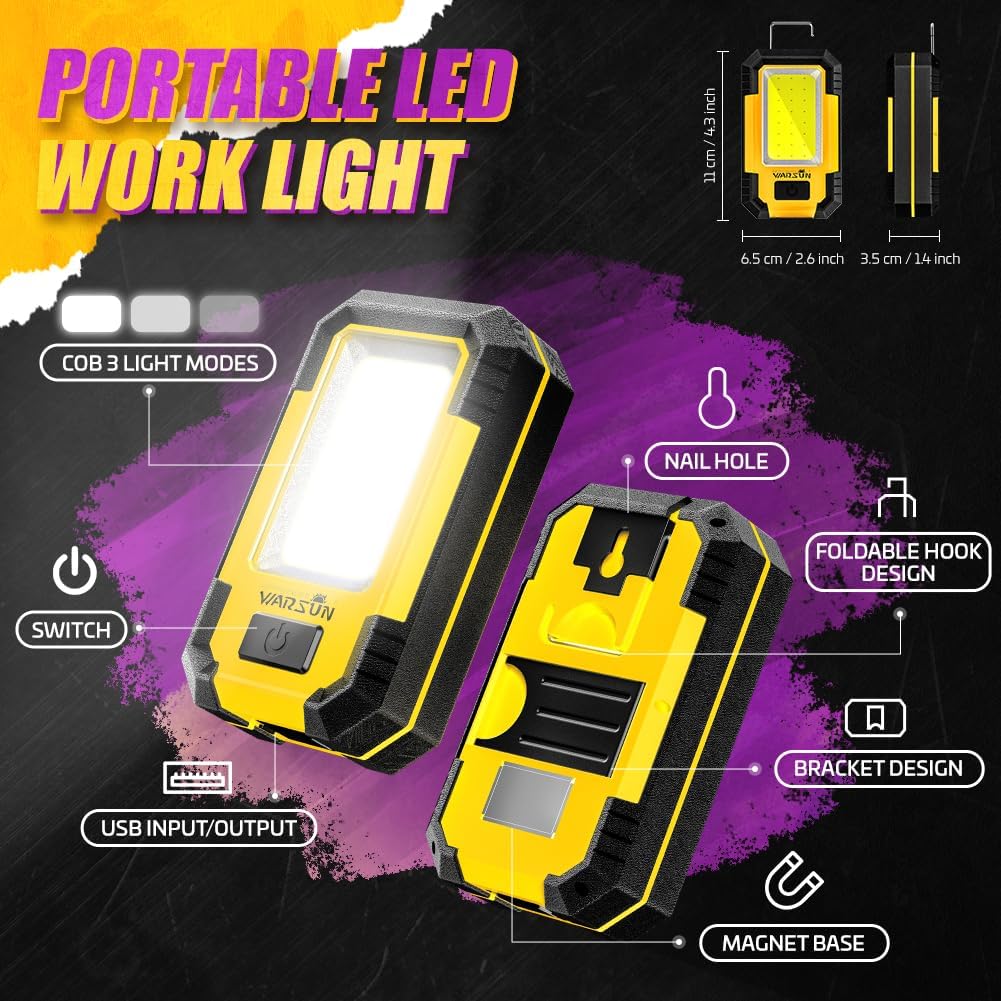
Image 2: Detailed Features Diagram
This diagram highlights the key components of the WARSUN Y36, including the COB light, power switch, USB input/output ports, foldable hook, bracket design, and magnetic base.
3. ترتیب کول
3.1 ابتدايي چارج کول
Before first use, fully charge the WARSUN Y36 work light. Connect the provided USB charging cable to the micro-USB input port (DC 5V) on the side of the device and plug the other end into a compatible USB power source (e.g., wall adapter, computer USB port). The charging indicator will illuminate during charging and change color or turn off when fully charged.
Note: To prolong battery life, avoid leaving the device plugged in indefinitely after it is fully charged.
4. عملیاتي لارښوونې
۵.۱ د بریښنا فعالول/بندول او د روښانتیا تنظیم کول
The WARSUN Y36 features a single power button for easy operation:
- د فعالولو لپاره: Press the power button once. The light will turn on in High brightness mode.
- د روښانتیا تنظیم کولو لپاره: While the light is on, press the power button repeatedly to cycle through the modes: High → Medium → Low.
- د بریښنا بندولو لپاره: After cycling through all brightness modes, pressing the button one more time will turn the light off. Alternatively, press and hold the power button for approximately 2-3 seconds to turn it off from any mode.

Image 3: Three Light Modes
This image illustrates the three distinct brightness levels (High, Medium, Low) available on the WARSUN Y36 work light.
۷. د چارج کولو او پاور بانک فعالیت
5.1 Charging the Work Light
To charge the internal 3600mAh battery, open the protective cover on the side of the device to reveal the micro-USB input port. Connect the provided USB cable to this port and a suitable power adapter. The charging indicator will show the charging status.
۶.۳ د پاور بانک په توګه کارول
The WARSUN Y36 can also function as a portable power bank. To charge external devices, open the protective cover on the side of the device and connect your device's USB cable to the standard USB output port (DC 5V). This feature is useful for charging smartphones or other small electronics in emergency situations.

Image 4: Charging and Power Bank Functionality
This image demonstrates the WARSUN Y36 being charged via its micro-USB input and simultaneously charging a smartphone via its USB output port, highlighting its dual functionality.
6. د نصبولو اختیارونه
The WARSUN Y36 offers multiple ways to position the light for hands-free operation:
- مقناطیسي اساس: The strong magnetic base allows the light to be securely attached to any metallic surface, such as car hoods, metal shelves, or toolboxes.
- ځوړند هک: A foldable hook is integrated into the design, enabling you to hang the light from tents, branches, or other suitable fixtures.
- Rotation Bracket/Stand: The adjustable bracket on the back can be extended to prop up the light on a flat surface, allowing you to angle the illumination as needed.
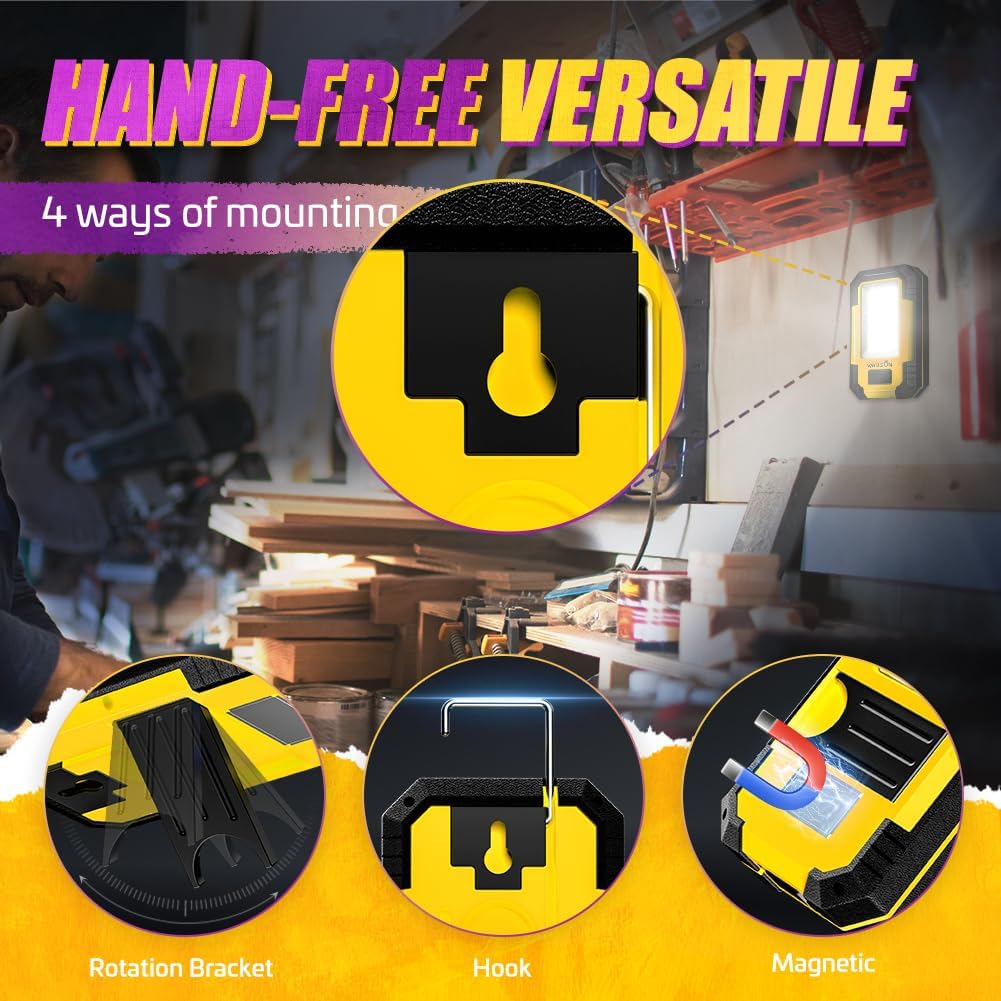
Image 5: Versatile Mounting Options
This image displays the WARSUN Y36 utilizing its rotation bracket, hanging hook, and magnetic base for flexible positioning in various work and outdoor scenarios.
۵. د رسنیو سرچینې
7.1 محصول پای ته ورسیدview ویډیو
Video 1: WARSUN Portable LED Rechargeable Work Light Overview
دا ویډیو یو جامع اوور وړاندې کويview of the WARSUN Y36 work light, demonstrating its features, brightness levels, and various applications.
7.2 WARSUN Y36 LED Work Light Demonstration
Video 2: WARSUN Y36 LED Work Light in Use
This video showcases the WARSUN Y36 LED work light in action, highlighting its illumination capabilities and practical use in different settings.
7.3 WARSUN Y36 LED Work Light Unboxing
Video 3: WARSUN Y36 LED Work Light Unboxing
This video provides an unboxing experience for the WARSUN Y36, showing the contents of the package and initial impressions of the product.
8. ساتنه
- پاکول: وسیله په نرمۍ سره مسح کړئ، دamp ټوکر د سختو کیمیاوي موادو یا خړوبولو پاکونکو څخه کار مه اخلئ.
- ذخیره کول: د کار څراغ په یخ او وچ ځای کې د مستقیم لمر وړانګو او سختې تودوخې څخه لرې وساتئ.
- د بیټرۍ پاملرنه: For optimal battery health, avoid fully discharging the battery frequently. If storing for long periods, charge the battery to about 50-70% every few months.
Image 6: WARSUN Y36 in a Workshop Setting
This image shows the WARSUN Y36 providing illumination in a workshop, demonstrating its practical application in a demanding environment.
9. ستونزه حل کول
- څراغ نه خلاصیږي: Ensure the battery is charged. If the battery is low, connect the device to a power source using the USB cable.
- څراغ نه چارج کیږي: Check the USB cable and power adapter for damage. Ensure the cable is securely connected to both the light and the power source. Try a different cable or adapter if necessary.
- Button unresponsive: If the power button feels stuck or unresponsive, gently try to free it. If the issue persists, contact customer support.
- کم شوی روښانتیا یا لنډ وخت: This may indicate a low battery charge or an aging battery. Fully charge the device. If the issue continues after a full charge, the battery may need replacement.
10. مشخصات
| فیچر | مشخصات |
|---|---|
| د ماډل شمیره | Y36 |
| د رڼا سرچینې ډول | COB LED |
| روښانتیا | 1200 Lumens |
| د بیټرۍ ظرفیت | 3600mAh (Lithium-Ion) |
| والیtage | 5 ولټه |
| د بریښنا سرچینه | د بیټرۍ چلول |
| مواد | اکریلونایتریل بوټاډین سټیرین (ABS) |
| د محصول ابعاد | ۷۱"لیتر x ۲۳.۶"واټه x ۲۴.۴"هوا |
| د توکي وزن | 8.5 اونس |
| د رنګ د حرارت درجه | 5000 کیلوین |
| د نصب کولو ډول | Tabletop Mount, Magnetic |
| ځانګړي ځانګړتیاوې | 3-way switching, USB input/output, Magnetic base, Hanging hook |
11. تضمین او ملاتړ
The WARSUN Y36 Rechargeable COB LED Work Light comes with a 1 کلن تضمین د پیرود نیټې څخه. دا تضمین د عادي استعمال لاندې د تولید نیمګړتیاوې او نیمګړتیاوې پوښي. مهرباني وکړئ د تضمین ادعاوو لپاره د پیرود ثبوت وساتئ.
For technical support, warranty inquiries, or any questions regarding your product, please contact WARSUN customer service through the retailer's platform or visit the official WARSUN webسایټ


