1. پیژندنه
Thank you for choosing the TechniSat VIOLA 2 Portable DAB/FM Radio. This compact and versatile radio allows you to enjoy high-quality digital DAB+ and traditional FM radio broadcasts wherever you are. This manual provides essential information for setting up, operating, and maintaining your device to ensure optimal performance and longevity.

Image 1.1: The TechniSat VIOLA 2 radio positioned on a wooden table in an outdoor setting, highlighting its portability.
2. د خوندیتوب معلومات
مهرباني وکړئ د وسیلې کارولو دمخه دا خوندیتوب لارښوونې په دقت سره ولولئ او د راتلونکي حوالې لپاره یې وساتئ.
- د بریښنا رسول: یوازې چمتو شوی بریښنا اډاپټر وکاروئ. ډاډ ترلاسه کړئ چې حجمtage ستاسو د سیمې اړتیاوې سره سمون لري.
- بیټرۍ: Use 4 x AA-LR6 batteries. Do not mix old and new batteries, or different types of batteries. Remove batteries if the device will not be used for an extended period.
- اوبه او رطوبت: وسیله د باران، رطوبت، یا څاڅکو/څاڅکو مایعاتو سره مه مخ کوئ. په وسیله کې هغه شیان مه ځای پر ځای کوئ چې د مایعاتو څخه ډک وي، لکه ګلدانونه.
- تودوخه: وسیله د تودوخې سرچینو لکه ریډیټرونو، د تودوخې راجسترونو، بخاریو، یا نورو وسایلو څخه لرې وساتئ (په شمول د ampلایفیر) چې تودوخه تولیدوي.
- وینټیلیشن: د هوا مناسبه هوا ورکول ډاډمن کړئ. د هوا د بهېدو هیڅ لاره مه بندوئ.
- پاکول: Disconnect the power before cleaning. Use a soft, dry cloth. Do not use liquid cleaners or aerosol cleaners.
- خدمت کول: د دې محصول پخپله خدمت کولو هڅه مه کوئ. ټول خدمتونه وړ خدماتي پرسونل ته راجع کړئ.
3. د بسته محتويات
بکس په احتیاط سره خلاص کړئ او ډاډ ترلاسه کړئ چې ټول توکي شتون لري او په ښه حالت کې دي:
- TechniSat VIOLA 2 Portable DAB/FM Radio
- د بریښنا اډاپټر (6V DC)
- د کارونکي لارښود (دا لاسوند)
Note: 4 x AA-LR6 batteries are required for portable use and are not included in the package.
4. محصول ختم شوview
Familiarize yourself with the various parts and controls of your VIOLA 2 radio.

انځور 4.1: مخکی view of the TechniSat VIOLA 2, displaying the speaker grille, LCD screen, and control buttons.
4.1 د مخکني پینل کنټرولونه
- سپیکر: د آډیو آوټ پټ لپاره مدغم سپیکر.
- د LCD نندارې: Two-line display showing station information, time, and menu options.
- آن/بند تڼۍ: وسیله چالان یا بندوي.
- Volume/Enter Knob: Rotate to adjust volume, press to confirm selections.
- Tune +/- Buttons: Used for manual tuning or navigating menus.
- د DAB/FM تڼۍ: د DAB+ او FM راډیو حالتونو ترمنځ بدلیږي.
- معلومات/مینو تڼۍ: Displays additional information or accesses the menu settings.

انځور ۸: یو مفصل view of the control buttons and rotary knob on the TechniSat VIOLA 2, illustrating its simple operation.
4.2 د شا پینل پیوستون

Image 4.3: The rear panel of the radio, showing the headphone output and the DC 6V power input.
- د هیډفون جیک (3.5mm): د شخصي اوریدلو لپاره.
- DC 6V داخلول: دلته ورکړل شوی بریښنا اډاپټر وصل کړئ.
- د بیټرۍ کڅوړه: Located on the rear, for 4 x AA batteries.
- دوربین انتن: د غوره راډیو استقبال لپاره غځول.
5. ترتیب کول
5.1 وسیلې ته ځواک ورکول
The VIOLA 2 can be powered by the included mains adapter or by batteries for portable use.
5.1.1 اصلي ځواک
- Insert the small plug of the power adapter into the DC 6V input on the rear of the radio.
- د بریښنا اډاپټر په معیاري دیوال کې ولګوئ.
5.1.2 د بیټرۍ ځواک
- د راډیو په شا کې د بیټرۍ د کمپارټمینټ پوښ خلاص کړئ.
- Insert 4 x AA-LR6 batteries, ensuring correct polarity (+/-).
- د بیټرۍ کمپارټ پوښ په خوندي ډول وتړئ.
۵.۲ د انتن تنظیم کول
For optimal reception, fully extend the telescopic antenna. Adjust its position and angle to achieve the best signal quality, especially in FM mode or areas with weaker DAB+ signals.
6. عملیاتي لارښوونې
6.1 آن/بندول
فشار ورکړئ آن/بند د راډیو د فعالولو یا بندولو لپاره تڼۍ.
۴.۲ د حالت انتخاب (DAB/FM)
فشار ورکړئ DAB / FM button to switch between DAB+ digital radio mode and FM analog radio mode.
۶.۱ د سټیشنونو لپاره سکین کول
6.3.1 DAB+ Auto Scan
When you first turn on the radio in DAB+ mode, it will automatically perform a full scan for available stations. If you move to a new location or wish to refresh the station list:
- Ensure the radio is in DAB+ mode.
- فشار ورکړئ او ونیسئ معلومات/مینو مینو ته د ننوتلو لپاره تڼۍ.
- وګرځوئ Volume/Enter knob to select "Full Scan" and press the knob to confirm.
- The radio will scan and update the station list.
6.3.2 FM Auto Scan
په FM حالت کې:
- Ensure the radio is in FM mode.
- فشار ورکړئ او ونیسئ ټون +/- buttons. The radio will scan for the next available station.
6.4 د حجم کنټرول
وګرځوئ Volume/Enter د اوریدلو حجم تنظیمولو لپاره غوټۍ.
۶.۳ د هیډفون کارول
Connect standard 3.5mm headphones to the headphone jack on the rear of the radio for private listening. The internal speaker will automatically mute when headphones are connected.
6.6 د معلوماتو ښودل

Image 6.1: A close-up of the radio's two-line LCD display, showing current station and program information.
The two-line LCD display provides various information depending on the mode:
- DAB+ Mode: Station name, program type, scrolling text (DLS), signal strength, time, date.
- د FM حالت: Frequency, station name (if RDS available), program type (if RDS available), time, date.
فشار ورکړئ معلومات/مینو button repeatedly to cycle through available display information.
7. ساتنه
7.1 پاکول
Wipe the radio with a soft, dry, lint-free cloth. Do not use abrasive cleaners, waxes, or solvents as they may damage the finish.
7.2 د بیټرۍ بدلول
When the battery indicator on the display shows low power, replace all four AA batteries with new ones. Ensure the radio is turned off or connected to mains power before replacing batteries.
8. ستونزه حل کول
| ستونزه | احتمالي لامل | د حل لاره |
|---|---|---|
| هیڅ ځواک نشته | د بریښنا اډاپټر نه دی وصل شوی؛ بیټرۍ خالي شوي یا په غلط ډول داخل شوي. | د بریښنا اډاپټر اتصال وګورئ؛ بیټرۍ بدل کړئ یا سم قطبي والی ډاډمن کړئ. |
| غږ نشته | Volume too low; Headphones connected; Mute activated. | Increase volume; Disconnect headphones; Check for mute function (if applicable). |
| Poor reception (DAB+/FM) | Antenna not extended or poorly positioned; Weak signal area. | Fully extend and adjust the telescopic antenna; Try moving the radio to a different location. Perform a full scan in DAB+ mode. |
| DAB+ stations missing | Not all stations scanned; Moved to a new area. | Perform a full scan (see Section 6.3.1). |
| ښودنه کار نه کوي | Device off; Faulty unit. | Ensure device is on; If problem persists, contact customer support. |
9. مشخصات
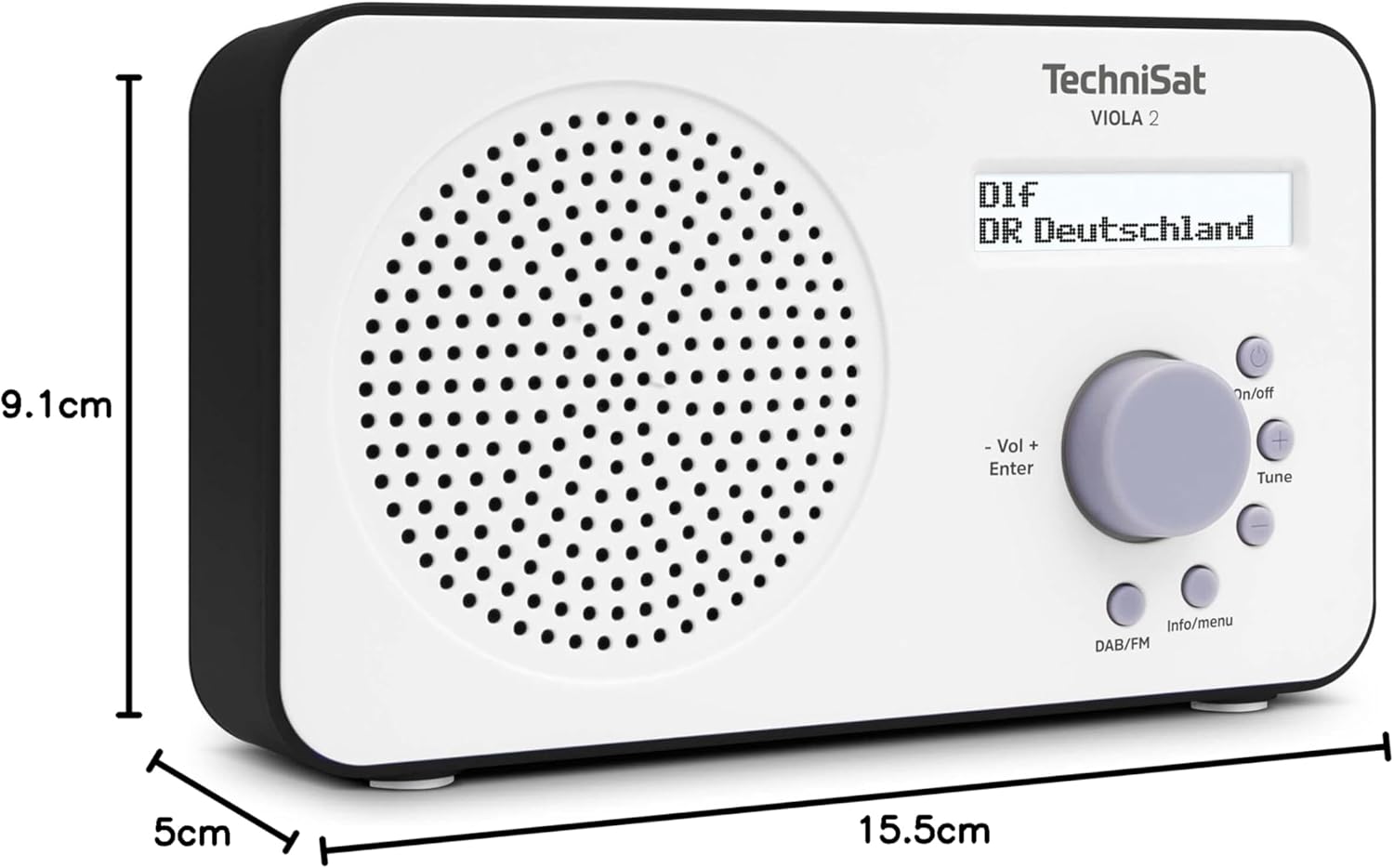
Image 9.1: The TechniSat VIOLA 2 radio with its physical dimensions indicated.
- ماډل: VIOLA 2
- جوړونکی: TechniSat
- د ماډل شمیره: ۹/۹۷
- د محصول ابعاد (W x D x H): 15.5 x 5 x 9.1 سانتي متره
- وزن: 338 ګرامه
- ملاتړ شوي راډیوګانې: DAB+, FM (with RDS and PLL)
- د تونر ټیکنالوژي: DAB / FM
- د سپیکر محصول: 1 واټ RMS
- ښکاره کول: Two-line LCD with backlight
- ارتباط: 3.5mm Headphone Jack (AUX)
- د بریښنا سرچینه: Corded Electric (6V DC adapter) and Battery Powered
- بیټرۍ: 4 x AA-LR6 (not included)
- ځانګړي ځانګړتیاوې: Automatic station search, electronic volume control
- د اصلي هیواد: چین
10. تضمین او ملاتړ
TechniSat products are designed for reliability and performance. For warranty information, please refer to the warranty card included with your purchase or visit the official TechniSat website. If you encounter any issues not covered in this manual, please contact TechniSat customer support for assistance.
You can find contact details and further support resources on the official TechniSat webسایټ: www.technisat.com


