1. پیژندنه
Thank you for choosing the AVANTEK CW-11 Wireless Doorbell. This manual provides essential information for the proper installation, operation, and maintenance of your new doorbell system. Please read these instructions carefully before use and retain them for future reference.

Image 1.1: AVANTEK CW-11 Wireless Doorbell system, showing the compact transmitter and receiver units.
2. د خوندیتوب معلومات
- وسیله د خورا تودوخې یا مستقیم لمر وړانګو ته مه ښکاره کوئ.
- Keep the device away from water and high humidity. The transmitter is IP55 waterproof, but the receiver is for indoor use only.
- هڅه مه کوئ چې وسیله پخپله جلا کړئ یا ترمیم کړئ. د مرستې لپاره د پیرودونکي ملاتړ سره اړیکه ونیسئ.
- بیټرۍ د ماشومانو له لاسرسي لرې وساتئ. کارول شوي بیټرۍ په سمه توګه له منځه یوسئ.
3. د بسته محتويات
- 1 x Wireless Transmitter (Doorbell Button)
- 1 x Plug-in Receiver (Chime Unit)
- ۱ x CR2 بیټرۍ (په ټرانسمیټر کې مخکې له مخکې نصب شوې)
- 2 x پیچ
- 2 x لنگرونه
- 1 x دوه اړخیز چپکونکی ټیپ
- 1 x سکرو ډرایور
4. محصول ختم شوview
The AVANTEK CW-11 Wireless Doorbell system consists of a battery-powered transmitter (doorbell button) and a plug-in receiver (chime unit). The receiver features 52 selectable melodies, 5 adjustable volume levels, and an LED indicator for visual alerts.

Image 4.1: The receiver unit, illustrating its features including 52 chimes, 5 volume levels, and an LED indicator.
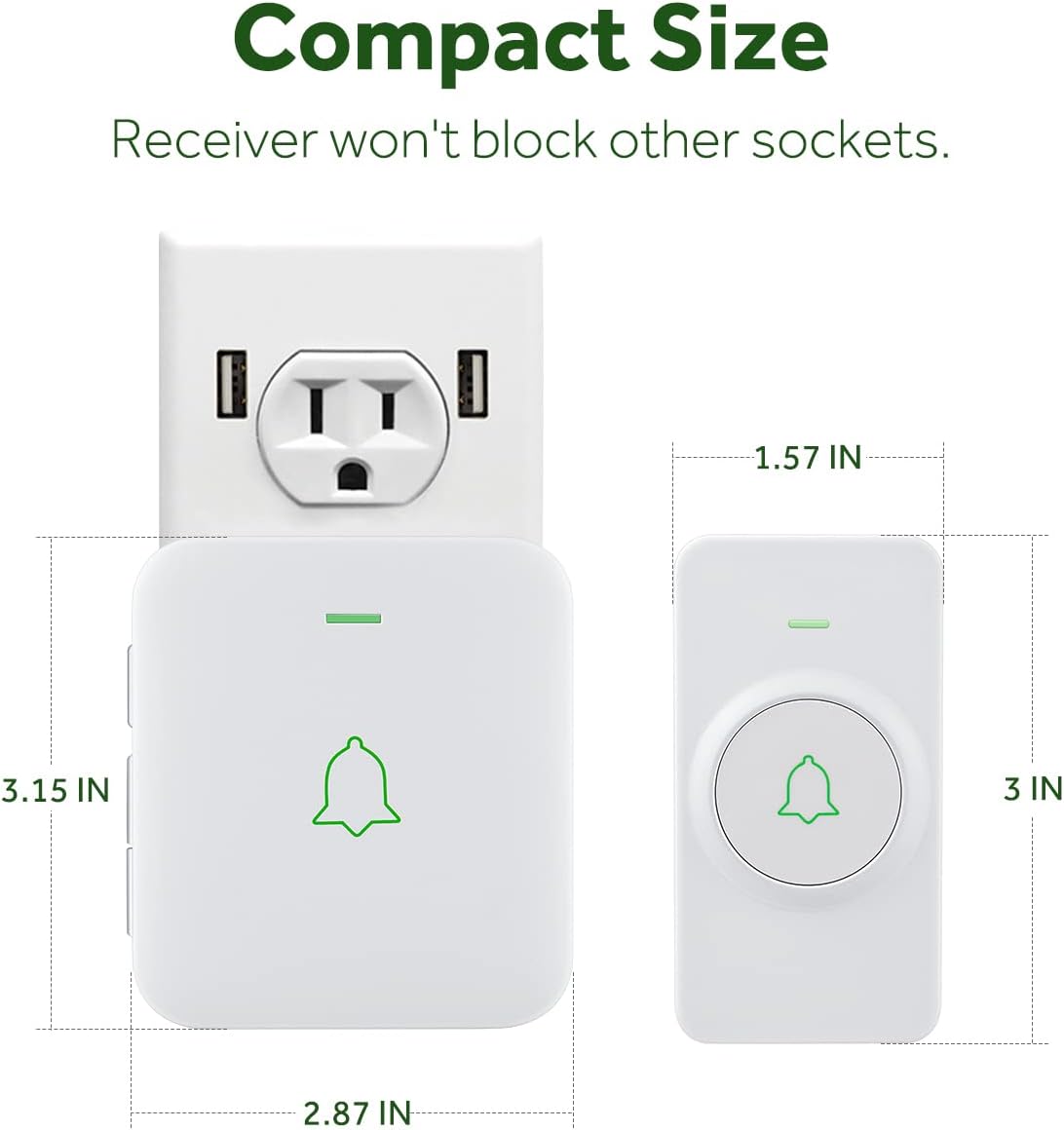
Image 4.2: The compact size of both the transmitter and receiver, designed to not obstruct adjacent power sockets.
۴. د تنظیم لارښوونې
5.1 Installing the Transmitter
The transmitter can be installed using either the provided double-sided adhesive tape or screws and anchor plugs.

Image 5.1: Visual guide for installing the transmitter using either adhesive tape or screws and anchor plugs.
Method A: Using Double-Sided Adhesive Tape
- د نصب کولو مطلوب سطح په بشپړه توګه پاک کړئ ترڅو ډاډ ترلاسه شي چې دا د دوړو او رطوبت څخه پاک دی.
- Peel off one side of the protective film from the double-sided adhesive tape and attach it to the back of the transmitter.
- Peel off the other side of the protective film and firmly press the transmitter onto the cleaned surface for at least 30 seconds.
Method B: Using Screws and Anchor Plugs
- Mark the desired mounting points for the transmitter on the wall.
- په نښه شویو ځایونو کې دوه سوري وکړئ.
- Insert the anchor plugs into the drilled holes.
- Align the transmitter's mounting holes with the anchor plugs and secure it with the provided screws.
مهم: To prevent signal interference, do not install the transmitter close to or on metal surfaces such as metal door frames or mailboxes.
5.2 Plugging in the Receiver
Plug the receiver into a standard electrical outlet in a location where the chime can be easily heard. The LED on the receiver will flash upon initial power-up.
5.3 Pairing the Doorbell System
The transmitter and receiver are pre-paired at the factory. If re-pairing is needed or if you add additional transmitters/receivers, follow these steps:
- ریسیور په بریښنا ساکټ کې ولګوه.
- To enter pairing mode, hold down the Volume button on the receiver for 3 seconds. The LED on the receiver will flash.
- Remove the battery insulating film from the transmitter (if not already done).
- Press the Push button on the transmitter. Its LED will flash.
- After successful pairing, the receiver will chime once, and the LEDs on both the receiver and transmitter will flash simultaneously.
Video 5.2: Official AVANTEK video demonstrating how to install the wireless doorbell transmitter.
Video 5.3: Official AVANTEK video demonstrating how to pair the wireless doorbell system.
6. عملیاتي لارښوونې
۵.۱ د موسيقۍ بدلول
The receiver offers 52 different melodies. Use the 'Next' and 'Previous' buttons on the side of the receiver to cycle through the available tunes. Press the doorbell button to preview the selected melody.

Image 6.1: The receiver offers a wide selection of melodies for personalization.
۶.۲ د حجم تنظیم کول
There are 5 adjustable volume levels, with a maximum setting of 115 dB. Use the 'Volume' button on the side of the receiver to increase or decrease the sound level.
6.3 د خاموش حالت
To activate mute mode (0 dB), repeatedly press the 'Volume' button until the sound is off. In this mode, only the LED indicator will flash when the doorbell is pressed, providing a silent visual alert.

Image 6.2: The mute mode feature allows for silent notifications, ideal for quiet environments.
7. ساتنه
7.1 پاکول
وسایل په نرم، وچ ټوکر سره پاک کړئ. د کثافاتو پاکوونکي یا محلولونه مه کاروئ.
7.2 Battery Replacement (Transmitter)
The transmitter uses a CR2 battery with an estimated lifespan of 3 years. When the battery is low, the transmitter's LED may not light up or the signal range may decrease. To replace the battery:
- په احتیاط سره ټرانسمیټر خلاص کړئ casing د چمتو شوي سکریو ډرایور یا کوچني فلیټ سر سکریو ډرایور په کارولو سره.
- زوړ CR2 بیټرۍ لرې کړئ.
- یو نوی CR2 بیټرۍ دننه کړئ، د سم قطبیت ډاډ ترلاسه کول (+/-).
- ج بند کړئasing په خوندي ډول.
8. ستونزه حل کول
- د دروازې زنګ نه غږېږي: Ensure the receiver is plugged in and powered. Check the transmitter battery. Re-pair the devices if necessary (refer to Section 5.3).
- Short signal range: Ensure the transmitter is not installed on or near metal surfaces. Relocate the receiver to a more central position. Replace the transmitter battery.
- لاسوهنه: The doorbell operates on a frequency that minimizes interference with other household devices. If interference occurs, try changing the melody or relocating the receiver.
- د حافظې دنده: The device remembers your last melody and volume level after a power outage, so no need to reset settings.
9. مشخصات
| فیچر | مشخصات |
|---|---|
| د ماډل شمیره | CW-11 |
| د بیسیم رینج | تر 1000 فوټو پورې (300 متره) |
| خټکی | 52 |
| د حجم کچه | 5 (up to 115 dB) |
| د لیږدونکي بیټرۍ | 1 x CR2 (پکې شامل دی) |
| د لیږدونکي بیټرۍ ژوند | نږدې ۷ کاله |
| د پنروک درجه | IP55 (لیږدونکی) |
| د عملیاتي حرارت درجه | -4 °F څخه تر 140 °F (-20 °C څخه تر 60 °C) |
| د بریښنا سرچینه | AC او بیټرۍ |
| د محصول ابعاد | Receiver: 2.8 x 0.6 x 3.1 inches; Transmitter: 3.15 x 1.57 x 0.79 inches (approx.) |
10. تضمین او ملاتړ
For warranty information or technical support, please refer to the contact details provided with your product packaging or visit the official AVANTEK webسایټ. د پیرود ثبوت په توګه د پیرود رسید وساتئ.


