محصول پای ته ورسیدview
The SteelSeries Arctis 3 headset redefines gaming audio with its innovative design, delivering superior sound, comfort, and style across all major gaming platforms. It features a completely overhauled audio system and a new microphone design for unmatched clarity.
کلیدي ځانګړتیاوې
- Optimal PS5 compatibility: Requires user to change settings on Sony PS5 – disable Sony 3D Audio and then increase default volume to 100%.
- All-Platform Design: Designed for everywhere you game, with superior sound, comfort and style on all gaming platforms, including PC, PlayStation, Xbox One, Nintendo Switch via detachable 3.5 millimeter cables.
- ClearCast Microphone: Widely recognized as the best mic in gaming, the Discord certified ClearCast microphone delivers studio quality voice clarity and background noise cancellation.
- غوره غږ: Sound is your competitive advantage with the S1 speaker drivers, engineered to produce ultra-low distortion audio so you hear every detail.
- د ټولې ورځې آرامۍ: Play all day with athletics inspired performance fabric AirWeave ear cushions that keep your ears cool and dry.
- Spatial Audio Ready: Windows Sonic Spatial Audio fully compatible with native surround sound built into Windows 10 PCs and Xbox One consoles; Headphone sensitivity: 98 dB.
په بکس کې څه دي
- هیډسیټ
- د کارن لارښود

The SteelSeries Arctis 3 headset and its included accessories, ready for setup.
چمتو کول
ستاسو د هیډسیټ سره نښلول
The Arctis 3 headset connects via detachable 3.5mm cables, ensuring broad compatibility across various gaming platforms.
د کمپیوټر پیوستون
For PC, use the included splitter extension cable to connect the headset's 3.5mm jack to separate microphone and headphone ports on your computer.
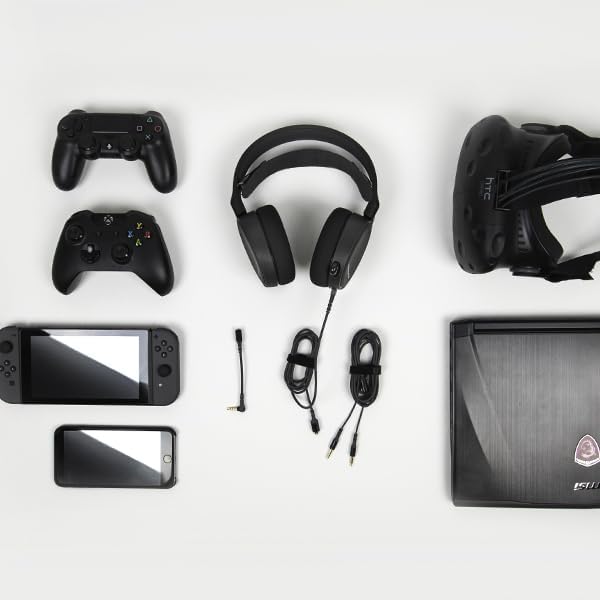
The SteelSeries Arctis 3 headset shown with various compatible devices and connection cables, highlighting its multi-platform design.
Console Connection (PlayStation, Xbox One, Nintendo Switch)
For consoles, connect the headset directly to your controller's 3.5mm audio jack.
Important PS5 Compatibility Note: To ensure optimal PS5 compatibility, disable Sony 3D Audio in your PS5 settings and increase the default volume to 100%.
Official SteelSeries video demonstrating the features and compatibility of the Arctis 3 Black Gaming Headset.
ستاسو د سرسیټ چلول
د مایکروفون کارول
The Discord-certified ClearCast microphone is retractable and delivers studio-quality voice clarity with background noise cancellation.
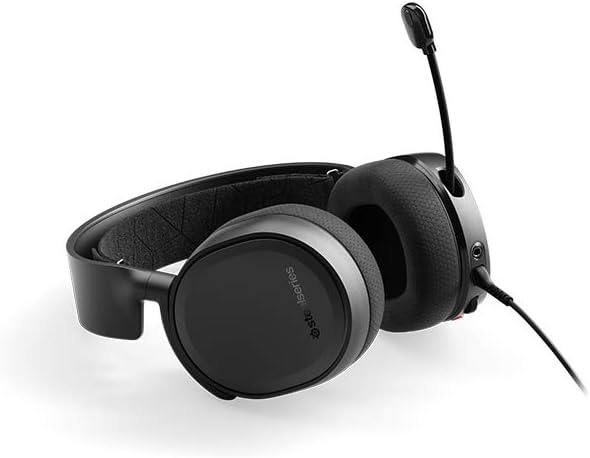
The SteelSeries Arctis 3 headset with its ClearCast microphone extended, ready for voice communication.
To extend the microphone, gently pull it out from the left earcup. To retract, push it back into the earcup until it is flush.
On-Headset Controls
The left earcup features convenient controls for volume adjustment and microphone muting.
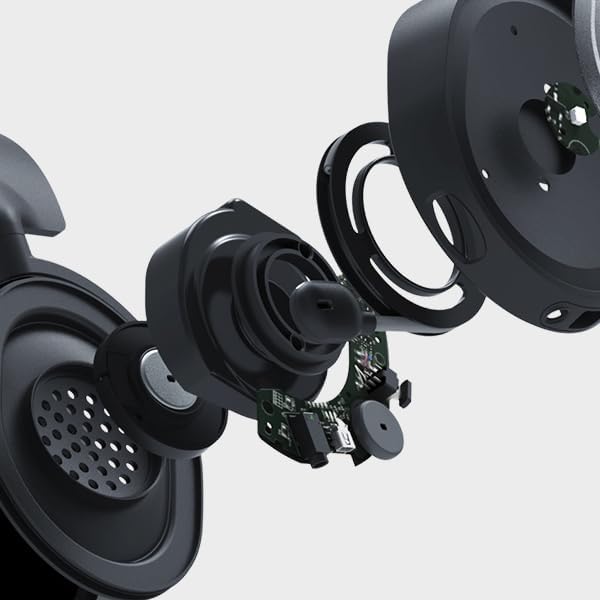
تړل view of the volume scroll wheel and microphone mute button located on the left earcup of the Arctis 3 headset.
- حجم ویل: Scroll up or down to adjust the audio volume.
- د مایکروفون خاموش تڼۍ: Press to mute or unmute your microphone.
ساتنه
To ensure the longevity and optimal performance of your SteelSeries Arctis 3 headset, follow these maintenance guidelines:
- پاکول: Use a soft, dry cloth to wipe down the earcups and headband. Avoid abrasive cleaners or solvents.
- ذخیره کول: هیډسیټ په یخ او وچ ځای کې د مستقیم لمر وړانګو او سختو تودوخې څخه لرې وساتئ. کله چې په کارولو کې نه وي، مایکروفون بیرته راوباسئ ترڅو یې خوندي کړئ.
- د کیبل پاملرنه: Handle cables gently. Avoid sharp bends or excessive pulling to prevent damage.
- Earcup Maintenance: The AirWeave ear cushions are designed for comfort and breathability. Periodically check them for wear and tear.
د ستونزو حل کول
If you encounter issues with your SteelSeries Arctis 3 headset, refer to the following common troubleshooting steps:
- غږ نشته/ټيټ غږ:
- Ensure the 3.5mm cable is securely connected to both the headset and your device.
- په هیډسیټ کې د حجم څرخ او د خپل وسیلې د آډیو ترتیبات وګورئ.
- Verify that the microphone mute button is not engaged.
- For PS5 users, confirm Sony 3D Audio is disabled and volume is at 100% as per setup instructions.
- مایکروفون کار نه کوي:
- ډاډ ترلاسه کړئ چې مایکروفون په بشپړه توګه غځول شوی دی.
- Check that the microphone mute button is not engaged.
- Verify microphone input settings on your PC or console.
- If using the PC splitter cable, ensure both jacks are correctly inserted into the microphone and headphone ports.
- د غږ تحریف:
- په هیډسیټ او خپل وسیله دواړو کې حجم ټیټ کړئ.
- د وسیلې پورې اړوند ستونزې د له منځه وړلو لپاره د بل وسیلې سره هیډسیټ ازموینه وکړئ.
مشخصات
| فیچر | تفصیل |
|---|---|
| هیډفون جیک | Mini-phone |
| د ماډل نوم | آرکیټس |
| د ارتباط ټیکنالوژي | تارونه |
| شاملې برخې | User Manual, Headset |
| د محصول لپاره ځانګړي کارول | لوبې کول |
| موضوع | ویډیو لوبه |
| د کنټرول ډول | د شور کنټرول |
| د کیبل ځانګړتیا | د جلا کولو وړ |
| د توکي وزن | 10.4 اونس |
| د پیرودونکي د بستې ډول | معیاري بسته بندي |
| د واحد شمیره | 1.0 شمېره |
| سټایل | آرکټیس ۹ |
| د توکو شمیر | 1 |
| UPC | 813682025212 |
| د نړیوال سوداګریز پیژندنې شمیره | 00813682025212 |
| جوړونکی | SteelSeries APS |
| د محصول ابعاد | 7.93 x 7.08 x 3.58 انچه |
| ASIN | B07G12Z1HR |
| د توکي ماډل نمبر | 61503 |
| بیټرۍ | 1 لیتیم پولیمر بیټرۍ ته اړتیا ده. |
| پیرودونکي بیاviews | 4.2 له 5 ستورو څخه (12,688 درجه بندي) |
| د غوره پلورونکو درجه | #23,643 in Video Games, #856 in PC Game Headsets |
| د تولید کونکي لخوا بند شوی | نه |
| نیټه لومړی شتون لري | د اګست ۷، ۲۰۲۴ |
| برانډ | د فولادو لړۍ |
| رنګ | تور |
| د فارم فکتور | په غوږ کې |
| خنډ | 32 اوم |
| د تعدد ځواب | 22000 Hz |
تضمین او ملاتړ
The SteelSeries Arctis 3 headset comes with a manufacturer's warranty. For detailed warranty information and support, please refer to the official SteelSeries website or the user manual.
You can download the full User Manual in PDF format: د کارن لارښود (PDF)
For further assistance, visit the official SteelSeries store page: SteelSeries Store