پیژندنه
د پیرودلو لپاره مننهasing the VTech VT1091 Cordless Phone. This manual provides essential information for setting up, operating, and maintaining your new phone. Please read these instructions carefully to ensure proper use and to fully benefit from its features.
د بسته محتويات
مخکې له دې چې تاسو پیل کړئ، ډاډ ترلاسه کړئ چې ټول توکي ستاسو په کڅوړه کې شتون لري:
- بې تاره دستګاه
- د بنسټ واحد
- د بیس یونټ لپاره د بریښنا اډاپټر
- د ټیلیفون کرښه
- د چارج وړ بیټرۍ (مخکې نصب شوي یا جلا)
- د کارونکي لارښود (دا لاسوند)
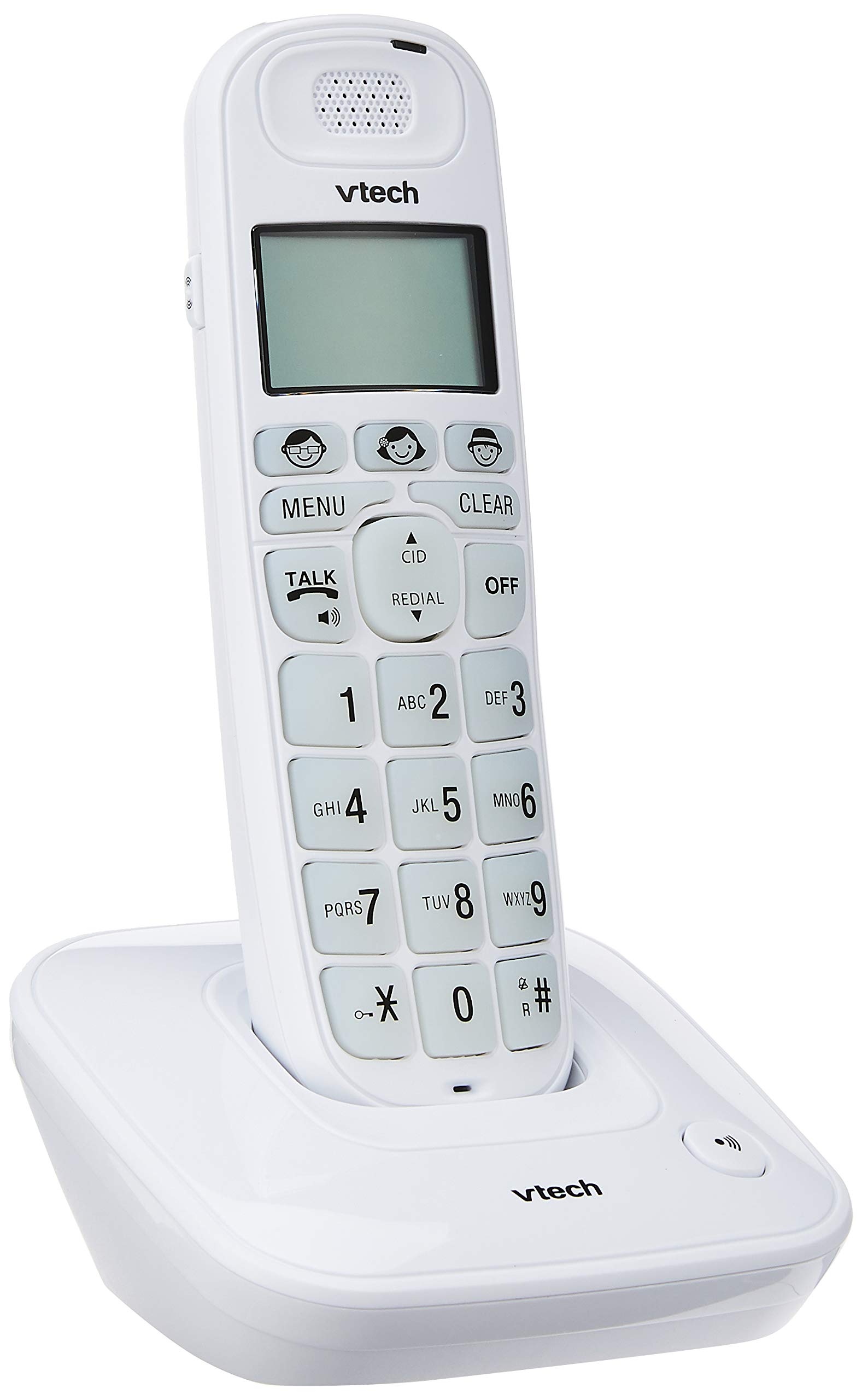
Image: The VTech VT1091 cordless phone handset resting in its base unit, showing the front view of the keypad and screen.
چمتو کول
1. د بیټرۍ نصب کول
- د هینډسیټ په شا کې د بیټرۍ د برخې پوښ ومومئ.
- د خلاصولو لپاره پوښ ښکته خوا ته وغورځوئ.
- چمتو شوي د چارج وړ بیټرۍ دننه کړئ، د سم قطبي حالت (+ او -) مشاهده کړئ.
- د بیټرۍ کمپارټ پوښ بدل کړئ.
۱.۳. د اساس واحد سره نښلول
- د ټیلیفون لاین تار یوه پای د بیس یونټ په شا کې د ټیل لاین جیک سره وصل کړئ.
- د ټیلیفون د لاین بل پای د خپل ټیلیفون دیوال جیک سره وصل کړئ.
- Connect the small end of the power adapter to the DC IN jack on the back of the base unit.
- د بریښنا اډاپټر لویه پای په معیاري بریښنایی آوټ لیټ کې ولګوئ.

انځور: شاته view of the VTech VT1091 base unit, showing the ports for the telephone line cord and the power adapter.
3. د دستګاه چارج کول
Place the handset on the base unit with the display facing forward. The handset will begin charging. For optimal battery performance, allow the handset to charge for at least 16 hours before initial use.

انځور: اړخ view of the VTech VT1091 cordless phone handset securely placed in its charging base.
کلیدي ځانګړتیاوې
- Ampتړل: Amplification of incoming sounds by up to 30 decibels.
- Ultra-low Radiation Mode: Operates with reduced radiation levels.
- BOOSTER Button: One-touch button for easy sound ampتړل
- لوی کیپډ: Big buttons with backlit keypad for improved visibility.
- د بیکلیټ LCD ښودنه: Large display with orange backlight.
- د سپیکر تلیفون: د لاسونو څخه پاکې اړیکې لپاره.
- Page/Handset Locator: Helps locate a misplaced handset.
- Auto Answer/Keypad Lock: Convenient call handling and security features.
- Alarm/Secrecy: Includes alarm function and call secrecy feature.
- GAP Compliant: Compatible with other GAP-enabled DECT devices.
- د تلیفون کتاب لارښود: 20 name and number entries.
- د زنګ وهونکي پیژندنه: Displays the last 10 caller numbers.
- سرخیل: Stores the last 5 numbers dialed.
- د رنګر سندرې: 10 selectable ringer melodies (5 polyphonic and 5 standard).
- د بیټرۍ ژوند: Approximately 10 hours talk time / 100 hours standby time.
- Memory Buttons: 3 one-touch memory buttons.
- سرعت ډایل: 8 number (2-9) speed dial memories.
- د اوریدلو مرستې سره مطابقت لري: د اوریدلو وسایلو سره د کارولو لپاره ډیزاین شوی.
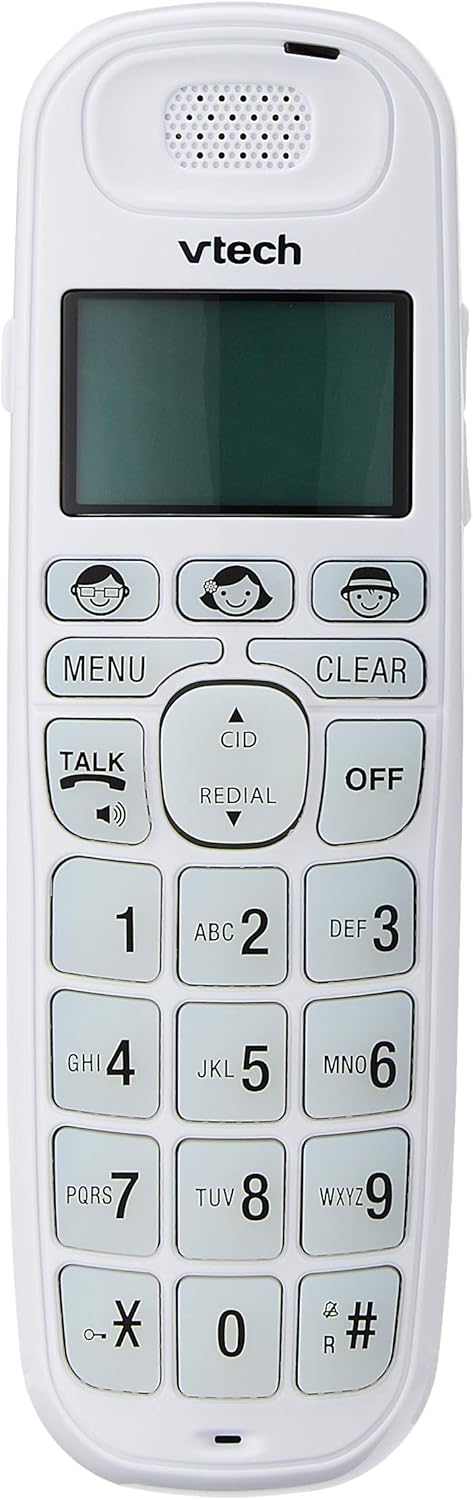
Image: Close-up of the VTech VT1091 handset, highlighting the large backlit keypad, LCD display, and dedicated function buttons.
عملیاتي لارښوونې
زنګ وهل
- فشار ورکړئ خبرې button to get a dial tone.
- مطلوب تلیفون شمیره ډایل کړئ.
- د تلیفون پای ته رسولو لپاره، کلیک وکړئ بند تڼۍ فشار ورکړئ یا هینډسیټ بیرته په بیس واحد کې ځای په ځای کړئ.
یو زنګ ته ځواب ورکول
کله چې تلیفون زنګ ووهي، فشار ورکړئ خبرې د زنګ ځواب لپاره تڼۍ.
د سپیکرفون کارول
د زنګ وهلو پرمهال خبرې button again (with the speaker icon) to activate the speakerphone function. Press it again to switch back to the earpiece.
د حجم تنظیم کول
د زنګ وهلو په جریان کې، دا وکاروئ UP او ښکته arrow buttons on the side of the handset to adjust the earpiece or speakerphone volume.
د تلیفون کتاب لارښود
- فشار ورکړئ مینو تڼۍ
- Navigate to "Phonebook" using the arrow buttons and press مینو غوره کول.
- د ننوتلو د اضافه کولو، سمولو یا حذف کولو لپاره په سکرین کې موجود لارښوونې تعقیب کړئ.
د ریډیل فعالیت
فشار ورکړئ سرخیل تڼۍ ته view a list of the last 5 dialed numbers. Use the arrow buttons to select a number and press خبرې ډایل کول
د زنګ وهونکي ID
When the phone rings, the caller's number (if available) will be displayed on the screen. Press the CID د بیا کولو تڼۍview the caller ID list. Use the arrow buttons to scroll through entries.
BOOSTER Function
د زنګ وهلو پرمهال، وقف شوی فشار ورکړئ بوسټر button (if available, often integrated with volume or a specific key) to instantly amplify the incoming audio by up to 30 decibels. Press again to deactivate.
د لاسي لوکیټر
To locate a misplaced handset, press the پاڼه د بیس واحد تڼۍ. هینډسیټ به زنګ ووهي.
ساتنه
پاکول
د هینډسیټ او بیس واحد د نرم، d سره پاک کړئamp cloth. Do not use cleaning sprays or abrasive cleaners, as these can damage the finish or electrical components.
د بیټرۍ پاملرنه
- Only use the supplied rechargeable batteries.
- که چیرې تلیفون د اوږدې مودې لپاره ونه کارول شي، نو د لیکیدو مخنیوي لپاره بیټرۍ لرې کړئ.
- بیټرۍ په اور کې مه ضایع کوئ.
د ستونزو حل کول
| ستونزه | د حل لاره |
|---|---|
| د ډایل ټون نشته |
|
| هینډسیټ چارج نه کوي |
|
| ضعیف غږ کیفیت |
|
| د زنګ وهونکي ID نه ښودل کیږي |
|
مشخصات
| برانډ | VTech |
| ماډل | VT1091 |
| د تلیفون ډول | بې تاره |
| رنګ | سپین |
| مواد | پلاستیک |
| د بریښنا سرچینه | د بریښنا تار (د اساس واحد لپاره) |
| د ډایلر ډول | واحد کیپډ |
| د ځواب ورکولو سیسټم ډول | Digital (Note: This model's primary features do not highlight an integrated answering machine, but refers to general digital phone capabilities.) |
| څو کرښې عملیات | واحد |
| د تلیفون خبرې وخت | 10 ساعته |
| د تلیفون سټینډ بای وخت | 100 ساعته |
| د زنګ وهونکي ID | هو |
| UPC | 735078026569 |

Image: The VTech VT1091 cordless phone in its base, with a measurement overlay indicating a height of 8.3 inches (21 cm).
تضمین او ملاتړ
This VTech VT1091 Cordless Phone comes with a د ۱ کال سیمه ایز (سینګاپور) جوړونکي تضمین. For warranty claims or technical support, please refer to the contact information provided with your purchase documentation or visit the official VTech Singapore webسایټ
د نورو مرستو لپاره، مهرباني وکړئ د VTech پیرودونکي خدماتو سره اړیکه ونیسئ.


