1. پیژندنه
This manual provides essential information for the safe and efficient operation of your Behringer NX3000D Ultra-Lightweight 3000 Watt Class-D Power Amplifier. Please read it thoroughly before use to ensure optimal performance and longevity of your device.
کلیدي ځانګړتیاوې:
- Delivers 2 x 1500 Watts into 2 Ohms; 2 x 900 Watts into 4 Ohms; 3000 Watts into 4 Ohms (Bridge mode).
- Weighs less than 7.9 lbs / 3.6 kg, ensuring portability.
- Features revolutionary cool-running high-density Class-D technology for ultimate reliability and near-zero thermal buildup.
- د شور څخه پاک آډیو، غوره لنډمهاله غبرګون، او ټیټ بریښنا مصرف لپاره د خورا موثر سویچ موډ بریښنا رسولو سره سمبال شوی.
- High-performance DSP and 24-bit/96 kHz converters provide ultimate signal integrity and extreme dynamic range.
- DSP section includes sophisticated delay, crossover (3 filter types, up to 48 dB/octave), EQ (8 parametric, 2 dynamic), dynamics processing, and lockable security settings.
2. د خوندیتوب مهمې لارښوونې
تل د دې لومړني خوندیتوب احتیاطي تدابیر تعقیب کړئ کله چې خپل کاروئ ampژوندی:
- دا لارښوونې ولولئ.
- دا لارښوونې وساتئ.
- ټول اخطارونو ته پام وکړئ.
- ټولې لارښوونې تعقیب کړئ.
- دا وسیله د اوبو سره نږدې مه کاروئ.
- یوازې د وچې جامې سره پاک کړئ.
- د وینټیلیشن هیڅ خلاصون مه بندوئ. د جوړونکي لارښوونو سره سم نصب کړئ.
- د تودوخې کومې سرچینې ته نږدې مه نصب کړئ لکه ریډیټرونه، د تودوخې راجسترونه، بخارۍ، یا نور وسایل (په شمول ampلایفیر) چې تودوخه تولیدوي.
- د قطبي یا ځمکني ډول پلګ خوندیتوب هدف مه ماتوئ. یو قطبي پلګ دوه تیغونه لري چې یو یې د بل په پرتله پراخ دی. د ګراونډنګ ډوله پلګ دوه تیغونه او دریم ګراونډنګ پرنګ لري. پراخه تیغ یا دریم پرنګ ستاسو د خوندیتوب لپاره چمتو شوي. که چیرې چمتو شوی پلګ ستاسو په پلورنځي کې مناسب نه وي، د ناببره پلورنځي ځای په ځای کولو لپاره د بریښنایی کارکونکي سره مشوره وکړئ.
- د بریښنا تار د چلولو یا پنچ کیدو څخه خوندي کړئ، په ځانګړې توګه په پلګونو، د اسانتیاو استخراج، او هغه ځای چې دوی د وسایلو څخه وځي.
- یوازې د جوړونکي لخوا مشخص شوي ضمیمې / لوازم وکاروئ.
- یوازې د کارټ، سټینډ، ټریپوډ، بریکٹ یا میز سره چې د تولید کونکي لخوا مشخص شوي، یا د وسایلو سره پلورل کیږي. کله چې یو کارټ کارول کیږي، د کارټ / وسایلو ترکیب حرکت کولو په وخت کې احتیاط وکاروئ ترڅو د ټپ څخه مخنیوی وشي.
- دا آله د بریښنا د طوفانونو په جریان کې یا کله چې د اوږدې مودې لپاره نه کارول کیږي خلاص کړئ.
- ټول خدمتونه وړ خدمت پرسونل ته راجع کړئ. خدمت کول اړین دي کله چې وسایل په هر ډول زیانمن شوي وي، لکه د بریښنا رسولو تار یا پلګ زیانمن شوی وي، مایع توی شوي وي یا توکي په وسایلو کې راوتلي وي، وسیله د باران یا رطوبت سره مخ شوې وي، په نورمال ډول کار نه کوي. ، یا غورځول شوی دی.
۲. په بکس کې څه دي؟
Upon unpacking your Behringer NX3000D, ensure all items listed below are present and in good condition:
- Behringer NX3000D 3000W Ultra-Lightweight Class-D Power Ampلايف
- د بریښنا کیبل
- Quick Start Guide (this document serves as the comprehensive manual)
که کوم توکي ورک یا زیانمن شوي وي، مهرباني وکړئ سمدستي خپل ډیلر سره اړیکه ونیسئ.
4. محصول ختم شوview
Familiarize yourself with the front and rear panels of your NX3000D ampلايف
4.1 مخکښ پینل

انځور: مخکینۍ برخه view د بهرینګر NX3000D پاور Amplifier, showing the main display, control knobs for channels A and B, and status indicators.
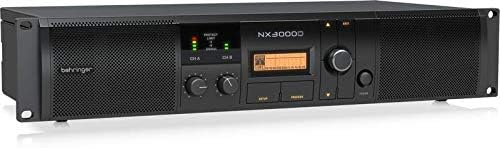
انځور: زاویه لرونکی مخ view د بهرینګر NX3000D پاور Amplifier, highlighting the rack-mountable design and ventilation grilles.
- د بریښنا تڼۍ: بدلوي ampژوندی یا بند.
- Level Controls (CH A/CH B): Adjust the input sensitivity for each channel.
- د LCD نندارې: Shows DSP settings, operating modes, and status information.
- Navigation Buttons (SETUP, PROCESS, UP/DOWN, EXIT): Used to navigate and adjust DSP parameters.
- LED Indicators (SIGNAL, LIMIT, PROTECT): Provide visual feedback on signal presence, clipping, and protection status.
4.2 شاته پینل

انځور: شاته view د بهرینګر NX3000D پاور Amplifier, displaying input and output connectors, cooling fan, and power inlet.
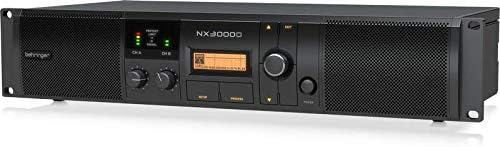
Image: Angled rear view د بهرینګر NX3000D پاور Amplifier, showing the USB port for PC connection and additional ventilation.
- د AC داخلول: Connects to the main power supply using the provided power cable.
- Input Connectors (CH A/CH B): XLR/TRS combo jacks for connecting audio sources.
- Output Connectors (CH A/CH B): Twist-lock speaker connectors for connecting loudspeakers.
- USB پورټ: For connecting to a computer for DSP control and firmware updates.
- د یخولو فین: Ensures proper thermal management of the ampلايف
5. ترتیب کول
Follow these steps to set up your Behringer NX3000D ampژوندی:
- ځای په ځای کول: موقعیت ورکړئ amplifier in a well-ventilated area, away from direct sunlight, heat sources, and moisture. Ensure adequate space around the unit for airflow. For rack mounting, secure the amplifier using appropriate rack screws.
- د بریښنا پیوستون: Connect the supplied AC power cable to the AC input on the rear panel of the amplifier and then to a suitable power outlet. Ensure the amplifier's power switch is in the OFF position before connecting.
- د ننوتلو اړیکې: Connect your audio source (e.g., mixer, audio interface) to the Input Connectors (CH A and/or CH B) on the rear panel using XLR or 1/4" TRS cables.
- وتۍ اړیکې: Connect your passive loudspeakers to the Output Connectors (CH A and/or CH B) using high-quality speaker cables with twist-lock connectors. Ensure correct polarity (+ to + and - to -) and that the impedance of your speakers matches the amplifier's capabilities (2 Ohms, 4 Ohms, or Bridge mode 4 Ohms).
- ابتدايي بریښنا فعاله: With all connections secure and input levels turned down, switch the amplifier's power button to the ON position. The display will illuminate, and the unit will perform a self-test.
۲. د چلولو Ampلايف
The Behringer NX3000D features advanced DSP control for precise sound optimization.
6.1 بنسټیز عملیات
- د کچې تنظیمول: Slowly increase the Level Controls for CH A and/or CH B until the desired volume is achieved. Monitor the SIGNAL and LIMIT LEDs to prevent clipping. The SIGNAL LED indicates audio presence, while the LIMIT LED indicates that the signal is approaching clipping.
- د څارنې حالت: The PROTECT LED will illuminate if the amplifier enters protection mode due to overheating, short circuits, or other issues. If this occurs, turn off the amplifier, resolve the issue, and then power it back on.
6.2 DSP Control
The integrated DSP allows for comprehensive sound shaping and system management:
- Accessing DSP Settings: د کارولو چمتو کول button to enter the main DSP menu. Navigate through options using the پورته/ ښکته buttons and confirm selections with the rotary encoder.
- کراسور: Configure high-pass and low-pass filters for each channel. Choose from 3 filter types (e.g., Butterworth, Linkwitz-Riley) and slopes up to 48 dB/octave. This is crucial for integrating subwoofers or bi-ampسیسټمونه
- مساوات (EQ): Utilize the 8 parametric EQs and 2 dynamic EQs per channel to fine-tune the frequency response. This helps in correcting room acoustics or tailoring the sound to specific preferences.
- ځنډ: Apply delay to individual channels to align speakers in different physical positions, ensuring phase coherence.
- د پروسس متحرکات: Adjust compression, limiting, and gating settings to control the dynamic range of your audio.
- SmartSense Loudspeaker Impedance Compensation: This feature automatically adjusts the amplifier's output to match the loudspeaker impedance, providing consistent power delivery and improved sound quality.
- امنیتي ترتیبات: Lock DSP settings to prevent unauthorized changes, ideal for fixed installations.
For detailed DSP parameter adjustments, refer to the full software manual available on the Behringer website or connect the amplifier to a PC via the USB port for software control.
7. ساتنه
مناسب ساتنه ستاسو د ژوند اوږدوالی او غوره فعالیت تضمینوي ampلايف
- پاکول: په منظمه توګه د کور بهر پاک کړئ ampد نرم او وچ ټوکر سره لایفیر. د مایع پاکوونکو یا محلولونو څخه کار مه اخلئ. ډاډ ترلاسه کړئ چې د هوا د تویولو جالونه د دوړو او کثافاتو څخه پاک دي.
- وینټیلیشن: تل ډاډ ترلاسه کړئ چې د amplifier's ventilation openings are not obstructed. Overheating can lead to reduced performance and potential damage.
- ذخیره کول: که ذخیره کول amplifier for an extended period, disconnect it from power, clean it, and store it in a cool, dry place, preferably in its original packaging or a protective case.
8. ستونزه حل کول
If you encounter issues with your Behringer NX3000D, consult the table below for common problems and solutions.
| ستونزه | احتمالي لامل | د حل لاره |
|---|---|---|
| هیڅ ځواک نشته | Power cable disconnected; Power outlet faulty; Ampد لایفیر فیوز وچاودید. | Check power cable connection; Test outlet with another device; Contact qualified service personnel for fuse replacement. |
| د غږ تولید نشته | Input/output cables disconnected or faulty; Speaker impedance mismatch; Amplifier in protect mode; Input levels too low. | Check all cable connections; Verify speaker impedance; Check PROTECT LED and resolve underlying issue; Increase input levels gradually. |
| تحریف شوی غږ | Input signal too high (clipping); Speaker impedance mismatch; Faulty cables or speakers. | Reduce input signal (monitor LIMIT LED); Verify speaker impedance; Test with different cables/speakers. |
| Amplifier overheats (PROTECT LED on) | Insufficient ventilation; Excessive load (low impedance speakers); Prolonged high-power operation. | Ensure proper ventilation; Use speakers with correct impedance; Reduce output level or allow cooling time. |
If the problem persists after attempting these solutions, please contact Behringer support or a qualified service technician.
9. تخنیکي مشخصات
| فیچر | مشخصات |
|---|---|
| برانډ | بېرنجر |
| د ماډل شمیره | NX3000D |
| د واټ محصولtage | 2 x 1500 Watts (2 Ohms); 2 x 900 Watts (4 Ohms); 3000 Watts (4 Ohms Bridge mode) |
| سپیکر Ampد بندولو ډول | کلاس-ډ |
| د توکي وزن | 7.92 pounds / 3.6 Kilograms |
| د محصول ابعاد | 19.02 x 9.09 x 3.7 انچه |
| د نښلونکي ډول | Twist-lock (Outputs), XLR/TRS Combo (Inputs) |
| د بریښنا سرچینه | د بریښنا تار شوی |
| والیtage | 100V |
| رنګ | تور |
| DSP | High-performance DSP with 24-bit/96 kHz converters, delay, crossover, EQ, dynamics processing, SmartSense Impedance Compensation |
10. تضمین او ملاتړ
10.1 د محصول تضمین
The Behringer NX3000D amplifier typically comes with a د 3 کلن محدود تضمین, indicating its design and engineering quality. Please refer to the warranty card included with your product or visit the official Behringer webد تفصیلي شرایطو او شرایطو لپاره سایټ.

Image: Behringer logo with a '3 Years Warranty' badge, indicating the product is designed and engineered in Germany.
10.2 تخنیکي ملاتړ
For technical assistance, troubleshooting beyond this manual, or service inquiries, please visit the official Behringer website or contact their customer support. You can find more information and resources at the د بهرینګر پلورنځی.


