پیژندنه
This manual provides detailed instructions for the THOKWOK TK-X2 Motorcycle Bluetooth Headset. Please read thoroughly to ensure proper use, optimal performance, and to familiarize yourself with all features and functions.
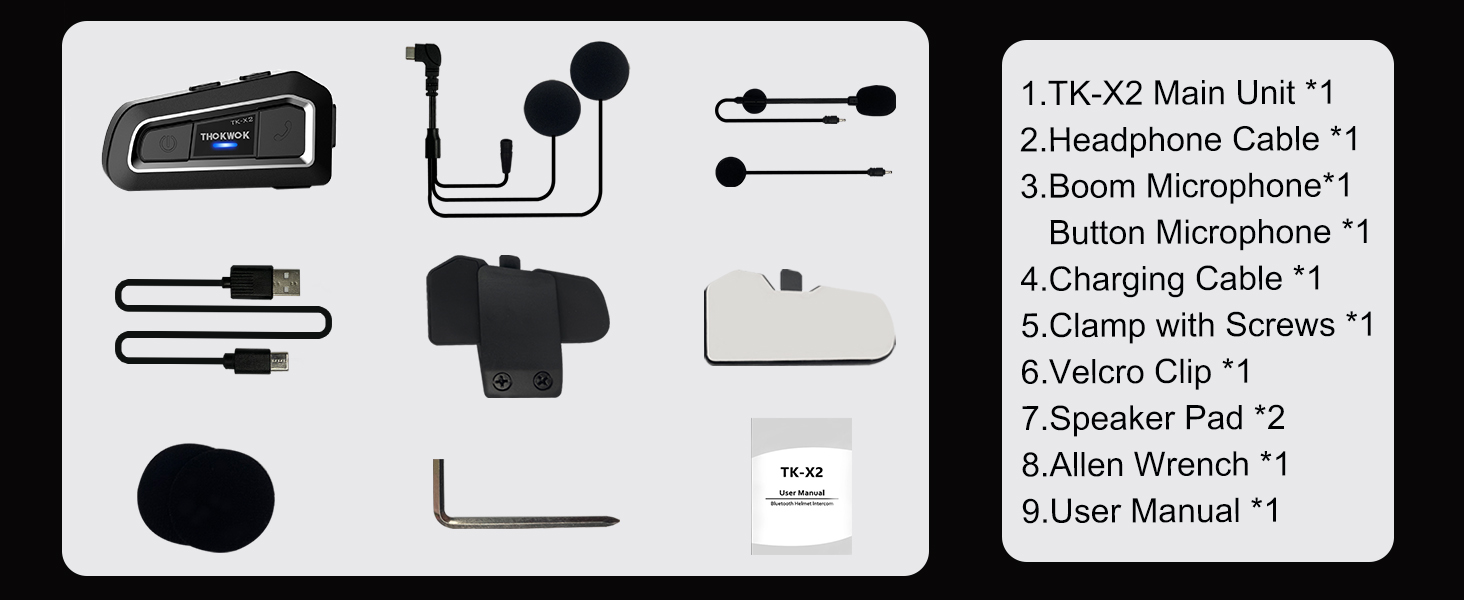
په بکس کې څه دي
The TK-X2 package includes the following components:
- TK-X2 Main Unit
- غوږۍ کیبل
- بوم مایکروفون
- تڼۍ مایکروفون
- د چارج کیبل
- Clamp د سکرو سره
- Velcro Clip
- Speaker Pad (2x)
- الن رنچ
- د کارن لارښود
چمتو کول
د وسیله چارج کول
Before first use, fully charge the TK-X2 unit. Connect the provided charging cable to the unit and a USB power source. A full charge typically takes approximately 2.5 hours. The unit will indicate charging status.

نصب کول
The TK-X2 helmet intercom offers two interchangeable microphones to suit different helmet types:
- Boom Microphone: Ideal for open-face or flip-face (convertible) helmets.
- Button Microphone: Suitable for full-face helmets.
Choose the appropriate microphone and install the main unit using either the clamp with screws or the velcro clip, ensuring secure attachment to your helmet. Position the speakers inside the helmet's ear pockets for optimal audio quality.

عملیات
پاور آن/بند
To power on the device, long press the power button until you hear an audible prompt. To power off, long press the power button again until the device shuts down.
د تلیفون سره یوځای کول
To pair your TK-X2 with a smartphone:
- Long press the power button for 4 seconds until the red and blue lights flash alternately, indicating pairing mode.
- On your phone, go to Bluetooth settings and turn on Bluetooth.
- Find "TK-X2" in the list of available devices and select it to connect.
- Once connected, the blue light will flash slowly, and you can play music and make calls.
د غږ غږ
- پلی کول / ودرول: Click the phone button.
- بله سندره: Click the forward button.
- پخوانۍ سندره: Click the backward button.
- حجم پورته کول: Hold the forward button.
- کموالی: Hold the backward button.
Voice Assistant (Siri/S-Voice)
Long press the phone button for 2 seconds to activate your phone's voice assistant (Siri or S-Voice). You will hear "Voice Dial" as confirmation.
ایف ایم راډیو
Double-click the phone button to start the FM radio. You will hear "Turn on radio". Double-click again to end FM radio.
Intercom Pairing (Multiple Units)
The TK-X2 supports full-duplex intercom for up to 3 riders, with 2 riders able to communicate simultaneously. For optimal performance, clear previous Bluetooth pairing records before initiating new intercom connections.
- Clearing Pairing Records: Turn on all units. Long press the power button for 8 seconds until pink lights flash twice, indicating records are cleared.
- Pairing Two Units:
- Ensure both units are in pairing mode (red and blue lights flashing alternately).
- Click the power button on one unit to initiate pairing. Once successful, blue lights will flash slowly.
- Pairing Three Units:
- First, pair Unit A and Unit B as described above.
- Then, hang up the intercom on Unit B.
- Put Unit B and Unit C into pairing mode (red and blue lights flashing alternately).
- Click the power button on Unit B to initiate pairing with Unit C.
- Once B and C are paired, hang up the intercom on Unit C.
- Double-click the power button on Unit A to connect with Unit C.
Refer to Video 1 (starting from 1:55 mark) for a visual guide on pairing multiple TK-X2 units.
Intercom Usage
- انټرکام پیل کړئ: د بریښنا تڼۍ کلیک وکړئ.
- Hang Up Intercom: Click the power button again.
- When an intercom call is active, music playback will automatically pause. Ending the intercom call will resume music.
کلیدي ځانګړتیاوې

1000M Intercom Distance & Universal Pairing: The TK-X2 motorcycle Bluetooth headset enables full-duplex intercom communication up to 1000 meters (without obstacles) for 3 riders, with 2 riders able to converse simultaneously. It also features universal pairing, allowing connection with most Bluetooth intercoms on the market.

Noise Reduction & Upgraded Hi-Fi Stereo Speakers: Equipped with DSP and CVC advanced noise reduction technology and Bluetooth A2DP profile, the TK-X2 provides superior sound quality for both incoming and outgoing audio. Upgraded 40mm Hi-Fi stereo speakers deliver high-fidelity audio with deep bass, ensuring crystal-clear communications and music even at high speeds.

Bluetooth 5.0 & Long Standby Battery: Featuring Bluetooth 5.0 HFP profile, the TK-X2 allows access to Siri and S Voice commands for hands-free calls, music playback, FM radio, and GPS voice guidance. The built-in 650mAh battery offers low power consumption, providing up to 24 hours of music or intercom time and up to 280 hours of standby time.
Exchangeable Microphone & Great Helmet Compatibility: The TK-X2 helmet intercom includes two interchangeable microphones: a boom microphone for open-face or flip-face (convertible) helmets, and a button microphone for full-face helmets, ensuring broad compatibility.

Waterproof Design & Low Battery Alarm: The TK-X2's shell is constructed using an integral casting process, minimizing seams for excellent waterproof functionality, allowing use in any weather. The device broadcasts current battery status ("Battery full", "Battery medium", "Battery low") upon power-on.
ساتنه
- پاکول: یو نرم استعمال کړئ، دamp cloth to clean the unit. Do not use harsh chemicals or abrasive cleaners.
- ذخیره کول: کله چې کارول نه وي، وسیله په یخ او وچ ځای کې وساتئ. د لوړې تودوخې څخه ډډه وکړئ.
- د بیټرۍ پاملرنه: د بیټرۍ د ژوند اوږدولو لپاره، د بیټرۍ په مکرر ډول د بشپړ چارج کولو څخه ډډه وکړئ. وسیله په منظم ډول چارج کړئ، حتی که په فعاله توګه نه وي.
- د اوبو ښکاره کول: While waterproof, ensure the charging port cover is securely closed before exposure to water to prevent damage.
د ستونزو حل کول
| ستونزه | د حل لاره |
|---|---|
| وسیله فعاله نه ده. | ډاډ ترلاسه کړئ چې بیټرۍ چارج شوې ده. چارجر سره وصل شئ او بیا هڅه وکړئ. |
| د تلیفون سره جوړه نشي کیدی. | Ensure the TK-X2 is in pairing mode (red and blue lights flashing alternately). Turn off and on your phone's Bluetooth. Clear previous pairing records on the TK-X2 if necessary. |
| د سپیکرو څخه هیڅ غږ نشته. | Check speaker connections to the main unit. Ensure volume is not set to minimum on both the headset and your connected device. |
| Intercom not connecting. | Ensure all units have cleared previous pairing records. Follow the multi-unit pairing instructions carefully. Ensure units are within range. |
| د بیټرۍ لنډ ژوند. | Ensure the device is fully charged before use. Extreme temperatures can affect battery performance. |
مشخصات
| فیچر | تفصیل |
|---|---|
| د ماډل نوم | TK-X2 Single |
| برانډ | تاکوک |
| د ارتباط ټیکنالوژي | بلوتوث |
| بلوتوث نسخه | 5.1 |
| د شور کنټرول | د فعال شور لغوه کول |
| د انټرکام فاصله | Up to 1000m (no obstacles) |
| میکس انټرکام رایډرز | 3 (2 talking simultaneously) |
| Battery Life (Music/Intercom) | تر 24 ساعتونو پورې |
| ولاړ وخت | تر 280 ساعتونو پورې |
| د چارج کولو وخت | 2.5 ساعته |
| د اوبو د مقاومت کچه | Waterproof (IP67 equivalent) |
| د کنټرول ډول | Button Control, Voice Control |
| هیډفون جیک | ټایپ-سي |
| مواد | اکریلونایتریل بوټاډین سټیرین (ABS) |
| د توکي وزن | 8.4 اونس |
| د محصول ابعاد | 3 x 1.6 x 0.83 انچه |
| UPC | 797447004837 |
تضمین او ملاتړ
For warranty information, technical support, or any inquiries regarding your THOKWOK TK-X2 headset, please refer to the contact information provided on the product packaging or visit the official THOKWOK webسایټ د تضمین ادعاګانو لپاره خپل د پیرود رسید وساتئ.


