پیژندنه
This manual provides detailed instructions for the proper use and maintenance of your Casio MX-12 Desk Calculator. Please read this manual thoroughly before using the calculator to ensure optimal performance and longevity.
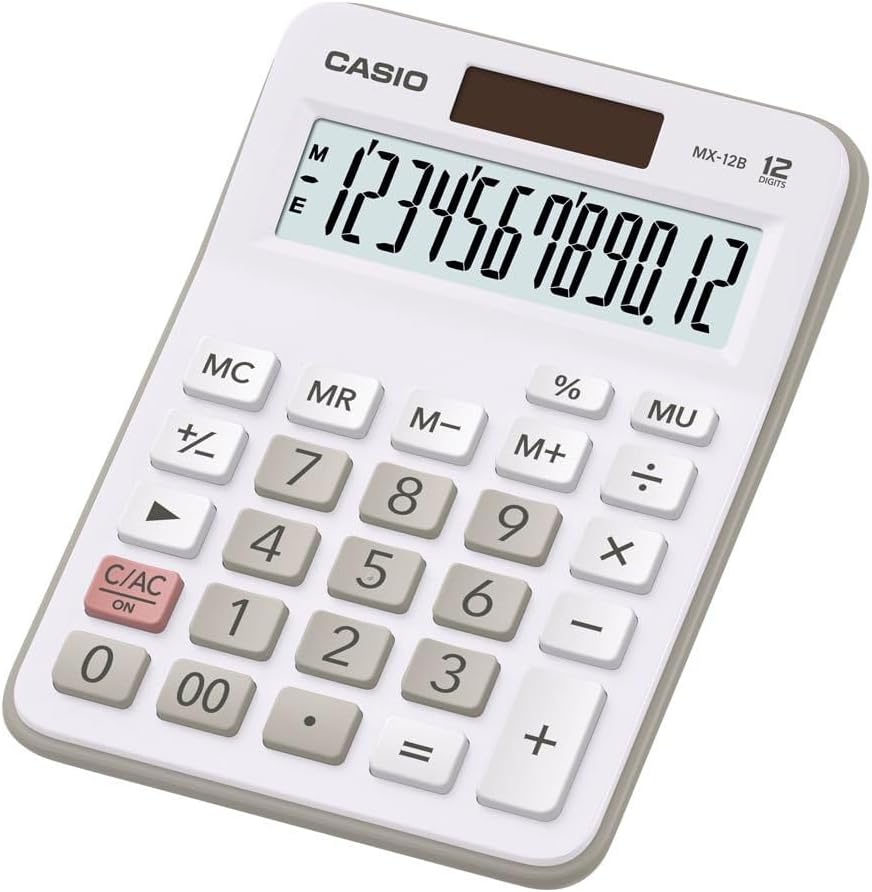
Image: The Casio MX-12 Desk Calculator, featuring a clear 12-digit display and a standard key layout for basic and advanced calculations.
چمتو کول
د بریښنا سرچینه
The Casio MX-12 calculator is dual-powered, operating on both solar energy and a battery backup. For optimal performance, use the calculator in a well-lit environment. The solar panel, located above the display, will power the unit and charge the internal battery.
د بیټرۍ نصب کول / بدلول
The calculator requires one AAA battery (included) for backup power. If the display becomes dim or unresponsive in low light conditions, the battery may need replacement.
- Turn the calculator over.
- د بیټرۍ د برخې پوښ ومومئ.
- Remove the screw (if present) and slide the cover off.
- Insert a new AAA battery, ensuring the correct polarity (+/-).
- د بیټرۍ کمپارټ پوښ بدل کړئ او خوندي یې کړئ.
عملیاتي لارښوونې
The Casio MX-12 features a large, clear 12-digit display and a user-friendly key layout for various calculations.
د حساب اساسي عملیات
- اضافه (+): لومړی شمېره دننه کړئ، فشار ورکړئ +، دوهم نمبر دننه کړئ، بیا فشار ورکړئ =.
- تخفیف (-): لومړی شمېره دننه کړئ، فشار ورکړئ -، دوهم نمبر دننه کړئ، بیا فشار ورکړئ =.
- ضرب (×): لومړی شمېره دننه کړئ، فشار ورکړئ ×، دوهم نمبر دننه کړئ، بیا فشار ورکړئ =.
- څانګه (÷): لومړی شمېره دننه کړئ، فشار ورکړئ ÷، دوهم نمبر دننه کړئ، بیا فشار ورکړئ =.
ځانګړې دندې
- Clear/All Clear (C/AC): مطبوعاتي C/AC once to clear the last entry. Press it twice to clear all entries and reset the calculator.
- پرسینtage (٪): To calculate a percentage, enter the number, press ×، فیصده دننه کړئtage value, then press %. د مثال لپارهample, to find 15% of 200: 200 × 15 %.
- د بدلون نښه (+/-): مطبوعاتي +/- to change the sign of the displayed number from positive to negative or vice versa.
- Mark-up (MU): د MU key is used for profit margin calculations. For example, to calculate the selling price with a 25% profit margin on a cost of 80: 80 ÷ 25 MU.
- Double Zero (00): د کارولو 00 key for quick entry of two zeros.
د حافظې دندې
The calculator includes a 4-key memory function:
- د حافظې پلس (M+): ښودل شوی ارزښت حافظې ته اضافه کوي.
- د حافظې منفي (M-): ښودل شوی ارزښت له حافظې څخه کموي.
- Memory Recall (MR): په حافظه کې زیرمه شوی ارزښت نندارې ته یادوي.
- Memory Clear (MC): په حافظه کې زیرمه شوی ارزښت پاکوي.
ساتنه
پاکول
To clean the calculator, wipe it gently with a soft, dry cloth. Do not use abrasive cleaners, solvents, or excessive moisture, as these can damage the display or internal components.
ذخیره کول
Store the calculator in a cool, dry place away from direct sunlight and extreme temperatures. Prolonged exposure to direct sunlight can affect the solar panel's efficiency and the display's longevity.
د ستونزو حل کول
- ښودنه خالي یا تیاره ده:
- Ensure the calculator is in a well-lit area for the solar panel to function.
- Check the AAA battery. Replace it if necessary (refer to "Battery Installation/Replacement" in the Setup section).
- د ناسمې محاسبې پایلې:
- مطبوعاتي C/AC twice to clear all previous entries and memory.
- Re-enter the calculation carefully.
- Ensure you are using the correct function keys for your desired operation.
- کیلي غیر ځواب ورکوونکې دي:
- Clean the calculator surface and keys to remove any debris.
- Ensure the calculator is adequately powered (solar or battery).
مشخصات
| د ماډل شمیره | MX-12B-WE-W-EC |
| ښودل | 12 Digits, Large LCD |
| د بریښنا سرچینه | Dual Powered (Solar with Battery Backup) |
| د بیټرۍ ډول | 1 x AAA (شامل) |
| ابعاد (L x W x H) | 5.79 x 4.21 x 1.14 انچه (14.7 x 10.7 x 2.9 سانتي متره) |
| وزن | 4.9 اونس (139 ګرامه) |
| افعال | Basic Arithmetic, Percentage, Mark-up (MU), Change Sign, 4-Key Memory |
تضمین او ملاتړ
Casio products are manufactured to high-quality standards. For information regarding warranty coverage, service, or technical support, please refer to the warranty card included with your product or visit the official Casio webسایټ. د پیرود ثبوت په توګه د پیرود رسید وساتئ.
د نورو مرستو لپاره، تاسو کولی شئ لیدنه وکړئ په ایمیزون کې د کاسیو پلورنځی یا مستقیم د کاسیو پیرودونکي خدماتو سره اړیکه ونیسئ.


