1. پیژندنه
This user manual provides comprehensive instructions for the Supermicro BTR-CVPM05 CacheVault Power Module. The BTR-CVPM05 is designed to protect cached data on compatible RAID controllers during unexpected power loss, ensuring data integrity and system reliability. Please read this manual thoroughly before installation and operation.
2. محصول ختم شوview
The Supermicro BTR-CVPM05 is a CacheVault Power Module (CVPM) specifically engineered to provide backup power for the DRAM cache on Supermicro MegaRAID controllers. In the event of a power outage, the CVPM supplies power to the controller, allowing it to write the contents of its volatile cache memory to non-volatile flash memory, thus preventing data loss.
This module includes a 24-inch remote extender cable, offering flexibility in mounting the CVPM within a server chassis.
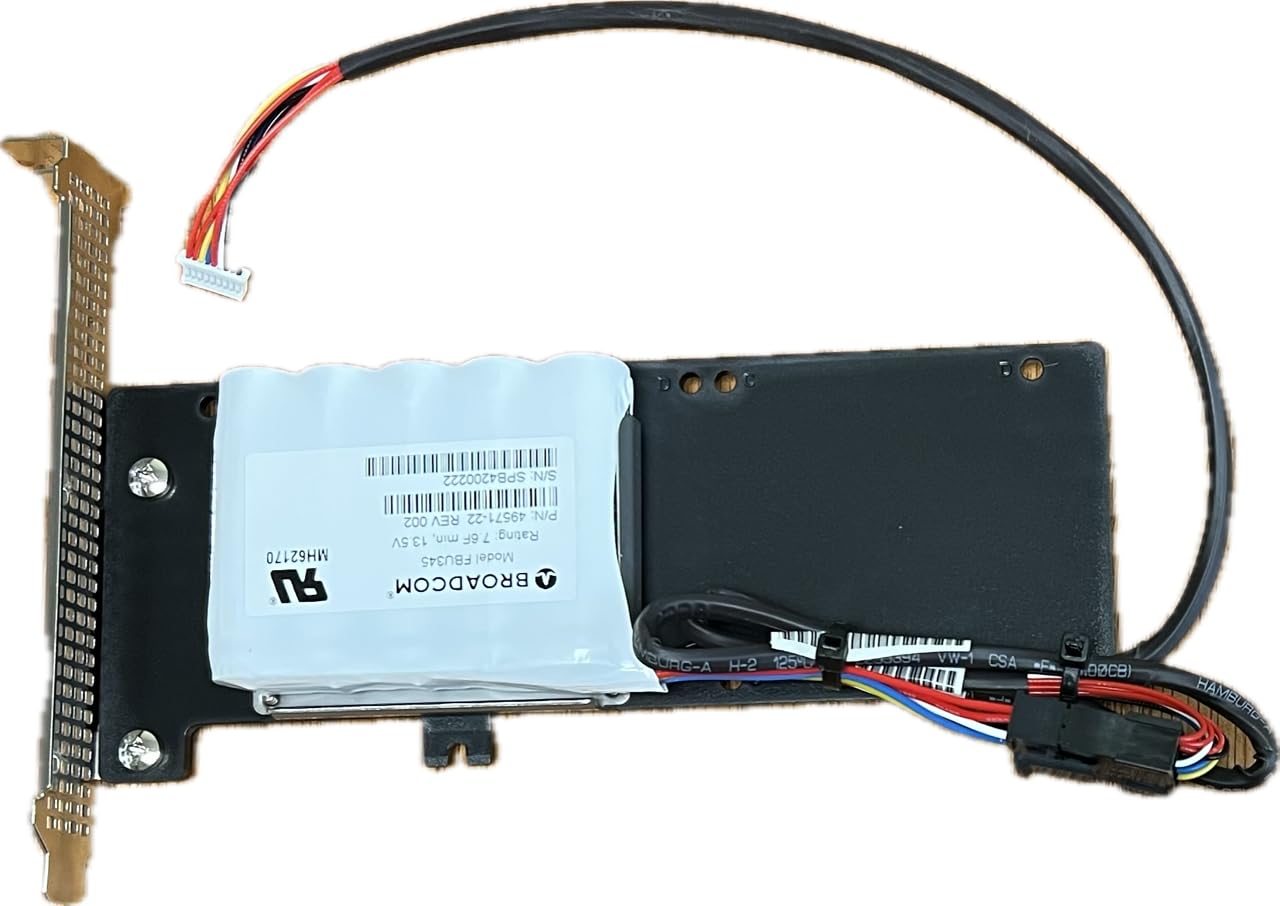
شکل 2.1: Supermicro BTR-CVPM05 CacheVault Power Module. This image shows the compact CacheVault module connected to its 24-inch remote extender cable, which facilitates flexible placement within a server chassis.
2.1. مطابقت
The BTR-CVPM05 is compatible with the following Supermicro MegaRAID controllers:
- 956016i
- 95608i
- 95808i8e
- 946016i
- 94608i
- 94808i8e
- 936528i
For specific compatibility details, always refer to the documentation provided with your Supermicro MegaRAID controller.
3. ترتیب او نصب کول
Follow these steps to properly install the BTR-CVPM05 CacheVault Power Module:
- لومړی خوندیتوب: Before beginning installation, ensure that the server system is powered off and disconnected from all power sources. Wear an anti-static wrist strap to prevent electrostatic discharge (ESD) damage.
- Locate CVPM Connector: Identify the CacheVault Power Module connector on your compatible Supermicro MegaRAID controller. This connector is typically labeled or indicated in the RAID controller's manual.
- Connect Extender Cable: Connect one end of the 24-inch remote extender cable to the CVPM connector on the RAID controller. Ensure a firm and secure connection.
- Connect CVPM: Connect the other end of the 24-inch remote extender cable to the BTR-CVPM05 module.
- Mount CVPM: Securely mount the BTR-CVPM05 module within the server chassis. Utilize the remote extender cable to position the module in an area with adequate airflow and away from excessive heat sources. Ensure the module is not obstructing other components or airflow paths.
- اړیکې تایید کړئ: Double-check all connections to ensure they are secure and correctly seated.
- پاور آن: Reconnect the server to power and power on the system. The RAID controller firmware should automatically detect the installed CVPM.
Refer to your specific MegaRAID controller's user manual for detailed instructions on CVPM installation and verification within the controller's BIOS or management software.
4. عملیات
The Supermicro BTR-CVPM05 operates automatically in conjunction with the compatible MegaRAID controller. Once installed and detected, the CVPM continuously monitors the system's power status.
- نورمال عملیات: During normal system operation, the CVPM remains in a standby state, charging its internal components as needed.
- Power Loss Event: If the system experiences a power failure, the CVPM immediately provides backup power to the RAID controller's cache memory. This allows the controller to safely transfer any data residing in its volatile DRAM cache to non-volatile flash memory.
- Data Restoration: Upon restoration of system power, the data is transferred back from the non-volatile flash memory to the DRAM cache, and normal RAID operations resume without data loss.
No direct user interaction is typically required for the CVPM's operational functions after proper installation. Monitor the status of the CVPM through the RAID controller's management utility.
5. ساتنه
The BTR-CVPM05 CacheVault Power Module is designed for minimal maintenance. However, adhering to the following guidelines can help ensure its longevity and reliable performance:
- د چاپیریال شرایط: Ensure the operating environment adheres to the specified temperature ranges (0°C to 55°C). Avoid exposing the module to extreme temperatures, high humidity, or direct sunlight.
- پاکوالی: Keep the server chassis and the CVPM free from dust and debris. Dust accumulation can impede heat dissipation and affect performance. Use compressed air for cleaning, ensuring the system is powered off.
- د اتصال بشپړتیا: Periodically inspect the connections between the CVPM, the extender cable, and the RAID controller to ensure they remain secure.
- د فرم ویئر تازه معلومات: While the CVPM itself typically does not have user-updatable firmware, ensure your MegaRAID controller's firmware is kept up-to-date, as updates may include improvements related to CVPM management.
6. ستونزه حل کول
If you encounter issues with your BTR-CVPM05 module, consider the following troubleshooting steps:
- CVPM Not Detected:
- Verify that the CVPM and its extender cable are securely connected to the RAID controller.
- Ensure the RAID controller itself is properly installed and functioning.
- Check the RAID controller's BIOS or management utility for CVPM status.
- Confirm that your RAID controller model is listed as compatible with the BTR-CVPM05.
- د تېروتنې پیغامونه:
- Any error messages related to the CacheVault module should be cross-referenced with your MegaRAID controller's documentation for specific interpretations and solutions.
- Unexpected Data Loss:
- If data loss occurs despite the presence of the CVPM, it may indicate a fault with the CVPM, the RAID controller, or an improper installation. Contact Supermicro support for assistance.
For advanced troubleshooting or issues not resolved by these steps, consult the Supermicro MegaRAID controller manual or contact Supermicro technical support.
7. مشخصات
| فیچر | مشخصات |
|---|---|
| د ماډل شمیره | BTR-CVPM05 |
| د وسیلې ډول | RAID Controller Cache Data Protection Module |
| مطابقت | Supermicro MegaRAID controllers (e.g., 956016i, 95608i, 95808i8e, 946016i, 94608i, 94808i8e, 936528i) |
| Extender Cable Length | 24 انچه |
| د عملیاتي حرارت درجه | له 0°C څخه تر 55°C (32°F څخه تر 131°F) |
| د ذخیرې د حرارت درجه | -40°C ته 70°C (-40°F ته 158°F) |
| وزن | تقریبا ۱ پونډ (۰.۴۵ کیلوګرامه) |
| UPC | 672042287086 |
8. تضمین او ملاتړ
For detailed warranty information regarding the Supermicro BTR-CVPM05 CacheVault Power Module, please refer to the official Supermicro website or the warranty documentation included with your product purchase.
If you require technical assistance, support resources, or have questions about the product, please visit the official Supermicro support portal or contact their customer service department.
- Supermicro Official Webسایټ: www.supermicro.com
- د ملاتړ اړیکه: Refer to the "Support" section on the Supermicro website for contact details and resources.


