1. پیژندنه
This manual provides detailed instructions for the installation, setup, and operation of your MOES WiFi Smart Wall Touch Light Switch. Please read this manual thoroughly before installation and use to ensure proper function and safety.

Figure 1: MOES WiFi Smart Wall Touch Light Switch (1 Gang, Black)
2. د خوندیتوب معلومات
- د بریښنا نصب کول: نصب کول باید یوازې د وړ بریښنایی کارکونکي یا هغه کس لخوا ترسره شي چې د بریښنایی تارونو بشپړ پوهه ولري.
- د بریښنا قطع کول: Always disconnect power at the circuit breaker before installing, removing, or servicing the switch. Failure to do so may result in serious injury or death.
- بې طرفه تار ته اړتیا ده: This smart switch requires a neutral wire in your switch box to operate correctly. If you do not have a neutral wire, this switch is not compatible.
- د Wi-Fi شبکه: Requires a 2.4GHz Wi-Fi network connection. It is not compatible with 5GHz Wi-Fi networks.
- مطابقت: Only compatible with 1 gang switch boxes. Not compatible with standard US 2/3/4 gang switch plates. This switch is not designed for 3-way switch configurations or as a dimmer switch.
- یوازې د کور دننه کارول: دا وسیله په وچو ځایونو کې د کور دننه کارونې لپاره ده.
- د عملیاتو Voltage: ډاډ ترلاسه کړئ چې ستاسو بریښنایی سیسټم په ټاکل شوي حجم کې کار کويtagد e رینج (۲۴۰ ولټه).

Figure 2: Key compatibility and wiring considerations.
3. د بسته محتويات
- MOES WiFi Smart Wall Touch Light Switch (1 Gang)
- د کارن لارښود
- د سکرو نصب کول
4. د محصول ب Featuresې
- د ټچ کنټرول: Features a toughened glass surface for touch operation.
- د غږ کنټرول: Compatible with Amazon Alexa (Amazon Echo/Dot/Tap) and Google Assistant for hands-free operation.
- د وای فای ریموټ کنټرول: Control the wall switch wirelessly from anywhere using the 'Smart Life' app on your smartphone via Wi-Fi or 4G network. No separate hub is required.
- د وخت دنده: Schedule lights and appliances to turn on/off automatically at specific times.

Figure 3: Smart Switch in a home environment.
5. مشخصات
| مشخصات | ارزښت |
|---|---|
| د عملیاتو حالت | په اتوماتيک ډول، بند، سمارټ سویچ |
| اوسنۍ درجه بندي | 10 Amps |
| د عملیاتو Voltage | 240 ولټه |
| د اړیکو ډول | په نورمال ډول خلاص |
| د نښلونکي ډول | بېسیم |
| ترمینل | سکرو |
| د توکي ابعاد (L x W x H) | 4.7 x 2.9 x 1.5 انچه |
| د سرکټ ډول | ۳۲-لاره |
| د فعالیت ډول | لمس |
| د تماس مواد | پیتل |
| د نړیوال خوندیتوب درجه بندي | IPX4 |
| د پوستونو شمیر | 3 |
| د کنټرولر ډول | ایمیزون الیکسا، د ګوګل مرستیال |
| د کنټرول طریقه | لرې |
| د ارتباط پروتوکول | وای فای (یوازې 2.4GHz) |
| واټtage | ۴۵ واټه |
| د توکي وزن | 7.4 اونس |

Figure 4: Product dimensions and wiring terminals.
6. د نصب لارښود
مخکې له دې چې تاسو پیل کړئ:
- ډاډ ترلاسه کړئ چې په سرکټ بریکر کې بریښنا بنده ده.
- Confirm your switch box has a neutral wire. This is essential for the smart switch to function.
- ډاډ ترلاسه کړئ چې ستاسو د وای فای شبکه 2.4GHz ده.
- This switch is for 1-gang setups only and is not a dimmer or 3-way switch.
د تار لګولو مرحلې:
- Turn off power at the circuit breaker for the light switch you are replacing.
- موجوده دیوال پلیټ لرې کړئ او سویچ یې کړئ.
- Identify the wires: Live (usually black), Neutral (usually white), and Load (to the light fixture). A Ground wire (usually green or bare copper) may also be present.
- Connect the wires from your wall box to the corresponding terminals on the MOES Smart Switch:
- N: Connect the Neutral wire (usually white).
- L: Connect the Live wire (incoming power, usually black).
- L1: Connect the Load wire (to the light fixture). For 1-gang switches, only L1 is typically used.
- ځمکه: If present, connect the ground wire to the switch's ground terminal (if available) or safely cap it.
- د ورکړل شویو پیچونو په کارولو سره سویچ د دیوال بکس کې خوندي کړئ.
- Attach the glass panel.
- په سرکټ بریکر کې بریښنا بحال کړئ.
After installation, the indicator lights on the switch should blink quickly, indicating it is ready for Wi-Fi connection in Default Normal Mode.

Figure 5: Replacing a traditional switch with the smart touch switch.
۷. د اپلیکیشن تنظیم او جوړه کول
To control your smart switch via smartphone, download the 'Smart Life' app from the App Store (iOS) or Google Play (Android).
- ډاونلوډ او راجستر کړئ: Install the 'Smart Life' app and register an account.
- وسیله اضافه کړئ: Open the app, tap '+' or 'Add Device', and select 'Light Switch' or 'Electrical Switch'.
- د شاخص حالت تایید کړئ: Ensure the indicator light on your switch is blinking quickly. If not, you may need to reset the device.
- وائی فای سره وصل کړئ: Follow the in-app instructions to connect the switch to your 2.4GHz Wi-Fi network. Enter your Wi-Fi password when prompted.
- د وسیلې نوم بدلول: Once connected, you can rename the switch for easier identification (e.g., "Living Room Light").
د وسیله بیا تنظیم کول:
If the indicator lights are not blinking quickly, or if you need to reset the switch for any reason:
- Press and hold any button on the switch for approximately 20 seconds until the indicator light blinks quickly. This puts the device into Default Normal Mode for Wi-Fi connection.
- If the indicator light blinks very slowly after holding for 20 seconds, it is in AP (Access Point) mode. This is an alternative pairing mode if Default Normal Mode fails.
Video 1: Demonstrates how to reset or unlock the device by pressing and holding a button for 20 seconds, showing the indicator light changes for different pairing modes.
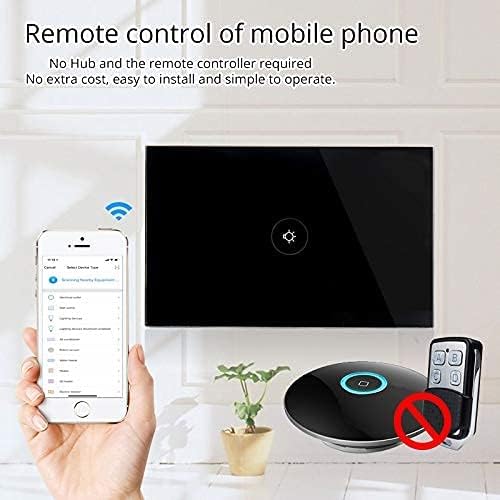
شکل ۵: د موبایل اپلیکیشن له لارې ریموټ کنټرول.
8. عملیات
Once installed and paired with the 'Smart Life' app, you can operate your switch in several ways:
- Manual Touch: Simply touch the glass panel to turn the connected light or appliance on or off.
- د اپلیکیشن کنټرول: Use the 'Smart Life' app on your smartphone to remotely turn the switch on or off from anywhere with an internet connection.
۴. د غږ کنټرول ادغام
The MOES Smart Switch is compatible with Amazon Alexa and Google Assistant for convenient voice control.
- Link 'Smart Life' Account: In your Amazon Alexa or Google Home app, search for the 'Smart Life' skill/action and enable it.
- ننوتل: Log in with your 'Smart Life' account credentials.
- وسایل کشف کړئ: Once linked, ask Alexa or Google Assistant to "Discover devices" or manually initiate device discovery in their respective apps.
- غږیز حکمونه: You can now use voice commands such as "Alexa, turn on [device name]" or "Hey Google, turn off [device name]". Use the names you assigned in the 'Smart Life' app.

شکل ۸: د الیکسا او ګوګل کور سره د غږ کنټرول.
10. د وخت فعالیت
The 'Smart Life' app allows you to set schedules and timers for your smart switch, automating your lighting or appliances.
- مهالویش جوړ کړئ: In the 'Smart Life' app, navigate to the device settings and select 'Schedule' or 'Timer'.
- د فعالولو/بندولو وختونه: Configure specific times for the switch to turn on or off. You can set daily, weekly, or custom schedules.
- Sunrise/Sunset Automation: Some app versions allow for automation based on local sunrise and sunset times.

Figure 8: Setting schedules via the Smart Life app.
11. ستونزه حل کول
| ستونزه | احتمالي لامل | د حل لاره |
|---|---|---|
| سویچ لمس ته ځواب نه ورکوي. | No power, incorrect wiring, or device locked. | Check circuit breaker. Verify wiring (Live, Neutral, Load). Perform a device reset (hold button for 20 seconds). |
| د وائی فای سره وصل نشو. | Incorrect Wi-Fi band (5GHz), weak signal, incorrect password, or device not in pairing mode. | Ensure your router is broadcasting a 2.4GHz signal. Move closer to the router. Double-check Wi-Fi password. Reset the switch to enter pairing mode (blinking indicator). Try AP mode if normal mode fails. |
| د غږ کنټرول کار نه کوي. | 'Smart Life' skill not enabled, incorrect device name, or no internet connection. | Ensure the 'Smart Life' skill is enabled and linked in your Alexa/Google Home app. Verify device names match. Check internet connectivity. |
| Switch goes offline frequently. | Weak Wi-Fi signal, network congestion, or router issues. | Improve Wi-Fi signal strength (e.g., Wi-Fi extender). Reduce network congestion. Restart your router. |
12. ساتنه
- پاکول: Gently wipe the glass panel with a soft, dry cloth. Avoid abrasive cleaners or solvents.
- د فرم ویئر تازه معلومات: Periodically check the 'Smart Life' app for available firmware updates to ensure optimal performance and security.
13. تضمین او ملاتړ
For warranty information or technical support, please refer to the documentation provided with your purchase or contact MOES customer service directly. Contact details can typically be found on the MOES official website or within the 'Smart Life' app's support section.
ویډیو ۱: پایview of MOES smart home products and their integration, demonstrating various smart life features like color temperature control, music sync lighting, and smart automation based on environmental sensors.


