پیژندنه
The Xfinity HD 720p Wireless Indoor/Outdoor Home Security Camera allows you to monitor your home environment with live video accessible from anywhere. Designed for both indoor and outdoor use, this camera provides essential security features to keep you informed.
په بکس کې څه دي
- Xfinity HD 720p Wireless Security Camera (Model: SCHC2AEW)
- د بریښنا اډاپټر
- USB کیبل
- د نصبولو هارډویر (پیچونه او لنگرونه)

Image: Xfinity Home Security Camera and accessories neatly packaged in its box.
د تنظیم کولو لارښود
- د بریښنا پیوستون: Connect the camera to the power adapter using the provided USB cable, then plug the adapter into a standard electrical outlet.
- اپلیکیشن ډاونلوډ: Download the official Xfinity Home app from your smartphone's app store (iOS App Store or Android Google Play).
- د وسایلو جوړه کول: Open the Xfinity Home app and follow the on-screen instructions to add a new device. You will typically need to scan a QR code on the camera or manually enter its details to pair it with your home Wi-Fi network. Ensure your Wi-Fi network is 2.4 GHz for compatibility.

Image: The Xfinity Home Security Camera placed on a surface, ready for setup.
عملیاتي لارښوونې
ژوندی View and Basic Controls
Once paired, access the live video feed through the Xfinity Home app. The app provides controls for:
- ژوندۍ خپرونه: View ریښتیني وخت footage ستاسو د کیمرې څخه.
- ثبتول: Manually record video clips.
- سکرین شاټ: د ژوندی فیډ څخه لاهم عکسونه ونیسئ.
- دوه طرفه آډیو: Speak through the camera's speaker and hear audio from its microphone.
د شپې لید
The camera features night vision capabilities for clear monitoring in low-light conditions. This feature automatically activates when ambient light is insufficient, providing a black-and-white image. Some models may offer color night vision depending on ambient light and settings.
د حرکت کشف او خبرتیاوې
Configure motion detection settings within the Xfinity Home app to receive alerts on your smartphone when activity is detected. You can customize sensitivity levels and notification preferences.
د ذخیره کولو اختیارونه
The camera supports local storage via a MicroSD card (not included). Insert a compatible MicroSD card into the designated slot to store recorded video clips directly on the device. Cloud storage options may also be available through your Xfinity Home service subscription.
نصب او نصب کول
The Xfinity Home Security Camera can be placed on a flat surface or mounted to a wall. Use the included mounting hardware for secure wall installation. Ensure the camera is positioned to cover the desired monitoring area.
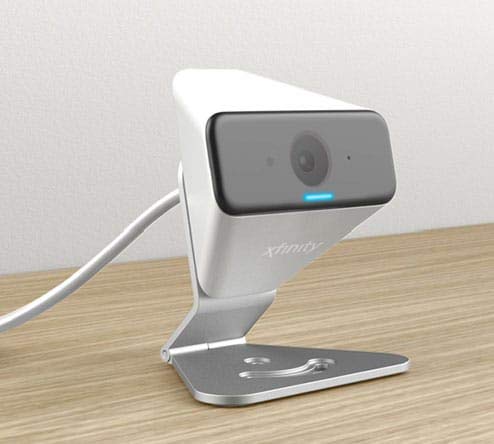
Image: The Xfinity Home Security Camera positioned on a desk, demonstrating its compact design.
د محصول مشخصات
| فیچر | تفصیل |
|---|---|
| د ماډل شمیره | د SCHC2AEW معرفي کول |
| د ویډیو نیول حل | 720p |
| د ارتباط ټیکنالوژي | بې سیم (وائی فای) |
| د ارتباط پروتوکول | Wi-Fi (2.4 GHz compatible) |
| د کور دننه / بهر کارول | دننه، بهر |
| ځانګړي ځانګړتیاوې | د حرکت سینسر، د شپې لید |
| د بریښنا سرچینه | DC (12 Volts, 1 Watt) |
| ابعاد (L x W x H) | 3 x 3 x 2 انچه |
| د توکي وزن | ۲.۴۵ پونډه |
| د نړیوال خوندیتوب درجه بندي | IP65 |
د ستونزو حل کول
- ځواک نشته: Ensure the power adapter is securely connected to both the camera and a working electrical outlet.
- د ارتباط مسلې: Verify your Wi-Fi network is 2.4 GHz. Restart your router and the camera. Ensure the camera is within range of your Wi-Fi signal.
- اپلیکیشن ځواب نه ورکوي: Close and reopen the Xfinity Home app. If the issue persists, try reinstalling the app.
- د ویډیو خراب کیفیت: د خپل وای فای سیګنال ځواک وګورئ. ډاډ ترلاسه کړئ چې د کیمرې لینز پاک او له خنډونو څخه پاک دی.
تضمین او د پیرودونکي ملاتړ
For warranty information, please refer to the documentation included with your purchase or visit the official Xfinity support website. For technical assistance or customer service, please contact Xfinity customer support directly.


