پیژندنه
The Insignia NS-SPBTWAVE2-BK Wave 2 Portable Bluetooth Speaker provides high-quality wireless audio streaming from your compatible devices. Designed for versatility, its robust construction and rubberized feet allow for stable placement in both horizontal and vertical orientations. Enjoy hands-free communication with the built-in speakerphone and extended listening sessions thanks to its 12-hour battery life.
This manual provides essential information for setting up, operating, maintaining, and troubleshooting your speaker. Please read it thoroughly before use and retain it for future reference.
د بسته محتويات
ډاډ ترلاسه کړئ چې ټول توکي په کڅوړه کې شتون لري:
- Insignia NS-SPBTWAVE2-BK Wave 2 Portable Bluetooth Speaker
- د USB چارج کیبل
- 3.5mm Audio Cable (Auxiliary)
- د چټک تنظیم لارښود (یا ورته اسناد)
د محصول ځانګړتیاوې
- د بیسیم اتصال: Connects wirelessly to smartphones, tablets, and other Bluetooth-enabled devices.
- د بیټرۍ اوږد ژوند: Features a rechargeable 2,000 mAh battery, providing up to 12 hours of playback on a full charge.
- جوړ شوی مایکروفون: Enables hands-free calling directly through the speaker.
- Auxiliary Audio Input: Allows for wired connection to audio devices via a 3.5mm audio cable.
- څو اړخیز ځای پرځای کول: Designed to stand securely in both horizontal and vertical positions.
د سپیکر برخې
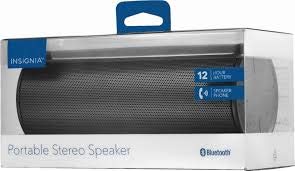
شکل 1: مخکی view of the Insignia Wave 2 Speaker in horizontal orientation.

Figure 2: Vertical view of the speaker, illustrating the power button, charging port, and auxiliary input port at the bottom.
Refer to the images above for the location of key components such as the power button, volume controls, Bluetooth indicator, charging port, and auxiliary input.
چمتو کول
1. د سپیکر چارج کول
- Connect the small end of the USB charging cable to the charging port on the speaker (refer to Figure 2).
- Connect the large end of the USB charging cable to a USB power adapter (not included) or a powered USB port on a computer.
- The charging indicator light will illuminate. Allow approximately 12 hours for a full charge before first use. The indicator light will change or turn off once charging is complete.
2. د بلوتوث جوړه کول
- Ensure the speaker is fully charged. Press and hold the Power button to turn on the speaker. The Bluetooth indicator light will begin to flash, indicating it is in pairing mode.
- On your Bluetooth-enabled device (smartphone, tablet, etc.), navigate to the Bluetooth settings and ensure Bluetooth is enabled.
- لټون available devices. Select "Insignia Wave 2" from the list.
- Once paired, the Bluetooth indicator light on the speaker will become solid, and you may hear an audible confirmation.
- که چیرې د پټنوم غوښتنه وشي، "0000" ولیکئ.
3. Auxiliary (Wired) Connection
- Connect one end of the 3.5mm audio cable to the AUX input port on the speaker (refer to Figure 2).
- د ۳.۵ ملي میتر آډیو کیبل بله پای د خپل آډیو وسیلې د هیډفون جیک یا آډیو آوټ پټ پورټ سره وصل کړئ.
- The speaker will automatically switch to auxiliary mode when a cable is detected.
د سپیکر چلول
پاور آن/بند
- To turn on: Press and hold the Power button until the indicator lights illuminate.
- To turn off: Press and hold the Power button until the indicator lights turn off.
د حجم کنټرول
- په سپیکر کې د حجم بټونو په کارولو سره حجم تنظیم کړئ.
- You can also control the volume from your connected Bluetooth device or auxiliary audio source.
د لاسونو څخه وړیا تلیفون کول
کله چې د بلوتوث له لارې وصل شي، سپیکر د لاسونو څخه پاک زنګونو لپاره کارول کیدی شي:
- زنګ ته ځواب ورکړئ: Press the Play/Pause/Call button once.
- تلیفون پای ته ورسوئ: Press the Play/Pause/Call button once during a call.
- تلیفون رد کړئ: د پلی/پاز/کال تڼۍ کېکاږئ او ونیسئ.
- Speak clearly towards the speaker's built-in microphone for optimal voice pickup.
ساتنه
- پاکول: د سپیکر بهرنۍ برخه پاکولو لپاره له نرم، وچ، لینټ څخه پاک ټوکر څخه کار واخلئ. د مایع پاکوونکو، ایروسولونو یا محلولونو څخه کار مه اخلئ.
- د بیټرۍ پاملرنه: To prolong battery life, avoid fully discharging the battery frequently. Recharge the speaker regularly, even if not in use. Avoid exposing the speaker to extreme temperatures (hot or cold).
- ذخیره کول: When not in use for extended periods, store the speaker in a cool, dry place away from direct sunlight and moisture.
- د اوبو مقاومت: دا سپیکر دی نه د اوبو ضد. د اوبو یا ډیر رطوبت سره د مخ کیدو څخه ډډه وکړئ.
د ستونزو حل کول
| ستونزه | احتمالي حل |
|---|---|
| سپیکر نه خلاصیږي. | ډاډ ترلاسه کړئ چې بیټرۍ چارج شوې ده. سپیکر د USB چارج کولو کیبل په کارولو سره د بریښنا سرچینې سره وصل کړئ. |
| د سپیکر څخه هیڅ غږ نشته. | Check the volume level on both the speaker and the connected device. Ensure the correct input source (Bluetooth or AUX) is selected. Verify the Bluetooth connection or auxiliary cable. |
| د بلوتوث له لارې جوړه نشي کیدی. | Ensure the speaker is in pairing mode (flashing Bluetooth indicator). Turn off and on Bluetooth on your device. Move the speaker closer to your device. Forget the speaker from your device's Bluetooth list and try pairing again. |
| د غږ ضعیف کیفیت یا تحریف. | Ensure the speaker is within Bluetooth range (approx. 33 ft / 10 m). Reduce the volume on the source device or speaker. Check for interference from other wireless devices. Try a different audio source or file. |
| د زنګ وهلو پر مهال مایکروفون کار نه کوي. | Ensure the speaker is properly connected via Bluetooth. Speak directly towards the speaker. Check your phone's call settings to ensure audio is routed to the Bluetooth speaker. |
مشخصات
- د موډل نوم: څپې 2
- د ماډل شمیره: NS-SPBTWAVE2-BK
- د ارتباط ټیکنالوژي: بلوتوث
- د بیټرۍ ژوند: تر 12 ساعتونو پورې
- د بیټرۍ ډول: 1 لیتیم ایون (شامل)
- د چارج کولو وخت: نږدې 12 ساعته
- د محصول ابعاد: 6.8 x 2.8 x 2.8 انچه (17.3 x 7.1 x 7.1 سانتي متره)
- د توکي وزن: 1 پونډ (0.45 کیلو)
- د آډیو محصول حالت: سټیریو
- د سیګنال څخه تر شور پورې اړوند تناسب: 80 dB
- جوړ شوی مایکروفون: هو
- مرستندویه معلومات: هو (۳.۵ ملي متره)
- پنروک: نه
- مواد: پلاستیک
- UPC: 600603230455
تضمین او ملاتړ
This Insignia NS-SPBTWAVE2-BK Wave 2 Portable Bluetooth Speaker comes with a محدود تضمین. For specific terms and conditions of your warranty, please refer to the warranty card included with your purchase or visit the official Insignia webسایټ
For technical support, troubleshooting assistance, or warranty claims, please contact Insignia Customer Service. Contact information can typically be found on the Insignia webسایټ یا ستاسو د محصول اسنادو کې.