1. پیژندنه
This manual provides essential information for the safe and efficient operation of your Intex SH4004 40-inch HD Ready LED Smart TV. Please read these instructions carefully before using the product and retain them for future reference. Your Intex SH4004 TV features a 40-inch HD Ready LED display, smart TV capabilities with Android OS, built-in Wi-Fi, and multiple connectivity options.
2. د خوندیتوب معلومات
د دې ټلویزیون کارولو پرمهال تل د خوندیتوب لومړني احتیاطي تدابیر تعقیب کړئ ترڅو د اور، بریښنا شاک او ټپي کیدو خطر کم کړئ.
- د بریښنا سرچینه: ډاډ ترلاسه کړئ چې تلویزیون د ټاکل شوي حجم دننه د بریښنا رسولو سره وصل دیtagد برېښنا رسونې ډېر مه کوئ.
- وینټیلیشن: د هوا د جریان لارې مه بندوئ. د تلویزیون شاوخوا کافي ځای پریږدئ ترڅو د هوا جریان مناسب وي ترڅو د ډیر تودوخې مخه ونیول شي.
- اوبه او رطوبت: تلویزیون باران یا رطوبت ته مه ښکاره کوئ. هغه شیان چې د مایعاتو څخه ډک وي، لکه ګلدانونه، په تلویزیون کې مه ځای پر ځای کوئ.
- پاکول: د پاکولو دمخه تلویزیون د بریښنا له ساکټ څخه خلاص کړئ. نرم او وچ ټوکر وکاروئ. د مایع پاکوونکو یا ایروسول پاکوونکو څخه کار مه اخلئ.
- ځای په ځای کول: تلویزیون په یوه مستحکم او هموار سطحه کېږدئ. د لمر په مستقیم رڼا یا د تودوخې سرچینو ته نږدې یې مه کیږدئ.
- خدمت کول: د دې محصول پخپله خدمت کولو هڅه مه کوئ. ټول خدمتونه وړ خدماتي پرسونل ته راجع کړئ.
3. د بسته محتويات
ډاډ ترلاسه کړئ چې ټول توکي په کڅوړه کې شتون لري:
- Intex SH4004 40-inch HD Ready LED Smart TV
- ریموټ کنټرول
- د تلویزیون سټینډ (۲ ټوټې)
- د تلویزیون سټینډ لپاره پیچونه
- د بریښنا کیبل
- د کارن لارښود
4. محصول ختم شوview
4.1 مخ View
The front of the Intex SH4004 TV features the 40-inch LED display and the Intex brand logo at the bottom center.

شکل 4.1: مخکی view of the Intex SH4004 Smart TV.
4.2 شاته View او د نښلولو بندرونه
شاته پینل د بهرنیو وسیلو سره د نښلولو لپاره مختلف ان پټ او آوټ پټ پورټونه لري.

شکل 4.2: شاته view of the Intex SH4004 Smart TV, highlighting port locations.
شته بندرونه:
- د HDMI پورټونه (x2): For connecting set-top boxes, Blu-ray players, gaming consoles, and other HDMI-enabled devices.
- د USB پورټ (x1): For connecting USB hard drives, flash drives, and other USB devices for media playback.
- د انتن داخلول: For connecting an aerial for terrestrial TV channels.
- آډیو/ویډیو معلومات: For connecting older devices using composite cables.
- ایترنیټ پورټ: د تار لرونکي انټرنیټ اتصال لپاره.
4.3 ابعاد
The physical dimensions of the TV are important for placement and installation.
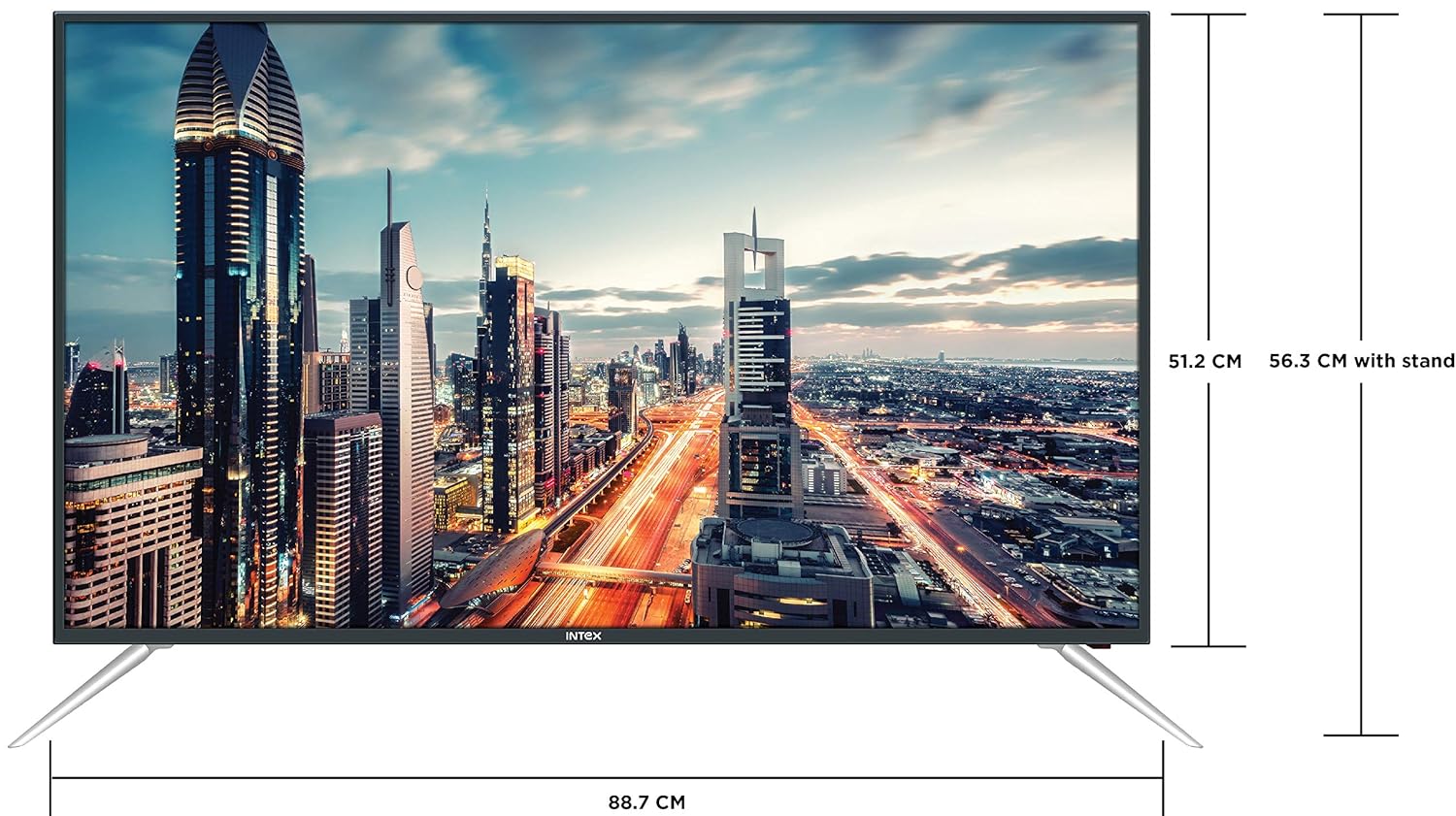
Figure 4.3: Intex SH4004 Smart TV dimensions.
- د سکرین اندازه: 40 انچه (98 سانتي متره)
- عرض: تقریبا 88.7 سانتي متره
- لوړوالی (پرته ولاړ) تقریبا 51.2 سانتي متره
- لوړوالی (د موقف سره): تقریبا 56.3 سانتي متره
- د بسته ابعاد: 102 x 60.5 x 16 سانتي متره
- د توکي وزن: 10.8 کیلو ګرامه
5. ترتیب کول
۴.۱ د تلویزیون سټینډ سره نښلول
- د سکرین د زیان مخنیوي لپاره، تلویزیون په احتیاط سره په نرم او پاک سطح باندې کیږدئ.
- Align the stand pieces with the corresponding slots at the bottom of the TV.
- د چمتو شویو پیچونو په کارولو سره د سټینډ ټوټې خوندي کړئ. ډاډ ترلاسه کړئ چې دوی په کلکه ټینګ شوي دي.
5.2 دیوال نصبول
If you prefer to wall mount your TV, please contact Intex support for professional installation. Refer to the Warranty and Support section for contact details. Ensure you use a compatible VESA wall mount kit (not included) and follow its instructions carefully.
5.3 د نښلولو بریښنا
Connect the power cable to the TV's power input and then plug the other end into a wall outlet.
۲.۳ د بهرنیو وسایلو نښلول
- HDMI: Use an HDMI cable to connect devices like set-top boxes, gaming consoles, or Blu-ray players to the HDMI ports on the TV's rear panel.
- USB: د میډیا پلې بیک لپاره USB پورټ ته USB فلش ډرایو یا بهرني هارډ ډرایو داخل کړئ.
- انتن: Connect your antenna cable to the ANTENNA IN port for receiving broadcast channels.
۳.۴ د ابتدايي تنظیم وزرډ
د لومړي ځل لپاره د بریښنا په فعالولو سره، تلویزیون به تاسو ته د لومړني تنظیم کولو پروسې له لارې لارښوونه وکړي:
- د ژبې انتخاب: خپله غوره ژبه غوره کړئ.
- د شبکې ترتیب: Connect to your Wi-Fi network or use a wired Ethernet connection. Enter your Wi-Fi password if prompted.
- د چینل سکین: تلویزیون به د شته نشراتي چینلونو لپاره سکین وکړي.
- د وخت زون: خپل سیمه ایز وخت زون تنظیم کړئ.
6. عملیاتي لارښوونې
6.1 د ریموټ کنټرول فعالیتونه
The remote control allows you to navigate the TV's features. Common buttons include Power, Volume Up/Down, Channel Up/Down, Input Source, Menu, Navigation (Up/Down/Left/Right), OK, Back, Home, and Smart TV app shortcuts.
۴.۱ د تلویزیون اساسي دندې
- پاور آن/بند: په ریموټ یا تلویزیون کې د بریښنا تڼۍ فشار ورکړئ.
- د حجم سمون: د حجم پورته / ښکته تڼۍ وکاروئ.
- د چینل انتخاب: د چینل پورته/ښکته تڼۍ وکاروئ یا مستقیم د چینل شمیرې دننه کړئ.
- د ننوتلو سرچینه: Press the Input/Source button to switch between HDMI, USB, AV, and TV inputs.
۵.۵ سمارټ تلویزیون ځانګړتیاوې (د انډرایډ عملیاتي سیسټم)
Your Intex SH4004 runs on Android OS, providing access to various smart features:
- د وای فای اتصال: د انټرنیټ لاسرسي لپاره خپل کور شبکې سره وصل شئ.
- د اپلیکیشن پلورنځی: Download and install applications. Supported internet services include Sony, TV Store, YouTube, and Zee5.
- میډیا پلے بیک: ویډیوګانې، موسیقي، او view photos from connected USB devices.
- Motion Sensor Gaming: The TV supports motion sensor gaming. An in-built tennis game is included for entertainment.
- د سمارټ بریښنا سپما: Features designed to optimize energy consumption.
- Eye Safe-T Matrix: Display technology aimed at reducing eye strain.
7. ساتنه
۴.۱ د تلویزیون پاکول
- تل د پاکولو دمخه تلویزیون خلاص کړئ.
- د سکرین او کابینې د نرمولو لپاره یو نرم، وچ، له لینټ څخه پاک ټوکر وکاروئ.
- د پردې د سختو نښو لپاره، په نرمۍ سرهampen the cloth with water or a specialized screen cleaner (ensure it's suitable for LED screens) and wipe gently. Do not spray liquid directly onto the screen.
- د کثافاتو پاکونکو، مومونو او محلولونو کارولو څخه ډډه وکړئ.
7.2 عمومي پاملرنه
- تلویزیون د مستقیم لمر وړانګو او تودوخې سرچینو څخه لرې وساتئ.
- ډاډ ترلاسه کړئ چې د تلویزیون شاوخوا مناسب هوا ورکول.
- که چیرې تلویزیون د اوږدې مودې لپاره ونه کارول شي، نو د بریښنا له شبکې څخه یې خلاص کړئ.
8. ستونزه حل کول
Before contacting support, try these basic troubleshooting steps for common issues.
| ستونزه | احتمالي لامل | د حل لاره |
|---|---|---|
| هیڅ ځواک نشته | Power cable disconnected; Power outlet fault. | Check power cable connection; Try a different outlet; Press power button on TV/remote. |
| انځور نشته، خو غږ شته | د ننوتلو ناسمه سرچینه غوره شوې؛ د بهرني وسیلې ستونزه. | Press the 'Input/Source' button to select the correct input; Check external device connections. |
| غږ نشته، خو انځور شته | غږ خاموش یا ډیر ټیټ دی؛ د بهرني آډیو سیسټم ستونزه. | Unmute volume or increase level; Check audio cables to external sound system. |
| د وای فای اتصال مسلې | Incorrect password; Router too far; Router issue. | Re-enter Wi-Fi password; Move TV closer to router or use Ethernet; Restart router. |
| ریموټ کنټرول کار نه کوي | بیټرۍ ختمې شوې؛ د ریموټ او تلویزیون ترمنځ خنډ. | Replace remote batteries; Remove any obstructions; Point remote directly at TV sensor. |
9. مشخصات
Detailed technical specifications for the Intex SH4004 Smart TV.
| فیچر | مشخصات |
|---|---|
| برانډ | Intex |
| د ماډل نوم | SH4004 |
| ټیکنالوژي ښکاره کول | LED |
| د سکرین اندازه | 40 انچونه (98 سانتي متره) |
| قرارداد | HD چمتو (1366 x 768 پکسلز) |
| د تازه کولو نرخ | 60 Hz |
| Viewزاویه | 178 درجې |
| د اړخ نسبت | 16:9 |
| عملیاتي سیسټم | Android |
| پروسیسر | 1.2GHz Quad core Mali 450 |
| RAM | 512MB |
| داخلي حافظه | 4GB |
| ارتباط | 2 HDMI ports, 1 USB port, Built-In-Wifi, Ethernet |
| د غږ محصول | 20 Watts (2 speakers, Stereo) |
| ملاتړ شوي انټرنیټ خدمتونه | Sony, TV Store, Youtube, Zee5 |
| د نصب کولو ډول | Wall Mount / Table Top |
| د توکي وزن | 10.8 کیلو ګرامه |
10. تضمین او ملاتړ
د تضمین معلومات:
- The product comes with a 1-year manufacturer warranty from the date of purchase.
- An additional 2 years of extended warranty is provided by Intex.
Installation and Support:
For requesting installation, wall mounting, or a product demonstration after delivery, please contact Intex support directly.
Intex Support Contact:
- تلیفون: 0120-4895555
When contacting support, please provide the product's model name (SH4004) and seller's details as mentioned on your invoice.