1. پیژندنه
The ATEN CL3700NW is a 19-inch Ultra Short Depth Wide Screen LCD Console designed for efficient system management in server rooms and data centers. This console integrates an 18.5-inch TFT active matrix display, keyboard, and touchpad into a 1U rack-mountable sliding housing. It supports HDMI and USB connectivity, offering a compact and convenient solution for accessing and controlling connected computers.
2. د محصول ب Featuresې
- ښکاره کول: 18.5-inch TFT active matrix with FHD 1080p (1920 x 1080) resolution.
- Viewزاویه: 178 degrees (horizontal and vertical).
- ارتباط: HDMI and USB interfaces.
- تناسب نسبت: 1000:1 (calculated based on luminance of 350 cd/m²).
- رنګ: تور پای.
- د بریښنا مصرف: 100-240 واټ
- وزن: Approximately 4 kilograms (8.82 pounds).
3. محصول ختم شوview
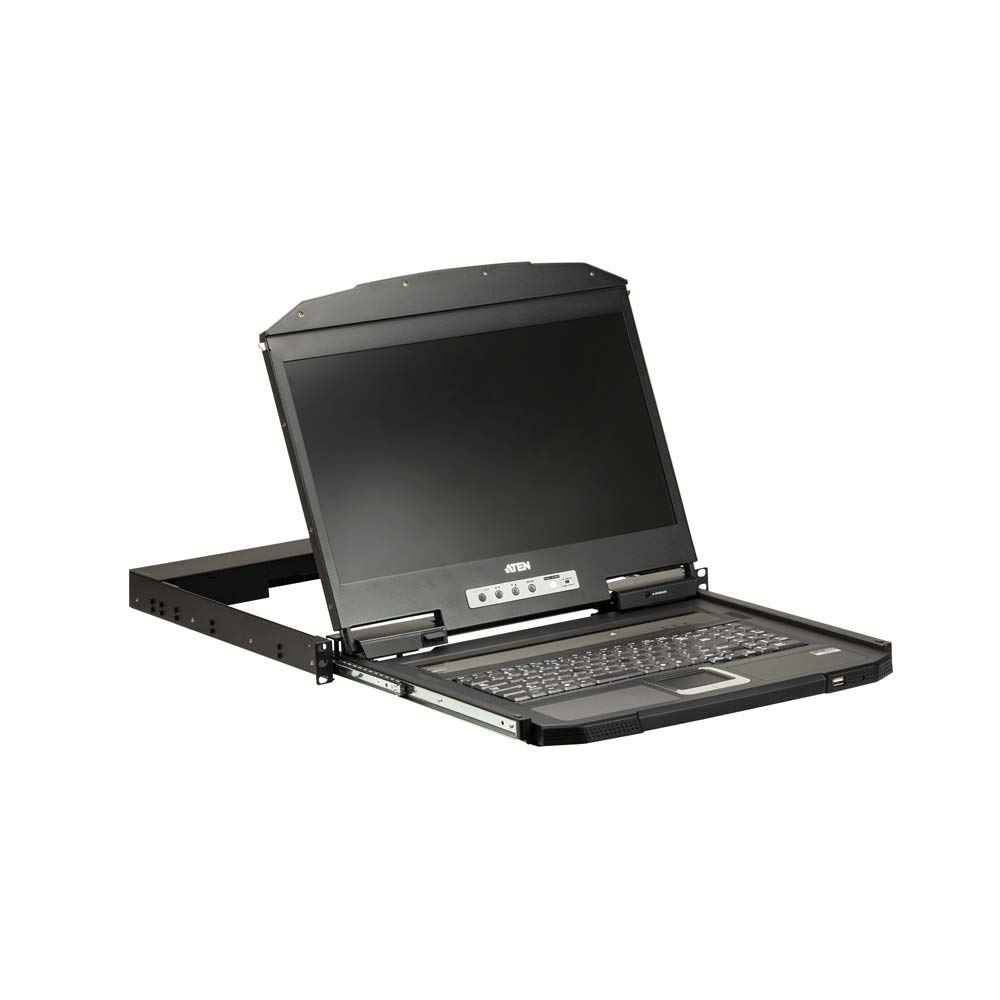
1 شکل: تړل view of the ATEN CL3700NW LCD console screen.

شکل 2: مخکی view of the ATEN CL3700NW LCD console, showing the closed unit.

Figure 3: The ATEN CL3700NW console with the keyboard and touchpad tray extended for use.
4. ترتیب او نصب کول
- د ریک نصبول: Install the CL3700NW console into a standard 1U rack space using the provided mounting kit. Ensure secure fastening to prevent movement.
- د ویډیو کیبل سره نښلول: Connect an HDMI cable from the console's HDMI input port to the HDMI output port of the computer or KVM switch.
- د USB کیبل سره وصل کړئ: Connect a USB cable from the console's USB port to a USB port on the computer or KVM switch. This provides keyboard and mouse functionality.
- بریښنا وصل کړئ: Connect the power adapter to the console's power input and then plug it into an AC power source.
- پاور آن: Press the power button on the console. The LCD display should illuminate, and the system will begin to boot.
5. عملیات
- د کنسول خلاصول: Gently pull the console tray out from the rack until it locks into place. Lift the LCD panel to the desired viewزاویه.
- کیبورډ او ټچ پیډ: Use the integrated keyboard and touchpad for input. Standard keyboard shortcuts and mouse gestures apply.
- د ښودنې تنظیمات تنظیم کول: Use the OSD (On-Screen Display) buttons, typically located near the screen, to adjust brightness, contrast, and other display parameters. Refer to the OSD menu for specific options.
- د کنسول بندول: Lower the LCD panel, then push the console tray back into the rack until it clicks into its locked position.
6. ساتنه
- د سکرین پاکول: د نرم، لینټ پاک ټوکر څخه لږ څه کار واخلئampened with a non-abrasive screen cleaner. Do not spray cleaner directly onto the screen.
- Cleaning the Keyboard/Touchpad: Use a soft brush or compressed air to remove dust and debris. A slightly damp cloth can be used for surface cleaning.
- وینټیلیشن: Ensure that the console's ventilation openings are clear of obstructions to prevent overheating.
- د کیبل مدیریت: Periodically check all connected cables for secure connections and signs of wear.
7. ستونزه حل کول
- نه ښودنه:
- Ensure the console is powered on and the power adapter is securely connected.
- Verify the HDMI cable is correctly connected to both the console and the computer/KVM.
- Check the computer/KVM video output settings.
- No Keyboard/Mouse Input:
- Ensure the USB cable is securely connected to both the console and the computer/KVM.
- Try connecting the USB cable to a different USB port on the computer/KVM.
- Restart the connected computer.
- ټوخی یا تحریف شوی ښودنه:
- د HDMI کیبل د خرابیدو یا خلاصیدو اړیکو لپاره وګورئ.
- Adjust the display resolution and refresh rate on the connected computer to match the console's specifications.
8. مشخصات
| فیچر | مشخصات |
|---|---|
| د ماډل نوم | CL3700NW |
| د سکرین اندازه | ۷۸۷ انچه |
| د سکرین ریزولوشن | ۱۹۲۰ x ۱۰۸۰ (FHD ۱۰۸۰p) |
| د ښودلو ډول | TFT فعال میټریکس |
| Viewزاویه | 178 degrees (Horizontal/Vertical) |
| د تناسب تناسب | 1000:1 |
| د ارتباط ټیکنالوژي | HDMI، USB |
| رنګ | تور |
| د توکي وزن | ۱.۹ پونډه (تقریبا ۰.۸۶ کیلوګرامه) |
| د محصول ابعاد (LxWxH) | 18.78 x 1.69 x 18.92 انچه |
| د بریښنا مصرف | 100-240 واټونه |
| د پروسیسر برانډ | NVIDIA (CPU compatibility) |
9. تضمین او ملاتړ
ATEN is committed to providing reliable products and support. For assistance with your CL3700NW console, please refer to the following information:
- تخنیکي ملاتړ: ATEN offers free technical support. Responses to customer inquiries are typically provided within 4 hours.
- د تضمین خدمت: Extended warranty service and variable value-added service packages are available.
- د ترمیم خدمتونه: Localized repair centers are available for RMA (Return Merchandise Authorization) services.

شکل 4: پایview of ATEN's support services, including localized repair, extended warranty, and free technical support.
For detailed warranty terms and to access support resources, please visit the official ATEN website or contact your local ATEN representative.


