1. پیژندنه
This manual provides detailed instructions for the safe and effective operation of your BSIDE ACM92 DC Current Clamp Meter. Please read this manual thoroughly before use and retain it for future reference.
The BSIDE ACM92 is a versatile digital multimeter designed for measuring DC and AC current, AC/DC voltage, frequency, resistance, and continuity. It also features V-alert non-contact voltage detection and live-wire checking capabilities.
2. د خوندیتوب معلومات
د خوندیتوب مهم احتیاطونه:
- تل د محلي او ملي خوندیتوب کوډونو ته غاړه کیږدئ.
- Do not use the meter if it appears damaged or operates abnormally.
- ډاډ ترلاسه کړئ چې د ازموینې لیډونه په سمه توګه وصل دي او د کارولو دمخه په ښه حالت کې دي.
- د ژوندیو سرکټونو سره د تماس څخه ډډه وکړئ.
- The device conforms to IEC-61010-1, IEC-61010-2-030, IEC-61010-2-032, IEC-61010-2-033 standards.
- ډیر ولtage protection class: CAT III 300V, CAT II 600V, pollution degree II.
DC Current Measurement Specifics:
- The readings for DC current can be influenced by the Earth's magnetic field due to the Hall effect sensor.
- صفر کول: Always zero out the readings multiple times before each DC current measurement.
- لورينه: Once zeroed, hold the meter in the exact same orientation when taking readings. Do not tilt, twist, or rotate it, as changes in orientation can lead to false readings due to varying magnetic field strengths.
- د اندازه کولو موده: For accurate results, measure DC current within 3 seconds after zeroing.
3. د بسته محتويات
ډاډ ترلاسه کړئ چې ټول توکي په کڅوړه کې شتون لري:
- 1 x BSIDE ACM92 Clamp متره
- ۲ x ټیسټ لیډونه (سور او تور)
- 1 x د بار وړلو قضیه
- 1 x سکرو ډرایور
- ۱ x د کارونکي لارښود (دا سند)
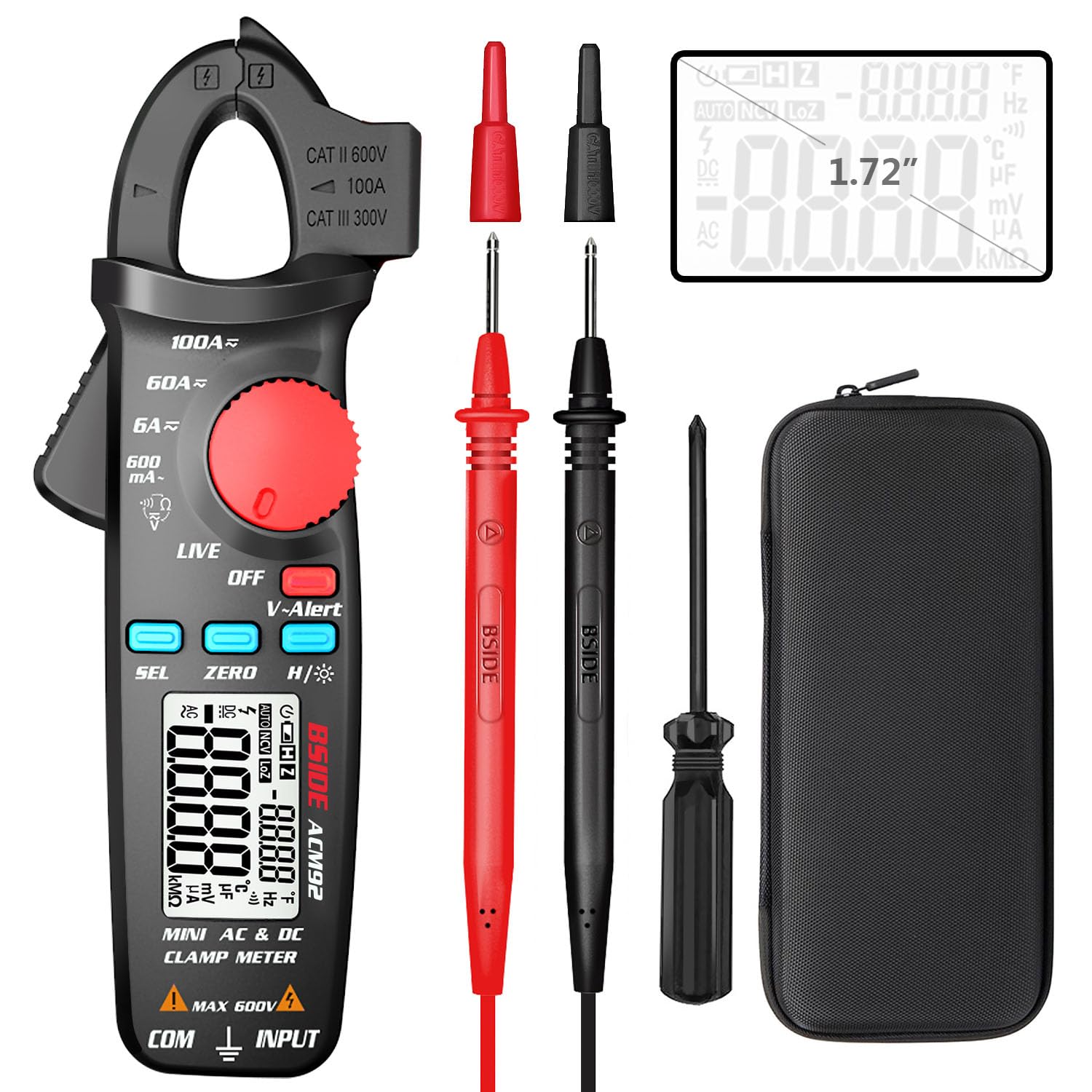
Image: The BSIDE ACM92 Clamp Meter, including the main unit, red and black test leads, a carrying case, and a small screwdriver.
4. د محصول ب Featuresې
- Measures DC Current (minimum 1mA by jaws)
- Measures AC Current (minimum 0.1mA by jaws)
- اندازه کول AC/DC حجمtage
- V-Alert (Non-Contact Voltagای کشف)
- Live-Wire Check
- Measures Frequency, Resistance, and Continuity
- Clamp-on Frequency Function
- د اتومات بریښنا بند
- د ډاټا نیول فنکشن
- Low Battery Indication with Backlight
- Dual Line Display: Shows both AC voltage/current and frequency simultaneously.

Image: The BSIDE ACM92 Clamp Meter displaying both current and frequency on its dual-line screen while clamping a wire.
پروب هولډر
The integrated probe holder on the side of the meter allows for convenient storage of test leads and can assist in hands-free measurements, especially in narrow or tight environments.

Image: The BSIDE ACM92 Clamp Meter with a test probe secured in its side holder, demonstrating convenient portability and readiness for use.
5. ترتیب کول
5.1 د بیټرۍ نصب کول
- ډاډ ترلاسه کړئ چې میټر بند دی.
- د میټر په شا کې د بیټرۍ کڅوړه ومومئ.
- د بیټرۍ د کمپارټمینټ پوښ خلاصولو لپاره چمتو شوي سکریو ډرایور وکاروئ.
- دوه ۱.۵V AAA بیټرۍ دننه کړئ، سم قطبي حالت (+/-) وګورئ.
- د بیټرۍ کمپارټ پوښ بدل کړئ او د سکرو سره یې خوندي کړئ.
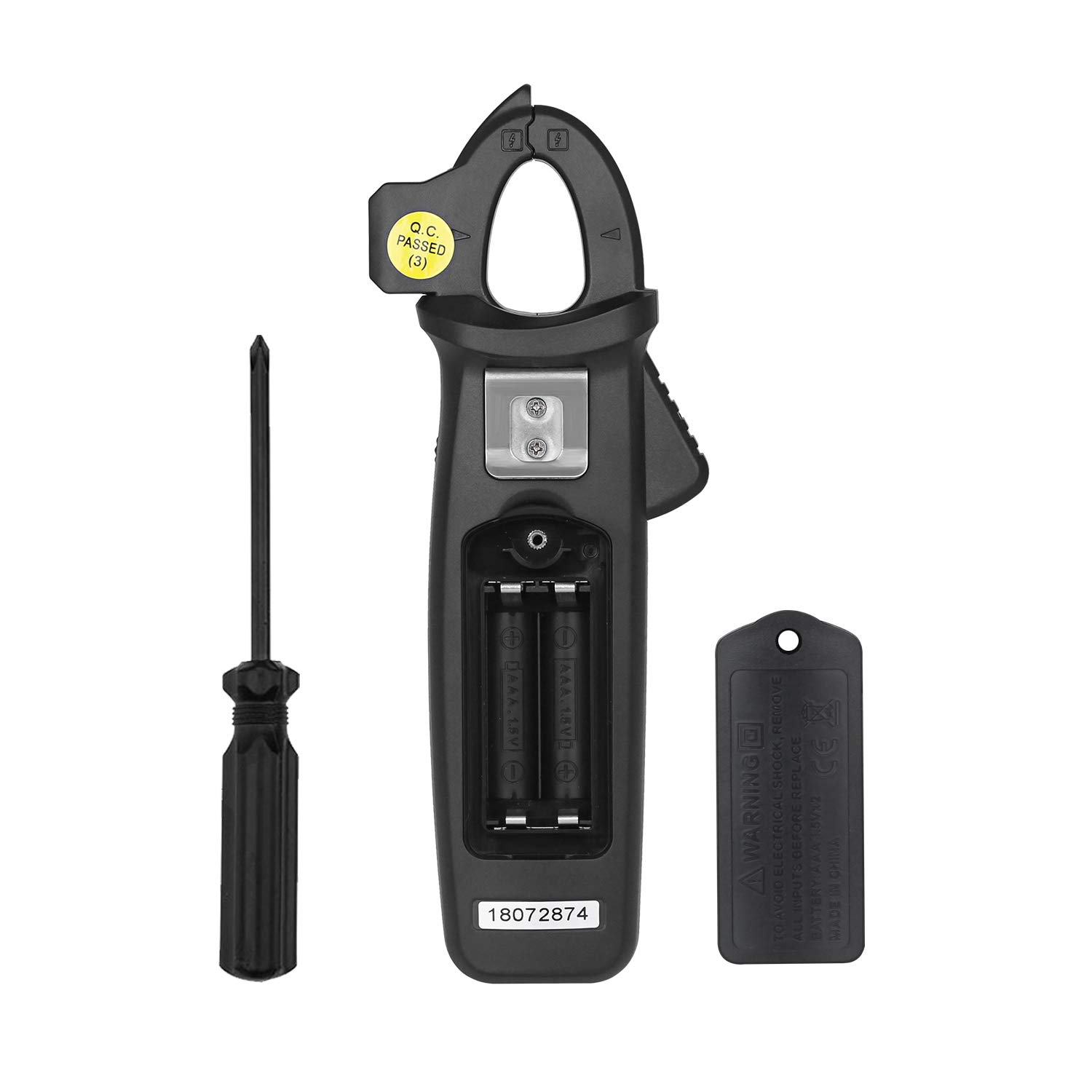
Image: The back of the BSIDE ACM92 Clamp Meter with the battery compartment open, showing the slots for two AAA batteries.
۶.۲ د ټیسټ لیډونو نښلول
د voltage, resistance, frequency (via leads), and continuity measurements, insert the red test lead into the "INPUT" jack and the black test lead into the "COM" jack.
6. عملیاتي لارښوونې
Rotate the central dial to select the desired measurement function.
6.1 DC Current Measurement (by Jaws)
- Turn the dial to the DC current range (e.g., 6A, 60A, 100A).
- Press and hold the "ZERO" button for 2 seconds to zero the display. Repeat this several times.
- cl خلاص کړئamp jaws and enclose only one conductor of the circuit.
- Hold the meter in the same orientation as when zeroed.
- Read the DC current value on the display within 3 seconds for optimal accuracy.
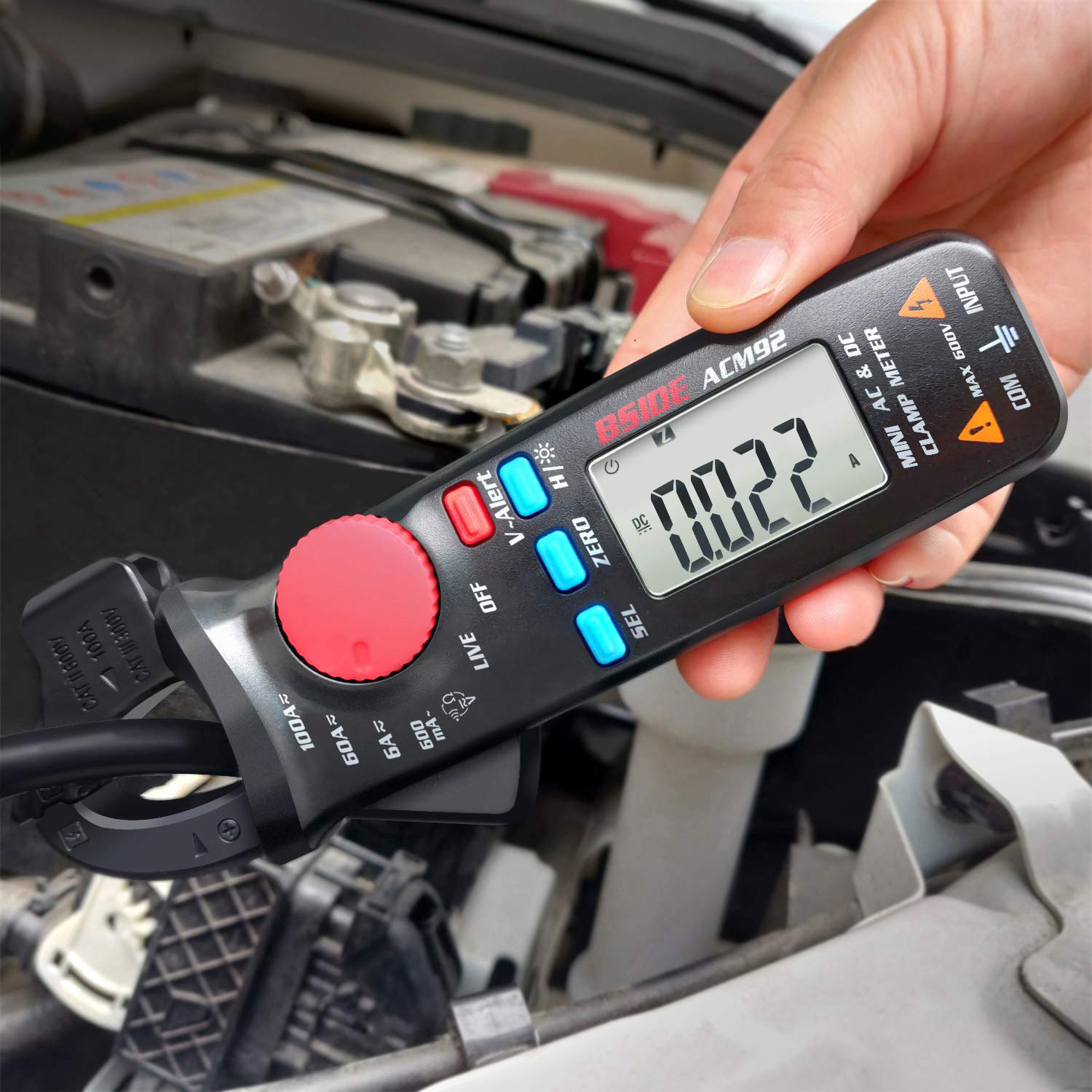
Image: The BSIDE ACM92 Clamp Meter measuring DC current on a car battery cable, showing a reading of 0.022A.
6.2 AC Current Measurement (by Jaws)
- Turn the dial to the AC current range (e.g., 600mA, 6A, 60A, 100A).
- cl خلاص کړئamp jaws and enclose only one conductor of the AC circuit.
- په ښودنه کې د AC اوسني ارزښت ولولئ.

Image: The BSIDE ACM92 Clamp Meter measuring AC current by clamping a single wire within an electrical panel.
6.3 AC/DC Voltage اندازه کول
- Connect the test leads to the "INPUT" and "COM" jacks.
- Turn the dial to the ACV or DCV range.
- Touch the test probes to the circuit points to be measured.
- ټوک ولولئtage ارزښت په نندارتون کې.
6.4 V-Alert (Non-Contact Voltagای کشف)
- Turn the dial to the "V-Alert" position.
- Bring the tip of the clamp د AC حجم ته نږدې میټرtage سرچینه.
- The LCD display will flash, and an alarm buzzer will sound if AC voltage کشف شوی دی.

Image: The BSIDE ACM92 Clamp Meter in V-Alert mode, indicating the detection of non-contact voltage with a flashing display and audible alert.
6.5 Live-Wire Check
- Connect the red test lead to the "INPUT" jack.
- Turn the dial to the "LIVE" position.
- Touch the red probe to the conductor to be tested.
- The meter will indicate if the wire is live.

Image: The BSIDE ACM92 Clamp Meter performing a live wire check using the red test probe on an electrical circuit.
۴.۳.۳ د مقاومت او دوام اندازه کول
- Connect the test leads to the "INPUT" and "COM" jacks.
- Turn the dial to the Resistance/Continuity position.
- For resistance, touch the probes across the component.
- For continuity, touch the probes across the circuit. If resistance is less than 30Ω, the continuity beeper will sound.
6.7 د فریکونسی اندازه کول
Frequency can be measured either by the clamp jaws (for current frequency) or by test leads (for voltage frequency).
- Select the appropriate frequency range using the dial.
- د cl څخه کار واخلئamp jaws for current frequency or test leads for voltage فریکونسي.
- په ښودنه کې د فریکونسۍ ارزښت ولولئ.
6.8 د ډیټا هولډ فعالیت
Press the "H/*" button briefly to hold the current reading on the display. Press it again to release the hold.
6.9 شالید
Press and hold the "H/*" button for 2 seconds to turn the backlight on or off.
7. ساتنه
7.1 پاکول
میټر د اعلان سره پاک کړئamp ټوکر او نرم صابون. د کثافاتو یا محلولونو څخه کار مه اخلئ. ډاډ ترلاسه کړئ چې میټر د ذخیره کولو یا کارولو دمخه وچ دی.
7.2 د بیټرۍ بدلول
When the low battery indicator appears on the display, replace the batteries as described in the "Battery Installation" section (5.1).
7.3 ذخیره کول
If the meter is not used for an extended period, remove the batteries to prevent leakage and store it in the provided carrying case in a cool, dry place.
8. ستونزه حل کول
| ستونزه | احتمالي لامل | د حل لاره |
|---|---|---|
| میټر نه چالانېږي. | مړه یا په غلط ډول نصب شوي بیټرۍ. | د بیټرۍ قطبیت وګورئ یا بیټرۍ بدل کړئ. |
| Inaccurate DC current readings. | Not zeroed correctly; meter orientation changed; external magnetic fields. | Ensure proper zeroing before measurement. Maintain consistent meter orientation. Measure within 3 seconds. |
| AC current reading is zero when clamping a power cord. | Clamping both live and neutral wires simultaneously. | Ensure only a single conductor (live or neutral) is enclosed by the clamp ژامې |
| No reading with test leads. | Test leads not properly connected or damaged. | Verify test lead connection to "INPUT" and "COM" jacks. Check leads for damage. |
9. مشخصات
| اندازه کول | رینج | قرارداد | دقت |
|---|---|---|---|
| ښودل | 6000 شمېرې | ||
| DC اوسنی | 6A/60A/100A | 0.001A/0.01A/0.1A | ±(2.5%+10 counts) |
| AC اوسنی | 600mA / 6A / 60A / 100A | 0.1mA / 0.001A / 0.01A / 0.1A | ±(3.0%+10 counts) for 600mA; ±(2.5%+10 counts) for others |
| DC Voltage | 600V | 0.1V | ±(1.0%+5 counts) |
| AC Voltage | 600V | 0.1V | ±(1.0%+3 counts) |
| مقاومت | 6000Ω | 1Ω | ±(1.0%+3 counts) |
| Frequency (by leads) | 60Hz / 1000،XNUMXHz | 0.1Hz / 1،XNUMXHz | ±(1.5%+5 counts) |
| Frequency (by jaws) | 60Hz / 1000،XNUMXHz | 0.1Hz / 1،XNUMXHz | ±(1.0%+5 counts) |
| دوام | Beeper sounds at < 30Ω | ||
| د ژامې ظرفیت | 20mm | ||
| ځواک | 2 x 1.5V AAA بیټرۍ | ||
| ابعاد | 179 x 67 x 36 mm (7.05 x 2.64 x 1.42 انچه) | ||
| وزن | 137 ګرامه (4.83 اونس) | ||
10. تضمین او ملاتړ
د محصول تضمین او د پیرودونکو ملاتړ په اړه معلومات د چمتو شوي محصول معلوماتو کې شتون نلري. مهرباني وکړئ د محصول بسته بندۍ یا د تولید کونکي چارواکي ته مراجعه وکړئ. website for details on warranty coverage and technical assistance.


