1. پیژندنه
This manual provides essential information for the safe and efficient operation, setup, maintenance, and troubleshooting of the Keba KeTop T50-xxx/67641/06 industrial control panel. The KeTop T50-xxx/67641/06 is designed for robust performance in industrial environments, serving as a human-machine interface (HMI) for various control applications.
مهرباني وکړئ د وسیلې له چلولو دمخه دا لارښود په دقت سره ولولئ ترڅو د سم استعمال ډاډ ترلاسه کړئ او د زیان یا ټپي کیدو مخه ونیسئ.
2. د خوندیتوب معلومات
د شخصي ټپي کیدو یا تجهیزاتو ته د زیان رسولو مخنیوي لپاره تل لاندې خوندیتوب احتیاطي تدابیر په پام کې ونیسئ:
- وړ پرسونل: Installation, operation, and maintenance should only be performed by qualified and authorized personnel.
- د بریښنا قطع کول: تل د هر ډول نصبولو، ساتنې، یا ترمیم کار ترسره کولو دمخه بریښنا قطع کړئ.
- د چاپیریال شرایط: Operate the device within specified environmental limits (temperature, humidity, etc.).
- اضطراري تمځای: Familiarize yourself with the location and operation of the emergency stop button on the device and the connected system.
- د کیبل مدیریت: Ensure all cables are properly routed and secured to prevent tripping hazards or damage.
3. محصول ختم شوview
The Keba KeTop T50-xxx/67641/06 is a robust handheld control panel designed for industrial applications. It features a display screen, various control buttons, and an emergency stop button, all integrated into an ergonomic housing.

شکل 1: مخکی view of the KeTop T50-xxx/67641/06 control panel, showing the display, control buttons, and the attached red connection cable.
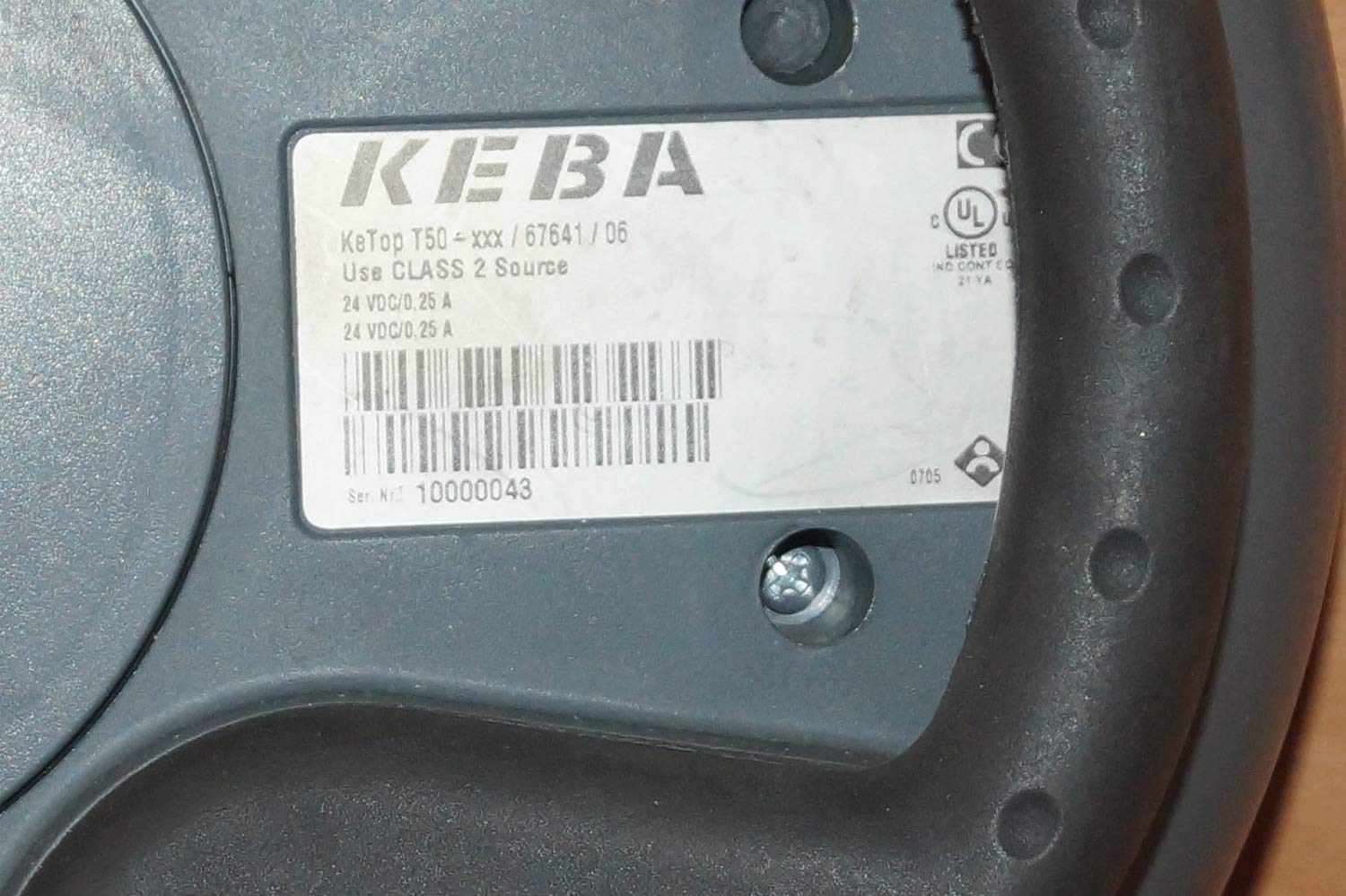
Figure 2: Rear label of the KeTop T50-xxx/67641/06, indicating model details and power requirements.
4. ترتیب او نصب کول
Before connecting the KeTop T50-xxx/67641/06, ensure the host system is powered off and secured.
- وسیله معاینه کړئ: Unpack the control panel and inspect it for any visible damage during transit.
- کیبل سره وصل کړئ: Connect the red multi-pin cable from the KeTop T50-xxx/67641/06 to the corresponding port on your industrial control system. Ensure the connection is secure and properly seated.
- د بریښنا رسول: Verify that the power supply for the control system meets the specifications required by the KeTop T50-xxx/67641/06 (24 VDC/0.25 A).
- ایښودل (اختیاري): If applicable, use the integrated mounting points to secure the panel in a convenient location, or ensure it is placed on a stable surface when not handheld.
- ابتدايي ځواک: Once all connections are secure, power on the host system. The KeTop T50-xxx/67641/06 display should illuminate, indicating successful power-up.
5. عملیاتي لارښوونې
The KeTop T50-xxx/67641/06 serves as an interface for controlling industrial machinery. Specific operations will depend on the programming of the connected system.
- نیویګیشن ښکاره کول: Use the directional buttons (if present) or touch screen (if applicable) to navigate through menus and display information.
- د فعالیت تڼۍ: The various buttons around the display are typically assigned specific functions by the system integrator. Refer to your system's documentation for button assignments.
- اضطراري تمځای: In case of an emergency, press the large red emergency stop button immediately. This will typically halt all connected machine operations. Ensure the button is reset before resuming operations.
- د معلوماتو داخلول: Use the integrated keypad or on-screen keyboard for data entry as required by the application.
- نظر: Pay attention to visual cues on the display and any audible signals from the device or connected system.
6. ساتنه
Regular maintenance ensures the longevity and reliable operation of your KeTop T50-xxx/67641/06.
- پاکول:
- د پاکولو دمخه بریښنا قطع کړئ.
- بهرنۍ سطحې په نرمۍ سره مسح کړئ، دamp ټوکر
- Do not use abrasive cleaners, solvents, or excessive moisture.
- Ensure no liquid enters the device.
- د کیبل معاینه: Periodically inspect the connection cable for signs of wear, cuts, or damage. Replace damaged cables immediately.
- د تڼۍ فعالیت: Regularly test all buttons, including the emergency stop, to ensure they respond correctly.
- ذخیره کول: When not in use, store the device in a clean, dry environment, away from extreme temperatures and direct sunlight.
7. ستونزه حل کول
This section provides solutions to common issues. For more complex problems, contact qualified service personnel.
| ستونزه | احتمالي لامل | د حل لاره |
|---|---|---|
| وسیله فعاله نه ده. | No power from host system; loose cable connection; faulty power supply. | Check host system power; ensure cable is securely connected; verify power supply output. |
| ښودنه خالي ده یا ځلیږي. | Insufficient power; cable issue; internal fault. | Verify power supply; check cable integrity; if problem persists, contact support. |
| تڼۍ بې ځوابه دي. | Software issue on host system; physical button damage. | Restart the host system; inspect buttons for physical damage. |
| Emergency Stop button is stuck. | د تڼۍ میکانیزم ستونزه. | Do not force. Contact qualified service personnel immediately. |
8. مشخصات
| فیچر | تفصیل |
|---|---|
| ماډل | KeTop T50-xxx/67641/06 |
| برانډ | Keba |
| د بریښنا انډول | 24 VDC / 0.25 A (as per device label) |
| ASIN | B07NSF65HM |
| د تولید کونکي حواله | 2186 |
| د لومړي شتون نیټه | د می 10، 2019 |
| د پرزو شتون | معلومات شتون نلري |
9. تضمین او ملاتړ
Information regarding specific warranty terms and conditions for the Keba KeTop T50-xxx/67641/06 is not provided in the product details. Please refer to the original purchase documentation or contact your supplier for warranty details.
For technical support or service inquiries, please contact the manufacturer, Keba, or your authorized distributor. Ensure you have the model number (KeTop T50-xxx/67641/06) and serial number (if applicable) ready when contacting support.


