پیژندنه
Welcome to the Ipega PG-9033 Bluetooth Gamepad user manual. This guide provides detailed instructions for setting up, operating, maintaining, and troubleshooting your new wireless controller. Please read this manual carefully before use to ensure optimal performance and longevity of your device.
محصول پای ته ورسیدview
The Ipega PG-9033 is a versatile Bluetooth gamepad designed for an enhanced gaming experience across multiple platforms, including Android, iOS, and PC. It features an adjustable phone holder, dual analog sticks, a D-pad, and action buttons.

Figure 1: The Ipega PG-9033 Bluetooth Gamepad with a smartphone securely mounted in its adjustable holder, actively displaying a racing game. This illustrates the controller's primary use for mobile gaming.
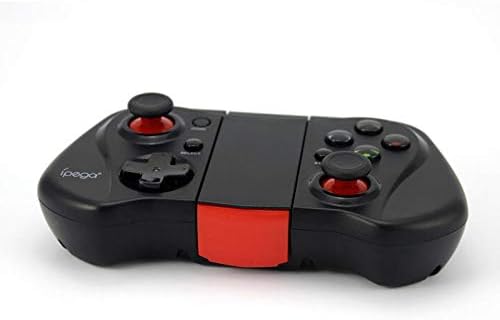
شکل ۳.۲: یوه اړخ view of the Ipega PG-9033 Bluetooth Gamepad, showcasing its ergonomic design and compact form factor when not in use. The red accent on the central hinge is visible.
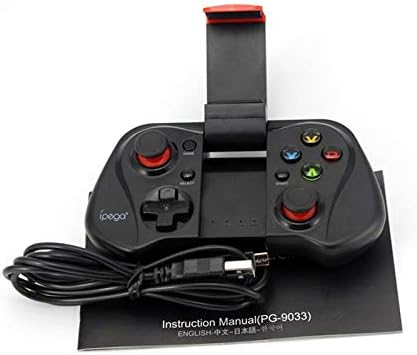
Figure 3: The Ipega PG-9033 Bluetooth Gamepad displayed alongside its USB charging cable and the included instruction manual, which clearly indicates the model number PG-9033.

شکل ۵: شاته برخه view of the Ipega PG-9033 Bluetooth Gamepad, featuring a label with technical details such as "BLUETOOTH CONTROLLER," working voltage, working current, and input specifications.
چمتو کول
د لوبې پیډ چارج کول
Before first use, fully charge the gamepad using the provided USB cable.
- Connect the micro-USB end of the charging cable to the gamepad's charging port.
- Connect the USB-A end to a USB power source (e.g., computer, USB wall adapter).
- The charging indicator light will illuminate. It will typically turn off or change color when fully charged.
د وسیلې سره جوړه کول
The PG-9033 supports different pairing modes for various operating systems.
د Android جوړه کول
- Ensure the gamepad is off.
- فشار ورکړئ او ونیسئ کور تڼۍ او د X button simultaneously until the indicator light flashes rapidly. This puts the gamepad into Android pairing mode.
- په خپل Android وسیله کې، د بلوتوټ ترتیباتو ته لاړ شئ او د شته وسیلو لټون وکړئ.
- Select "PG-9033" from the list to pair. The indicator light will become solid when connected.
iOS Pairing (iCade Mode)
- Ensure the gamepad is off.
- فشار ورکړئ او ونیسئ کور تڼۍ او د B button simultaneously until the indicator light flashes rapidly. This puts the gamepad into iOS iCade pairing mode.
- On your iOS device, go to Bluetooth settings and search for available devices.
- Select "PG-9033" from the list to pair. The indicator light will become solid when connected.
Note: iCade mode has limited game compatibility. For broader iOS compatibility, check specific game requirements.
د کمپیوټر جوړه کول
- Ensure the gamepad is off.
- فشار ورکړئ او ونیسئ کور تڼۍ او د A button simultaneously until the indicator light flashes rapidly. This puts the gamepad into PC pairing mode.
- On your PC, go to Bluetooth settings and search for available devices.
- Select "PG-9033" from the list to pair. The indicator light will become solid when connected.
Note: A Bluetooth adapter may be required for PCs without built-in Bluetooth.
عملیاتي لارښوونې
ستاسو د سمارټ فون سره نښلول
- Gently extend the adjustable phone holder located on the top of the gamepad.
- Carefully place your smartphone into the holder, ensuring it is securely gripped and centered.
- د غوره لپاره زاویه تنظیم کړئ viewing.
Game Mode Selection
The gamepad automatically enters the last used mode upon reconnection. To switch modes, disconnect the gamepad and re-pair using the desired mode's button combination (HOME + X for Android, HOME + B for iOS, HOME + A for PC).
پاور آن/بند
د بریښنا د فعالولو لپاره، فشار ورکړئ کور تڼۍ د بریښنا بندولو لپاره، فشار ورکړئ او ونیسئ کور button for approximately 5 seconds until the indicator light turns off. The gamepad will automatically power off after a period of inactivity.
ساتنه
To ensure the longevity and proper functioning of your Ipega PG-9033 gamepad, follow these maintenance guidelines:
- وسیله وچه وساتئ. د لندبل یا مایعاتو سره د مخ کیدو څخه ډډه وکړئ.
- د لوبې پیډ د نرم، وچ ټوکر سره پاک کړئ. سخت کیمیاوي مواد یا د کثافاتو پاکوونکي مه کاروئ.
- د لوبې پیډ په یخ او وچ ځای کې د مستقیم لمر وړانګو او سختې تودوخې څخه لرې وساتئ.
- د لوبې پیډ د قوي اغیزو سره د غورځولو یا تابع کولو څخه ډډه وکړئ.
- د بیټرۍ روغتیا ساتلو لپاره، حتی که په استعمال کې نه وي، بیټرۍ په منظم ډول چارج کړئ.
Do not attempt to disassemble the gamepad. This will void the warranty and may cause damage.
د ستونزو حل کول
Gamepad not connecting or pairing:
- ډاډ ترلاسه کړئ چې د لوبې پیډ په بشپړ ډول چارج شوی دی.
- ډاډ ترلاسه کړئ چې بلوتوټ ستاسو په وسیله فعال شوی.
- Make sure the gamepad is in the correct pairing mode for your device (Android, iOS, or PC).
- هڅه وکړئ چې وسیله په خپلو بلوتوث ترتیباتو کې هیره کړئ او بیا جوړه کړئ.
- Restart both the gamepad and your device.
تڼۍ یا جویسټیکونه ځواب نه ورکوي:
- وګورئ چې ایا د لوبې پیډ په سمه توګه وصل دی.
- Ensure the game you are playing supports external controllers.
- Some games may require specific controller mapping or settings adjustments within the game.
- If the issue persists, try resetting the gamepad (if a reset button is available, typically a small pinhole).
ځنډ یا د ننوتلو ځنډ:
- Ensure your device is not too far from the gamepad. Maintain a clear line of sight.
- د نورو بېسیم وسیلو مداخله کمه کړئ.
- په خپل وسیله کې غیر ضروري شالید غوښتنلیکونه بند کړئ.
Phone not fitting in holder:
- The holder is designed for most smartphones. Ensure your phone's dimensions are within the supported range.
- د تلیفون هر ډول غټ پوښونه لرې کړئ چې ممکن د خوندي فټ کیدو مخه ونیسي.
مشخصات
| فیچر | تفصیل |
|---|---|
| ماډل | PG-9033 |
| برانډ | Ipega |
| ارتباط | بلوتوث |
| مطابقت | Android, iOS (iCade), PC |
| د کار Voltage | DC 3.7V |
| د کار روان | 30mA |
| ننوتۍ جلدtage | DC 5V 500mA |
| ASIN | B07P52YH7M |
تضمین او ملاتړ
For warranty information and technical support, please refer to the official Ipega webسایټ ته لاړ شئ یا خپل پرچون پلورونکي سره اړیکه ونیسئ. د پیرود ثبوت په توګه د پیرود رسید وساتئ.
دا لارښود یوازې د معلوماتو لپاره دی. مشخصات پرته له خبرتیا د بدلون تابع دي.


