پیژندنه
This manual provides essential information for the safe and efficient operation of your Pioneer VSX-834 7.2-Channel AV Receiver. Please read these instructions thoroughly before use and retain them for future reference.
د خوندیتوب معلومات
خبرداری: دا محصول کولی شي تاسو ته د لیډ په شمول کیمیاوي موادو سره مخ کړي، کوم چې د کالیفورنیا ایالت ته پیژندل کیږي چې د سرطان او زیږون نیمګړتیاوې یا د زیږون نور زیان رسوي. د نورو معلوماتو لپاره لاړ شئ www.P65Warnings.ca.gov.
- دا وسیله باران یا رطوبت ته مه رسوئ.
- د هوا د بهېدو لارې مه بندوئ. د جوړونکي د لارښوونو سره سم نصب کړئ.
- د تودوخې کومې سرچینې ته نږدې مه نصب کړئ لکه ریډیټرونه، د تودوخې راجسترونه، بخارۍ، یا نور وسایل (په شمول ampلایفیر) چې تودوخه تولیدوي.
- یوازې د جوړونکي لخوا مشخص شوي ضمیمې / لوازم وکاروئ.
- ټول خدمتونه وړ خدمت پرسونل ته راجع کړئ.
محصول پای ته ورسیدview
The Pioneer VSX-834 is a 7.2-channel AV receiver designed to deliver an immersive home theater experience. It supports the latest audio and video formats, offering versatile connectivity and advanced sound calibration features.
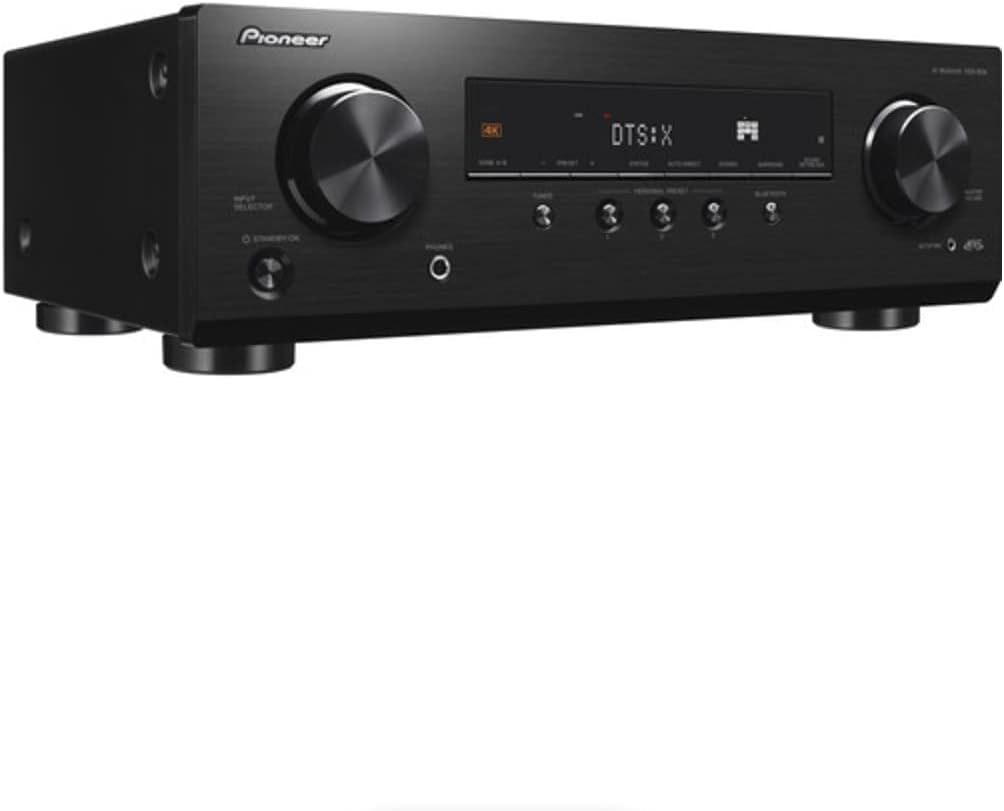
شکل 1: مخکی view of the Pioneer VSX-834 AV Receiver.
کلیدي ځانګړتیاوې
- 4K Video Support: Supports pass-through for HDR10, HLG (Hybrid Log-Gamma), and Dolby Vision signals. All HDMI terminals support 4K (60p/4:4:4/24-bit), wide color gamut (BT.2020), and HDCP 2.2.
- په زړه پوری آډیو: Compatible with Dolby Atmos and DTS:X audio formats, including Dolby Atmos Height Virtualizer and DTS Virtual:X for virtual surround effects without physical height or surround speakers.
- MCACC (Multi-Channel Acoustic Calibration System): Pioneer's proprietary system automatically compensates for differences in speaker size, level, and distance, and equalizes response for optimal acoustic environment.
- Zone B Audio Output: Expand main zone sound by connecting wireless headphones, allowing music playback in another room.
- بلوتوث جوړ شوی: Stream audio wirelessly from compatible devices (Ver. 4.2 + LE) with A2DP/AVRCP profiles and SBC/AAC codecs.
- Personal Preset: Save up to three preferred settings (volume, listening mode) for quick recall via the front panel button or remote control.
چمتو کول
1. خلاصول
Carefully remove the AV Receiver and all accessories from the packaging. The box should contain the AC Receiver, remote control, setup microphone, and FM/AM antennas.
2. ارتباطات
Ensure the receiver is powered off and unplugged before making any connections.

Figure 2: Rear panel connections for the Pioneer VSX-834 AV Receiver.
- د HDMI اړیکې: Connect your source devices (Blu-ray player, game console, streaming device) to the HDMI IN ports. Connect your TV or projector to the HDMI OUT port.
- د سپیکر اړیکې: Connect your speakers to the corresponding terminals on the rear panel. Pay attention to polarity (+/-) for each speaker. The receiver supports 5.1ch or 7.1/5.1.2ch configurations.
- د انتن پیوستون: د راډیو استقبال لپاره چمتو شوي FM او AM انتنونه وصل کړئ.
- ځواک: Once all connections are made, plug the power cord into an AC outlet.
3. Initial Configuration (MCACC)
Use the supplied setup microphone and the MCACC system to automatically calibrate your speakers for optimal sound performance in your listening environment. Follow the on-screen instructions displayed on your connected TV.
عملیاتي لارښوونې
1. بنسټیز عملیات
- پاور آن/بند: فشار ورکړئ ولاړ/آن په مخکینۍ پینل یا ریموټ کنټرول کې تڼۍ.
- د ننوتلو انتخاب: د کارولو ټاکنه knob on the front panel or the input buttons on the remote control to choose your desired source (e.g., BD/DVD, GAME, CBL/SAT).
- د حجم کنټرول: تنظیم کړئ ماسټر ولیم په مخکینۍ تخته کې غوټۍ یا حجم +/- د ریموټ کنټرول تڼۍ.
2. پرمختللي ځانګړتیاوې
- بلوتوث جریان: فشار ورکړئ بلوغ button on the front panel to activate Bluetooth mode. Pair your device with the receiver to stream audio.
- Personal Presets: To save current settings, press and hold the PERSONAL PRESET button for three seconds. To recall, press the button briefly. Up to three presets can be stored.
- زون ب آډیو: Connect wireless headphones to the Zone B audio output terminals to enjoy audio from the main zone in a separate location.
ساتنه
- پاکول: واحد د نرم او وچ ټوکر سره پاک کړئ. د کثافاتو پاکوونکو یا محلولونو څخه کار مه اخلئ.
- وینټیلیشن: Ensure adequate ventilation around the receiver to prevent overheating. Do not block any vents.
- د بریښنا تار: د بریښنا تار په منظم ډول د هر ډول زیان لپاره وګورئ.
د ستونزو حل کول
- ځواک نشته: وګورئ چې د بریښنا تار په خوندي ډول ولګول شوی او آوټ لیټ فعال دی.
- غږ نشته: Verify speaker connections, input selection, and volume level. Ensure the mute function is not active.
- ویډیو نشته: د سرچینې، رسیدونکي او تلویزیون ترمنځ د HDMI کیبل اړیکې وګورئ. په رسیدونکي او تلویزیون دواړو کې د سم ان پټ انتخاب تایید کړئ.
- د بلوتوټ اتصال مسلې: Ensure the receiver is in Bluetooth mode and your device is in pairing mode. Check for interference from other wireless devices.
For more detailed troubleshooting, refer to the comprehensive online manual available on the Pioneer support webسایټ
مشخصات
| د محصول ابعاد | 17.1 x 12.6 x 6.8 انچه |
| د توکي وزن | ۲.۴۵ پونډه |
| د ماډل شمیره | VSX834 |
| د ارتباط ټیکنالوژي | بلوتوث |
| ټول HDMI بندرونه | 5 |
| د آډیو کوډ کول | DTS |
| د آډیو وتلې حالت | محاصره |
| شاوخوا د غږ چینل ترتیب کول | 7.2 چینل |
| جوړونکی | پایینر |
تضمین او ملاتړ
For warranty information and customer support, please visit the official Pioneer website or contact your local dealer. Keep your purchase receipt as proof of purchase for warranty claims.
Online resources and additional support can be found at: د پاینیر ملاتړ


