1. پیژندنه
This manual provides essential information for the safe and efficient operation of your Vonyx CDJ450 DJ Workstation. Please read it thoroughly before using the device and retain it for future reference. The Vonyx CDJ450 is a versatile DJ workstation featuring dual CD/MP3 players, Bluetooth connectivity, two USB ports, and a 2-channel mixer, designed for comprehensive audio control.
2. د خوندیتوب لارښوونې
- ډاډ ترلاسه کړئ چې د بریښنا رسولو حجم سره سمون لريtage په واحد کې مشخص شوی.
- د بریښنا شاک څخه د مخنیوي لپاره واحد باران یا رطوبت ته مه ښکاره کوئ.
- د تودوخې سرچینو ته نږدې یا مستقیم لمر وړانګو کې د واحد له ایښودلو څخه ډډه وکړئ.
- سي مه خلاصوهasinز؛ ټولې خدمتونه وړ پرسونل ته راجع کړئ.
- د هوا د تودوخې د مخنیوي لپاره د وینټیلیشن پرانیستې پاک وساتئ.
- د بریښنا د طوفانونو په وخت کې یا کله چې د اوږدې مودې لپاره نه کارول کیږي، د بریښنا تار قطع کړئ.
3. محصول ختم شوview
The Vonyx CDJ450 integrates two media players and a central mixer into a single unit, offering a compact and powerful solution for DJs.

شکل 3.1: پورته- ښکته view of the Vonyx CDJ450 DJ Workstation, showing the dual players and central mixer controls.

شکل 3.2: زاویه view of the workstation, highlighting its compact design and accessible controls.

شکل 3.3: Close-up of the central mixer and player controls, including jog wheels, pitch faders, and display screens.

شکل 3.4: USB ports located on the top panel, demonstrating USB drive connectivity for MP3 playback.

شکل 3.5: مخکی view with both CD trays open, ready for disc insertion.

شکل 3.6: تفصيلي view of a player's display, showing track information, and associated playback controls.
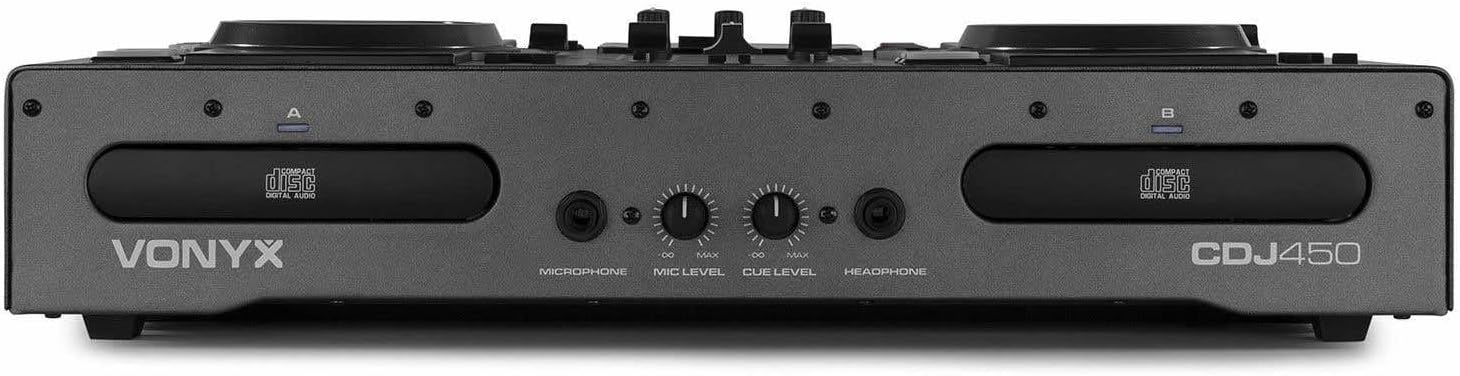
شکل 3.7: Front panel featuring microphone input, microphone level control, cue level, and headphone output.

شکل 3.8: Rear panel showing power input, main outputs (XLR, RCA), record output, USB Type-B port, and switchable Phono/Line inputs.
4. ترتیب کول
- ځای په ځای کول: Place the CDJ450 on a stable, flat surface with adequate ventilation.
- د بریښنا پیوستون: Connect the included power cable to the unit's power input and then to a suitable wall outlet. Ensure the power switch is in the OFF position before connecting.
- آډیو تولید: Connect the main outputs (XLR or RCA) to your amplifier, powered speakers, or PA system.
- بهرني وسایل (اختیاري): Connect external audio sources (e.g., turntables, additional CD players) to the Phono/Line inputs on the rear panel. Use the switches to select the correct input type.
- Microphone/Headphones: Connect your microphone to the XLR-DJ input or the 6.3mm jack on the front. Plug your headphones into the 3.5mm jack on the front.
- د USB اتصال (اختیاري): For computer control or recording, connect a USB Type-B cable from the unit to your computer.
5. عملیاتي لارښوونې
5.1. بریښنا فعال/بند
Flip the power switch on the rear panel to the 'ON' position. The displays will illuminate. To power off, flip the switch back to 'OFF'.
5.2. Media Playback (CD/USB)
- سي ډي غږول: Insert an audio CD or MP3 CD into one of the CD trays. The unit will automatically read the disc.
- USB پلیباک: یو USB فلش ډرایو داخل کړئ چې MP3 ولري files into one of the USB ports on the top panel.
- د سرچینې انتخاب: Use the 'SOURCE' button above each player to switch between CD and USB input.
- د انتخاب ټاکل: Use the navigation buttons or the numeric keypad to select tracks. The integrated folder search function allows quick access to files on USB drives.
- د پلې بیک کنټرول: Use the 'PLAY/PAUSE' and 'CUE' buttons for standard playback control.
5.3. د بلوتوټ ارتباط
- Activate Bluetooth on your smartphone, tablet, or laptop.
- Select 'Bluetooth' as the source on the desired player.
- لټون available devices on your external device and select 'Vonyx CDJ450'.
- Once paired, you can stream audio wirelessly to the workstation.
5.4. Mixer Functions
- چینل فرډر: Adjust the volume level for each player (Channel A and B).
- د EQ کنټرولونه: Use the HIGH, MID, and LOW knobs for each channel to adjust the frequency response.
- Gain/Level: Adjust the input gain for each channel to match levels.
- کراسفادر: Blend between Channel A and Channel B.
- ماسټر محصول: Control the overall volume of the mix.
- مایکروفون: Adjust microphone volume using the 'MIC LEVEL' knob on the front panel.
- هیډفونونه: Use the 'CUE LEVEL' knob to adjust headphone volume and the 'CUE' buttons on each channel to monitor specific sources.
5.5. ځانګړي ځانګړتیاوې
- سکریچ: Use the jog wheels for scratching effects.
- برعکس: Play audio in reverse.
- ماتول: Create a brake effect on playback.
- پچه: Adjust the playback speed and pitch using the pitch faders.
- لوپ: Use 'LOOP IN', 'LOOP OUT', and 'RELOOP' buttons to create and manage seamless loops.
6. ارتباطات
The CDJ450 offers a variety of input and output options:
- پایلې:
- 2 x XLR Speaker Outputs
- 1 x RCA Master Output
- 1 x RCA Recorder Output
- معلومات:
- 2 x Switchable Phono/Line RCA Inputs (for external devices)
- 1 x XLR-DJ Microphone Input
- 1 x 6.3mm Jack Microphone Input (front)
- Digital/Control:
- 2 x USB Ports (Type-A, top panel, for media playback)
- 1 x USB Type-B Port (rear, for computer connection)
- د بلوتوټ ارتباط
- څارنه:
- 1 x 3.5mm Jack Headphone Output (front)
7. ساتنه
- پاکول: د واحد بهرنۍ برخه پاکولو لپاره نرم، وچ ټوکر وکاروئ. د کثافاتو پاکوونکي یا محلولونه مه کاروئ.
- CD Trays: Keep CD trays free of dust and debris. Avoid touching the lens inside the CD player.
- ذخیره کول: کله چې په کارولو کې نه وي، نو دا واحد په یخ او وچ ځای کې وساتئ، د مستقیم لمر وړانګو او سختې تودوخې څخه لرې.
8. ستونزه حل کول
| ستونزه | احتمالي لامل | د حل لاره |
|---|---|---|
| هیڅ ځواک نشته | د برېښنا کیبل قطع شوی؛ د برېښنا سویچ بند دی؛ خراب سوری. | Check power cable connection; ensure power switch is ON; try a different outlet. |
| د غږ تولید نشته | Volume levels too low; incorrect input/output connections; external ampزنده باد. | Increase master/channel volumes; verify all audio connections; ensure external ampلایفیر روان دی. |
| سي ډي نه غږېږي/لوستل کېږي | Disc dirty or scratched; incorrect disc format; source not selected. | Clean or replace disc; ensure disc is audio CD or MP3 CD; select 'CD' source. |
| USB نه لوبه کوي | د USB ډرایو په سمه توګه فارمیټ شوی نه دی؛ ملاتړ نه کیږي file type; source not selected. | ډاډ ترلاسه کړئ چې USB د FAT32 فارمیټ شوی دی؛ یوازې MP3 files supported; select 'USB' source. |
| بلوتوث نه نښلي | Bluetooth not enabled on external device; unit not in pairing mode; interference. | Enable Bluetooth on your device; select 'Bluetooth' source on CDJ450; try re-pairing. |
9. مشخصات
- د موډل نوم: CDJ450
- د ارتباط ټیکنالوژي: بلوتوث، USB
- د ډیسکونو شمیر: 2
- ملاتړ شوي آډیو فارمیټونه: CD, MP3, USB, AAC (Bluetooth)
- د نښلونکي ډول: Bluetooth, Jack 6.35 mm, RCA, USB, XLR 3-pin
- د چینلونو شمیر: 2
- د توکي وزن: 7.8 کیلوګرامه
- مطابقت لرونکي وسایل: هیډفونونه، سپیکرونه
- جوړونکی: وونیکس
10. تضمین او ملاتړ
For warranty information, please refer to the documentation provided at the time of purchase or contact your retailer. For technical support, please visit the official Vonyx webسایټ یا د دوی د پیرودونکي خدماتو څانګې سره اړیکه ونیسئ.