1. پیژندنه
This manual provides essential information for the safe and efficient use of your Lenovo ThinkPad T590 laptop. Please read this manual thoroughly before operating your device to ensure proper setup, operation, and maintenance. Keep this manual for future reference.
2. محصول ختم شوview
The Lenovo ThinkPad T590 is a high-performance laptop designed for productivity. It features a 15.6-inch Full HD IPS display, an Intel Core i5-8265U processor, 8GB of RAM, and a 256GB SSD, running on Windows 10 Pro.
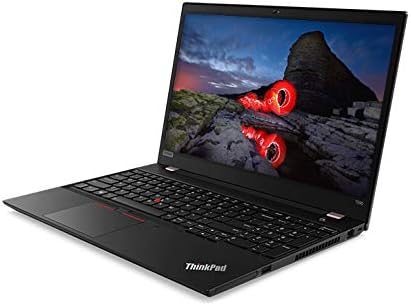
شکل 2.1: زاویه view of the Lenovo ThinkPad T590 laptop, showcasing its sleek design and full-size keyboard.
مهمې برخې:
- ښکاره کول: 15.6-inch Full HD (1920x1080) IPS anti-glare screen.
- پروسیسر: Intel Core i5-8265U Quad-Core (1.60GHz).
- حافظه: ۱۶ جي بي ډي ډي آر ۴ رام.
- ذخیره کول: 256GB PCIe NVMe Solid State Drive (SSD).
- عملیاتي سیسټم: Windows 10 Pro 64-bit.
- ګرافیک: مدغم شوی انټل UHD ګرافیک 620.
- ارتباط: Intel 9560ac Wi-Fi and Bluetooth 5.0.
- Webکیم: Integrated 720p HD camera with microphone and ThinkShutter privacy cover.
- بندرونه: Includes USB 3.0 ports.
- بیټرۍ: 3-cell Li-Polymer battery.
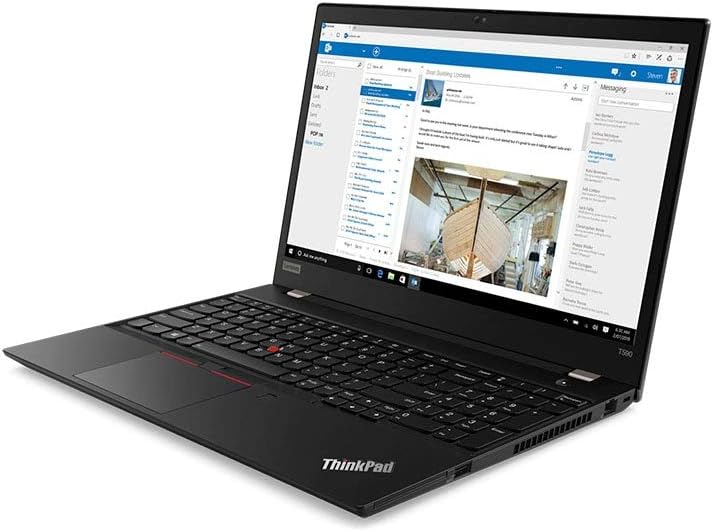
شکل 2.2: The laptop screen displaying an email application, demonstrating its capability for professional use.

شکل 2.3: The laptop screen displaying a video conference call, highlighting its integrated webcam and microphone for communication.

شکل 2.4: شاته view of the Lenovo ThinkPad T590 laptop, showing the hinge and ventilation design.
3. ترتیب کول
3.1 پیک کول
په احتیاط سره لپ ټاپ او ټول لوازم له بسته بندۍ څخه لرې کړئ. ډاډ ترلاسه کړئ چې لاندې توکي شتون لري:
- د لینوو تھنک پیډ T590 لیپ ټاپ
- AC اډاپټر
- د بریښنا تار
- اسناد (د دې لارښود په ګډون)
۲.۲ د بریښنا اډاپټر سره نښلول
- د بریښنا تار د AC اډاپټر سره وصل کړئ.
- Plug the AC adapter into a suitable electrical outlet.
- Connect the AC adapter's output plug to the power input port on your ThinkPad T590.
- بیټرۍ ته اجازه ورکړئ چې لږترلږه د 30 دقیقو لپاره د لومړني کارونې دمخه چارج شي، یا تر هغه چې د بیټرۍ شاخص کافي چارج وښيي.
3.3 ابتدايي پاور آن
Press the power button located on the laptop to turn it on. Follow the on-screen instructions to complete the initial setup of Windows 10 Pro, including language selection, network connection, and user account creation.
4. چلول
4.1 Using the Keyboard and TrackPoint/Touchpad
Your ThinkPad T590 features a full-size keyboard, a TrackPoint pointing device, and a multi-touch touchpad. Refer to the on-screen tutorials in Windows for detailed gestures and customization options.
4.2 د شبکې سره نښلول
د وائی فای شبکې سره د نښلولو لپاره:
- د سیسټم ټری (د سکرین ښکته ښیې کونج) کې د وای فای آیکون باندې کلیک وکړئ.
- له لیست څخه خپل مطلوب شبکه غوره کړئ.
- که غوښتنه وشي، د شبکې امنیتي کیلي (پاسورډ) دننه کړئ.
- "وصل" کلیک وکړئ.
For wired connections, connect an Ethernet cable to the laptop's Ethernet port (if available or via an adapter).
۵.۴ د بهرنیو وسایلو کارول
Connect USB devices such as external hard drives, mice, or keyboards to the available USB 3.0 ports. For display output, use the appropriate video output ports (e.g., HDMI, USB-C with display capabilities) to connect to external monitors or projectors.
5. ساتنه
۶.۱ د لپ ټاپ پاکول
- سکرین: د نرم، لینټ پاک ټوکر څخه په روښانه توګه کار واخلئampپه اوبو یا د سکرین پاکونکي سره مینځل شوی. په مستقیم ډول په سکرین باندې مایع مه سپری کوئ.
- کیبورډ او سيasing: د نرم او وچ ټوکر څخه کار واخلئ. د سختې خاورې لپاره، یو څه damp د نرم صابون محلول سره ټوکر کارول کیدی شي، ډاډ ترلاسه شي چې هیڅ مایع سوریو ته ننوځي.
- وینټیلیشن: Periodically check and clean the ventilation openings to prevent dust buildup, which can affect cooling performance. Use compressed air if necessary.
5.2 د بیټرۍ پاملرنه
د بیټرۍ د عمر د اعظمي کولو لپاره:
- د سخت تودوخې څخه ډډه وکړئ.
- بیټرۍ په مکرر ډول په بشپړه توګه مه خارجوئ.
- که چیرې لیپ ټاپ د اوږدې مودې لپاره ذخیره کوئ، ډاډ ترلاسه کړئ چې بیټرۍ نږدې 50-60٪ چارج شوې ده.
5.3 د سافټویر تازه معلومات
Regularly update your Windows operating system and Lenovo drivers to ensure optimal performance, security, and compatibility. Windows updates can be managed through the Settings app, and Lenovo updates can be found on the official Lenovo support webسایټ
6. ستونزه حل کول
دا برخه هغه عامې ستونزې په ګوته کوي چې تاسو یې د خپل ThinkPad T590 سره مخ کیدی شئ.
۵.۱ لیپ ټاپ نه چالانېږي
- ډاډ ترلاسه کړئ چې د AC اډاپټر په خوندي ډول د لپ ټاپ او د کار کولو بریښنا سایټ دواړو سره وصل دی.
- د بل وسیلې په لګولو سره د بریښنا آوټ لیټ فعال دی تصدیق کړئ.
- که چیرې بیټرۍ په بشپړه توګه وچه شي، نو ممکن د لیپ ټاپ چارج کولو لپاره څو دقیقې وخت ونیسي مخکې لدې چې فعال شي.
6.2 Screen Remains Black or Goes to Sleep Mode Unexpectedly
- Press any key or move the mouse/TrackPoint to wake the system.
- Check power settings in Windows to ensure display sleep timers are set appropriately.
- If the issue persists, try connecting an external monitor to determine if the laptop's display is faulty.
- Perform a hard reset by holding the power button for 10-15 seconds until the laptop powers off, then restart.
۴.۲ د وای فای اتصال مسلې
- ډاډ ترلاسه کړئ چې د وینډوز ترتیباتو کې وای فای فعال شوی دی.
- خپل روټر او موډیم بیا پیل کړئ.
- شبکه هېره کړئ او بیا وصل شئ، پټنوم بیا دننه کړئ.
- Update your wireless adapter drivers from the Lenovo support webسایټ
- If experiencing issues with 5GHz networks, try connecting to a 2.4GHz network if available, or ensure your router's 5GHz channel is not congested.
6.4 BIOS Password Set Out of the Box
If you encounter a BIOS password prompt upon initial setup, this indicates an unusual configuration. Contact Lenovo support immediately for assistance. Do not attempt to guess or bypass the password, as this may lead to data loss or system lockout.
7. مشخصات
| فیچر | مشخصات |
|---|---|
| د ماډل نوم | ThinkPad T590 |
| د توکي ماډل شمیره | 20N4001NUS |
| پروسیسر | Intel Core i5-8265U (1.6 GHz, Quad-Core) |
| RAM | 8 GB DDR4 |
| ذخیره کول | ۵۱۲ جي بي ايس ايس ډي (پي سي آی) |
| ښودل | 15.6 Inches, Full HD (1920 x 1080) IPS |
| ګرافیک | د انټل UHD ګرافیک 620 (مدغم) |
| عملیاتي سیسټم | وینډوز 10 پرو |
| بې سیم ډول | Bluetooth, Intel 9560ac Wi-Fi |
| USB بندرونه | 2 x USB 3.0 بندرونه |
| د توکي وزن | ۱.۹ پونډه (تقریبا ۰.۸۶ کیلوګرامه) |
| د محصول ابعاد (LxWxH) | ۲.۶۴ x ۲.۳۲ x ۲.۷۶ انچه (تقریبا ۶.۷ x ۵.۹ x ۷ سانتي متره) |
| بیټرۍ | 1 Lithium Ion battery (3-cell Li-Polymer) |
| رنګ | تور |
| ځانګړی ځانګړنه | د ګوتو نښې لوستونکی |
8. تضمین او ملاتړ
8.1 د محصول تضمین
Your Lenovo ThinkPad T590 laptop typically comes with a 3-Year Depot Warranty. This warranty covers manufacturing defects and hardware failures under normal use conditions. For specific terms and conditions, please refer to the warranty documentation included with your product or visit the official Lenovo support webسایټ
د ساتنې پراخ شوي پلانونه ممکن په جلا توګه د پیرودلو لپاره هم شتون ولري، چې د معیاري تضمین دورې هاخوا اضافي پوښښ وړاندې کوي.
8.2 تخنیکي ملاتړ
د تخنیکي مرستې، د ډرایور ډاونلوډونو، یا د خدماتو غوښتنو لپاره، مهرباني وکړئ د لینوو رسمي ملاتړ ته مراجعه وکړئ. website. You will need your product's serial number (usually found on a label on the bottom of the laptop or in the BIOS settings) to access specific support resources.
د لینوو ملاتړ Webسایټ: ملاتړ.lenovo.com
When contacting support, be prepared to provide your model number (20N4001NUS) and a detailed description of the issue.