1. پیژندنه
This user manual provides detailed instructions for the safe and efficient operation of your Veidoo 10-inch Android Tablet PC. Please read this manual thoroughly before using the device and retain it for future reference. This tablet is designed for various uses, including communication, entertainment, and productivity.

This image shows the Veidoo 10-inch Android Tablet PC. The front of the tablet displays the home screen with the current time, date, and various application icons such as Camera, Gallery, Settings, and Music. The rear of the tablet, visible behind the front, is black with a subtle textured design and features the rear camera module.
2. د خوندیتوب معلومات
- وسیله د سختې تودوخې، مستقیم لمر وړانګو، یا لوړې رطوبت سره مه مخ کوئ.
- د قوي تاثیراتو سره د وسیله له مینځه وړلو یا تابع کولو څخه ډډه وکړئ.
- یوازې د جوړونکي لخوا تصویب شوي چارجرونه او لوازمات وکاروئ.
- هڅه مه کوئ چې وسیله پخپله جلا کړئ یا ترمیم کړئ. د خدماتو وړ پرسونل ته مراجعه وکړئ.
- وسیله د ماشومانو او څارویو څخه لرې وساتئ.
- وسیله او د هغې بیټرۍ د ځایی مقرراتو سره سم په مسؤلیت سره تصفیه کړئ.
3. محصول ختم شوview
3.1 فزیکي ځانګړتیاوې
Familiarize yourself with the various ports and buttons on your Veidoo Tablet PC:

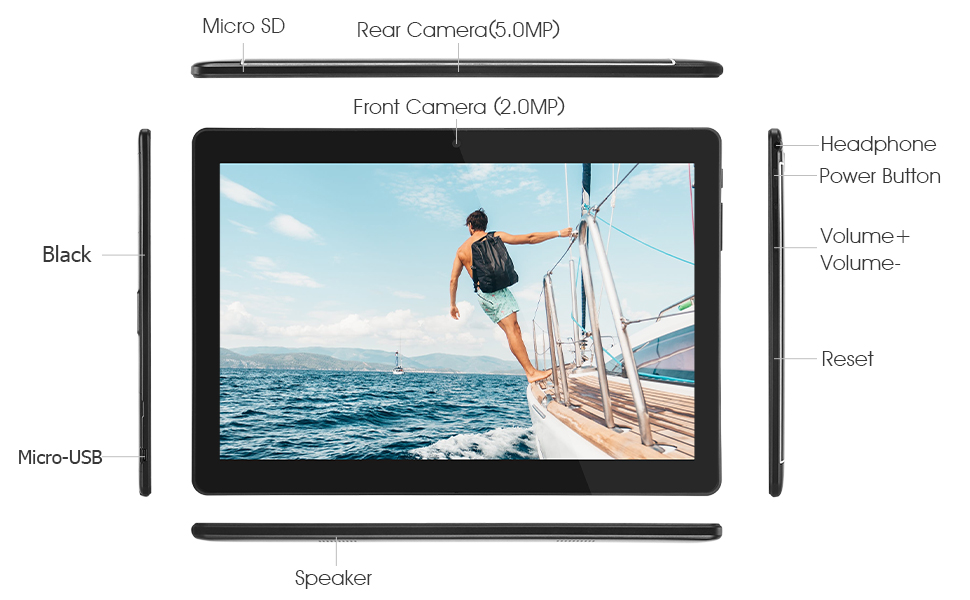
This diagram illustrates the various physical components and ports of the Veidoo 10-inch Android Tablet PC. It clearly labels the Micro SD card slot, the 5.0MP rear camera, the 2.0MP front camera, the headphone jack, the power button, the volume up and down buttons, the reset pinhole, the Micro-USB charging port, and the speaker.
- د مایکرو SD سلاټ: د پراخېدو وړ ذخیره کولو لپاره.
- شاته کیمره (۱۳ میګاپکسله): د عکسونو او ویډیوګانو اخیستلو لپاره.
- مخکینۍ کیمره (۸ میګاپکسله): د ویډیو زنګونو او سیلفیو لپاره.
- د سر غوږ جیک: د 3.5 ملي هیډفونونه وصل کړئ.
- د بریښنا تڼۍ: Press and hold to power on/off, short press to sleep/wake.
- د حجم تڼۍ: د غږ حجم تنظیم کړئ.
- پنهول بیا تنظیم کړئ: Use a thin object to reset the device if unresponsive.
- د مایکرو USB پورټ: د چارج کولو او ډیټا لیږد لپاره.
- سپیکر: د آډیو تولید.
3.2 د بسته محتويات
ډاډ ترلاسه کړئ چې ټول توکي ستاسو د محصول په بکس کې شتون لري:

This image displays the items typically found inside the Veidoo 10-inch Android Tablet PC product box. It includes the tablet itself, a black protective case, a power adapter (wall charger), a USB charging and data cable, a service warranty card, and a leaflet containing frequently asked questions and support information.
- Veidoo 10-inch Android Tablet PC
- د بریښنا اډاپټر
- USB کیبل
- Protective Case (optional, may vary by package)
- د کارونکي لارښود (دا لاسوند)
- د خدمت تضمین کارت
- FAQ Leaflet
4. ترتیب کول
4.1 د بیټرۍ چارج کول
Before first use, fully charge the tablet. Connect the USB cable to the tablet's Micro-USB port and the other end to the power adapter. Plug the adapter into a wall outlet. The charging indicator will show the charging status. A full charge typically takes 3-4 hours.

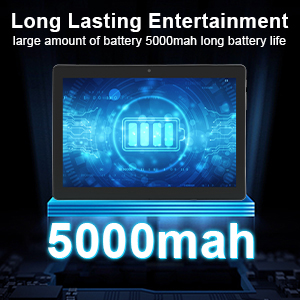
This image focuses on the Veidoo 10-inch Android Tablet PC's battery capacity, prominently displaying a battery icon and '5000mAh'. This signifies the tablet's 5000mAh battery, designed to provide extended usage time for entertainment and productivity.
4.2 بریښنا کول / بندول
- د فعالولو لپاره: Press and hold the Power button until the Veidoo logo appears on the screen.
- د بریښنا بندولو لپاره: د پاور تڼۍ فشار ورکړئ او ونیسئ تر هغه چې یو مینو څرګند شي. "پاور بند کړئ" غوره کړئ او تایید یې کړئ.
- خوب/پاڅېدل: د ټابلیټ د خوب حالت ته د اچولو یا ویښولو لپاره د بریښنا تڼۍ په لنډه توګه فشار ورکړئ.
4.3 Inserting SIM and Micro SD Cards
The tablet supports dual SIM cards for 3G phone calls and a Micro SD card for expandable storage.
- Locate the SIM/SD card slot on the side of the tablet.
- Carefully open the slot cover.
- Insert the SIM card(s) and/or Micro SD card into the designated slots with the gold contacts facing down. Ensure they are correctly seated.
- د سلاټ پوښ په خوندي ډول وتړئ.
This image demonstrates the storage capabilities of the Veidoo 10-inch Android Tablet PC, showing multiple applications and content open. It highlights the device's 16GB internal storage (ROM) and its ability to expand storage up to 32GB via a Micro SD card, allowing for ampد اپلیکیشنونو، عکسونو او ویډیوګانو لپاره ځای.
4.4 ابتدايي ترتیب
د لومړي ځل لپاره د بریښنا په فعالولو سره، ټابلیټ به تاسو ته د لومړني تنظیم کولو پروسې له لارې لارښوونه وکړي:
- د خپلې خوښې ژبه وټاکئ.
- د Wi-Fi شبکې سره وصل شئ.
- د خپل ګوګل حساب سره لاسلیک وکړئ یا یو نوی حساب جوړ کړئ. دا د ګوګل پلی پلورنځي څخه د ایپسونو ډاونلوډ کولو لپاره اړین دی.
- د سکرین لاک (پن، نمونه، پټنوم) تنظیم کړئ.
- Review او شرایط او مقررات ومني.
۳. د ټابلیټ چلول
5.1 بنسټیز نیویګیشن
- ټایپ: یو توکي غوره کړئ یا یو اپلیکیشن خلاص کړئ.
- ټایپ او ونیسئ: د شرایطو مینو ته لاسرسی ومومئ یا عکسونه حرکت وکړئ.
- سوائپ: د سکرینونو یا لیستونو له لارې سکرول وکړئ.
- د زوم کولو لپاره پنچ: په انځورونو کې زوم ان یا آوټ کړئ او web پاڼې
۵.۲ اتصال (وای فای او بلوتوث)
- وای فای: ورتګ ترتیبات > شبکه او انټرنیټ > وای فای. Turn Wi-Fi on, select your network, and enter the password.
- بلوتوث: ورتګ ترتیبات> وصل شوي وسایل> بلوتوث. Turn Bluetooth on, scan for devices, and pair with your desired accessory.
5.3 Making Phone Calls (3G)
With a valid SIM card inserted, you can make and receive 3G phone calls:

This image shows a group of four individuals participating in a video call using the Veidoo 10-inch Android Tablet PC. This illustrates the tablet's capability for video conferencing and its 3G phone call functionality, allowing users to connect with others remotely.
- خلاص کړئ تلیفون اپلیکیشن
- د کیپډ په کارولو سره شمیره ډایل کړئ یا اړیکه غوره کړئ.
- د تلیفون پیل کولو لپاره د زنګ تڼۍ کلیک وکړئ.
5.4 د کیمرې کارول
The tablet is equipped with a front and rear camera for photos and videos.
- خلاص کړئ کیمره اپلیکیشن
- د کیمرې آیکون په کارولو سره د مخکینۍ او شا کیمرې ترمنځ بدل کړئ.
- د عکس اخیستلو یا د ویډیو ثبت پیل/بندولو لپاره د شټر تڼۍ کلیک وکړئ.
۵.۲ د ذخیره کولو اداره کول
تاسو کولی شئ view and manage your tablet's internal and external storage:
- ورتګ ترتیبات> ذخیره کول.
- Here you can see storage usage and free up space by deleting unnecessary fileد ایپسونو غیر نصب کول یا غیر نصب کول.
5.6 Installing and Uninstalling Apps
This image features the Veidoo 10-inch Android Tablet PC showcasing its Android 10 operating system with a multitude of application icons. This highlights that the device is GMS (Google Mobile Services) certified, ensuring access to Google Play Store and other Google services.
- لګول: خلاص کړئ د ګوګل پلی پلورنځي اپلیکیشن، د خپلې خوښې اپلیکیشن لټون وکړئ، او ټایپ کړئ نصب کړئ.
- غیر نصب کول: ورتګ ترتیبات > اطلاقات او خبرتیاوې > ټول اطلاقات وګورئ. Select the app you wish to uninstall and tap غیر نصب کړئ.
6. ساتنه
- پاکول: د سکرین او بدن پاکولو لپاره له نرم، لینټ څخه پاک ټوکر څخه کار واخلئ. د کثافاتو پاکونکو یا محلولونو څخه ډډه وکړئ.
- د سافټویر تازه معلومات: په منظم ډول د سیسټم تازه معلومات وګورئ ترتیبات> سیسټم> د سیسټم تازه کول د غوره فعالیت او امنیت ډاډمن کولو لپاره.
- د بیټرۍ پاملرنه: د بیټرۍ د ژوند اوږدولو لپاره، د بیټرۍ په مکرر ډول د بشپړ چارج کولو څخه ډډه وکړئ. ټابلیټ په یخ او وچ ځای کې وساتئ کله چې د اوږدې مودې لپاره نه کارول کیږي.
- د معلوماتو بیک اپ: Regularly back up important data to a cloud service or external storage device to prevent data loss.
7. ستونزه حل کول
| ستونزه | احتمالي حل |
|---|---|
| ټابلیټ نه چالانیږي | Ensure the battery is charged. Connect the charger and wait a few minutes before attempting to power on. If unresponsive, try pressing the reset pinhole. |
| سکرین بې ځوابه دی | Restart the tablet by holding the Power button. If that doesn't work, use the reset pinhole. Ensure the screen is clean and dry. |
| د وائی فای سره وصل نشو | Check if Wi-Fi is enabled in settings. Ensure the Wi-Fi password is correct. Restart your router and the tablet. |
| اپلیکیشنونه خرابېږي یا کنګل کېږي | Close and reopen the app. Clear the app's cache in امستنې> اطلاقات او خبرتیاوې. Update the app or uninstall and reinstall it. Ensure sufficient storage space. |
| د بیټرۍ ضعیف ژوند | Reduce screen brightness. Close unused apps running in the background. Turn off Wi-Fi, Bluetooth, and GPS when not in use. Limit background data usage. |
8. مشخصات
Key technical specifications for the Veidoo 10-inch Android Tablet PC (Model T10):

This image provides a visual summary of the Veidoo Tablet PC's key specifications. It highlights features such as 1GB RAM, a 2MP front and 5MP rear camera setup, a 10.1-inch IPS HD display with 1280x800 resolution, 16GB of internal storage, Android 10 operating system, Wi-Fi connectivity, a Quad-Core CPU, and dual SIM card support.
| فیچر | تفصیل |
|---|---|
| د ماډل نوم | Touch (T10) |
| د ولاړ سکرین نندارې اندازه | ۷۸۷ انچه |
| د سکرین ریزولوشن | 800 x 1280 (IPS) |
| RAM | 1 GB (DDR3 SDRAM) |
| د هارډ ډرایو / فلش حافظې اندازه | ۲۵۶ جي بي (د مایکرو ایس ډي له لارې تر ۵۱۲ جي بي پورې د غځېدو وړ) |
| بې سیم ډول | 802.11b, 802.11b/g (Wi-Fi), Bluetooth |
| د اوسط بیټرۍ ژوند | 6 Hours (5000mAh Lithium Polymer) |
| د هارډویر پلیټ فارم | Android |
| عملیاتي سیسټم | Android 6.0 Marshmallow (GMS Certified) |
| د توکي وزن | ۲.۴۵ پونډه |
| د محصول ابعاد | 9.49 x 6.69 x 0.37 انچه |
| شاته Webد کیم ریزولوشن | 5 MP |
| مخکی Webد کیم ریزولوشن | 2 MP |
| د پروسیجرونو شمیر | 4 (Quad-Core) |
| د بریښنا سرچینه | د بیټرۍ چلول، د بریښنا تار شوی |
9. تضمین او ملاتړ
Your Veidoo Tablet PC comes with a service warranty. Please refer to the included Service Warranty Card for specific terms and conditions, including warranty period and coverage details.
For technical support, troubleshooting assistance, or warranty claims, please contact Veidoo customer service. Contact information can typically be found on the warranty card or the official Veidoo website. When contacting support, please have your model number (T10) and purchase information ready.
You can also visit the official Veidoo store on Amazon for more information and support resources: Veidoo Store


