1. پیژندنه
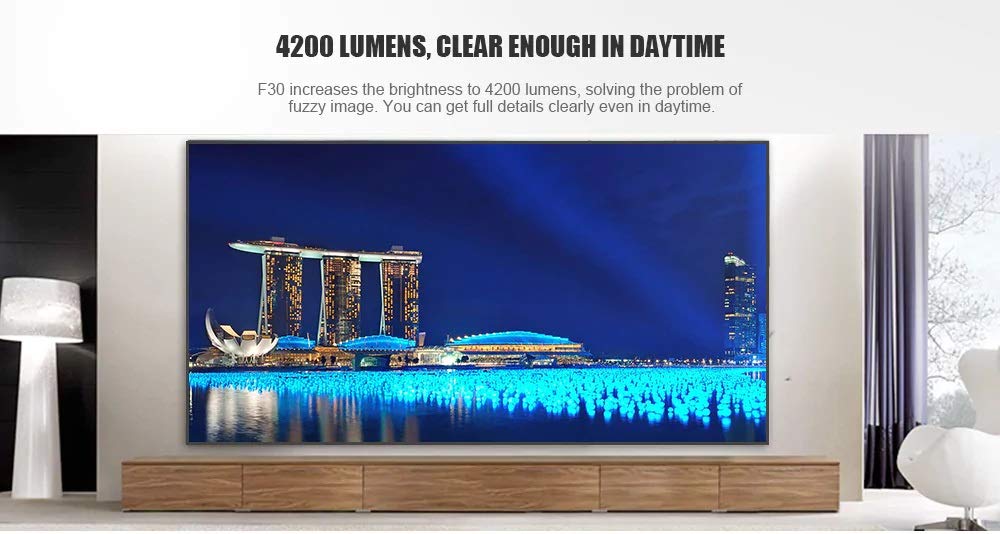
This manual provides essential instructions for the safe and efficient use of your Vivibright F30 Projector. Please read this manual thoroughly before operating the device and retain it for future reference. The Vivibright F30 is a Full HD 1080p LED projector designed for home theater, education, and business presentations, offering 4200 lumens brightness and multiple connectivity options.
2. د خوندیتوب معلومات
- د بریښنا رسول: یوازې ټاکل شوی بریښنا اډاپټر وکاروئ. ډاډ ترلاسه کړئ چې حجمtage د پروجیکټر اړتیاوې پوره کوي.
- وینټیلیشن: د هوا د بهېدو لارې مه بندوئ. د پروجیکټر شاوخوا کافي ځای ډاډمن کړئ ترڅو د هوا جریان مناسب وي ترڅو د ډیر تودوخې مخه ونیول شي.
- تودوخه: پروجکټور lamp generates heat. Avoid touching the lens or vents immediately after use.
- د سترګو ساتنه: کله چې l وي، مستقیم د پروجیکټر لینز ته مه ګورئamp is on. The bright light can cause eye strain or damage.
- ځای په ځای کول: پروجیکټر په یوه مستحکم او هموار سطحه کېږدئ. د لمر په مستقیم رڼا کې، د تودوخې سرچینو ته نږدې، یا د لوړ رطوبت یا دوړو په چاپیریال کې یې له کیښودلو څخه ډډه وکړئ.
- پاکول: د پاکولو دمخه بریښنا قطع کړئ. نرم او وچ ټوکر وکاروئ. مایع یا ایروسول پاکوونکي مه کاروئ.
- خدمت کول: د پروجیکټر د خدمت کولو هڅه مه کوئ. ټولې خدمتونه وړ پرسونل ته راجع کړئ.
3. د بسته محتويات
ډاډ ترلاسه کړئ چې ټول توکي په کڅوړه کې شتون لري:
- Vivibright F30 Projector
- د بریښنا کیبل
- ریموټ کنټرول
- د کارونکي لارښود (دا لاسوند)
- د HDMI کیبل (ممکن د سیمې/پیکج له مخې توپیر ولري)
4. محصول ختم شوview
د پروجیکټر د اجزاو او انٹرفیسونو سره ځان بلد کړئ.
شکل 4.1: مخکی view of the Vivibright F30 Projector, showing the lens and ventilation.

شکل 4.2: اړخ view of the Vivibright F30 Projector, highlighting the various input ports.
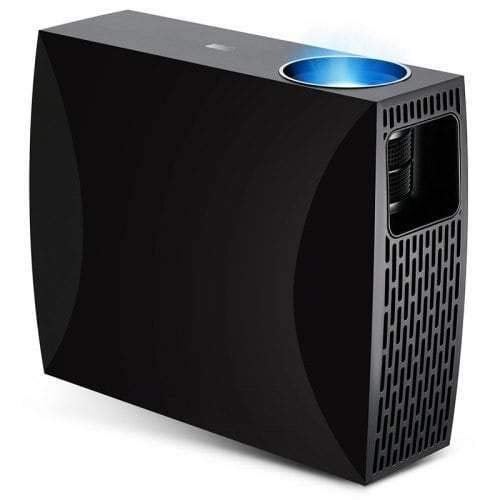
شکل 4.3: Top or rear view of the Vivibright F30 Projector, showing control buttons or additional vents.
4.1. انٹرفیسونه
- HDMI بندرونه: For connecting devices like laptops, gaming consoles, Blu-ray players, and media players.
- VGA پورټ: For connecting older computers or other VGA-compatible devices.
- USB پورټونه: For connecting USB storage devices to play media directly.
- آډیو بهر: د بهرني سپیکرو یا هیډفونونو د نښلولو لپاره.
- د بریښنا ننوتل: د بریښنا کیبل سره نښلولو لپاره.
5. ترتیب کول
5.1. ځای پرځای کول
Position the projector on a stable surface or mount it appropriately. Ensure the projector is perpendicular to the projection screen for optimal image geometry. The projection distance can range from 1.2 to 6.8 meters, depending on the desired screen size.
5.2. د بریښنا پیوستون
- د بریښنا کیبل د پروجیکټر د بریښنا ان پټ پورټ سره وصل کړئ.
- د بریښنا کیبل بله پای په یوه ځمکني بریښنایی پلورنځي کې ولګوئ.
۴.۳. د ننوتنې وسیلو نښلول
Connect your desired source device (e.g., laptop, media player) to the projector using an appropriate cable (HDMI, VGA, USB). Ensure the cable is securely connected to both the projector and the source device.
۴. د تمرکز او کیسټون سمون
- تمرکز: د پروجیکټر لینز باندې د تمرکز حلقه وګرځوئ تر هغه چې انځور په سکرین کې تیز او روښانه ښکاري.
- کیسټون: If the projected image is trapezoidal (wider at the top or bottom), use the keystone correction feature (manual or digital, depending on model) to adjust the image to a rectangular shape.
6. عملیاتي لارښوونې
6.1. بریښنا کول/بندول
- پاور آن: په پروجیکټر یا ریموټ کنټرول کې د بریښنا تڼۍ فشار ورکړئ. د شاخص رڼا به بدله شي، او lamp روښانه کړي.
- بندول: Press the power button again. Confirm shutdown if prompted. Allow the projector to cool down before unplugging it.
6.2. د ننوت سرچینې انتخاب
Press the "Source" button on the remote control or the projector's control panel to cycle through available input sources (HDMI1, HDMI2, VGA, USB). Select the input corresponding to your connected device.
6.3. مینو نیویگیشن
Use the arrow buttons on the remote control or projector to navigate through the on-screen display (OSD) menu. Press "OK" or "Enter" to select an option and "Exit" or "Menu" to go back or close the menu.
۳.۳. د انځور او آډیو ترتیبات
Adjust picture settings such as brightness, contrast, color, and aspect ratio via the OSD menu to optimize image quality. Adjust volume levels for the built-in speaker or connected external audio devices.
7. ساتنه
7.1. د لینز پاکول
د پروجیکټر لینز په نرمۍ سره د نرم، لینټ نه پاک ټوکر سره پاک کړئ چې په ځانګړي ډول د نظري سطحو لپاره ډیزاین شوی. د کثافاتو موادو یا سخت کیمیاوي موادو څخه کار مه اخلئ.
۲. د پروجیکټر بدن پاکول
د پروجیکټر بهرنۍ برخه پاکولو لپاره نرم، وچ ټوکر وکاروئ. د سختو نښو لپاره، یو څه damp cloth can be used, followed by a dry cloth. Ensure no liquid enters the ventilation openings.
7.3. ایلamp ژوند
The Vivibright F30 Projector utilizes an LED lamp with an estimated lifespan of up to 50,000 hours, requiring no regular replacement under normal usage conditions.
8. ستونزه حل کول
| ستونزه | احتمالي لامل | د حل لاره |
|---|---|---|
| هیڅ عکس ندی ښودل شوی |
|
|
| انځور غلی دی |
|
|
| Image is trapezoidal (keystone effect) |
|
|
| غږ نشته |
|
|
| پروجیکټر ډیر ګرمیږي یا بندیږي |
|
|
9. مشخصات
| فیچر | تفصیل |
|---|---|
| برانډ | Vivibright |
| ماډل | F30 |
| اصلي حل | 1920 x 1080 (بشپړ HD) |
| ملاتړ شوی حل | تر 4K پورې |
| روښانتیا | 4200 Lumens (LED Luminous) |
| د تناسب تناسب | 2200:1 |
| ټیکنالوژي ښکاره کول | LCD |
| Lamp ډول | LED |
| Lamp ژوند | تر 50,000 ساعتونو پورې |
| د پروجیکشن فاصله | له 1.2 څخه تر 6.8 مترو پورې |
| د شور کچه | ۴۵ ډیسیبلونه |
| ارتباط | HDMI، VGA، USB |
| ځانګړي ځانګړتیاوې | Portable, Built-in Speaker |
| د توکي وزن | 3 کیلو ګرامه |
| د نصب کولو ډول | د میز ټاپ غر |
10. تضمین او ملاتړ
10.1. د تضمین معلومات
The Vivibright F30 Projector comes with a 1 کلن تضمین د پیرود نیټې څخه. دا تضمین د عادي استعمال لاندې د تولید نیمګړتیاوې او نیمګړتیاوې پوښي. مهرباني وکړئ د تضمین ادعاوو لپاره د پیرود ثبوت وساتئ.
تضمین د ناوړه ګټې اخیستنې، حادثو، غیر مجاز ترمیم، یا عادي اغوستلو او اوښکو له امله رامینځته شوي زیانونه نه پوښي.
10.2. د پیرودونکي ملاتړ
For technical assistance, warranty claims, or further inquiries, please contact Vivibright customer support through their official website or the contact information provided with your purchase documentation. When contacting support, please have your product model (F30) and purchase details ready.


