1. پیژندنه
This manual provides essential instructions for the installation, operation, and maintenance of your FSP iFP600 Uninterruptible Power Supply (UPS). Please read this manual thoroughly before installing or operating the unit to ensure proper function and safety. The FSP iFP600 is designed to provide reliable power backup and surge protection for your electronic devices.

انځور 1.1: مخکی view of the FSP iFP600 UPS, showcasing its compact design and integrated LCD display.
2. د خوندیتوب لارښوونې
Please adhere to these important safety guidelines during installation, operation, and maintenance of the UPS:
- د UPS سي مه خلاصوئasinج. دننه د کارونکي لپاره د خدمت وړ برخې نشته. ټولې خدمتونه وړ خدماتو پرسونل ته راجع کړئ.
- Do not connect appliances that could overload the UPS, such as laser printers, vacuum cleaners, or heaters.
- ډاډ ترلاسه کړئ چې UPS د ځمکې لاندې AC بریښنا سایټ سره وصل دی.
- Avoid placing the UPS in direct sunlight, near heat sources, or in environments with excessive dust, humidity, or corrosive substances.
- Position the UPS in a well-ventilated area to prevent overheating.
- In case of fire, use a dry chemical extinguisher. Water can be hazardous.
- The battery inside the UPS is not user-replaceable. Battery replacement should only be performed by qualified personnel.
3. محصول ختم شوview
The FSP iFP600 UPS provides reliable power protection for your critical electronics. It features a compact design and an intuitive LCD display for monitoring status.
3.1 د بسته محتويات
د بسته بندۍ پرانستلو سره، مهرباني وکړئ تصدیق کړئ چې ټولې برخې شتون لري او زیانمن شوي ندي:
- FSP iFP600 UPS Unit
- د کارونکي لارښود (دا لاسوند)
- د بریښنا تار
- د USB مخابراتو کیبل
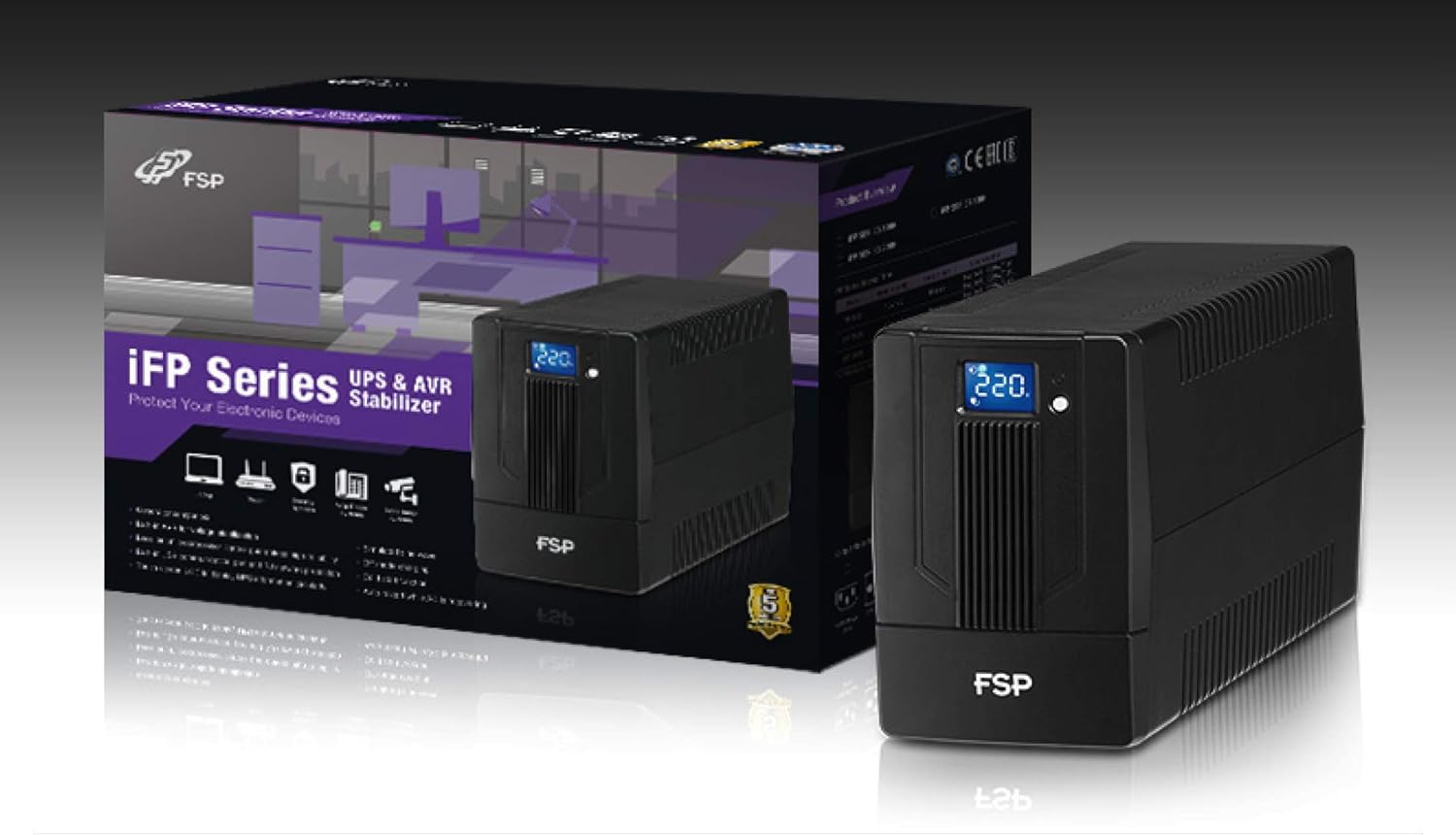
Image 3.1: The FSP iFP600 UPS shown alongside its retail packaging, illustrating the product's presentation.
۳.۲ د شا پینل اجزا
Familiarize yourself with the connections on the rear panel of the UPS:

انځور ۲: تفصیلي view of the FSP iFP600 UPS rear panel, highlighting connection points.
- دکانونه: Two SCHUKO type outlets for connecting protected equipment.
- د AC داخلول: Connects the UPS to the main utility power.
- فیوز/ماتونکی: د UPS لپاره د اوورکرنټ محافظت.
- د USB اړیکه: Port for connecting to a computer for monitoring and management.
- Combo RJ11/RJ45 Surge Protection: د ټیلیفون / شبکې لاینونو لپاره د سرج محافظت چمتو کوي.
4. ترتیب او نصب کول
Follow these steps to set up your FSP iFP600 UPS:
- بسته بندي کول: UPS په احتیاط سره د هغې له بسته بندۍ څخه لرې کړئ. د بار وړلو کوم زیان لپاره معاینه کړئ.
- ځای په ځای کول: Place the UPS on a flat, stable surface in a clean, cool, and well-ventilated area. Ensure adequate clearance around the unit for airflow.
- ابتدايي چارج کول: Connect the UPS to a standard grounded AC outlet using the provided power cord. Allow the unit to charge for at least 4-6 hours before initial use to ensure optimal battery performance. The UPS will charge whether it is turned on or off.
- د نښلولو وسایل: Plug your computer, monitor, and other critical electronic devices into the UPS outlets (A). Do not connect surge suppressors or power strips to the UPS outlets.
- د USB مخابرات (اختیاري): Connect the USB cable from the UPS USB port (D) to your computer's USB port to enable power management software features (software not included, typically downloaded from manufacturer's webسایټ).
- RJ11/RJ45 Protection (Optional): For surge protection of your telephone or network line, connect the incoming line to the 'IN' port of the Combo RJ11/RJ45 (E) and connect the 'OUT' port to your device.
5. عملیاتي لارښوونې
5.1 بریښنا کول / بندول
- د فعالولو لپاره: د مخکینۍ پینل د بریښنا تڼۍ د نږدې 2 ثانیو لپاره فشار ورکړئ او ونیسئ تر هغه چې تاسو بیپ واورئ او LCD ډسپلې روښانه شي.
- د بریښنا بندولو لپاره: د بریښنا تڼۍ د نږدې 2 ثانیو لپاره فشار ورکړئ او ونیسئ تر هغه چې تاسو بیپ واورئ او LCD ډسپلې بند شي.
۳.۳ د LCD ښودنې معلومات
The FSP iFP600 features an LCD display that provides real-time status information. The display is touch-sensitive for navigating information.

Image 5.1: The LCD display of the FSP iFP600 UPS, indicating voltage output and its touch-screen functionality.
د LCD ښودنه معمولا ښیې:
- ننوتۍ جلدtage
- د محصول Voltage
- د بیټرۍ چارج کچه
- د بار کچه
- Operating Mode (e.g., AC mode, Battery mode)
- Warning/Fault Indicators
5.3 Battery Mode Operation
When the utility power fails or fluctuates outside acceptable limits, the UPS will automatically switch to battery mode. During battery mode, the UPS will provide power to connected equipment from its internal battery. An audible alarm will sound to indicate battery operation.
6. ساتنه
Proper maintenance ensures the longevity and reliability of your UPS.
- پاکول: د UPS بهرنۍ برخه پاکولو لپاره نرم، وچ ټوکر وکاروئ. د مایع یا ایروسول پاکوونکو څخه کار مه اخلئ.
- د بیټرۍ پاملرنه: To maximize battery life, ensure the UPS is connected to AC power and fully charged. If the UPS is stored for an extended period, recharge it every three months to prevent battery degradation.
- د بیټرۍ بدلول: The internal battery (12V / 7Ah x1) is not user-serviceable. Battery replacement should only be performed by FSP-certified service personnel or a qualified technician. Incorrect battery replacement can pose a risk of explosion or injury.
- ذخیره کول: Store the UPS in a cool, dry place with adequate ventilation. Ensure the battery is fully charged before storage.
7. ستونزه حل کول
Refer to the following table for common issues and their solutions. If the problem persists, contact FSP support.
| علامه | د اوریدو وړ الارم | احتمالي لامل | د حل لاره |
|---|---|---|---|
| UPS operating on battery power | هره 10 ثانیه کې بیپونه کیږي | Utility power failure or fluctuation | Save work and shut down equipment if power outage is prolonged. UPS will return to AC mode when power is restored. |
| د ټیټ بیټرۍ خبرداری | هره ثانیه غږیږي | د بیټرۍ چارج خورا ټیټ دی | Immediately save work and shut down connected equipment. |
| د اوورلوډ حالت | په هره 0.5 ثانیه کې بیپ | وصل شوي تجهیزات د UPS ظرفیت څخه ډیر دي | Disconnect non-essential equipment until the alarm stops. Ensure total load is within UPS capacity. |
| د UPS تېروتنه | په دوامداره توګه غږ کول | داخلي نیمګړتیاوې او نیمګړتیاوې | Turn off the UPS and disconnect it from the AC outlet. Contact FSP technical support. |
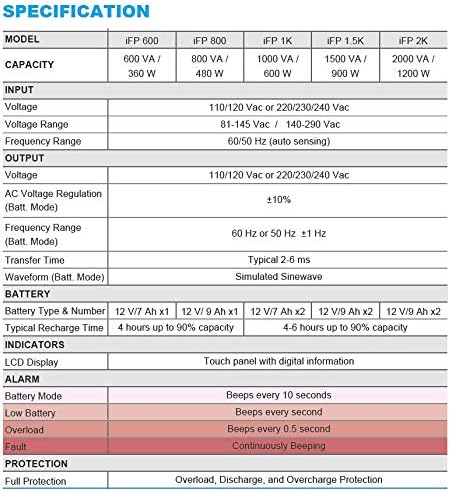
Image 7.1: Excerpt from the FSP iFP series specification table, detailing alarm indicators and their meanings.
8. مشخصات
Detailed technical specifications for the FSP iFP600 UPS:
| فیچر | مشخصات |
|---|---|
| ماډل | iFP 600 |
| ظرفیت | 600 VA / 360 W |
| ننوتۍ جلدtage | 110/120 Vac or 220/230/240 Vac |
| ننوتۍ جلدtage حد | 81-145 Vac / 140-290 Vac |
| د ننوتلو فریکونسی رینج | 60/50 Hz (آټو سینسنگ) |
| د محصول Voltage | 110/120 Vac or 220/230/240 Vac |
| AC Voltage مقررات (د بټ حالت) | ±10% |
| Output Frequency Range (Batt. Mode) | 60 Hz or 50 Hz ±1 Hz |
| د لیږد وخت | معمول 2-6 ms |
| څپې (بټ. حالت) | سمول شوی سینویو |
| د بیټرۍ ډول او شمیره | 12V / 7Ah x1 |
| د عادي ریچارج وخت | تر ۹۰٪ ظرفیت پورې ۴ ساعته |
| شاخصونه | LCD Display (Touch panel with digital information) |
| ساتنه | Overload, Discharge, and Overcharge Protection |
| د توکي وزن | ۶ پونډه (۳ کیلو ګرامه) |
| د محصول ابعاد (LxWxH) | 11.81 x 3.98 x 5.59 انچه |
| رنګ | تور |
| مواد | فلزي |
9. تضمین او ملاتړ
FSP products are designed for reliability and performance. For warranty information, please refer to the warranty card included with your product or visit the official FSP website. For technical support, troubleshooting assistance, or service inquiries, please contact FSP customer service through their official channels.
تاسو کولی شئ په دې اړه نور معلومات او ملاتړ سرچینې ومومئ FSP Store on Amazon.


