1. پیژندنه
This manual provides detailed instructions for the setup, operation, and maintenance of your Tera Wireless Barcode Scanner, Model 8541733886. Please read this manual thoroughly before using the device to ensure proper functionality and to prevent damage.
The Tera Wireless Barcode Scanner offers versatile connectivity and efficient scanning capabilities for various barcode types, both printed and digital.
2. محصول ختم شوview
2.1 اجزا
په کڅوړه کې عموما شامل دي:
- Tera Wireless Barcode Scanner
- Hands-Free Stand
- 2.4GHz بې سیم USB ډونګل
- د USB چارج کول / ډیټا کیبل
- د لارښود لارښود (دا سند)

Image: Tera Wireless Barcode Scanner, showing the scanner unit, flexible stand, 2.4GHz USB dongle, and USB cable.
2.2 کلیدي ځانګړتیاوې
- د اتصال ۳ طریقې: Supports Bluetooth, 2.4GHz wireless, and USB 2.0 wired connections.
- پراخه مطابقت: Works with POS systems, iOS, Android, Windows, Mac OS, and Linux. Supports Bluetooth HID, SPP, and BLE protocols.
- ګړندی او دقیق سکین کول: Equipped with an ARM32Bit Cortex CPU and a Japan-manufactured scanner head, achieving decoding speeds up to 500 scans per second.
- Dual Upload Modes:
- د فوري اپلوډ حالت: Barcodes are transmitted to your device immediately upon scanning.
- Offline Storage Mode: Stores up to 50,000 barcodes internally when out of range, allowing for later upload.
- Multi-Language Barcode Support: Capable of scanning barcodes in English, Spanish, German, French, Italian, and Japanese. Ensure your keyboard language matches the selected language for correct input.
- Versatile Barcode Symbologies:
- 1D: UPC-A, UPC-E, EAN-8, EAN-13, Code 128, Code 39, Code 93, Code 11, Interleaved 2 of 5, Matrix 2 of 5, Standard 2 of 5, Coda bar, MSI Plessey, RSS, etc.
- 2D: QR Code, Data Matrix, PDF417, Aztec code, Maxicode, etc.
- پایښت: Designed to withstand impacts from drops of up to 1.5 meters (5 feet) onto concrete.
- د بیټرۍ اوږد ژوند: Built-in 2200mAh battery supports approximately 57,000 scans on a full charge, with up to 15 days of standby time.
3. ترتیب کول
۴.۲ د سکینر چارج کول
د لومړي ځل کارولو دمخه، سکینر په بشپړه توګه چارج کړئ. د USB چارج کولو کیبل د سکینر د چارج کولو پورټ او د USB بریښنا سرچینې سره وصل کړئ (د مثال په توګه، د کمپیوټر USB پورټ، د USB دیوال اډاپټر). د شاخص څراغ به د چارج کولو حالت وښيي.

Image: Illustration showing the scanner's 2200mAh battery capacity and its ability to withstand a 1.5-meter drop.
3.2 د پیوستون طریقې
سکینر د اتصال درې طریقې ملاتړ کوي:

Image: Visual representation of the three connection modes: Bluetooth, 2.4G Wireless via USB dongle, and USB Wired connection.
3.2.1 USB Wired Mode (Plug & Play)
- د ورکړل شوي USB کیبل په کارولو سره سکینر مستقیم خپل کمپیوټر سره وصل کړئ.
- The computer will typically recognize the device automatically without requiring driver installation.
- سکینر د کارونې لپاره چمتو دی.

Image: The scanner connected to a laptop, illustrating its plug-and-play functionality and compatibility with various operating systems including Windows, Mac OS, Linux, and Android.
۳.۱.۲ ۲.۴GHz بېسیم حالت
- Insert the 2.4GHz USB dongle into an available USB port on your computer or device.
- Turn on the barcode scanner. It should automatically pair with the dongle.
- A successful connection is usually indicated by a specific sound or light on the scanner.
3.2.3 بلوتوث حالت
- Ensure your device (smartphone, tablet, computer) has Bluetooth enabled.
- Put the scanner into Bluetooth pairing mode (refer to the scanner's quick start guide for specific instructions, usually by scanning a special barcode).
- On your device, search for available Bluetooth devices and select "Tera Barcode Scanner" (or similar name).
- که غوښتنه وشي نو جوړه تایید کړئ.
یادونه: Wireless range varies. Indoors with obstacles, Bluetooth range is approximately 33ft, and 2.4GHz wireless is approximately 98ft. Outdoors in barrier-free environments, Bluetooth range is approximately 65ft, and 2.4GHz wireless is approximately 328ft.
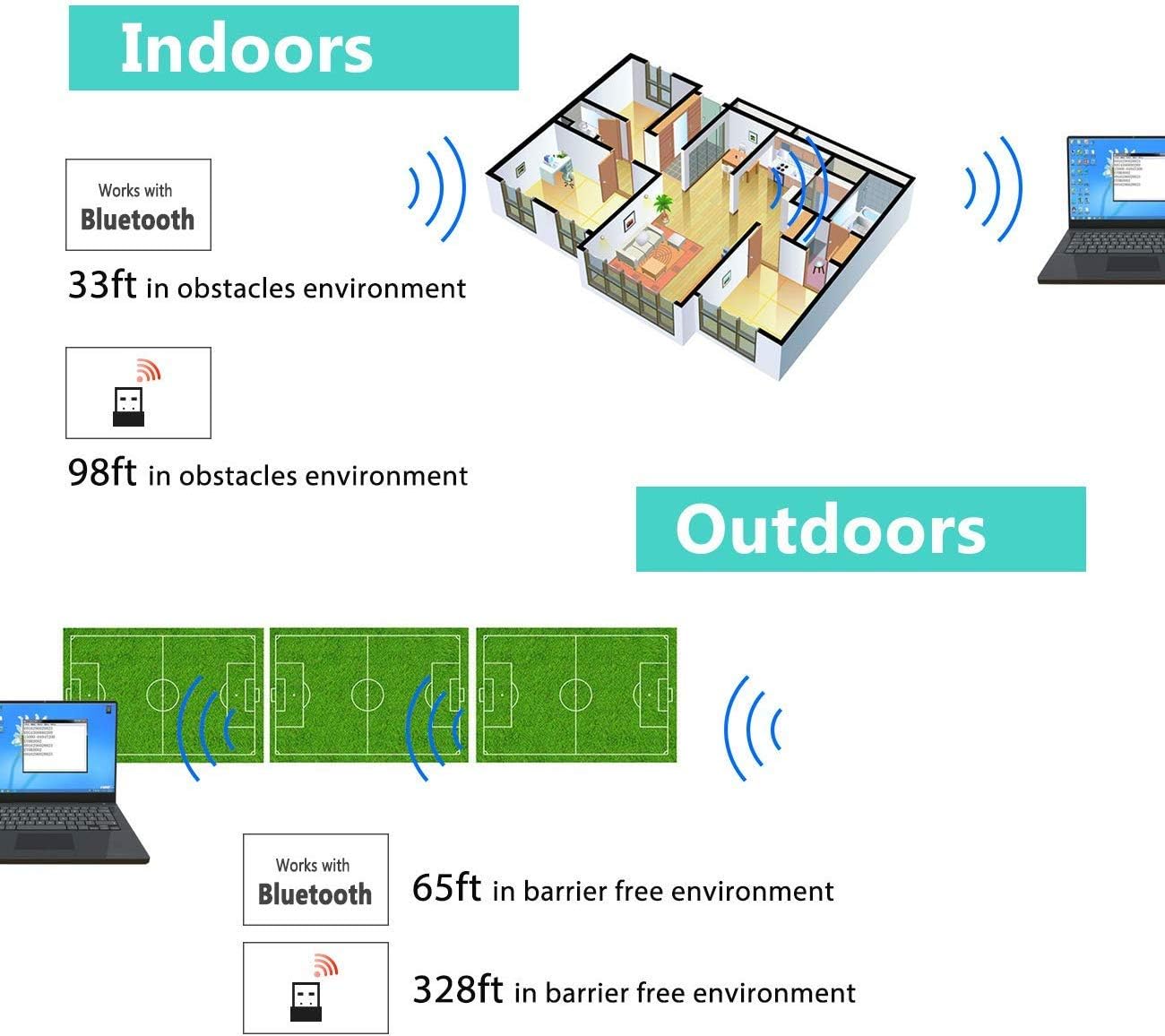
Image: Diagram illustrating the effective wireless range of the scanner in both indoor (with obstacles) and outdoor (barrier-free) environments for Bluetooth and 2.4GHz connections.
4. عملیاتي لارښوونې
۵.۳ د بارکوډونو سکین کول
The scanner can read both 1D and 2D barcodes, including QR codes, from printed materials and digital screens.
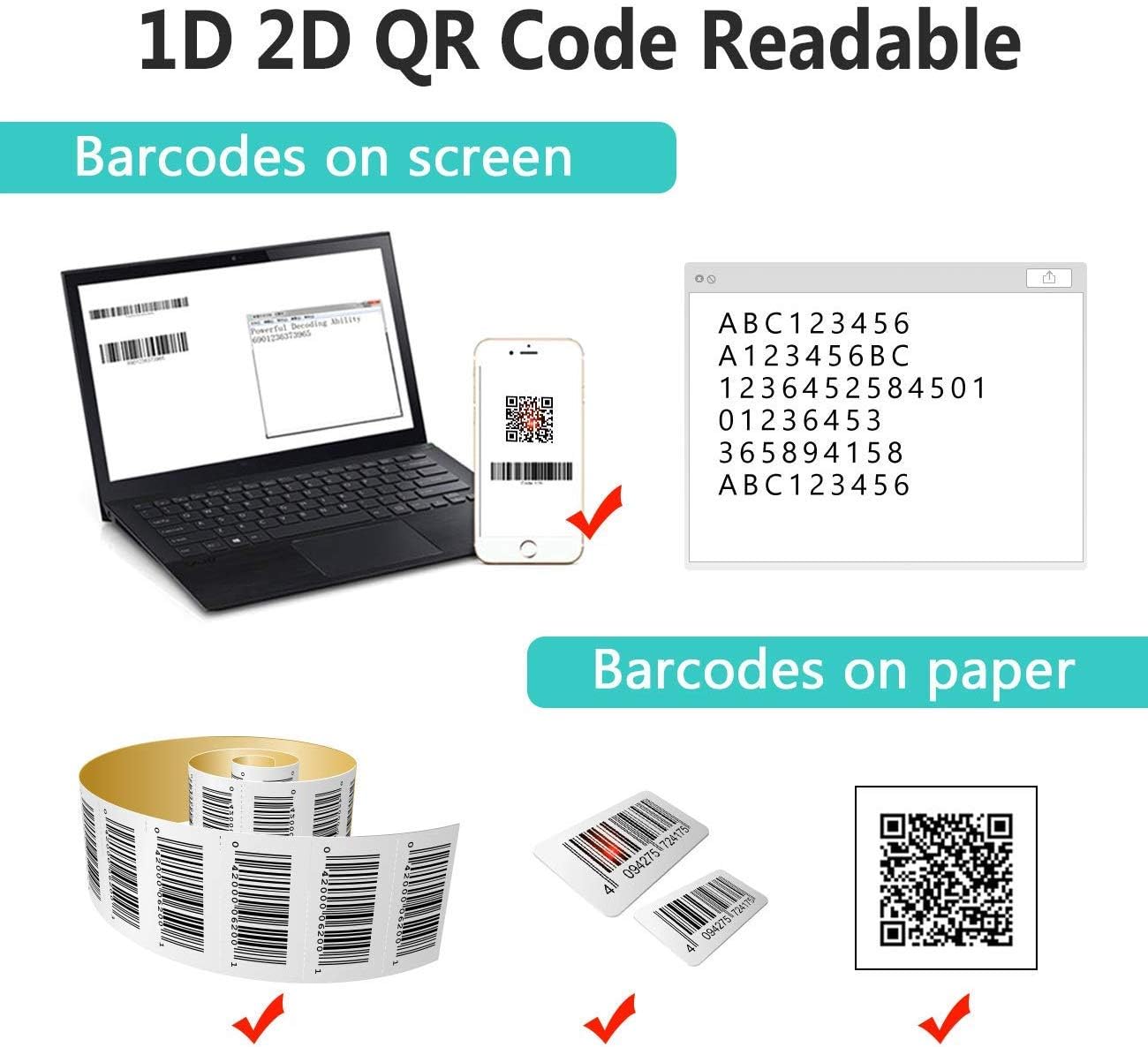
Image: The scanner demonstrating its ability to read 1D and 2D barcodes from both digital screens (laptop, smartphone) and physical printed labels.
د بارکوډ سکین کولو لپاره:
- د سکینر کړکۍ د بارکوډ په لور وښایاست.
- Press the trigger button (or allow the sensor to activate in automatic modes).
- A successful scan is indicated by a beep and/or a green light.
۳.۶.۳ د سکین کولو طریقې
سکینر د سکین کولو درې لومړني طریقې ملاتړ کوي:

Image: The barcode scanner mounted on its stand, highlighting its 360-degree rotation capability and the three available scanning modes: Key Trigger Mode, Sensor Activated Mode, and Continuous Scan Mode.
- کلیدي محرک حالت: Scan by manually pressing the trigger button for each barcode.
- Sensor Activated Mode: The scanner automatically activates when a barcode is detected in its field of view.
- د دوامداره سکین حالت: The scanner continuously emits a scan beam, reading any barcode that passes through it.
Refer to the quick start guide or programming barcodes for instructions on how to switch between these modes.
۶.۳ د معلوماتو د پورته کولو طریقې
The scanner offers two methods for uploading scanned data:
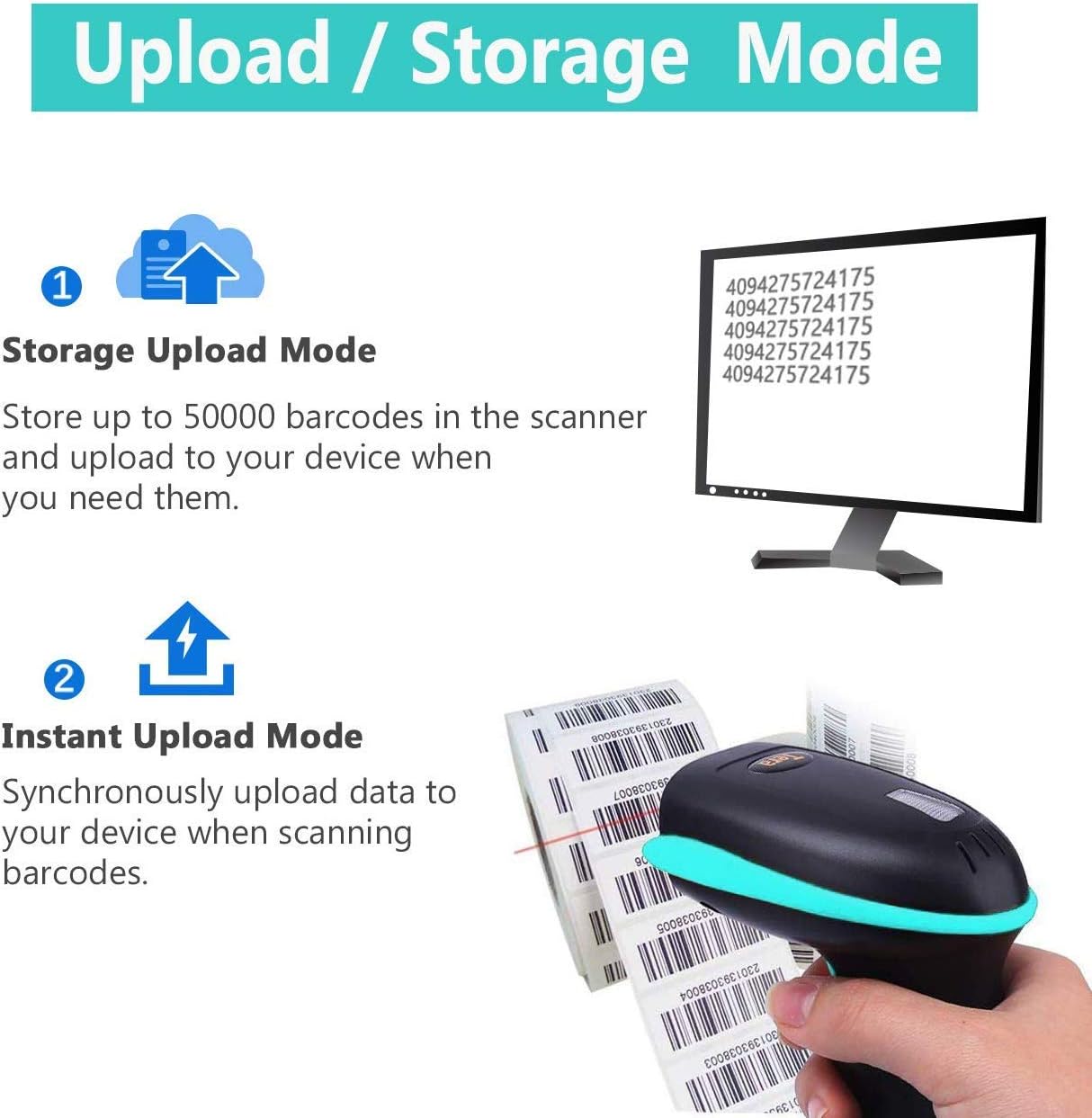
Image: Illustration of the two data upload modes: Storage Upload Mode, where barcodes are stored internally and uploaded later, and Instant Upload Mode, where data is transmitted immediately.
- د فوري اپلوډ حالت: Barcodes are sent to your connected device immediately after scanning. This is suitable for real-time data entry.
- Offline Storage Mode: If the scanner is out of range or not connected, it will store scanned barcodes internally. Up to 50,000 barcodes can be stored. Once reconnected, you can upload the stored data to your device.
To switch between upload modes, scan the appropriate programming barcode found in the quick start guide.
5. ساتنه
5.1 پاکول
- Use a soft, clean cloth slightly dampened with water or a mild cleaning solution to wipe the scanner's exterior.
- Do not use abrasive cleaners, solvents, or excessive liquid, as these can damage the device.
- Keep the scanning window clean and free of dust or smudges to ensure optimal reading performance.
5.2 د بیټرۍ پاملرنه
- Charge the scanner regularly, especially if it will be stored for an extended period.
- د بیټرۍ په مکرر ډول په بشپړه توګه چارج کولو څخه ډډه وکړئ، ځکه چې دا کولی شي د هغې عمر کم کړي.
- سکینر په یخ او وچ ځای کې وساتئ کله چې کارول نه وي.
5.3 ذخیره کول
When not in use, store the scanner in a safe place to prevent physical damage. The included stand can be used for convenient storage and hands-free operation.
6. ستونزه حل کول
| ستونزه | احتمالي لامل | د حل لاره |
|---|---|---|
| سکینر نه چالانېږي. | ټیټ بیټرۍ. | سکینر لږ تر لږه د ۲-۳ ساعتونو لپاره چارج کړئ. |
| سکینر بارکوډونه نه لولي. |
|
|
| No data transmitted to device. |
|
|
| Scanner beeps continuously or behaves erratically. | Configuration error or internal issue. | Perform a factory reset (refer to the quick start guide for the reset barcode). If the issue persists, contact support. |
7. مشخصات
- د ماډل شمیره: 8541733886
- د محصول ابعاد: 6.1 x 2.55 x 3.54 انچه
- د توکي وزن: ۲.۴۵ پونډه
- بیټرۍ: 1 Lithium Ion battery (2200mAh)
- ارتباط: Bluetooth, 2.4GHz Wireless, USB 2.0 Wired
- مطابقت لرونکي وسایل: Desktop, Laptop, Smartphone (POS, iOS, Android, Windows, Mac OS, Linux)
- د بریښنا سرچینه: د بریښنا تار (د چارج کولو لپاره)
- جوړونکی: تیرا
- لومړی شتون لري: د می 7، 2019
8. تضمین او ملاتړ
8.1 د تضمین معلومات
For specific warranty details, please refer to the warranty card included with your product or visit the official Tera webسایټ. د تضمین ادعاوو لپاره د پیرود ثبوت په توګه د پیرود رسید وساتئ.
8.2 د پیرودونکي ملاتړ
If you encounter any issues not covered in this manual or require further assistance, please contact Tera customer support. Contact information can typically be found on the product packaging, the official Tera webسایټ، یا ستاسو د پرچون پلورونکي له لارې.
کله چې د ملاتړ سره اړیکه ونیسئ، مهرباني وکړئ د خپل محصول ماډل شمیره (8541733886) او د پیرود توضیحات چمتو ولرئ.


Image: Illustrations representing customer service and technical support teams available to assist users.


