محصول پای ته ورسیدview
The Feit Electric Smart Wi-Fi LED Color Changing Dimmable 60W Light Bulbs offer advanced lighting control for your home. These A19 shape bulbs provide 800 lumens of brightness and are designed for indoor use. They feature color-changing capabilities, tunable white light, and dimming functionality, all controllable via a smartphone app or voice commands through compatible smart assistants.

Image: Front packaging of the Feit Electric Smart Wi-Fi LED Light Bulbs, showing two bulbs and features like Wi-Fi connectivity, Energy Star rating, 800 lumens brightness, and compatibility with Alexa, Siri, and Google Assistant.
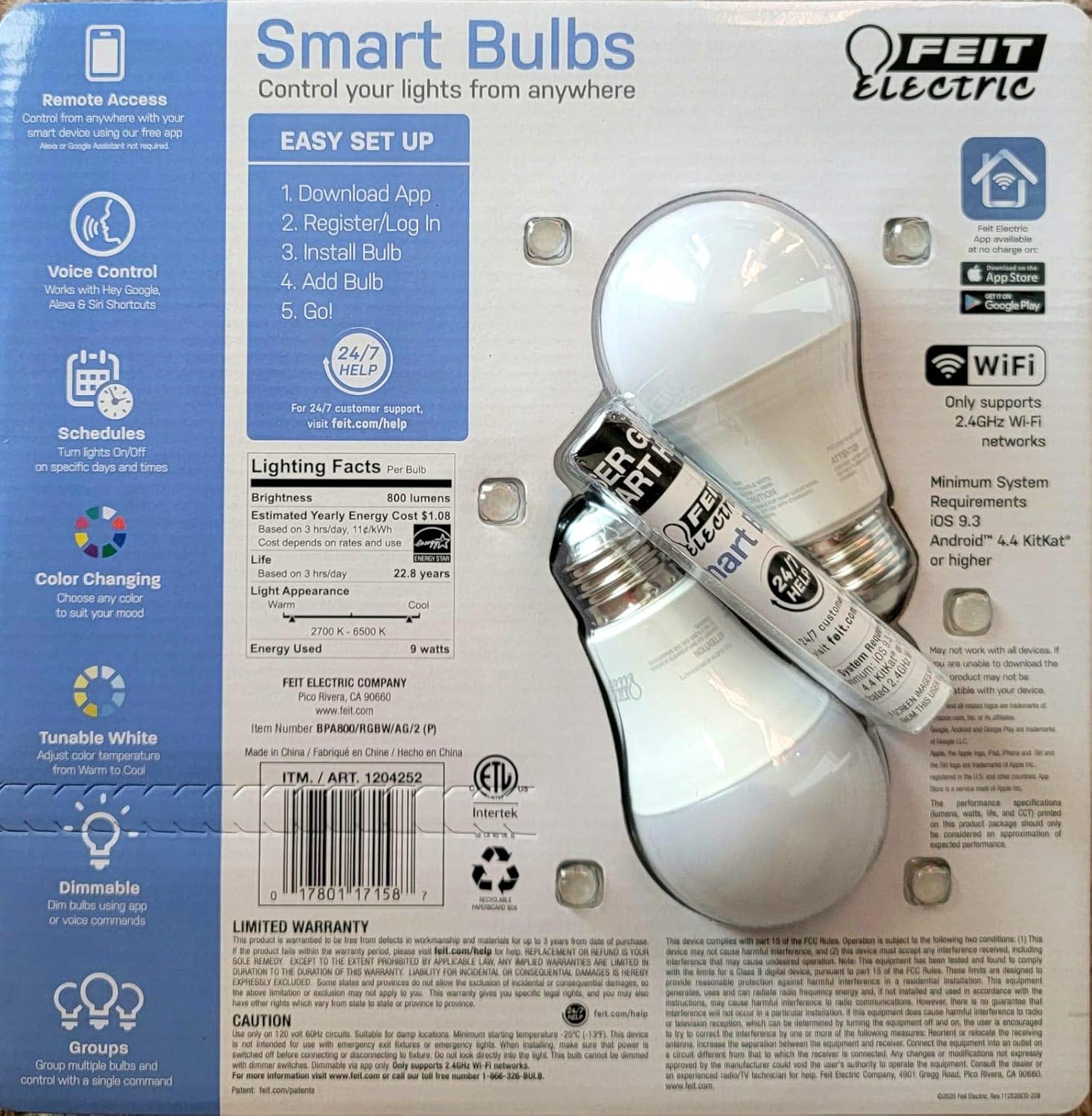
Image: Back packaging of the Feit Electric Smart Wi-Fi LED Light Bulbs, detailing easy setup steps, lighting facts (800 lumens, $1.08 estimated yearly cost, 22.8 years life), and system requirements.
کلیدي ځانګړتیاوې
- Color Changing and Tunable White: Adjust light color from millions of options or choose from various shades of white (2700K-6500K).
- د کمولو وړ: Smooth dimming from 100% down to 1% via the app or voice commands.
- د غږ کنټرول: Works seamlessly with Amazon Alexa, Google Assistant, and Siri Shortcuts.
- لرې لاسرسی: Control your lights from anywhere using the Feit Electric mobile app.
- مهالویش: Set custom schedules to turn lights on/off at specific times.
- د انرژي موثریت: 9W power consumption, equivalent to a 60W incandescent bulb, with an estimated yearly energy cost of $1.08.
- اوږد عمر: Designed to last up to 22.8 years based on 3 hours of daily use.
د تنظیم کولو لارښود
Follow these steps to set up your Feit Electric Smart Wi-Fi LED Bulbs:
- د فیټ بریښنا اپلیکیشن ډاونلوډ کړئ: لټون "Feit Electric" in the Apple App Store or Google Play Store and download the official app.
- نوم لیکنه/ننوتل: اپلیکیشن خلاص کړئ او یو نوی حساب جوړ کړئ یا لاګ ان شئ که تاسو دمخه لرئ.
- بلب نصب کړئ: Screw the Feit Electric Smart Wi-Fi LED bulb into any standard E26 medium base light fixture. Ensure the fixture is powered on.
- Add the Bulb in App:
- Open the Feit Electric app.
- د نوي وسیله اضافه کولو لپاره د "+" آیکون باندې کلیک وکړئ.
- Select "Lighting" and then "Light Source (Wi-Fi)".
- Follow the in-app instructions to connect the bulb to your 2.4GHz Wi-Fi network. (Note: These bulbs only support 2.4GHz Wi-Fi networks).
- The bulb will blink to indicate pairing mode. If it doesn't, turn the light switch off and on 5 times to reset it.
- Go!: Once connected, you can rename your bulb and start controlling it from the app.
For a visual guide, you can scan the QR code on the product packaging for a "HOW TO" video (if available).
عملیاتي لارښوونې
د اپلیکیشن کنټرول
The Feit Electric app provides full control over your smart bulbs:
- آن/بند: Tap the power icon next to the bulb's name to turn it on or off.
- روښانتیا: د روښانتیا کچه له 1٪ څخه تر 100٪ پورې تنظیمولو لپاره د سلایډر څخه کار واخلئ.
- د رنګ انتخاب: Access the color wheel to choose from millions of colors.
- د سپینې رڼا تنظیم: Select different shades of white, from warm (2700K) to cool (6500K).
- صحنې: Apply pre-set scenes or create custom scenes for different moods or activities.
- مهالویش: Set daily or weekly schedules for your lights to turn on/off automatically.
- ډله کول: څو بلبونه سره یوځای کړئ ترڅو په ورته وخت کې یې کنټرول کړئ.
د غږ کنټرول
Integrate your Feit Electric Smart Bulbs with your preferred voice assistant:
- ایمیزون الیکسا:
- Enable the "Feit Electric" skill in the Alexa app.
- وسایل کشف کړئ.
- Example commands: "Alexa, turn on [Light Name]", "Alexa, dim [Light Name] to 50%", "Alexa, set [Light Name] to blue".
- د ګوګل معاون:
- Link your Feit Electric account in the Google Home app.
- Example commands: "Hey Google, turn off [Light Name]", "Hey Google, change [Light Name] to warm white".
- د سری شارټ کټ:
- Create custom Siri Shortcuts within the Feit Electric app or Apple's Shortcuts app to control your lights with voice commands.
- Example: "Hey Siri, good morning lights" (if you've set up a shortcut for this).
ساتنه
Feit Electric Smart Wi-Fi LED bulbs are designed for long-lasting performance with minimal maintenance. Follow these general guidelines:
- پاکول: ډاډ ترلاسه کړئ چې بلب بند او یخ دی مخکې له دې چې پاک شي. په نرم او وچ ټوکر سره یې پاک کړئ. مایع یا د کثافاتو پاکوونکي مه کاروئ.
- لګول: Always ensure the bulb is securely screwed into the fixture. Do not overtighten.
- چاپیریال: These bulbs are designed for indoor use in dry locations. Avoid exposure to water or high humidity.
- د بریښنا زیاتوالی: While LED bulbs are generally robust, consider using surge protectors for your lighting circuits in areas prone to power fluctuations.
د ستونزو حل کول
If you encounter issues with your Feit Electric Smart Wi-Fi LED Bulbs, try the following solutions:
| ستونزه | احتمالي لامل / حل |
|---|---|
| Bulb not connecting to Wi-Fi / App |
|
| بلب د غږ امرونو ته ځواب نه ورکوي |
|
| Bulb is flickering or dimming unexpectedly |
|
مشخصات
| فیچر | تفصیل |
|---|---|
| برانډ | فیټ بریښنا |
| د رڼا ډول | LED |
| ځانګړی ځانګړنه | د رنګ بدلول، د ټون کولو وړ سپین |
| واټtage | ۱۵ واټونه (۱۰۰ واټونه تاپدیپت مساوي) |
| د بلب شکل اندازه | A19 |
| رڼا رنګ | څو رنګه |
| والیtage | 110 ولټه |
| د واحد شمیره | 2 شمېره |
| د رنګ د حرارت درجه | 2700-6500 کیلوین |
| روښانتیا | 800 Lumens |
| شکل | ګرد |
| مواد | مسو |
| د ارتباط ټیکنالوژي | وای فای (یوازې 2.4GHz) |
| د کور دننه / بهر کارول | دننه |
| د کنټرولر ډول | Amazon Alexa, Google Assistant, Siri Shortcuts |
| د رنګ رینډینګ انډیکس (CRI) | 80 |
| اټکل شوی د انرژي کلنی لګښت | $1.08 (based on 3 hrs/day) |
| د ژوند موده | 22.8 years (based on 3 hrs/day) |
| UPC | 810744036599 |
| ASIN | B07RL48PFF |
تضمین او ملاتړ
For customer support, warranty information, and additional resources, please visit the official Feit Electric webسایټ:
د فیټ بریښنایی ملاتړ څخه لیدنه وکړئ
Feit Electric offers 24/7 customer support to assist with any questions or issues you may have regarding your smart bulbs.


