1. پیژندنه
This manual provides instructions for the safe and efficient use of your KOAMTAC KDC280CJPH 2D Imager Data Collector. Please read this manual thoroughly before operating the device and keep it for future reference.
The KDC280CJPH is a compact and powerful 2D barcode scanner and data collector, designed for various applications requiring efficient data capture. It features Bluetooth v4.1 BLE connectivity, supporting both SPP and HID profiles, and is compatible with iOS devices.
2. د خوندیتوب معلومات
- وسیله د سختې تودوخې، مستقیم لمر وړانګو، یا لوړې رطوبت سره مه مخ کوئ.
- Avoid dropping the device or subjecting it to severe impacts, although it is rated for 1.5m drops.
- د وسیلې د جلا کولو یا بدلولو هڅه مه کوئ. دا به تضمین باطل کړي.
- یوازې منظور شوي چارجینګ کیبلونه او اډاپټرونه وکاروئ.
- Keep the device away from water and other liquids. The IP65 rating provides protection against dust and splashes, but not immersion.
- بیټرۍ او وسیله د ځایی مقرراتو سره سم له منځه یوسئ.
3. د بسته محتويات
ډاډ ترلاسه کړئ چې ټول توکي ستاسو په کڅوړه کې شتون لري:
- KDC280CJPH 2D Imager Data Collector
- Communication Dongle (KBLED41)
- Single Charging Base
- د غاړې پټه
- Pairing Sheet
- د چارج کولو کیبل (مایکرو USB)
- Communication Cable (Micro USB)
- AC اډاپټر
Optional accessories (sold separately): 4-slot charging base, finger trigger glove, ring scanner, custom front panel colors/logo printing.
4. وسیله ختمه شوهview
The KDC280CJPH is designed for ergonomic handling and ease of use. Below are key components and their functions.

Figure 1: KDC280CJPH Device Front View. This image shows the front of the KDC280CJPH data collector, highlighting its display screen and control buttons. The screen displays menu options such as "KDC Mode", "Data Display", "Barcode Settings", and "Code Options". Below the screen, there are three circular buttons: a central selection button and two directional buttons. The device also features "KOAMTAC" branding and a "BLE" indicator.
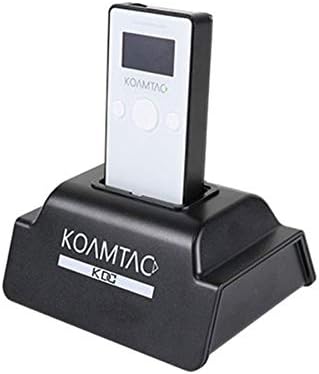
Figure 2: KDC280CJPH in Charging Base. This image displays the KDC280CJPH data collector securely docked in its black charging base. The device is white with a black screen, showing the "KOAMTAC" logo. The charging base also features the "KOAMTAC KDC" logo on its front.
مهمې برخې:
- د ښودلو سکرین: Shows operational status, menu options, and scanned data.
- د سکین بټن: د بارکوډ سکینګ پیل کوي.
- د نیویګیشن تڼۍ: د مینو نیویګیشن او انتخاب لپاره کارول کیږي.
- د مایکرو USB پورټ: For charging and wired data communication.
- Imager Window: The area through which barcodes are scanned.
5. ترتیب کول
5.1 د وسیلې چارج کول
- Connect the charging cable to the Micro USB port on the KDC280CJPH.
- Connect the other end of the charging cable to the AC adapter, then plug the AC adapter into a power outlet. Alternatively, connect the charging cable to a computer's USB port.
- The device will begin charging. A full charge typically takes approximately 3-4 hours.
For convenience, you can also place the KDC280CJPH into the single charging base (included) or the optional 4-slot charging base for charging.
5.2 ابتدايي پاور آن
Press and hold the power button (usually located on the side or top) for a few seconds until the display screen illuminates.
5.3 Using the Communication Dongle
The KDC280CJPH can be used with the included communication dongle (KBLED41) for easy pairing with a host device.
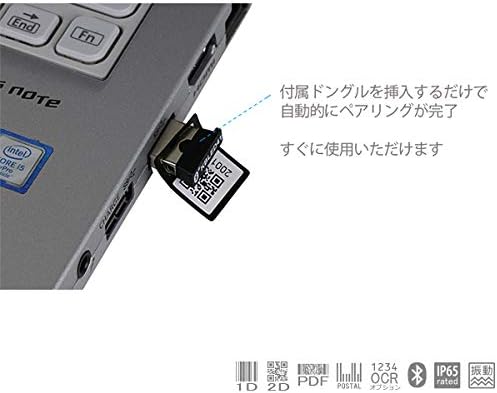
Figure 3: Communication Dongle in Use. This image illustrates the communication dongle (KBLED41) being inserted into a USB port of a laptop. The dongle has a QR code printed on it, indicating its pairing function. The accompanying text states that inserting the dongle automatically completes pairing, making the device ready for immediate use.
- Insert the KBLED41 communication dongle into an available USB port on your computer or host device.
- The KDC280CJPH will automatically detect and pair with the dongle, establishing a connection.
- Once paired, the device is ready for data transmission.
6. عملیات
6.1 د بلوتوټ جوړه کول
The KDC280CJPH supports Bluetooth v4.1+EDR with SPP (Serial Port Profile) and HID (Human Interface Device) profiles, allowing connection to various devices including iOS.
- Ensure Bluetooth is enabled on your host device (smartphone, tablet, computer).
- On the KDC280CJPH, navigate to the Bluetooth pairing menu using the navigation buttons.
- Select the desired Bluetooth profile (SPP or HID) if prompted.
- On your host device, search for available Bluetooth devices and select "KDC280CJPH" from the list.
- Follow any on-screen prompts to complete the pairing process. You may need to enter a PIN, which is usually "0000" or "1234".
- Once paired, the KDC280CJPH will indicate a successful connection on its display.
Note: Your connecting device must be Bluetooth v4.1 BLE compatible to connect with the KDC280CJPH.
۴.۲ د بارکوډ سکین کول
The KDC280CJPH can read a wide array of 1D and 2D barcodes, OCR fonts, and postal codes.
- د سکین کولو لپاره: Point the imager window at the barcode and press the scan button. A successful scan will typically be indicated by a beep and/or a green LED light.
- د سکین کولو غوره واټن: The reading distance for Code39 is 4-246mm. Adjust the distance for other barcode types as needed.
- ملاتړ شوي سمبولونه:
- 1D: EAN, UPC, Code 11, Code 39, Code 93, Code 128, Codabar/NW-7, Interleaved 2 of 5, GS1-128(EAN 128), GS1 DataBar(RSS), IATA, Industrial 2 of 5, ISBN-ISSN-ISMN, Matix 2 of 5, MSI/Plessy, S-Code, Telepen, Tri-Optic, UK/Plessy.
- 2D: Aztec Code, Aztec Runes, Codablock F, Composite Codes, Data Matrix, Maxi Code, Chinese Sensible, Micro PDF, PDF417, QR Code, Micro QR Code.
- OCR: OCR-A, OCR-B (ISBN codes).
- پوستي کوډونه: Various international postal codes.
6.3 Data Collection and Storage
The device has 8MB of user data area, capable of storing over 400,000 UPC codes. Scanned data can be stored internally and then transferred to a host device.
- د پلورنځي حالت: Data is saved to the device's internal memory.
- د لیږد حالت: Data is immediately transmitted to the connected host device.
- مهال ویشamping: The built-in Quartz RTC provides timestamps for collected data.
6.4 KTSync Software and SDK
KOAMTAC provides free software and SDKs to enhance the functionality of your KDC280CJPH.
- KTSync Software: Available for download, KTSync allows for KDC device settings configuration, data synchronization, and matching functions.
- SDKs: Software Development Kits are available for Android, iOS, and Windows platforms, enabling custom application development and integration with the KDC280CJPH.
7. ساتنه
7.1 پاکول
- وسیله په نرمۍ سره مسح کړئ، دamp ټوکر د کثافاتو پاکوونکي یا محلول مه کاروئ.
- Ensure the imager window is clean and free of dust or smudges for optimal scanning performance.
7.2 د بیټرۍ پاملرنه
- د بیټرۍ د ژوند اوږدولو لپاره، د بیټرۍ په مکرر ډول د بشپړ چارج کولو څخه ډډه وکړئ.
- If storing the device for an extended period, charge the battery to approximately 50% and store it in a cool, dry place.
7.3 د ذخیره کولو شرایط
Store the device within the specified temperature range of -20℃ to 60℃ and humidity of 5% to 95% (non-condensing).
8. ستونزه حل کول
| ستونزه | احتمالي لامل | د حل لاره |
|---|---|---|
| وسیله فعاله نه ده. | بیټرۍ ختمه شوې. | Charge the device using the provided charging cable and AC adapter. |
| د بلوتوث له لارې نشي وصل کېدای. | Bluetooth is not enabled on host device; host device is not BLE v4.1 compatible; device is out of range. | Ensure Bluetooth is on. Verify host device compatibility. Move KDC280CJPH closer to the host device. Re-attempt pairing. |
| Barcodes are not scanning. | Barcode is damaged or poorly printed; imager window is dirty; incorrect scanning distance. | Try scanning a different barcode. Clean the imager window. Adjust the distance between the device and the barcode. |
| Data is not transmitting to host. | Device is in store mode; connection is lost; incorrect application settings. | Switch the device to transfer mode. Re-establish Bluetooth connection. Check KTSync or custom application settings. |
9. مشخصات
| فیچر | تفصیل |
|---|---|
| د ماډل شمیره | KDC280CJPH |
| عملیاتي سیسټم | Dedicated OS |
| CPU | ARM7, 32-bit |
| حافظه | RAM: 64KB, Flash ROM: 256KB (Data Area), 8MB (User Data Area, stores over 400,000 UPC codes) |
| د سکینر ډول | 2D Imager, 640x480 CMOS, 100fps |
| د لوستلو واټن | 4-246mm (Code39) |
| د ریښتیني وخت ساعت | Quartz RTC for timestamp |
| انٹرفیس | مایکرو USB |
| د بلوتوټ مخابرات | Bluetooth v4.1+EDR, SPP/HID |
| ابعاد (W x L x H) | 40 x 82 x 18 mm |
| وزن | 57.5 ګرامه |
| بیټرۍ | Lithium-Ion (650mAh) |
| د عملیاتي حرارت درجه | -20 ℃ تر 50 ℃ |
| د ذخیرې د حرارت درجه | -20 ℃ تر 60 ℃ |
| رطوبت | له 5٪ څخه تر 95٪ پورې (غیر کنډیشن) |
| Dust/Splash Protection | د IP65 مطابق |
| ډراپ مشخصات | 1.5m drop resistance |
| د مقرراتو اطاعت | UL 60950-1; EN/IEC 60950-1; EN/IEC 60825-1, EMI/RFI; R&TTE, FCC, KC, TELEC, RoHS |
| د خوندیتوب معیارونه | IEC 62471:2006 |
10. تضمین او ملاتړ
10.1 د تضمین معلومات
The KOAMTAC KDC280CJPH comes with a 1 کلن تضمین from the date of purchase. This warranty covers manufacturing defects but excludes damage caused by misuse, accidents, unauthorized modifications, or normal wear and tear. Cables are not covered under this warranty.
مهرباني وکړئ د تضمین ادعاګانو لپاره د پیرود ثبوت وساتئ.
10.2 تخنیکي ملاتړ
For technical assistance, troubleshooting, or inquiries regarding your KDC280CJPH, please refer to the official KOAMTAC webسایټ یا د دوی پیرودونکي ملاتړ سره اړیکه ونیسئ.
Additional resources, including the KTSync software and SDKs for various platforms (Android, iOS, Windows), are available for download from the KOAMTAC support portal.


