1. پیژندنه
This manual provides instructions for the proper setup, operation, and maintenance of your Mitel Cordless Headset and DECT Module Bundle. This bundle is designed to enhance communication efficiency by providing wireless freedom for users of compatible Mitel IP phones.
د محصول مطابقت: This bundle is compatible with Mitel 5330e, 5340e, and 5360e IP phones.
2. د بسته محتويات
Before proceeding with the setup, ensure all components are present in your package:
- Mitel Cordless Headset
- Mitel DECT Module (Model 50005712)
- Headset Charging Cradle
- Headband, Battery, and Earhook accessories for the headset
- Connecting cables for the DECT Module

Figure 2.1: Included Headset Accessories (Headband, Battery, Earhook)
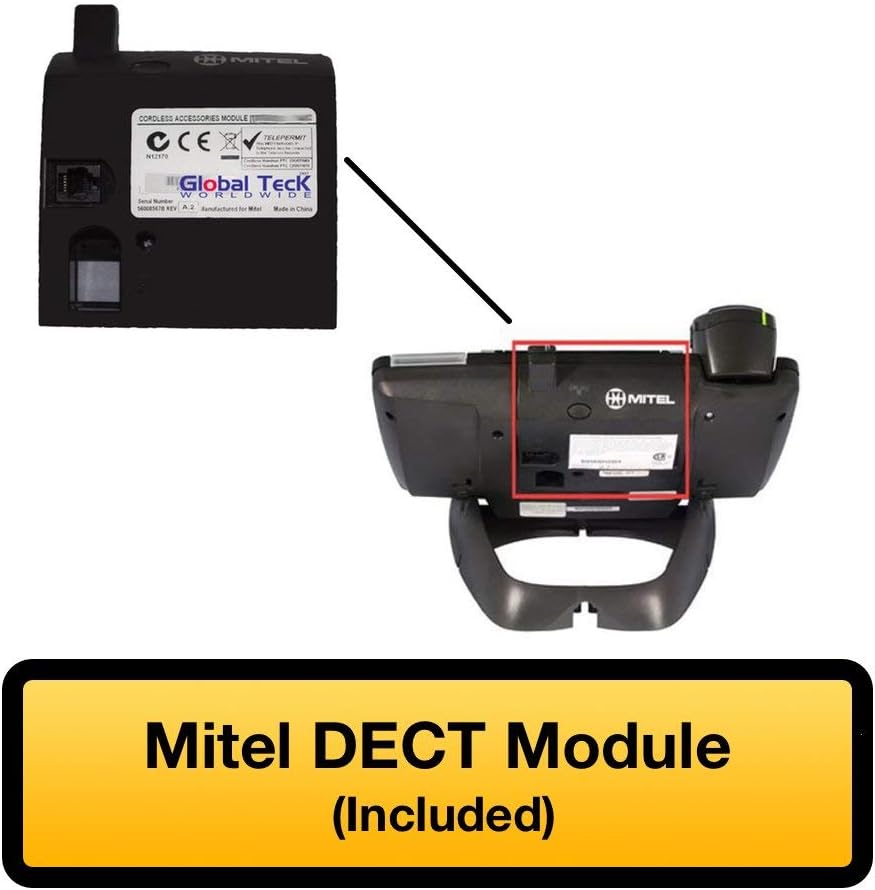
Figure 2.2: Mitel DECT Module
۴. د تنظیم لارښوونې
3.1. Installing the DECT Module
- Locate the accessory port on the back of your compatible Mitel IP phone (5330e, 5340e, or 5360e).
- Carefully align the Mitel DECT Module with the accessory port and slide it into place until it clicks securely.
- Connect the provided cable from the DECT Module to the headset charging cradle.

Figure 3.1: Mitel IP Phone with DECT Module Installed

Figure 3.2: DECT Module with Cable Connection
3.2. د هیډسیټ چارج کول
Place the cordless headset into the charging cradle. Ensure the headset is properly seated and the charging indicator light illuminates. A full charge provides approximately 8 hours of talk time and 43 hours of standby time.
3.3. Pairing the Headset with the DECT Module
The headset and DECT module are typically pre-paired. If re-pairing is necessary:
- ډاډ ترلاسه کړئ چې هیډسیټ چارج شوی او فعال دی.
- Locate the Cordless Module pairing button on the DECT Module (refer to Figure 3.3).
- Press and hold the pairing button on the DECT Module until the indicator light begins to flash.
- Follow the headset's specific pairing instructions, usually involving pressing a button on the headset. The indicator lights on both devices will confirm successful pairing.

Figure 3.3: DECT Module Features - Pairing Button and Cradle Cable
4. عملیاتي لارښوونې
۳. د هیډسیټ اغوستل
The headset can be worn in an over-the-head style using the included headband for comfort and stability.

Figure 4.1: Over-the-Head Wearing Style
4.2. د کال مدیریت
- زنګ وهل پیل کړئ: Press the call button on the headset. Dial the number using your Mitel IP phone.
- زنګ ووهئ: When an incoming call rings, press the call button on the headset.
- ټلیفون پای: Press the call button on the headset to terminate an active call.
- د حجم کنټرول: Use the volume controls on the headset or your Mitel IP phone to adjust audio levels.
The integrated functionality of the Cordless (DECT) Headset eliminates the need for a handset lifter, allowing direct call control from the headset.
4.3. د LED شاخصونه
The headset features LED indicators that provide status information, such as power, charging status, and call activity. Refer to the headset's specific user guide for detailed indicator meanings.
5. ساتنه
To ensure the longevity and optimal performance of your Mitel Cordless Headset and DECT Module:
- پاکول: Use a soft, dry cloth to clean the headset and DECT module. Avoid using harsh chemicals or abrasive materials.
- ذخیره کول: When not in use, store the headset in its charging cradle to maintain battery life.
- د بیټرۍ پاملرنه: Avoid fully discharging the headset battery frequently. Charge it regularly.
6. ستونزه حل کول
If you encounter issues with your Mitel Cordless Headset and DECT Module, try the following:
- No Audio/Cannot Hear: Ensure the headset is powered on and properly paired. Check the volume settings on both the headset and the Mitel IP phone.
- زنګونه نشي وهلی/ترلاسه کولی: Verify the DECT Module is securely connected to the IP phone. Confirm the headset is paired and within range.
- هیډسیټ چارج نه کوي: Ensure the headset is correctly seated in the charging cradle and the cradle cable is connected to the DECT module. Check for any obstructions on the charging contacts.
- لاسوهنه: د نورو بېسیم وسیلو څخه لرې شئ چې ممکن د مداخلې لامل شي.
- بیا جوړه کول: If connection issues persist, attempt to re-pair the headset with the DECT module as described in Section 3.3.
7. مشخصات
| فیچر | مشخصات |
|---|---|
| د ماډل نوم | Mitel Cordless Headset |
| د توکي ماډل شمیره | 50005712 |
| د ارتباط ټیکنالوژي | بېسیم |
| د بې سیمه مخابراتو ټیکنالوژي | DECT |
| مطابقت لرونکې وسیلې | Mitel Phones (5330e, 5340e, 5360e) |
| د بیټرۍ ژوند (د خبرو اترو وخت) | 8 ساعته |
| د بیټرۍ ژوند (سټنډبای وخت) | 43 ساعته |
| د کنټرول ډول | د رسنیو کنټرول، ریموټ |
| مواد | فلزي، پلاستيک |
| رنګ | تور / سپین زر |
| د توکي وزن | 16 اونس (1 پونډ) |
| د محصول ابعاد | 8.6 x 5.2 x 5 انچه |
| UPC | 751889011785 |
| جوړونکی | میټل |
8. تضمین او ملاتړ
۸.۱. د ایمیزون نوی شوی تضمین
This product is part of the Amazon Renewed program. If you are not satisfied with your purchase, renewed products are eligible for replacement or refund under the Amazon Renewed Guarantee. Please refer to Amazon's official Renewed program terms for full details.
8.2. تخنیکي ملاتړ
For technical assistance or further inquiries, Global Teck's US-based support specialists are available to help. Contact information can typically be found on your purchase documentation or the Global Teck webسایټ


