1. پیژندنه
The AIWA KSTB6043 Network Video Player is designed to transform your existing television into a smart Android TV. This device allows you to access various network video services and play media content from external storage devices. It operates on Android 8.0 Oreo and supports HDMI 2.0 for high-definition video output.
Included accessories are a Bluetooth remote control, a 1.5m Premium HDMI cable, an instruction manual, and a warranty card.
2. محصول ختم شوview
2.1. د وسیلې اجزا
Familiarize yourself with the various ports and components of your AIWA KSTB6043 Network Video Player.
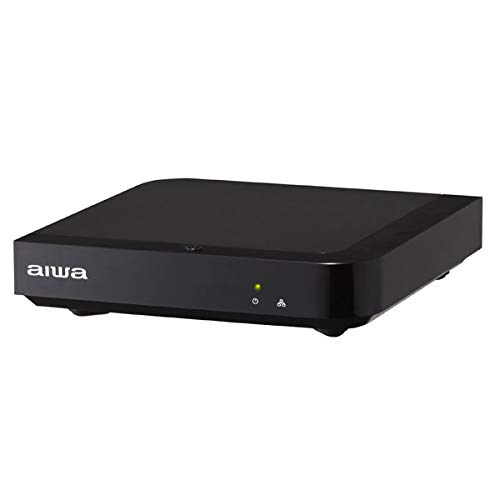
انځور 1: مخکی View. This image displays the front of the AIWA KSTB6043 unit, featuring the AIWA logo and indicator lights.

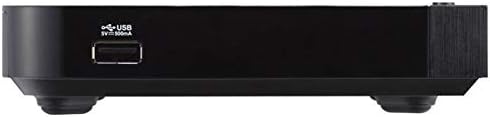
انځور ۵.۱: اړخ View. This image shows the side of the device, highlighting a USB port for connecting external storage.
انځور 3: شاته View. This image illustrates the rear panel of the player, featuring the LAN port, HDMI output, S/PDIF port, power input (12V=1.5A IN), and a reset button.
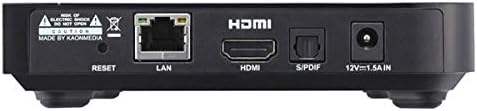
Image 4: Setup Example. The player is shown connected to a television, with the remote control placed nearby, demonstrating a typical setup.
2.2. ریموټ کنټرول
The included Bluetooth remote control allows for easy navigation and control of the network video player. Refer to the remote control diagram in the included physical manual for specific button functions.
3. ترتیب کول
Follow these steps to set up your AIWA KSTB6043 Network Video Player:
- له تلویزیون سره وصل شئ: Use the provided Premium HDMI cable to connect the HDMI OUT port on the network video player to an HDMI input port on your television.
- بریښنا وصل کړئ: Plug the power adapter into the 12V=1.5A IN port on the back of the player, then plug the adapter into a wall outlet.
- پاور آن: Press the power button on the remote control or the device. The indicator light on the front of the player will illuminate.
- ان پټ غوره کړئ: On your TV, select the corresponding HDMI input source using your TV's remote control.
- ابتدايي ترتیب: Follow the on-screen prompts for initial Android TV setup, including language selection, network connection (Wi-Fi or Ethernet), and Google account login.
3.1. Connection Demonstration Video
Video 1: Basic Connection and Media Playback. This video demonstrates how to connect a media player to a TV and play content from an SD card or USB drive. Note: The specific product shown in this video may differ from the AIWA KSTB6043, but the connection principles are similar.
Video 2: Detailed Port Overview او تنظیم کول. This video provides a closer look at the ports on a media player, including HDMI, USB, and power, and shows the connection process. It also demonstrates basic menu navigation. Note: The specific product shown in this video may differ from the AIWA KSTB6043, but the connection principles and interface navigation are generally applicable.
4. عملیاتي لارښوونې
4.1. Navigating the Android TV Interface
Once powered on and connected, the Android TV home screen will appear. Use the directional buttons (up, down, left, right) and the OK button on your remote control to navigate through apps, settings, and content.
- کور سکرین: Access your installed apps, recommended content, and system settings.
- اطلاقات: Select the 'Apps' icon to view and launch all installed applications.
- ترتیبات: Access network settings, display options, audio settings, and device preferences.
4.2. Playing Media from External Storage
The AIWA KSTB6043 supports playback of video, image, and music fileد USB ډرایو یا SD کارتونو څخه.
- ذخیره داخل کړئ: Insert your USB drive into a USB port or your SD card into the SD card slot on the device.
- لاسرسی Files: Navigate to the 'File Manager' or 'Media Player' app on the Android TV interface.
- منځپانګه غوره کړئ: Browse your external storage for the desired video, image, or music files and select them for playback.
4.3. Using Network Services
With an internet connection, you can access various streaming services. The device supports Netflix, among others.
- شبکې سره وصل شئ: Ensure your device is connected to Wi-Fi or via an Ethernet cable.
- اپلیکیشن پیل کړئ: Select the desired streaming app (e.g., Netflix) from the home screen or app list.
- Login/Subscribe: Log in with your existing account or follow the prompts to subscribe to the service.
5. ساتنه
- پاکول: د وسیلې بهرنۍ برخه پاکولو لپاره نرم، وچ ټوکر وکاروئ. مایع پاکوونکي یا د کثافاتو مواد مه کاروئ.
- د سافټویر تازه معلومات: Periodically check for system updates in the settings menu to ensure optimal performance and access to the latest features.
- وینټیلیشن: ډاډ ترلاسه کړئ چې وسیله په ښه هوا لرونکي ځای کې ځای پر ځای شوې ده ترڅو د ډیر تودوخې مخه ونیول شي. د هوا د جریان لارې مه بندوئ.
6. ستونزه حل کول
| ستونزه | احتمالي لامل | د حل لاره |
|---|---|---|
| هیڅ ځواک نشته | د برېښنا کیبل نه دی وصل شوی؛ د برېښنا ساکټ کار نه کوي | د برېښنا کیبل اتصال وګورئ؛ د برېښنا بل سوري هڅه وکړئ |
| په تلویزیون کې سیګنال نشته | Incorrect HDMI input selected; HDMI cable loose or faulty | Select correct HDMI input on TV; Reconnect or replace HDMI cable |
| ریموټ کنټرول کار نه کوي | Batteries depleted; Obstruction between remote and device | Replace batteries; Ensure clear line of sight to the device |
| د وائی فای سره وصل نشو | Incorrect password; Router issue; Device too far from router | Verify Wi-Fi password; Restart router; Move device closer to router |
7. مشخصات
| فیچر | تفصیل |
|---|---|
| د ماډل شمیره | KSTB6043 |
| عملیاتي سیسټم | Android 8.0 Oreo |
| د HDMI نسخه | 2.0 |
| HDMI Port Count | 1 |
| د ارتباط ټیکنالوژي | بلوتوث، HDMI |
| ملاتړ شوي آډیو فارمیټونه | دولبي ډیجیټل، DTS، PCM |
| د انټرنیټ خدمتونه | Netflix (and others via Android apps) |
| قرارداد | 1920 x 1080 پکسلز (بشپړ HD) |
| د محصول ابعاد | 12.5 cm (L) x 12.5 cm (W) x 3 cm (H) |
| وزن | Approx. 760 g (packaged) |
| ځانګړتیاوې | High-definition video output, Android TV compatible |
8. تضمین او ملاتړ
The AIWA KSTB6043 Network Video Player comes with a warranty. Please refer to the warranty card included in the product packaging for detailed terms and conditions, including the warranty period and coverage.
For technical support or inquiries, please contact AIWA customer service through the contact information provided in your warranty documentation or on the official AIWA webسایټ


