1. پیژندنه
Thank you for choosing the Soundmaster Eliteline IR300SI Internet DAB+ FM Radio. This device offers a wide range of audio entertainment options, including Internet Radio, DAB+ digital radio, FM radio, Bluetooth connectivity, and USB playback. It also features Amazon Alexa compatibility for voice control and can be managed via the UNDOK app. This manual provides essential information for setting up, operating, and maintaining your radio.
2. د خوندیتوب معلومات
- د کارولو دمخه ټولې لارښوونې په دقت سره ولولئ او د راتلونکي حوالې لپاره یې وساتئ.
- وسیله د باران، رطوبت، یا ډیرې تودوخې سره مه مخ کوئ.
- د هوا مناسبه هوا ورکول ډاډمن کړئ؛ د هوا د بهېدو هیڅ لاره مه بندوئ.
- یوازې د بریښنا اډاپټر وکاروئ چې د واحد سره چمتو شوي.
- د واحد د پرانیستلو یا ترمیمولو هڅه مه کوئ. ټولې خدمتونه وړ پرسونل ته راجع کړئ.
- وسیله د قوي مقناطیسي ساحو څخه لرې وساتئ.
3. د بسته محتويات
مهرباني وکړئ وګورئ چې ټول توکي شتون لري:
- Soundmaster Eliteline IR300SI Internet DAB+ FM Radio
- د بریښنا اډاپټر
- ریموټ کنټرول
- د کارونکي لارښود (دا لاسوند)
- Installation material (e.g., antenna, if separate)
4. محصول ختم شوview
Familiarize yourself with the various parts and controls of your Soundmaster IR300SI radio.

شکل ۱: مخکینۍ زاویه view of the Soundmaster IR300SI radio, showing the display, speakers, and control buttons.
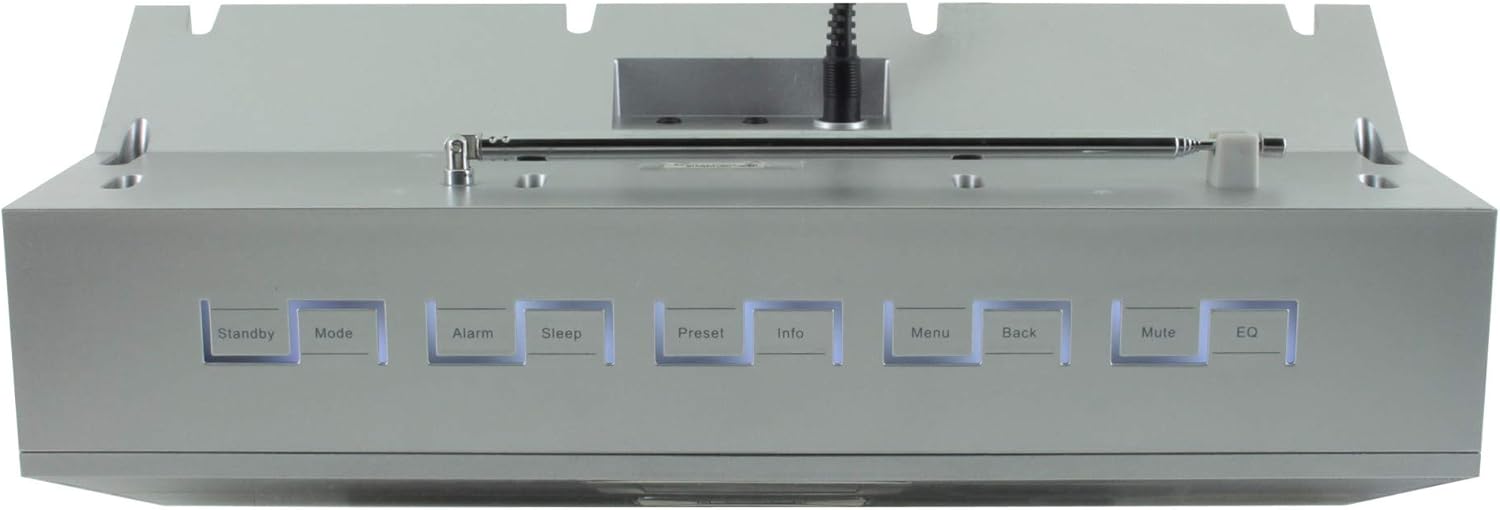
شکل 4.2: پورته view of the Soundmaster IR300SI radio, highlighting the control buttons: Standby, Mode, Alarm, Sleep, Preset, Info, Menu, Back, Mute, and EQ.
مخکینۍ پینل
- 2.4" / 6 cm TFT Color Display: Shows station information, menus, and time.
- ويناوال: د سټیریو غږ محصول.
- د کنټرول ډایل/تڼۍ: د نیویګیشن او انتخاب لپاره.
د سرلیک پینل کنټرولونه
- ولاړ: بریښنا آن/آف.
- حالت: Switch between Internet Radio, DAB+, FM, Bluetooth, USB, AUX.
- الارم: الارمونه تنظیم او اداره کړئ.
- خوب: Activate sleep timer.
- مخکې ټاکل: Access and save favorite stations.
- معلومات: Display additional information about the current broadcast.
- مینو: د سیسټم ترتیباتو او اختیارونو ته لاسرسی ومومئ.
- شاته: مخکینی مینو ته ورشئ.
- خاموش: غږ خاموش/غیر غږ کړئ.
- EQ: د برابرونکي پریزیټ غوره کړئ.
Rear/Side Panel Connections
- د بریښنا ننوتل: ورکړل شوي بریښنا اډیپټر وصل کړئ.
- دوربین انتن: د DAB+ او FM استقبال لپاره.
- USB پورټ: For MP3 playback from USB storage devices.
- 3.5mm Aux-In Port: بهرنۍ آډیو سرچینې وصل کړئ.
- د سر غوږ جیک: د شخصي اوریدلو لپاره.
5. ترتیب کول
5.1 د بریښنا نښلول
- Connect the power adapter to the DC input on the rear of the radio.
- د بریښنا اډاپټر په دیوال کې ولګوئ.
- فشار ورکړئ ولاړ button on the top panel or remote control to turn on the radio.
5.2 د انتن تنظیم کول
د غوره DAB+ او FM راډیو استقبال لپاره ټیلسکوپیک انتن په بشپړه توګه پراخ کړئ.
5.3 Initial Wi-Fi Network Setup
Upon first power-on, the radio will guide you through the initial setup wizard:
- Select your preferred language using the control dial and confirm.
- راډیو به د شته وای فای شبکو لپاره سکین وکړي.
- د لیست څخه خپل شبکه غوره کړئ.
- Enter your Wi-Fi password using the on-screen keyboard and control dial. Confirm to connect.
- Once connected, the radio will display the main menu.
6. عملیاتي لارښوونې
د کارولو موډ button to switch between different audio sources.
6.1 انټرنیټ راډیو
- مطبوعاتي موډ to select "Internet Radio".
- Navigate through categories (e.g., Location, Genre, Popular) using the control dial.
- د پلې بیک پیل کولو لپاره یو سټیشن غوره کړئ.
- د سټیشن د مخکینۍ برخې په توګه د خوندي کولو لپاره، فشار ورکړئ او ونیسئ مخکینۍ تڼۍ، بیا یو مخکینۍ شمیره غوره کړئ.
۶.۳ DAB+ راډیو
- مطبوعاتي موډ to select "DAB+ Radio".
- راډیو به په اتوماتيک ډول د شته DAB+ سټیشنونو لپاره سکین وکړي.
- Use the control dial to browse and select stations.
- فشار ورکړئ او ونیسئ مخکینۍ to save a station.
6.3 ایف ایم راډیو
- مطبوعاتي موډ to select "FM Radio".
- The radio will automatically scan for available FM stations.
- Use the control dial to browse and select stations.
- فشار ورکړئ او ونیسئ مخکینۍ to save a station.
6.4 د بلوتوت ارتباط
- مطبوعاتي موډ to select "Bluetooth". The radio will enter pairing mode.
- په خپل ګرځنده وسیله (سمارټ فون، ټابلیټ) کې، بلوتوټ فعال کړئ او د شته وسایلو لټون وکړئ.
- Select "Soundmaster IR300SI" from the list to pair.
- یوځل چې وصل شو، تاسو کولی شئ آډیو له خپل وسیله څخه راډیو ته واستوئ.
۱۴ USB پلے بیک
- Insert a USB storage device (formatted as FAT32) containing MP3 fileد USB پورټ ته ننوځي.
- مطبوعاتي موډ to select "USB".
- Navigate through folders and select tracks using the control dial.
6.6 AUX داخلول
- Connect an external audio device (e.g., MP3 player) to the 3.5mm Aux-In port using an audio cable (not supplied).
- مطبوعاتي موډ to select "AUX".
- د خپل بهرني آلې څخه پلے بیک کنټرول کړئ.
۶.۵ الارمونه او د خوب وخت
- الارمونه: فشار ورکړئ الارم button to set up to two alarms. Configure time, source (buzzer, radio), and frequency (daily, weekdays, weekends).
- د خوب وخت فشار ورکړئ خوب button to set a countdown timer (e.g., 15, 30, 60 minutes) after which the radio will automatically turn off.
6.8 برابرونکی (EQ)
فشار ورکړئ EQ button to cycle through pre-programmed sound settings (e.g., Normal, Jazz, Rock, Classical, Pop, News) to optimize audio output for different content.
6.9 Amazon Alexa and UNDOK App Control
- ایمیزون الیکسا: The radio is compatible with Amazon Alexa. Follow the instructions in the Alexa app to link your Soundmaster IR300SI for voice control functionalities.
- UNDOK App: Download the UNDOK app from your mobile device's app store. Ensure your mobile device and the radio are on the same Wi-Fi network. The app allows you to control the radio, browse stations, and manage settings remotely.
7. ساتنه
7.1 پاکول
- تل د پاکولو دمخه راډیو د بریښنا له سایټ څخه خلاص کړئ.
- د بهرنۍ سطحې د پاکولو لپاره نرم، وچ ټوکر وکاروئ.
- د کثافاتو پاکوونکي، موم یا محلول مه کاروئ ځکه چې دوی ممکن پای ته زیان ورسوي.
7.2 ذخیره کول
که تاسو پلان لرئ چې راډیو د اوږدې مودې لپاره ذخیره کړئ، نو د بریښنا سرچینې څخه یې خلاص کړئ او په یخ، وچ ځای کې یې وساتئ، د مستقیم لمر وړانګو او سختې تودوخې څخه لرې.
8. ستونزه حل کول
که تاسو له ستونزو سره مخ شئ، لاندې عامې ستونزې او حل لارې وګورئ:
| ستونزه | احتمالي لامل | د حل لاره |
|---|---|---|
| هیڅ ځواک نشته | د بریښنا اډاپټر وصل شوی نه دی یا خراب آوټ لیټ دی. | د برېښنا اتصالونه وګورئ. یو بل ساکټ هڅه وکړئ. |
| غږ نشته | غږ ډېر ټیټ، خاموش شوی، یا ناسم سرچینه غوره شوې ده. | Increase volume. Press خاموش. Ensure correct mode (Internet Radio, DAB+, etc.) is selected. |
| د وائی فای سره وصل نشو | غلط پټنوم، کمزوری سیګنال، یا د روټر ستونزه. | Verify password. Move radio closer to router. Restart router. |
| د DAB+/FM ضعیف استقبال | انتن غځول شوی نه دی یا د سیګنال ساحه یې کمزورې ده. | Fully extend the telescopic antenna. Reposition the radio. |
| بلوتوث جوړه ناکامه ده | Radio not in pairing mode, or device too far. | Ensure radio is in Bluetooth mode. Move devices closer. Restart Bluetooth on both devices. |
9. مشخصات
| فیچر | مشخصات |
|---|---|
| د ماډل نوم | IR300SI |
| برانډ | د غږ ماسټر |
| د ارتباط ټیکنالوژي | بلوتوث، USB، وای فای |
| ځانګړي ځانګړتیاوې | Integrated Clock, Internet Radio, DAB+, FM, Bluetooth, USB MP3 Playback, AUX-In, Headphone Jack, 2 Alarms with Weekend Function, Sleep Timer, Equalizer, Amazon Alexa Compatible, UNDOK App Control, Network Music Player (DLNA) |
| د آډیو وتلې حالت | سټیریو |
| د سپیکر اعظمي تولید ځواک | 2 x 10 واټ RMS |
| ښودل | 2.4" / 6 cm TFT Color Display |
| د کنټرول طریقه | Remote Control, UNDOK App, On-device Buttons |
| د بریښنا سرچینه | AC Powered (100 Volts input) |
| د محصول ابعاد (L x W x H) | 17 x 18 x 15 سانتي متره |
| د توکي وزن | 2.3 کیلوګرامه |
| رنګ | سره زر |
| مطابقت لرونکې وسیلې | Personal Computer, Television, Tablet, Smartphone, Laptop |
| د نصب کولو ډول | ټابلیټ |
10. تضمین او ملاتړ
The Soundmaster Eliteline IR300SI comes with a spare parts availability period of 1 year from the date of purchase. For technical support, warranty claims, or further assistance, please contact your retailer or the Soundmaster customer service department. Refer to the contact information provided with your purchase documentation.


