1. پیژندنه
This manual provides essential information for the safe and efficient operation of your TCL 55P8 55-inch AI 4K UHD Android Smart LED TV. Please read it thoroughly before using the product and retain it for future reference. This television combines advanced display technology with smart features for an enhanced viewتجربه

انځور 1.1: مخکی view of the TCL 55P8 TV displaying a vibrant image.
2. د خوندیتوب معلومات
د خوندي عملیاتو ډاډ ترلاسه کولو او د زیان مخنیوي لپاره، لاندې احتیاطي تدابیر په پام کې ونیسئ:
- د بریښنا رسول: تلویزیون یوازې د ټاکل شوي حجم دننه د AC بریښنا سرچینې سره وصل کړئtagد e رینج ډاډ ترلاسه کړئ چې د بریښنا تار زیانمن شوی یا چپ شوی نه وي.
- وینټیلیشن: Do not block ventilation openings. Maintain adequate space around the TV for proper airflow to prevent overheating.
- اوبه او رطوبت: تلویزیون د باران، رطوبت سره مه مخ کوئ، یا هغه شیان مه ځای پر ځای کوئ چې د مایعاتو څخه ډک وي یا په تلویزیون کې نږدې وي.
- پاکول: د پاکولو دمخه تلویزیون خلاص کړئ. نرم او وچ ټوکر وکاروئ. مایع یا ایروسول پاکوونکي مه کاروئ.
- ځای په ځای کول: تلویزیون په یوه مستحکم، هموار سطحه کېږدئ یا یې په خوندي ډول دیوال ته وصل کړئ. د مستقیم لمر وړانګو یا د تودوخې سرچینو ته نږدې یې له کېښودلو څخه ډډه وکړئ.
- خدمت کول: د تلویزیون د خدمت کولو هڅه مه کوئ. ټولې خدمتونه وړ خدماتو پرسونل ته راجع کړئ.
۲. په بکس کې څه دي؟
Upon unpacking your TCL 55P8 TV, verify that all the following components are included:
- 1 x TCL 55P8 LED TV
- ۱ x د میز سر ولاړ (سیټ)
- 1 x Wall Mount Bracket (Note: Wall mount is provided, but installation service is separate for TVs above 55 inches.)
- 1 x د کارونکي لارښود
- 1 x تضمین کارت
- 1 x ریموټ کنټرول
- ۲ x AAA بیټرۍ (د ریموټ کنټرول لپاره)
- 1 x AV-RCA Adapter
4. ترتیب کول
4.1 فزیکي نصب کول
You can install your TV using the included tabletop stand or a wall mount bracket.
د ټابلیټاپ سټینډ نصب کول:
- د سکرین د زیان مخنیوي لپاره د تلویزیون مخ په نرم او فلیټ سطحه په احتیاط سره کیږدئ.
- د تلویزیون په ښکته برخه کې ټاکل شوي سلاټونو ته د سټینډ اساسات وصل کړئ.
- د چمتو شوي پیچونو سره سټینډونه خوندي کړئ.
- تلویزیون په یو باثباته، سطحه سطح کې مستقیم ځای ونیسئ.

Image 4.1: The TCL 55P8 TV securely placed on its tabletop stand.
د دیوال نصب کول:
If you choose to wall mount the TV, use the provided wall mount bracket. For TVs above 55 inches, professional installation is recommended. Ensure the wall can support the TV's weight (approximately 12 kg). Refer to the wall mount bracket's specific instructions for detailed steps.
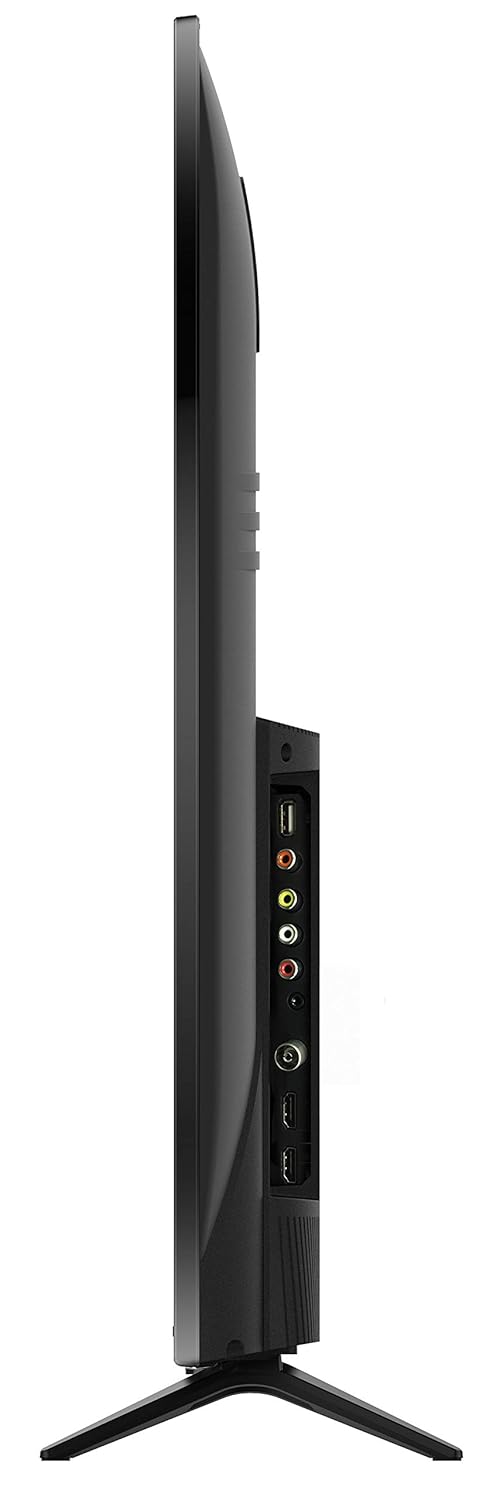
انځور 4.2: شاته view of the TCL 55P8 TV, indicating VESA mounting points for wall installation.
۲.۳ د بهرنیو وسایلو نښلول
Your TCL 55P8 TV offers various ports for connecting external devices:
- د HDMI پورټونه (x3): سیټ ټاپ بکسونه، بلو رې پلیرونه، د لوبو کنسولونه، یا نور HDMI فعال شوي وسایل وصل کړئ.
- د USB پورټونه (x2): Connect USB flash drives or external hard drives for media playback.
- LAN پورټ: د تار لرونکي انټرنیټ اتصال لپاره د ایترنیټ کیبل وصل کړئ.
- AV ننوت: Use the provided AV-RCA adapter to connect older devices with composite video and stereo audio outputs.
- د سر غوږ جیک: د شخصي اوریدلو لپاره هیډفونونه وصل کړئ.
- ډیجیټل آډیو بهر: د ښه غږ لپاره د غږ بار یا کور تیاتر سیسټم سره وصل شئ.

Image 4.3: Diagram illustrating the various connectivity ports available on the TCL 55P8 TV.
5. عملیاتي لارښوونې
۸ پاور آن/بند
Press the power button on the remote control or on the TV to turn it on or off. The TV may take a few moments to boot up due to its Android operating system.
5.2 ریموٹ کنټرول
The included remote control allows you to navigate the TV's features. It supports both IR and Bluetooth technology. Insert the two AAA batteries into the remote control, ensuring correct polarity.
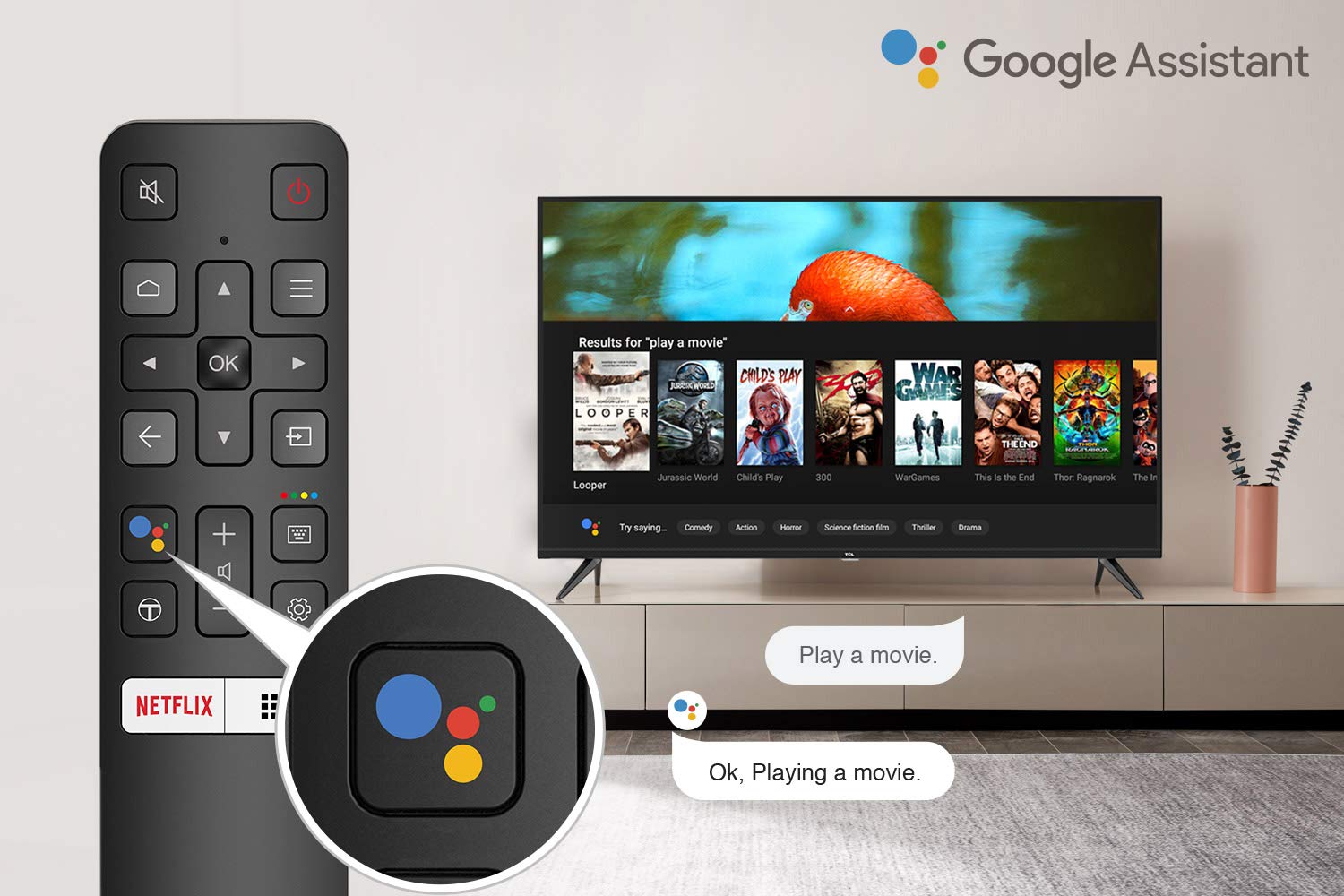
Image 5.1: The remote control for the TCL 55P8 TV, highlighting the Google Assistant button for voice commands.
۳.۲ د سمارټ تلویزیون ځانګړتیاوې (د انډرایډ تلویزیون ۹.۰)
Your TCL 55P8 TV runs on Android TV 9.0, offering a wide range of smart functionalities:
- AI-Google Assistant: د ریموټ کنټرول له لارې د غږیز امرونو څخه کار واخلئ ترڅو د مینځپانګې لټون وکړئ، سمارټ کور وسایل کنټرول کړئ، او معلومات ترلاسه کړئ.
- ګوګل کاسټ (د کروم کاسټ جوړ شوی): Cast content from your compatible smartphone, tablet, or computer directly to the TV screen.
- T-cast: Utilize the T-cast app for additional smart features and screen mirroring.
- بلوتوث: Connect Bluetooth-enabled devices such as headphones or game controllers.
- اپلیکیشن ته لاسرسی: Download and install various applications from the Google Play Store, including streaming services like Netflix, Amazon Prime Video, YouTube, Hotstar, Sony Liv, and Zee5.
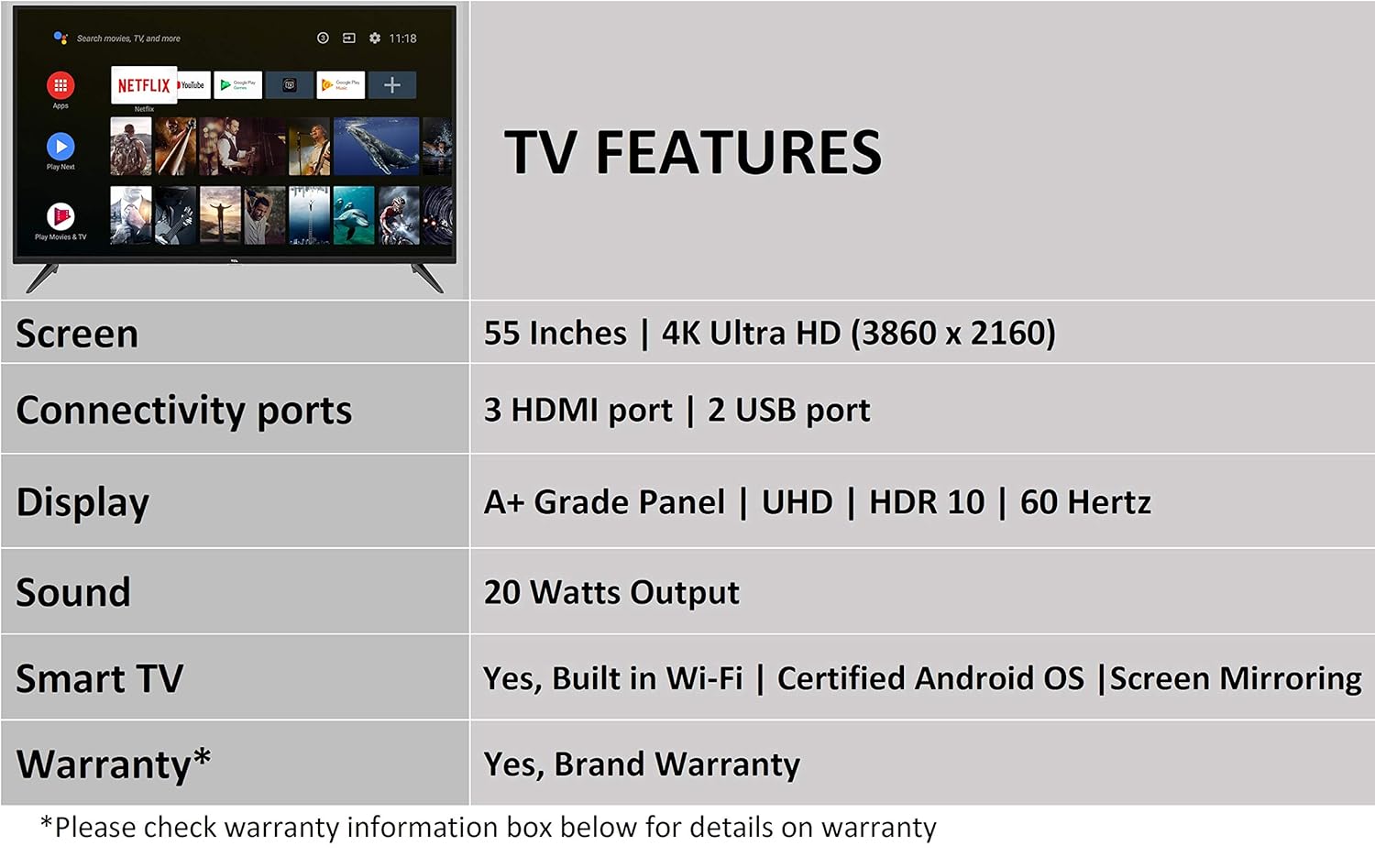
Image 5.2: The Android TV home screen on the TCL 55P8, displaying icons for popular streaming applications.
۳.۳ د انځور او غږ ترتیبات
- انځور: Navigate to the picture settings menu to adjust brightness, contrast, color, and sharpness. The TV supports 4K Ultra HD resolution, HDR10, and features Micro Dimming for enhanced contrast.
- غږ: Access sound settings to adjust volume, equalizer, and select audio output modes. The TV provides 20 Watts of audio output and supports Dolby Audio.
6. ساتنه
۴.۱ د تلویزیون پاکول
- سکرین: Gently wipe the screen with a soft, lint-free, dry cloth. For stubborn marks, slightly dampټوکر د اوبو سره ومینځئ (مستقیم په سکرین مه سپری کوئ).
- بدن: د تلویزیون چوکاټ پاک کړئ او د نرم، وچ ټوکر سره یې ودریږئ.
- احتیاط: Do not use abrasive cleaners, alcohol, benzene, or thinners, as these can damage the TV's surface.
6.2 د سافټویر تازه معلومات
Your Android TV may receive periodic software updates. Ensure your TV is connected to the internet to receive these updates, which can improve performance and add new features. You can usually check for updates in the TV's settings menu.
7. ستونزه حل کول
که تاسو په خپل تلویزیون کې ستونزې سره مخ شئ، لاندې عام حلونو ته مراجعه وکړئ:
| ستونزه | احتمالي حل |
|---|---|
| هیڅ ځواک نشته | وګورئ چې د برېښنا تار په خوندي ډول د تلویزیون او دیوال ساکټ سره نښلول شوی دی. ډاډ ترلاسه کړئ چې د برېښنا ساکټ فعال دی. |
| انځور نشته، خو غږ شته | Verify the correct input source is selected. Check HDMI/AV cable connections. Try restarting the TV. |
| غږ نشته، خو انځور شته | Check the volume level and ensure the TV is not muted. Verify audio cable connections if using external speakers. Check audio output settings. |
| ریموټ کنټرول کار نه کوي | Replace batteries. Ensure there are no obstructions between the remote and the TV's IR sensor. Re-pair the Bluetooth remote if necessary. |
| د شبکې د اتصال ستونزې | Check Wi-Fi password. Restart your router. Ensure the TV is within range of the Wi-Fi signal or the Ethernet cable is properly connected. |
| ورو فعالیت / د اپلیکیشن کریشونه | Close unused applications. Clear cache for problematic apps. Restart the TV. Consider a factory reset if issues persist (note: this will erase all data). |
که چیرې د دې حلونو له هڅه کولو وروسته هم ستونزه دوام ومومي، مهرباني وکړئ د TCL پیرودونکو ملاتړ سره اړیکه ونیسئ.
8. مشخصات
Detailed technical specifications for the TCL 55P8 55-inch AI 4K UHD Android Smart LED TV:
| فیچر | مشخصات |
|---|---|
| ماډل | 55P8 |
| د سکرین اندازه | 55 انچونه (138.78 سانتي متره) |
| قرارداد | 4K الټرا HD (3840 x 2160 پکسلز) |
| د تازه کولو نرخ | 60 Hz |
| Viewزاویه | 178 درجې |
| د ښودلو ډول | LED، A+ درجې پینل |
| د HDR ملاتړ | HDR 10 |
| عملیاتي سیسټم | Android 9.0 |
| پروسیسر | Quad-core A55 (1.1GHz) |
| د ګرافیک کاپروسیسر | Mali470x3 (600MHz-800MHz) |
| RAM | 2 جي بي |
| داخلي ذخیره | 16 جي بي |
| د آډیو تولید | 20 واټ |
| آډیو ټیکنالوژي | AI Sound Engine, Dolby Audio |
| د HDMI بندرونه | 3 (HDMI 2.0, HDCP2.2, ARC on Port 1) |
| USB بندرونه | 2 (USB 2.0) |
| ارتباط | Wi-Fi (2x2 b/g/n 2.4GHz), Ethernet, Bluetooth 5.0 |
| ځانګړي ځانګړتیاوې | AI-Google Assistant, Google Cast, T-cast, Micro Dimming |
| د محصول ابعاد (LxWxH) | ۲۵.۳ x ۶۱.۳ x ۵۳.۹ سانتي متره (د سټینډ سره) |
| د توکي وزن | 12 کیلو ګرامه |

Image 8.1: Dimensional diagram of the TCL 55P8 TV, showing height, width, and depth measurements.
9. تضمین او ملاتړ
9.1 د تضمین معلومات
Your TCL 55P8 TV comes with an د 18 میاشتو تضمین provided by TCL from the date of purchase. Please retain your purchase receipt and warranty card for any warranty claims.
9.2 Installation and Customer Support
For requesting installation, wall mounting, or a product demonstration after delivery, please contact TCL customer service:
- وړیا شمېرې: 18004190622 یا 18001020622
For any other technical assistance or support, please refer to the contact information provided on your warranty card or the official TCL webسایټ
۹.۲ د راستنیدو پالیسي
This product is eligible for replacement or refund within 10 days of delivery in case of any product defects, damage, or features not matching the description provided. Please refer to the retailer's return policy for detailed terms and conditions.


