1. پیژندنه
The eKids Frozen 2 Bluetooth Karaoke Machine with Light Show is designed to provide an interactive music experience. This portable device allows users to stream audio wirelessly via Bluetooth, sing along with the included wired microphone, and expand content through a USB port. It features a multi-colored LED light show and built-in memory for storing music.
۲. په بکس کې څه دي؟
- Bluetooth MP3 Karaoke Machine
- واړه مایکروفون
- د USB چارج کیبل
3. د محصول ب Featuresې
- د بلوتوټ ارتباط: Connect to any compatible Bluetooth device to stream audio wirelessly.
- تار لرونکی مایکروفون: Includes one real working wired microphone for singing along. An additional mic jack is available for a second microphone (sold separately).
- USB Audio Player: Features a USB port to play MP3 files from a USB flash drive (not included).
- د ثبت دنده: Record performances while singing along to streaming music. Requires a USB flash drive (not included).
- Multi-colored LED Light Show: Integrated light show to enhance the performance experience.
- جوړ شوی حافظه: Store hours of music directly on the device.
- د چارج وړ بیټرۍ: Portable design with a built-in rechargeable battery for on-the-go use.

شکل 1: پایview of the Karaoke Machine's Controls and Features.

Figure 2: Bluetooth Compatibility with various devices.
4. ترتیب کول
۲.۱ د واحد ځواک ورکول
The karaoke machine operates on a built-in rechargeable battery. Ensure the unit is fully charged before first use for optimal performance.
- Connect the supplied USB charging cable to the USB charging port on the back of the unit.
- Connect the other end of the USB cable to a standard USB power adapter (not included) or a powered USB port.
- The charging indicator will illuminate. Allow sufficient time for a full charge.
۴.۱ د مایکروفون نښلول
The wired microphone connects to the microphone jack on the unit.
- Locate the microphone jack on the side or back of the karaoke machine.
- Insert the microphone plug firmly into the jack.

Figure 3: Karaoke Machine with Microphone Connected.
5. عملیاتي لارښوونې
۸ پاور آن/بند
فشار ورکړئ او ونیسئ ځواک button located on the control panel to turn the unit on or off.
5.2 د بلوتوټ جوړه کول
- Turn on the karaoke machine. The Bluetooth indicator on the display will flash, indicating it is in pairing mode.
- ستاسو په بلوتوث فعال شوي وسیله (سمارټ فون، ټابلیټ، او نور) کې، د بلوتوث ترتیباتو ته لاړ شئ او بلوتوث فعال کړئ.
- Select "eKids Frozen 2 Karaoke" (or similar name) from the list of available devices.
- Once paired, the Bluetooth indicator will stop flashing and remain solid. You can now stream audio from your device.
5.3 Playing Music via USB
- یو USB فلش ډرایو داخل کړئ چې MP3 ولري fileپه یونټ کې د USB پورټ ته لاړ شئ.
- The unit should automatically switch to USB mode and begin playing music. If not, press the موډ د USB حالت غوره کولو لپاره تڼۍ.
- د کارولو پلی/ودرول, بله لار، او مخکینی ټریک د پلې بیک کنټرول لپاره تڼۍ.
۶.۴ د مایکروفون کارول
- Ensure the microphone is securely plugged into the mic jack.
- فشار ورکړئ مایکروفون پر / بند button to activate the microphone.
- Adjust the microphone volume using the dedicated volume controls if available, or the main volume controls.
5.5 د رڼا ننداره
فشار ورکړئ څراغ فعال/بند دی button to activate or deactivate the multi-colored LED light show.
5.6 Recording Performances
To record your singing, a USB flash drive (not included) must be inserted into the USB port.
- Ensure a USB flash drive is inserted.
- Start playing your desired music (via Bluetooth or USB).
- فشار ورکړئ REC د ثبت پیل کولو لپاره تڼۍ.
- Sing into the microphone.
- فشار ورکړئ REC button again to stop recording. Your performance will be saved to the USB flash drive.
6. ساتنه
- واحد د نرم او وچ ټوکر سره پاک کړئ. د کثافاتو پاکوونکي یا محلول مه کاروئ.
- واحد د مستقیم لمر وړانګو، تودوخې سرچینو او رطوبت څخه لرې وساتئ.
- Store the microphone in its designated compartment on the back of the unit when not in use to prevent loss or damage.
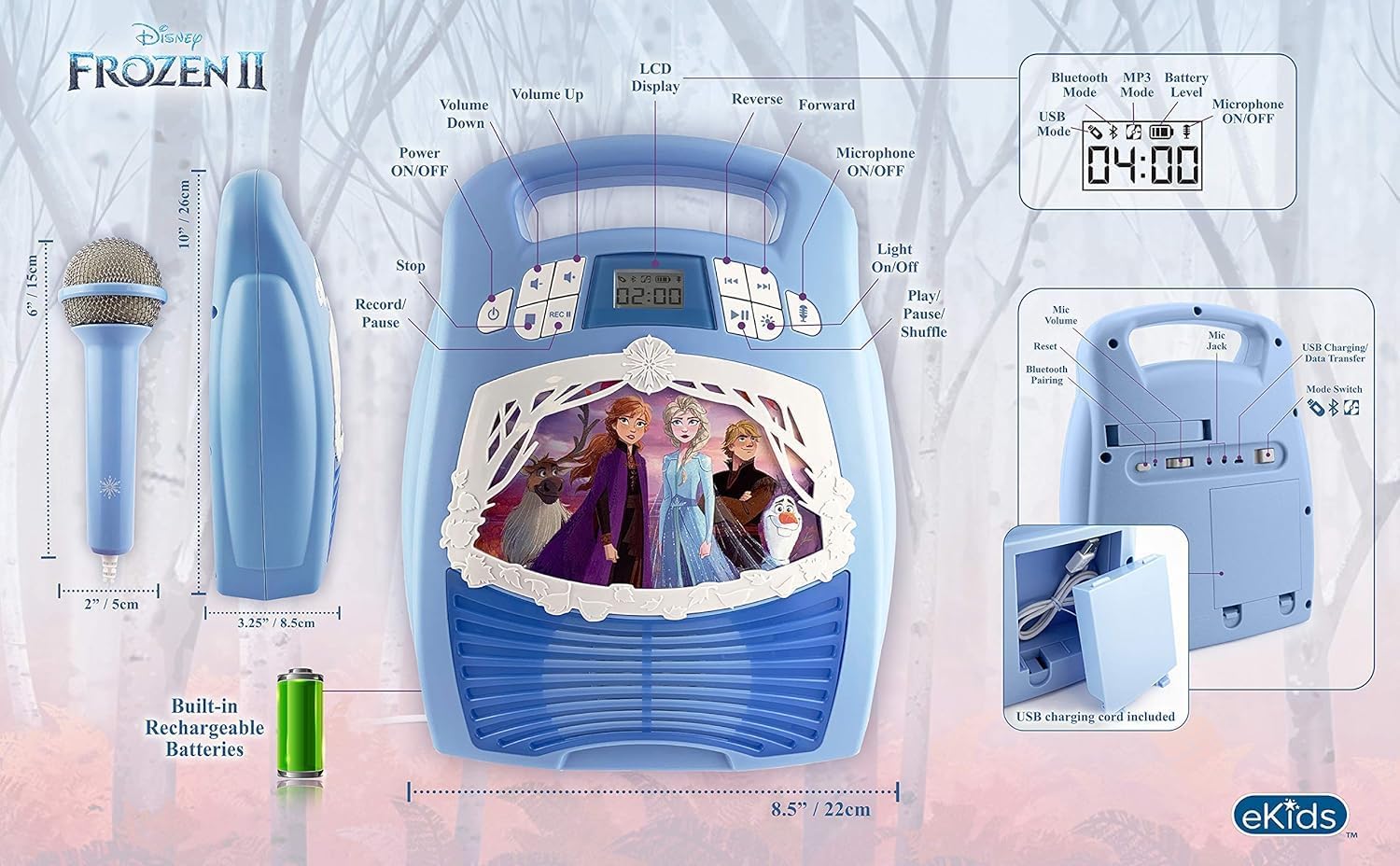
شکل 4: شاته view with microphone storage compartment.
7. ستونزه حل کول
- ځواک نشته: Ensure the unit is charged. Connect the USB charging cable and allow it to charge.
- غږ نشته: Check the volume levels on both the karaoke machine and your connected Bluetooth device. Ensure the microphone is turned on if using it.
- بلوتوث نه نښلي: Make sure Bluetooth is enabled on your device and the karaoke machine is in pairing mode. Try restarting both devices. Ensure no other devices are currently connected to the karaoke machine.
- مایکروفون کار نه کوي: Verify the microphone is securely plugged into the correct jack and the microphone ON/OFF button is activated.
- د ثبت کولو مسلې: Ensure a compatible USB flash drive is inserted and has sufficient free space.
8. مشخصات
| فیچر | تفصیل |
|---|---|
| د محصول ابعاد | 8 x 3 x 10 انچه |
| د توکي وزن | ۲.۴۵ پونډه |
| د ماډل شمیره | د FR-553v9M معرفي کول |
| وړاندیز شوی عمر | ۳ - ۱۸ میاشتې |
| بیټرۍ | 3 AA batteries required (included) - Note: Product description also mentions built-in rechargeable battery. Please refer to packaging for exact battery type. |
| ځانګړی ځانګړنه | د پور وړ وړ، د چارج وړ |
| رنګ | Older Version |
| جوړونکی | د ماشوم ډیزاینونه |
9. د خوندیتوب معلومات
Please read and follow all safety instructions provided with the product packaging. This product is intended for use by children aged 3 and up, under adult supervision.
10. تضمین او ملاتړ
دا محصول د الف سره راځي یو کال محدود تضمین. For warranty claims or technical support, please refer to the contact information provided in your product packaging or visit the eKids official webسایټ
۱۱. د محصول ویډیو
Video 1: An official product video from KIDdesigns, Inc. showcasing the eKids Frozen 2 Bluetooth Karaoke Machine with Light Show, highlighting its features and design.


