پیژندنه
This manual provides detailed instructions for the operation and maintenance of your Casio JF-100BM Standard Function Calculator. Designed for business and general use, this desktop calculator features a large display for easy readability and a kickstand for optimal viewing. Please read this manual thoroughly to ensure proper use and to maximize the lifespan of your device.
چمتو کول
د بریښنا سرچینه
The Casio JF-100BM calculator is powered by both solar energy and a battery backup. This dual power system ensures reliable operation in various lighting conditions. No specific battery installation is required by the user for initial setup.
ابتدايي استعمال
The calculator is ready for use upon unboxing. Simply ensure it is exposed to sufficient light for the solar panel to function, or that the internal battery has adequate charge.
د کیک سټینډ تنظیم کول
د لوړولو لپاره viewing comfort, locate the kickstand on the underside of the calculator. Gently pull it out to raise the calculator to an angled position. Push it back in to return the calculator to a flat position.

Image: A single Casio JF-100BM calculator displayed in its clear retail blister packaging, showing the front of the device.
عملیاتي لارښوونې
بنسټیز حسابونه
Perform standard arithmetic operations:
- اضافه: لومړی شمېره دننه کړئ، فشار ورکړئ +، دوهم نمبر دننه کړئ، فشار ورکړئ =.
- تخفیف: لومړی شمېره دننه کړئ، فشار ورکړئ -، دوهم نمبر دننه کړئ، فشار ورکړئ =.
- ضرب: لومړی شمېره دننه کړئ، فشار ورکړئ ×، دوهم نمبر دننه کړئ، فشار ورکړئ =.
- څانګه: لومړی شمېره دننه کړئ، فشار ورکړئ ÷، دوهم نمبر دننه کړئ، فشار ورکړئ =.
دندې پاکې کړئ
- AC (ټول پاک): Clears all entries and memory, resetting the calculator to its initial state.
- ج (پاک داخله): د تیرو عملیاتو یا حافظې اغیزمن کولو پرته وروستی داخل شوی شمیره یا اوسنی محاسبه داخله پاکوي.
د حافظې دندې
The calculator includes memory functions for storing and recalling values:
- M+ (میموري پلس): ښودل شوی ارزښت حافظې ته اضافه کوي.
- M- (د حافظې منفي): ښودل شوی ارزښت له حافظې څخه کموي.
- MRC (یاد یادښت/پاک): د حافظې ارزښت یادولو لپاره یو ځل فشار ورکړئ. د حافظې پاکولو لپاره دوه ځله فشار ورکړئ.
د مالیاتو محاسبه
The calculator features dedicated keys for tax calculations:
- TAX+ (Tax Plus): ښودل شوي ارزښت ته مالیه اضافه کوي.
- TAX- (Tax Minus): د ښودل شوي ارزښت څخه مالیه کموي.
- RATE SET %: Used to set the tax rate percentage. Refer to the calculator's on-screen prompts or a more detailed guide for specific steps to set the rate.
د لګښت، خرڅلاو، حاشیې محاسبه
These functions are useful for business calculations:
- لګښت: Used in conjunction with SELL and MARGIN to calculate the cost of an item.
- پلورل: Used to calculate the selling price.
- MAR (Margin): Used to calculate the profit margin.
لوی مجموعه (GT)
د GT key accumulates the results of all calculations performed since the last GT clear. Press GT د ټولټال ښودلو لپاره.
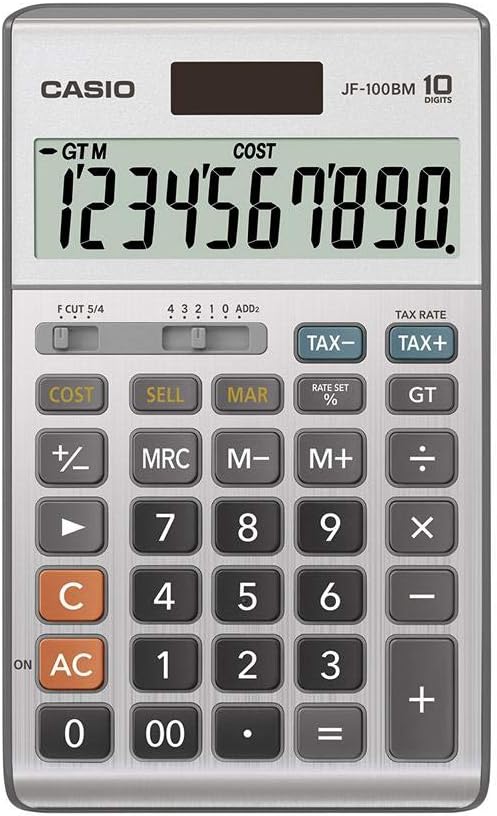
Image: A detailed close-up of the Casio JF-100BM calculator's display and keypad, showing the layout of all function buttons and the large digital display.
ساتنه
پاکول
د کیلکولیټر پاکولو لپاره، په نرمۍ سره سطحه د نرم، وچ ټوکر سره پاک کړئ. د سختې خاورې لپاره، یو څه کم کړئampen the cloth with water and then wipe dry immediately. Do not use abrasive cleaners, solvents, or chemical sprays, as these can damage the casing او ښودنه.
ذخیره کول
کیلکولیټر په یو سړه او وچ ځای کې وساتئ چې د مستقیم لمر وړانګو او سختې تودوخې څخه لرې وي. د کیلکولیټر په سر کې د درنو شیانو له ایښودلو څخه ډډه وکړئ.
د ستونزو حل کول
ښودنه خالي یا تیاره ده
- Ensure the calculator is exposed to sufficient light for solar power.
- If the display remains dim, the battery may be low or depleted. While the JF-100BM has solar power, a backup battery ensures consistent performance. Consult a service professional for battery replacement if needed, as it is not typically user-replaceable.
Incorrect Calculation Results
- مطبوعاتي AC to clear all previous calculations and memory, then re-enter your calculation.
- Verify that the correct tax rate is set if you are performing tax calculations.
- Check the decimal point setting (F CUT 5/4, 4 3 2 1 0 ADD2 switch) to ensure it matches your required precision.
مشخصات
| فیچر | تفصیل |
|---|---|
| د ماډل شمیره | JF-100BM |
| برانډ | کاسیو |
| د محاسبې ډول | Business, Standard Function |
| ښودل | Large 10-digit display |
| د بریښنا سرچینه | Solar Plus Battery Backup |
| مواد | پلاستیک |
| رنګ | سره زر |
| د محصول ابعاد | 9.5 x 6.75 x 1.5 انچه |

Image: A cardboard carton containing five individually packaged Casio JF-100BM calculators, illustrating the product as sold in a multi-pack.
تضمین او ملاتړ
For information regarding warranty coverage, service, and technical support for your Casio JF-100BM calculator, please refer to the warranty card included with your purchase or visit the official Casio support webسایټ. د تضمین ادعاوو لپاره د پیرود ثبوت وساتئ.
یادونه: This manual provides general operational guidelines. For advanced functions or specific troubleshooting not covered here, please consult the comprehensive guide available on the manufacturer's webسایټ ته مراجعه وکړئ یا د کاسیو پیرودونکي ملاتړ سره اړیکه ونیسئ.


