1. پیژندنه
The Okaysou AirMic4S Air Purifier is designed to provide clean and fresh air in your home or office. It features an advanced filtration system to capture and reduce airborne particles, odors, and harmful gases, contributing to a healthier indoor environment.

Figure 1.1: Okaysou AirMic4S Air Purifier, illustrating its capability to filter various airborne contaminants including dust, pollen, dander, smoke, and VOCs.
This manual provides detailed instructions for the setup, operation, maintenance, and troubleshooting of your AirMic4S Air Purifier. Please read it thoroughly before use and keep it for future reference.
2. د خوندیتوب معلومات
د اور، بریښنا شاک، یا ټپي کیدو خطر کمولو لپاره، مهرباني وکړئ لاندې خوندیتوب احتیاطي تدابیر په پام کې ونیسئ:
- تل د هوا پاکوونکی د فلټرونو له حرکت کولو، پاکولو یا بدلولو دمخه خلاص کړئ.
- واحد د خراب شوي تار یا پلګ سره مه چلوئ.
- د بریښنا تار د ګرمو سطحو څخه لرې وساتئ.
- د هوا خلاصې لارې مه بندوئ یا واحد په نرمه سطحه کې مه کیږدئ چیرې چې خلاصې ممکن بندې شي.
- یونټ په اوبو یا نورو مایعونو کې مه ډوب کوئ.
- دا وسیله د افرادو (د ماشومانو په شمول) د فزیکي ، حسي ، یا ذهني وړتیاو کمښت ، یا د تجربې او پوهې نشتوالي سره د کارولو لپاره ندي ، پرته لدې چې دوی ته د دوی د خوندیتوب مسؤل شخص لخوا د وسیلې کارولو په اړه نظارت یا لارښوونې ورکړل شوي وي. .
- Use only genuine Okaysou replacement filters to maintain optimal performance and warranty.
3. محصول ختم شوview
The Okaysou AirMic4S features a compact design with powerful air purification capabilities. It utilizes a multi-stage filtration system to effectively clean the air.

شکل 3.1: مخکی view of the Okaysou AirMic4S Air Purifier, showcasing د هغې ښکلی ډیزاین.
3.1 مهمې برخې
- د هوا د ننوتلو ګریل: Located on the lower section, designed to capture hair and large particles.
- د تضمین اداره: Top-mounted touch panel for all functions.
- د هوا له لارې: Top grille for purified air release.
- د فلټر برخه: څو کورونه لريtage فلټر.
د فلټر کولو سیسټم
The AirMic4S employs an advanced 3-stage H13 True HEPA filtration system:
- د وینځلو وړ پری فلټر: The first defense, capturing large particles like hair and fur.
- H13 ریښتیني HEPA فلټر: Captures pollen, dander, dust, smell, and smoke particles as small as 0.3 microns.
- فعال کاربن فلټر: Effectively absorbs stubborn and unwanted odors, harmful gases, and VOCs.

Figure 3.2: Illustration of the advanced 3-stage H13 True HEPA filtration system, detailing the washable pre-filter, H13 True HEPA filter, and active carbon filter.
4. ترتیب کول
Follow these steps to set up your Okaysou AirMic4S Air Purifier:
- واحد خلاص کړئ: د هوا پاکونکی په احتیاط سره د هغې له بسته بندۍ څخه لرې کړئ.
- د فلټر بسته بندي لرې کړئ: Before first use, unscrew the bottom cover (twist counter-clockwise) and remove the plastic packaging from the filter.
- فلټر بیا نصب کړئ: فلټر بیرته په واحد کې ځای په ځای کړئ، ډاډ ترلاسه کړئ چې دا په سمه توګه ناست دی.
- Secure Bottom Cover: Replace the bottom cover and twist clockwise to secure it.
- ځای په ځای کول: Place the air purifier on a firm, level surface. Ensure there is adequate space around the unit for proper airflow (at least 6 inches from walls or furniture).
- نښلول: د برښنا تار له یو مناسب بریښنایی دستګاه سره وصل کړئ.
5. عملیاتي لارښوونې
The AirMic4S features an intuitive touch control panel for easy operation.

Figure 5.1: The control panel of the AirMic4S, showing buttons for power, fan speed, timer, filter reset, and night light/sleep mode.
5.1 د کنټرول پینل دندې
- د بریښنا تڼۍ (⑁): د واحد د فعال یا بندولو لپاره فشار ورکړئ.
- Fan Speed Button (✴): د فین سرعت (ټيټ، متوسط، لوړ) له لارې تیریږي.
- Timer Button (⌛): د عملیاتي وخت لپاره د 2، 4، یا 8 ساعتونو لپاره تنظیموي. واحد به د ټاکل شوي وخت وروسته په اتوماتيک ډول بند شي.
- Night Light Mode (🌙): Activates or deactivates the night light feature.
- Sleep Mode (🌛): Activates a quiet operation mode (as low as 24dB) for undisturbed sleep.
- Filter Reset Indicator (📄): Lights up when it's time to replace the filter. Press and hold to reset after filter replacement.
5.2 عمومي عملیات
- پاور آن: Press the Power button to start the air purifier. It will typically start on a low fan speed.
- د فین سرعت تنظیم کړئ: Press the Fan Speed button repeatedly to cycle through the desired fan speeds (Low, Medium, High).
- ټایمر وټاکئ: Press the Timer button to select 2H, 4H, or 8H. The corresponding indicator will light up.
- د خوب حالت فعال کړئ: Press the Sleep Mode button to enter ultra-quiet operation. The night light may dim or turn off in this mode.
- Control Night Light: Use the Night Light button to toggle the light on or off independently.
- بندول: Press the Power button again to turn off the unit.
6. ساتنه
منظم ساتنه غوره فعالیت تضمینوي او ستاسو د هوا پاکونکي عمر اوږدوي.
6.1 د فلټر ځای په ځای کول
The filter replacement indicator will illuminate when it's time to change the filter. Filter lifespan varies based on usage and air quality.
- د بریښنا د ځای څخه د هوا پاکونکی لرې کړئ.
- واحد پورته کړئ او لاندې پوښ یې د ساعت په مقابل لوري وګرځوئ ترڅو یې لرې کړئ.
- زاړه فلټر لرې کړئ.
- Insert a new genuine Okaysou filter into the unit.
- Replace the bottom cover and twist clockwise to secure it.
- Plug in the unit. With the unit powered on, press and hold the Filter Reset button for 3-5 seconds until the indicator light turns off.
Okaysou offers 4 optional replacement filters tailored to specific needs:
- Original Filter: Best for general use, absorbing odors, dander, pollen, smoke.
- Customized Blue Filter (G-Defense Filter): Best for humid environments to absorb harmful substances.
- Customized Green Filter (Toxin Absorber Filter): Best for areas with high levels of toxins, vehicle exhaust, VOCs.
- Yellow Odor Remover Filter: Best for powerfully reducing odors from ash, wildfire, cooking.

Figure 6.1: Various optional replacement filters available for the AirMic4S, each designed for specific air purification needs.
6.2 د واحد پاکول
- د هوا پاکونکي بهرنۍ برخه د نرم او وچ ټوکر سره پاک کړئ.
- The washable pre-filter can be gently cleaned with a soft brush or vacuum cleaner to remove large dust and hair particles. Ensure it is completely dry before reinstallation.
- د کثافاتو پاکوونکي یا محلول مه کاروئ.
7. ستونزه حل کول
If you encounter issues with your AirMic4S Air Purifier, refer to the following table for common problems and solutions:
| ستونزه | احتمالي لامل | د حل لاره |
|---|---|---|
| واحد نه خلاصیږي. | نه دی لګېدلی؛ بریښنا بنده دهtage؛ فلټر په سمه توګه نه دی نصب شوی. | Ensure unit is securely plugged in. Check power supply. Verify filter is unwrapped and correctly seated, and bottom cover is secured. |
| د هوا جریان کمزوری یا شور دی. | فلټر چټل یا بند دی؛ د هوا داخلې/خارجې لارې بندې دي. | Clean or replace the filter. Ensure nothing is obstructing the air inlets or outlets. |
| بوی دوام لري. | فلټر بدلولو ته اړتیا لري؛ د بوی قوي بهرنۍ سرچینه. | Replace the filter, especially if using the Original filter for strong odors. Consider using an Odor Remover filter. Ensure the room is adequately ventilated. |
| Filter Reset light remains on after replacement. | د فلټر بیا تنظیم کول په سمه توګه نه دي ترسره شوي. | With the unit powered on, press and hold the Filter Reset button for 3-5 seconds until the light turns off. |
If the problem persists after trying these solutions, please contact Okaysou customer support.
8. مشخصات
| فیچر | تفصیل |
|---|---|
| د ماډل شمیره | AirMic 4S |
| د محصول ابعاد | ۱۶"د x ۲۶"وچ x ۴۷"ح |
| وزن | 6.6 پونډه |
| درجه بندي ځواک | ۴۵ واټه |
| د شور کچه | ۲۳ ډي بي (د خوب حالت) |
| د پوښښ ساحه | Up to 300 sq. ft. (5x per hour in 150 sq.ft, 3x per hour in 300 sq.ft, 2x per hour in 580 sq.ft) |
| د فلټر کولو ډول | H13 True HEPA (3-Stage) |
| اوزون وړیا | 100% Ozone Free |
| تصدیقونه | CARB, CE, RoHS, ETL Listed |
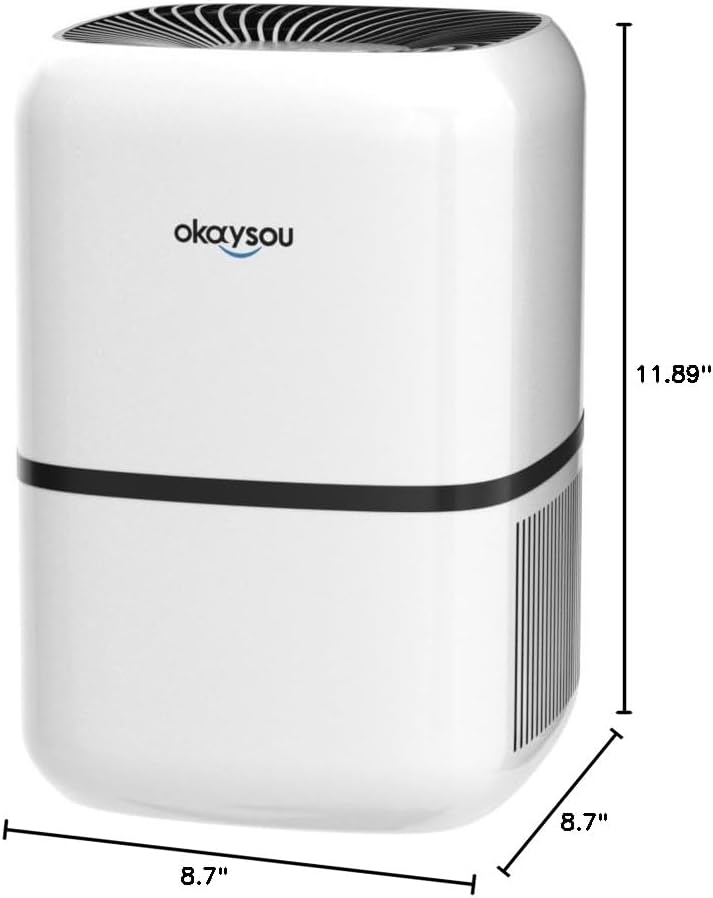
شکل ۴: ابعادي view of the Okaysou AirMic4S Air Purifier, showing its height, depth, and width.
9. تضمین او ملاتړ
The Okaysou AirMic4S Air Purifier comes with a 5 کلن تضمین. Okaysou also provides lifetime US-based customer support.
For warranty claims, technical assistance, or any questions regarding your product, please contact Okaysou customer support through their official channels or refer to the contact information provided with your purchase.
You can also visit the official Okaysou store on Amazon for more information and support: Okaysou Amazon Store


