1. پیژندنه
This manual provides essential information for the safe and effective installation, operation, and maintenance of your Aiphone QH-6KAT Security Intercom Door Phone. Please read this manual thoroughly before using the product and keep it for future reference.
The Aiphone QH-6KAT is a residential security master unit designed for condominiums, offering comprehensive communication and security features including intercom, emergency call, and detection for fire and gas leaks.
2. د خوندیتوب معلومات
د خوندیتوب مهم خبرداری:
- Installation of this unit requires an Electrical Engineer qualification and adherence to Fire Law Class A (Category 4) standards.
- Notification to the competent fire department is required prior to installation and operation.
- دا وسیله د دې لپاره ډیزاین شوې AC direct power connection. Ensure proper electrical wiring is performed by a qualified professional.
- Do not attempt to disassemble or modify the unit. This may cause malfunction, electric shock, or fire.
3. محصول ختم شوview
The Aiphone QH-6KAT is an exposed-type housing information panel that integrates various security and communication functions for residential units. It supports connections for two entrances, an optional handset (VHW-HSKA), and a monitor-less extension master unit (VH-RS).

شکل 1: مخکی view of the Aiphone QH-6KAT Security Intercom Door Phone.
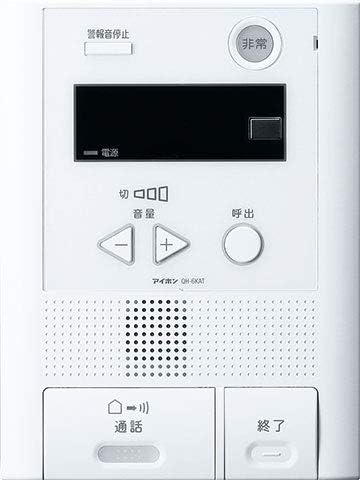
Figure 2: Aiphone QH-6KAT unit, showcasing its sleek and functional design.
4. ترتیب او نصب کول
The QH-6KAT unit is designed for AC direct power connection. Professional installation is required due to the electrical wiring and fire safety regulations.
4.1 ابعاد
- Product Dimensions (Length x Width x Height): 240 mm x 180 mm x 42 mm
- Item Weight: Approximately 1.36 kg
4.2 تارونه
This system is designed to minimize complex wiring, offering flexible installation options.

Figure 3: Illustration of minimal wiring requirements for certain configurations.
4.3 د نصبولو طریقې
The Aiphone system offers selectable installation methods to suit various residential environments.

شکل 4: مثالamples of selectable installation methods, including wall-mounted and desktop options.
5. عملیاتي لارښوونې
5.1 اساسي دندې
- انټرکام: Communicate with visitors at the entrance.
- عاجله اړیکه: Activate an emergency alert for various situations.
- کشف: The unit is compatible with sensors for fire, gas leaks, and general purpose calls (e.g., bath, toilet).
۴.۲ د تڼۍ دندې (شکل ۳.۱ ته مراجعه وکړئ)
- بیړنۍ تڼۍ: Press in case of an emergency (e.g., fire, gas leak, personal emergency).
- د حجم کنټرول بټن (+/-): د سپیکر حجم تنظیم کړئ.
- د تلیفون تڼۍ: Initiate a call to an external unit or another internal unit.
- د خبرو تڼۍ: Press to speak during an intercom call.
- End Button: Terminate an intercom call.
6. ساتنه
To ensure optimal performance and longevity of your Aiphone QH-6KAT unit, follow these general maintenance guidelines:
- Regularly wipe the unit with a soft, dry cloth to remove dust and dirt.
- Do not use abrasive cleaners, solvents, or strong chemicals, as these can damage the surface.
- Ensure that the speaker and microphone grilles are free from obstructions.
- Periodically check all connections for security, especially after any building maintenance.
7. ستونزه حل کول
If you experience issues with your Aiphone QH-6KAT unit, consider the following basic troubleshooting steps:
- ځواک نشته: Verify that the unit is properly connected to the AC power source. Check the circuit breaker if necessary.
- بې غږه/تحریف شوی غږ: Adjust the volume using the +/- buttons. Ensure the speaker and microphone are not obstructed.
- Call Not Connecting: Check the wiring connections if accessible, or contact a qualified technician.
- غلط الارمونه: Ensure sensors are clean and free from environmental factors that might trigger them. If persistent, contact a professional.
For more complex issues or repairs, please contact a qualified Aiphone service technician. Do not attempt to repair the unit yourself.
8. مشخصات
| مشخصات | ارزښت |
|---|---|
| د محصول ماډل شمیره | QH-6KAT |
| د محصول اندازه | 4.2 x 18 x 24 سانتي متره |
| د توکي وزن | 1.36 کیلوګرامه |
| برانډ | آیفون |
| د ماډل نوم | QH-6KAT |
| د ارتباط ټیکنالوژي | بېسیم |
| د بریښنا سرچینه | د بریښنا تار شوی |
| د توکو شمیر | 1 |
| شاملې برخې | Instruction manual, etc. |
9. تضمین او ملاتړ
Aiphone has been a leader in intercom systems for over 70 years, committed to providing reliable communication and security solutions. The company handles all aspects from manufacturing to after-sales support to ensure customer satisfaction.

Figure 5: Aiphone's dedicated customer support team.
For warranty information, technical support, or service inquiries, please refer to the contact details provided in the included documentation or visit the official Aiphone website. You can also explore the Aiphone Brand Store on Amazon د نورو معلوماتو لپاره.
10. Aiphone's Global Presence
Aiphone intercoms are utilized in approximately 70 countries worldwide, including various notable locations, demonstrating the brand's global reach and reliability.

Figure 6: Aiphone intercoms are used in various prominent locations globally.


