پیژندنه
This manual provides detailed instructions for the setup, operation, and maintenance of your LIGE BW0223 Smart Watch. Please read this guide thoroughly to ensure proper use and to maximize the features of your device. The LIGE BW0223 Smart Watch is designed to assist with fitness tracking, health monitoring, and smart notifications, compatible with both iOS and Android devices.
1. ترتیب کول
1.1 د وسیلې چارج کول
Before initial use, fully charge your LIGE BW0223 Smart Watch. Connect the magnetic charging cable to the charging contacts on the back of the watch and plug the USB end into a standard USB power adapter (5V/1A recommended). The watch display will indicate charging status. A full charge typically takes approximately 2 hours.

The back of the LIGE Smart Watch features a magnetic charging interface and advanced optical sensors for continuous monitoring of heart rate, blood pressure, and blood oxygen levels.
۳.۳ د اپلیکیشن نصب او جوړه کول
- د کمپینین اپلیکیشن ډاونلوډ کړئ: Scan the QR code provided in the watch packaging or search for the designated companion app (e.g., 'FitPro' or 'LIGE Smart') in your smartphone's app store (App Store for iOS, Google Play Store for Android).
- بلوتوث فعال کړئ: ډاډ ترلاسه کړئ چې ستاسو په سمارټ فون کې بلوتوټ فعال دی.
- اپلیکیشن خلاص کړئ: نصب شوی اپلیکیشن لانچ کړئ او د حساب جوړولو یا ننوتلو لپاره په سکرین کې لارښوونې تعقیب کړئ.
- ساعت جوړه کړئ: Within the app, navigate to the device management section (often labeled 'Device', 'My Device', or 'Add Device'). The app will search for available Bluetooth devices. Select 'BW0223' or 'LIGE Smart Watch' from the list to initiate pairing. Confirm the pairing request on both your phone and the watch if prompted.
1.3 ابتدايي ترتیبات
After successful pairing, complete your personal profile within the app, including gender, age, height, and weight. This information helps improve the accuracy of fitness and health data. You can also set preferences for units of measurement (metric/imperial) and time format (12/24-hour).
2. عملیاتي لارښوونې
۲.۱ ښودنه او نیویګیشن
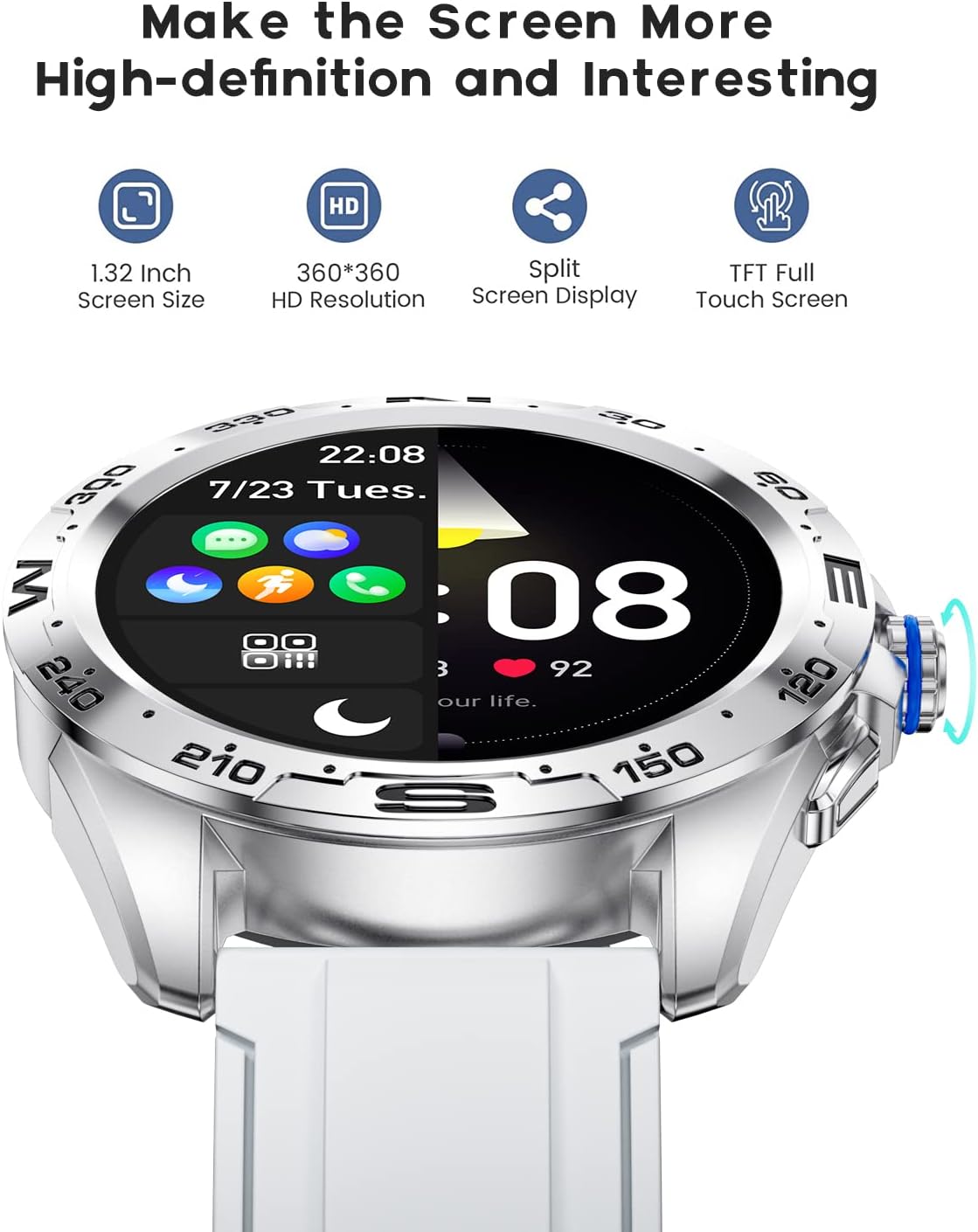
The LIGE BW0223 Smart Watch features a 1.28-inch full touch screen with 360x360 HD resolution. Navigate the watch interface using touch gestures:
- پورته / ښکته سوائپ: د مینو یا خبرتیاو له لارې سکرول وکړئ.
- کیڼ/ښي خوا ته سوپ کړئ: چټکو دندو یا مختلفو معلوماتو سکرینونو ته لاسرسی ومومئ.
- ټایپ: یو توکي غوره کړئ یا یو عمل تایید کړئ.
- د غاړې تڼۍ فشار ورکړئ: Return to the home screen or power on/off the device.

The LIGE Smart Watch features a 1.28-inch full touch screen with 360x360 HD resolution, offering clear visuals and responsive interaction. It supports a split-screen display for quick access to functions.
2.2 سپورت موډونه
The watch supports 7 sports modes, including walking, running, cycling, and climbing. To access:
- Swipe on the watch face to find the 'Sports' or 'Workout' icon.
- Tap to select your desired activity.
- Tap 'Start' to begin tracking. The watch will record duration, steps, calories burned, and distance.
- To end a workout, swipe right or press the side button, then select 'End' or 'Pause'.
2.3 د روغتیا څارنه
The LIGE BW0223 Smart Watch provides 24/7 heart rate tracking, blood pressure, and blood oxygen monitoring. These measurements are for reference only and should not be used for medical diagnosis.
- د زړه ضربان: Swipe to the heart rate interface to view your current heart rate. The watch continuously monitors your heart rate throughout the day.
- Blood Pressure/Blood Oxygen: Swipe to the respective interfaces and tap to initiate a measurement. Ensure the watch is snug on your wrist for accurate readings.
- د خوب څارنه: Wear the watch to bed, and it will automatically track your sleep patterns, including deep sleep, light sleep, and wake-up times. View د ملګري ایپ کې د خوب تفصيلي معلومات.
۳.۲ بلوتوث زنګونه
After pairing your watch with the app and enabling the Bluetooth call function (usually a separate Bluetooth connection in your phone's settings, e.g., 'BW0223_CALL'), you can make and receive calls directly from your watch.
- زنګ وهل: Access the 'Dialer' or 'Contacts' function on your watch to dial a number or select a contact.
- تلیفونونه ترلاسه کول: کله چې زنګ راشي، نو ساعت به د زنګ وهونکي ID ښکاره کړي. د ځواب ورکولو لپاره شنه آیکون یا د ردولو لپاره سور آیکون باندې کلیک وکړئ.
- The watch features a built-in microphone and speaker for hands-free communication.

With the LIGE Smart Watch, you can make and receive Bluetooth calls directly from your wrist. It includes a built-in microphone and speaker for convenient communication.
۴.۴ د پیغام خبرتیاوې
Enable message notifications through the companion app to receive alerts for SMS, calls, and various social media applications (e.g., Facebook, Twitter, WhatsApp, LinkedIn, Instagرام) مستقیم ستاسو په ساعت کې.
- Ensure the app has necessary permissions to access notifications on your smartphone.
- Configure which apps send notifications to your watch within the companion app settings.
- د ساعت په مخ باندې ښکته سوائپ کړئ ترڅو view وروستي خبرتیاوې.

The LIGE Smart Watch provides call and message reminders, displaying notifications from SMS, Facebook, Twitter, WhatsApp, LinkedIn, and Instagپه مستقیم ډول ستاسو په مړوند باندې رام وکړئ.
2.6 اصلاح کول
Personalize your watch by changing watch faces. Many options are available directly on the watch or through the companion app.
- په لید کې: Long-press the watch face, then swipe left or right to browse available faces. Tap to select.
- د اپلیکیشن له لارې: Open the companion app, navigate to 'Dial Market' or 'Watch Faces' to explore and download additional designs.
Personalize your LIGE Smart Watch with a variety of customizable watch faces and a rich user interface. Choose from different styles to match your preference and occasion.
3. ساتنه
۵.۱ د ساعت پاکول
خپل ساعت په منظم ډول پاک کړئ ترڅو غوره فعالیت او حفظ الصحه ډاډمنه کړئ. د سکرین او ساعت بدن پاکولو لپاره نرم، لینټ نه پاک ټوکر وکاروئ. د سختې خاورې لپاره، یو څه کمampen the cloth with water. Avoid using harsh chemicals, abrasive materials, or strong detergents.
۶.۱ د اوبو مقاومت (IP68)
The LIGE BW0223 Smart Watch is IP68 waterproof, meaning it is resistant to dust and can withstand immersion in water up to 1.5 meters for 30 minutes. It is suitable for daily use, such as hand washing, rain, and splashes.
مهم محدودیتونه:
- Do not wear the watch in hot showers, saunas, or steam rooms, as steam and hot water can compromise the seals.
- Avoid diving or high-pressure water activities.
- Do not operate buttons or the touchscreen underwater.
- که ساعت لوند شي، نو د چارج کولو یا چلولو دمخه یې په ښه توګه وچ کړئ.
3.3 د بیټرۍ پاملرنه
د بیټرۍ ژوند اوږدولو لپاره:
- د سخت تودوخې څخه ډډه وکړئ.
- ساعت په منظم ډول چارج کړئ، خو د اوږدې مودې لپاره یې په بشپړه توګه خالي مه پریږدئ.
- Reduce screen brightness and disable unnecessary notifications or features if battery life is a concern.
4. ستونزه حل کول
۶.۱ ساعت چې نه چالانېږي او نه چارج کېږي
- ډاډ ترلاسه کړئ چې د چارج کولو کیبل په خوندي ډول د ساعت او بریښنا سرچینې دواړو سره وصل دی.
- Verify the power adapter and USB port are functional.
- په ساعت او کیبل کې د چارج کولو تماسونه پاک کړئ ترڅو هر ډول دوړې یا کثافات لرې کړئ.
- Allow the watch to charge for at least 30 minutes before attempting to power it on.
۷.۲ د بلوتوث اتصال ستونزې
- ډاډ ترلاسه کړئ چې ستاسو په سمارټ فون او ساعت کې بلوتوټ فعال دی.
- Keep the watch within the Bluetooth range of your smartphone (typically 10 meters).
- خپل سمارټ فون او واچ دواړه بیا پیل کړئ.
- Unpair the watch from your phone's Bluetooth settings and re-pair it through the companion app.
- Ensure the companion app is running in the background and has necessary permissions.
۶.۴ خبرتیاوې کار نه کوي
- Verify the watch is successfully paired with the companion app.
- Check notification settings within the companion app to ensure desired apps are enabled.
- Ensure your smartphone's notification access is granted to the companion app (check phone settings: Apps & notifications > Special app access > Notification access).
- په خپل تلیفون او ساعت دواړو کې 'Do Not Disturb' موډ غیر فعال کړئ.
۶.۳ ناسم روغتیايي لوستل
- Ensure the watch is worn snugly on your wrist, about one finger's width from the wrist bone.
- Keep the sensor clean and free from sweat or dirt.
- د غوره دقت لپاره د اندازه کولو پرمهال ارام پاتې شئ.
- Remember that health data from smartwatches is for reference and not intended for medical use.
5. مشخصات
| د ماډل شمیره | BW0223 |
| برانډ | LIGE |
| د سکرین اندازه | ۷۸۷ انچه |
| د انسان انٹرفیس ننوت | ټچ سکرین |
| د ارتباط ټیکنالوژي | بلوتوث |
| د اوبو د مقاومت درجه | IP68 |
| د بیټرۍ ډول | لیتیم پولیمر |
| شکل | ګرد |
| د توکي وزن | 7 اونس |
6. د تضمین معلومات
The LIGE BW0223 Smart Watch comes with a standard limited warranty against manufacturing defects. The warranty period typically covers 12 months from the date of purchase. This warranty does not cover damage caused by misuse, accidents, unauthorized modifications, or failure to follow the instructions in this manual. Please retain your proof of purchase for warranty claims.
7. د پیرودونکي ملاتړ
If you encounter any issues or have questions not covered in this manual, please contact LIGE customer support. Refer to the contact information provided with your product packaging or visit the official LIGE webد مرستې لپاره سایټ.